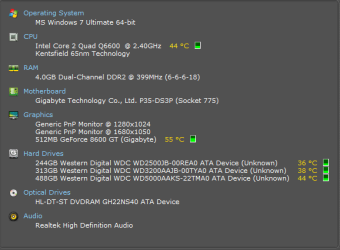
i just installed my system (with GEforce 8600 GT).
and there is something i cannot resolve.
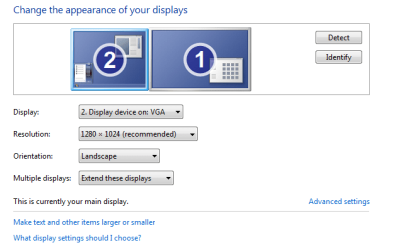
my Left screen (which i use for main display) is set for (native) 1280x1024
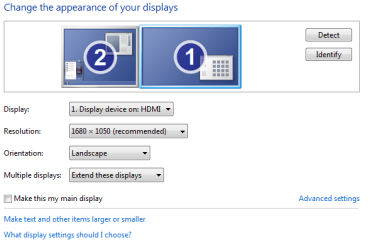
my extended screen is set for (native) 1680x1050
here's my problem:
the left screen icons exceed the screen top limit and are half seen.. that's not suppose to happen, right?
and the right screen desktop image is cropped at the edges (about 1/3 inch).
so something must be wrong with my setup.
already downloaded Nvidia driver and control panel.
*oh... and the LEFT screen is VGA (via DVI), the RIGHT is DVI.
thanks in advance! (my eyes are annoyed very easily so I'm frustrated )
hello and welcome to the forums
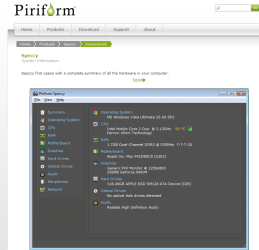
can you post your system specs please so it would be helpful to establish what you are using here is a free program you can download from piriform called speccy Speccy - System Information - Free Download
have you converted the connection to the screen you are having problems with?
Attachments
speccy.PNG
27.9 KB
· Views: 7
My Computer
Computer Manufacturer/Model Number
packard bell IXTREME M5722
OS
Operating System : Windows 7 Home Premium Edition 6.01.7600 SP1 (x64)
CPU
Processor : Intel Core 2 Quad Q8300 @ 2500 MHz
Motherboard
Mainboard : Packard Bell (Acer EG43M )
Memory
Physical Memory :8GB Corsair4x 2GB 800MHz C5 DDR2
Graphics Card(s)
Video Card : XFX 6700 AMD
Monitor(s) Displays
Maestro 234DL - BenQ V2220 - BenQ VW2420H
Screen Resolution
Current Display :1920x1080p pixels at 60 Hz in HD LED
Hard Drives
Hard Disks : WDC (1000 GB)
Drive C: (Hard Disk) : 428 GB available on 491 GB
Drive D: (Hard Disk) : 426 GB available on 492 GB
SAMSUNG spinpoint HD103SJ 1000.2 GB
(X 2) KINGSTON SSD NOW V 30GB
PSU
XFX ProSeries 550W PSU
Case
PACKARD BELL IXTREME
Cooling
System Blower Current: 150mA Air Flow16CFM ;Akasa 90mm rear
EXTRA COOLING>(FAN CONTROLLER) PC Bay Cooler 3 x 40mm fans; Akasa AK-HD-BL Blue hard drive cooler 2 x 40 mm fan 4500 rpm 29.7 dBA
Bios> American Megatrends Inc.
Version : P01-A1
Date : 08/31/2009
ok, uploaded png. (although i put down my specs on my page options)
i think i managed some of the problem somehow.. played with it a while...
the main vga screen now contain all the icons perfectly.
but the extended 1680x1050 still has cropped edgse. but only with the desktop background.opened windows fill the whole screen.
so it might be the only option of dual background image.
but hey- if i should change the connections and it would be better, please advice me on the tweaks
EXTRA COOLING>(FAN CONTROLLER) PC Bay Cooler 3 x 40mm fans; Akasa AK-HD-BL Blue hard drive cooler 2 x 40 mm fan 4500 rpm 29.7 dBA
Bios> American Megatrends Inc.
Version : P01-A1
Date : 08/31/2009
ok- if you look the the back of the panel:
on the left- i connect dvi to dvi cable that goes to the bigger, 1680x1080 screen (the extended)
on the right - a dvi/vga adapter and to the cable that goes to the vga main display - 1280x1024
ok i just had a look at the card specs on there web site and its powerful enough the thing is some people experience problems because of using a dvi - vga to convert the signal have you swapped the monitors around to see if its still the same? and what settings in windows are you using?
have a read of this here DVI adapters work from a DVI-I source (with the analog output) to a VGA destination. VGA is a an analog signal....you just can't convert with a simple adapter an analog VGA signal from a computer to a digital DVI-D signal input on a monitor; for that you'll need a "VGA to DVI Conversion Box" is this yours? http://www.svideo.com/dvi.htmlNote:
EXTRA COOLING>(FAN CONTROLLER) PC Bay Cooler 3 x 40mm fans; Akasa AK-HD-BL Blue hard drive cooler 2 x 40 mm fan 4500 rpm 29.7 dBA
Bios> American Megatrends Inc.
Version : P01-A1
Date : 08/31/2009
DVI and VGA explained
this site explains it in detail for you im sure if you read it you will understand why the quality is different maybe santa will bring you a new compatible monitor!
My Computer
Computer Manufacturer/Model Number
packard bell IXTREME M5722
OS
Operating System : Windows 7 Home Premium Edition 6.01.7600 SP1 (x64)
CPU
Processor : Intel Core 2 Quad Q8300 @ 2500 MHz
Motherboard
Mainboard : Packard Bell (Acer EG43M )
Memory
Physical Memory :8GB Corsair4x 2GB 800MHz C5 DDR2
Graphics Card(s)
Video Card : XFX 6700 AMD
Monitor(s) Displays
Maestro 234DL - BenQ V2220 - BenQ VW2420H
Screen Resolution
Current Display :1920x1080p pixels at 60 Hz in HD LED
Hard Drives
Hard Disks : WDC (1000 GB)
Drive C: (Hard Disk) : 428 GB available on 491 GB
Drive D: (Hard Disk) : 426 GB available on 492 GB
SAMSUNG spinpoint HD103SJ 1000.2 GB
(X 2) KINGSTON SSD NOW V 30GB
PSU
XFX ProSeries 550W PSU
Case
PACKARD BELL IXTREME
Cooling
System Blower Current: 150mA Air Flow16CFM ;Akasa 90mm rear
EXTRA COOLING>(FAN CONTROLLER) PC Bay Cooler 3 x 40mm fans; Akasa AK-HD-BL Blue hard drive cooler 2 x 40 mm fan 4500 rpm 29.7 dBA
Bios> American Megatrends Inc.
Version : P01-A1
Date : 08/31/2009
EXTRA COOLING>(FAN CONTROLLER) PC Bay Cooler 3 x 40mm fans; Akasa AK-HD-BL Blue hard drive cooler 2 x 40 mm fan 4500 rpm 29.7 dBA
Bios> American Megatrends Inc.
Version : P01-A1
Date : 08/31/2009

 )
)