Hi guys local permissions

djjamieg

New member
Local time
6:01 PM
Messages
113
Location
UK
Im trying to use the CMD tool to communicate with another machine on my home network but keep getting access denied.

Do i have to setup some sort of permission/firewall exception between the 2 machines?

Thanks in advance :)
 

My Computer My Computer

At a glance

Windows 7 Ultimate x64i7 477016GB corsair vengenancePalit GT640
Computer type
PC/Desktop
OS
Windows 7 Ultimate x64
CPU
i7 4770
Motherboard
MSI Z87 Mpower
Memory
16GB corsair vengenance
Graphics Card(s)
Palit GT640
Sound Card
MOTU Ultralite mk3 hybrid
Monitor(s) Displays
AOC
Screen Resolution
1024x768
Hard Drives
1) 1tb
PSU
850w
Keyboard
Microsoft Fingerprint Keyboard
Internet Speed
10MBs
Other Info
COMPTIA A+ Certified
If you are trying to do a:

net use * \\MachineName\ShareName you will need to make sure that File and Printer Sharing is turned on in the Firewall on the Windows 7 machines.
 

My Computer My Computer

At a glance

Windows 7 Enterprise (x64); Windows Server 20...16GB
Computer type
PC/Desktop
Computer Manufacturer/Model Number
Dell OP7010
OS
Windows 7 Enterprise (x64); Windows Server 2008 R2 (x64)
Memory
16GB
Monitor(s) Displays
4 Dell 24" LCD
Screen Resolution
1280x1024
Keyboard
Dell
Mouse
Dell Optical
Internet Speed
40meg
Can both computers connect via the standard Windows interface? Are they part of the same workgroup/domain/etc?
 

My Computer My Computer

At a glance

Windows 7 Ultimate x64 SP1Core i7-2670QM8GB DDR3 PC3-10600Intel HD Graphics 3000 + GeForce GT 540M
Computer Manufacturer/Model Number
Dell XPS 15 L502x
OS
Windows 7 Ultimate x64 SP1
CPU
Core i7-2670QM
Memory
8GB DDR3 PC3-10600
Graphics Card(s)
Intel HD Graphics 3000 + GeForce GT 540M
Screen Resolution
1920x1080
Hard Drives
1TB 5400RPM Seagate
Im trying to use the CMD tool to communicate with another machine on my home network but keep getting access denied.

Do i have to setup some sort of permission/firewall exception between the 2 machines?

Thanks in advance :)

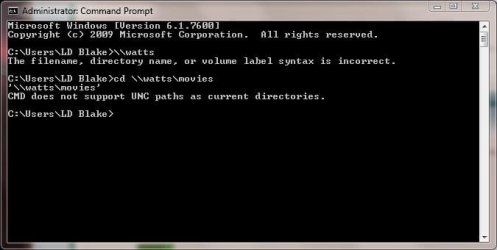
Here's what I got when I tried it...

Capture.JPG

you can't use CMD to connect to another computer.

You'll probably have to use a telnet client...

What exactly are you trying to do?
 

My Computer My Computer

At a glance

XP Pro SP3 X86 / Win7 Pro X86Amd 64 x2 4200 (2.4ghz)Kingston DDR2 800 2gbNvidia GF-8400
Computer Manufacturer/Model Number
Homebrew
OS
XP Pro SP3 X86 / Win7 Pro X86
CPU
Amd 64 x2 4200 (2.4ghz)
Motherboard
Asus M2N-MX SE Plus
Memory
Kingston DDR2 800 2gb
Graphics Card(s)
Nvidia GF-8400
Sound Card
Realtek on Motherboard
Monitor(s) Displays
Acer x-193bw
Screen Resolution
1440 x 900
Hard Drives
Western Digital 500g
PSU
350watt In-Win
Case
In-Win
Cooling
Air
Keyboard
yes
Mouse
yes
Internet Speed
5mpbs
Other Info
Also ASRock ION 330 as HTPC (on XP).
Acer Aspire as GP netbook (on XP).
Im trying to use the CMD tool to communicate with another machine on my home network but keep getting access denied.

Do i have to setup some sort of permission/firewall exception between the 2 machines?

Thanks in advance :)

hello..when you're want to connect with 2 mechines.
the simple is like this..
- make sure the firewall is off
- assume IP PC1 is 171.0.0.0 and IP PC2 is 171.0.0.1
so you can use run and type \\171.0.0.1

note make sure that you are sharing permission. if you're sharing printer make sure, right click on printer > properties > security, set up the permission for who allow to connect.

hope can help!!
 

My Computer My Computer

At a glance

windows 7Phenom II AMD Dragon 3.5GhzDDR3 4GBATI Radeon 512Mb
Computer Manufacturer/Model Number
built up
OS
windows 7
CPU
Phenom II AMD Dragon 3.5Ghz
Memory
DDR3 4GB
Graphics Card(s)
ATI Radeon 512Mb
Monitor(s) Displays
HP L1506
Screen Resolution
1152 x 864
Hard Drives
WDC 1 TB SATA-II Green Power
Keyboard
HP wireless keyboard
Mouse
HP Optic
Internet Speed
1GB
Hey guys

Basically im trying to implement the shutdown -i command line on the computer in my study from my laptop but I get "access denied" once I ok the command.

Any ideas?
 

My Computer My Computer

At a glance

Windows 7 Ultimate x64i7 477016GB corsair vengenancePalit GT640
Computer type
PC/Desktop
OS
Windows 7 Ultimate x64
CPU
i7 4770
Motherboard
MSI Z87 Mpower
Memory
16GB corsair vengenance
Graphics Card(s)
Palit GT640
Sound Card
MOTU Ultralite mk3 hybrid
Monitor(s) Displays
AOC
Screen Resolution
1024x768
Hard Drives
1) 1tb
PSU
850w
Keyboard
Microsoft Fingerprint Keyboard
Internet Speed
10MBs
Other Info
COMPTIA A+ Certified
Hi James,

Outside the box but this may be what you are looking for ....

PsShutdown

Doesn't state it works on win7 but 2000 upwards suggests so and sysinternals are updated regularly - in fact the whole suite is an essential for windows users in my opinion - and of course it's free :D

edit

You may also need to use the runas command to assign the needed remote permissions
 

My Computers My Computers

  • At a glance

    Windows 11 Pro x64 [Latest Release and Releas...Ryzen 9 5950X, 3.8 - 5.2 MHz64GB [2 x 32GB] DDR4 3200MHz4GB NVIDIA GEFORCE GTX 1650 Ti
    Computer type
    PC/Desktop
    Computer Manufacturer/Model Number
    ChillBlast - Custom to my design
    OS
    Windows 11 Pro x64 [Latest Release and Release Preview]
    CPU
    Ryzen 9 5950X, 3.8 - 5.2 MHz
    Motherboard
    Asus Prime X570-Pro
    Memory
    64GB [2 x 32GB] DDR4 3200MHz
    Graphics Card(s)
    4GB NVIDIA GEFORCE GTX 1650 Ti
    Sound Card
    On-board SPDIF to 5.1 System + HDMI [5.1 system]
    Monitor(s) Displays
    32" UHD 32 Bit HDR Monitor + 43" UHD 4K 32Bit HDR TV
    Screen Resolution
    2 x 3840 x 2160 @60Hz
    Hard Drives
    1TB M2 SSD OS, 500GB Fast Access SSD, 2 x 8TB Data + Various Externals from 1TB to 4TB, 10TB NAS
    PSU
    NZXT C750 80 PLUS Gold 750W Modular PSU
    Case
    Workstation Case [Matt Black]
    Cooling
    NZXT Kraken X63 280mm CPU Cooler +2x Quiet Case fans
    Keyboard
    Logitech Wireless MX Keys & K400 + others
    Mouse
    Logitech Wireless MX Master 3S
    Internet Speed
    920 MB Down 50 MB Up
    Antivirus
    BitDefender Total Security Pro
    Browser
    Chrome (always run latest Non-Beta)
    Other Info
    Also run ...
    Laptop - Quad 8GB - Windows 10 Pro x64
    Nexus 7 Android tablet x2
    Samsung 10.2" tablet
    Blackview TAB 8 4G Android Tablet c/w Keyboard
    Wacom Intuos Pro Medium Pen Pad
    Wacom Intuos Pro Small Pen Pad
    Wacom Expresskeys Remote
    Loopdeck+ Graphics Controller
    Shuttle Pro v2 Control
  • At a glance

    Windows 11 Pro x64 Latest RPIntel I7 10750H 5.0GHz32GB [2x16GB] DDR4 2933 MHznVidia GTX1650Ti 4 GB GDDR6
    Computer type
    Laptop
    System Manufacturer/Model Number
    Dell XPS 17 10750H
    OS
    Windows 11 Pro x64 Latest RP
    CPU
    Intel I7 10750H 5.0GHz
    Motherboard
    Dell XPS
    Memory
    32GB [2x16GB] DDR4 2933 MHz
    Graphics Card(s)
    nVidia GTX1650Ti 4 GB GDDR6
    Sound Card
    Stock [Realtek] 4 Speaker
    Monitor(s) Displays
    17" IPS UHD+ Infinity Edge Touchscreen
    Screen Resolution
    3840 x 2400
    Hard Drives
    2TB M2 NVMe, 4TB External + various 500GB & 1TB External NVMe (also have access to spinner HDD from
    PSU
    Stock
    Case
    Stock XPS Aluminium & Carbon Fibre
    Cooling
    Stock - Active Fan Control
    Keyboard
    Backlit + Various Logitech
    Mouse
    Stock Track Pad + Logitech MX Trackball
    Internet Speed
    72 MB Down 18MB Up
    Browser
    Chrome
    Other Info
    Also run ...
    Laptop - Quad 8GB - Windows 10 Pro x64
    Nexus 7 Android tablet x2
    10.2" tablet
    Sony Z3 Android Smartphone
    Wacom Intuos Pro Medium Pen Pad
    Wacom Intuos Pro Small Pen Pad
    Wacom Expresskeys Remote
    Loopdeck+ Graphics Controller
    Shuttle Pro v2 Control Pad
    10TB NAS
To send such commands to other computers on the network you must have admin privileges on those computers. To determine whether you have those, Click start, click Run, then type \\yourcomputer (replace yourcomputer with the networked computer’s name) then hit enter. If you are able to access the computer you will be able to send shutdown commands to it. If you are denied access, you don’t have administrative privileges and you won’t be able to.
The computer sending the shutdown command must be logged in as a user with administrative privileges on the computer receiving that command. The user name and password have to match on both computers.
 
Last edited:

My Computer My Computer

At a glance

Windows 7 x64 pro/ Windows 7 x86 Pro/ XP SP3 x86
Computer Manufacturer/Model Number
Too many to describe...
OS
Windows 7 x64 pro/ Windows 7 x86 Pro/ XP SP3 x86
Hey guys

Basically im trying to implement the shutdown -i command line on the computer in my study from my laptop but I get "access denied" once I ok the command.

Any ideas?

Ok... simple alternative... On the the Study machine enable Remote Desktop.

From the laptop, click on Remote Desktop and log into the other machine. Then in the "virtual desktop" click start/shutdown...

The nice part of this is with remote desktop you can also run programs, do a lot of maintenance and even install/uninstall software from remote locations.
 

My Computer My Computer

At a glance

XP Pro SP3 X86 / Win7 Pro X86Amd 64 x2 4200 (2.4ghz)Kingston DDR2 800 2gbNvidia GF-8400
Computer Manufacturer/Model Number
Homebrew
OS
XP Pro SP3 X86 / Win7 Pro X86
CPU
Amd 64 x2 4200 (2.4ghz)
Motherboard
Asus M2N-MX SE Plus
Memory
Kingston DDR2 800 2gb
Graphics Card(s)
Nvidia GF-8400
Sound Card
Realtek on Motherboard
Monitor(s) Displays
Acer x-193bw
Screen Resolution
1440 x 900
Hard Drives
Western Digital 500g
PSU
350watt In-Win
Case
In-Win
Cooling
Air
Keyboard
yes
Mouse
yes
Internet Speed
5mpbs
Other Info
Also ASRock ION 330 as HTPC (on XP).
Acer Aspire as GP netbook (on XP).
Hey guys

Basically im trying to implement the shutdown -i command line on the computer in my study from my laptop but I get "access denied" once I ok the command.

Any ideas?

Make sure you have the firewall settings correct on the remote machine. That is that File and Printer Sharing is allowed.

Then type:
Code:
net use [URL="file://\\ComputerName\ipc$"]\\ComputerName\ipc$[/URL]
Enter a user name that has Administrator Rights
Enter the password.

Then type:
Code:
shutdown -i
Pick the machine or manually add it. Check all the setting you want and then click ok.

That will shutdown the remote machine.
 

My Computer My Computer

At a glance

Windows 7 Enterprise (x64); Windows Server 20...16GB
Computer type
PC/Desktop
Computer Manufacturer/Model Number
Dell OP7010
OS
Windows 7 Enterprise (x64); Windows Server 2008 R2 (x64)
Memory
16GB
Monitor(s) Displays
4 Dell 24" LCD
Screen Resolution
1280x1024
Keyboard
Dell
Mouse
Dell Optical
Internet Speed
40meg
Back
Top