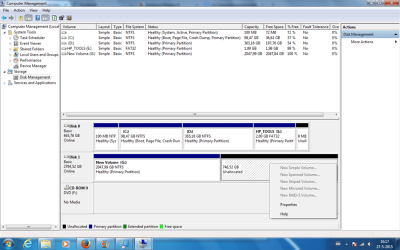
Do you have data on the drive? How is it initialized, MBR or GPT?
Your HDD is ~3TB, that's more than 2.2TB, till that limit you can initialize in MBR, anything above must be GPT so that the system would recognize the whole capacity of the drive.
To me it looks like the drive has been initialized in MBR and thus it has automatically allocated space to the MBR limit. It won't let you allocate the rest unless you reinitialize the drive in GPT. If you have any data on Volume G:, I suggest you back it up/move it elsewhere, on another drive, as the reinitializing will delete whatever's on the drive.
After initializing in GPT (erase the drive first, then right click on the drive's Disk 1 name and choose Convert to GPT) you should be able to format the whole thing, whether as one or more partitions.