Solved hibernation

akvaman

New member
Local time
4:29 PM
Messages
23
Hi, I can't find how to make my computer hibernate after finishing work in some program, say photoshop, it keeps running.I go to Power saver then change plan setting then change advanced power setting, sleep, hibernate after and apply.
Nothing happens.What em I doing wrong?
 

My Computer

OS
w7
CPU
pentium duall core cpu e5300 @ 2.60ghz
Motherboard
asrock g 41m-s
Memory
3gb
Graphics Card(s)
ati radeon 4350 hd
Monitor(s) Displays
philips HD 23ie full hd
Screen Resolution
full hd
Hard Drives
western digital sata 2
Internet Speed
10 mbps-765 kbps
You have to leave the computer INACTIVE for that period (specified in hibernate after) for it to hibernate after. Are you doing that or are you continuing to work on the computer and expecting it to hibernate?
 

My Computer

Computer Manufacturer/Model Number
Too many to describe...
OS
Windows 7 x64 pro/ Windows 7 x86 Pro/ XP SP3 x86
Hi, I can't find how to make my computer hibernate after finishing work in some program, say photoshop, it keeps running.I go to Power saver then change plan setting then change advanced power setting, sleep, hibernate after and apply.
Nothing happens.What em I doing wrong?
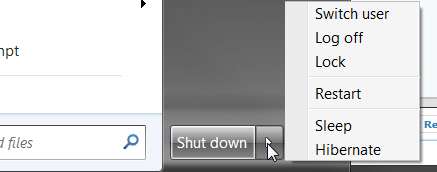
You can manually enter hibernation, by Start and then position the cursor over (or left-click on) the right-arrow to the right of the "shut down" item, and you'll get a popup menu that shows "hibernate":

hibernate.jpg


Note that if you do not see "hibernate" in the list, it's probably because you have "hybrid sleep" enabled in your power plan. You must disable "hybrid sleep" in order for the true "hibernate" item to appear in this manual shut down method list.


Alternatively, if you have your power plan set to enter hibernation after a certain amount of idle time, it should happen automatically.
 

My Computer

Computer type
PC/Desktop
Computer Manufacturer/Model Number
Home-built, two systems (1) and (2)
OS
Windows 7 Pro x64 (1), Win7 Pro X64 (2)
CPU
i5-3350p 3.1Ghz/6MB-cache (1); E8400 3.0Ghz/6MB-cache (2)
Motherboard
ASUS P8Z77-V Pro (1); ASUS P5Q3 (2)
Memory
8GB PC3-12800 DDR3 (1); 4GB PC3-10600 DDR3 (2)
Graphics Card(s)
ATI HD7750 (1), (see TV cards); ATI R7 250 (2)
Sound Card
Realtek ALC892 HD Audio (1); Realtek ALC1200 HD Audio (2)
Monitor(s) Displays
Eizo HD2441W LCD, Eizo S2433W (1); Eizo 24" S2433W (2)
Screen Resolution
1920x1200, 1920x1200 (1); 1920x1200 (2)
Hard Drives
(1) 1TB SATA-II (7200RPM), 2x2TB SATA-III (7200RPM), 250GB SATA-III (10000RPM) for OS; 2x2TB external USB 3.0

(2) 320GB SATA-II (7200RPM), 750GB SATA-II (7200RPM), 150GB SATA-II (10000RPM) for OS; 2TB external USB 3.0
PSU
Nesteq ECS-6001 600W (1); Nesteq ECS-5001 500W (2)
Case
Acousti-Case 360 (1) and (2)
Cooling
Noctua NH-U12P SE2 for CPU, 2x120mm case fans (1) and (2)
Keyboard
IBM PS/2 (1) and (2)
Mouse
Logitech MX Revolution wireless (1); Microsoft wired (2)
Internet Speed
100mbps down / 10mbps up
Antivirus
Microsoft Security Essentials; Malwarebyte Anti-Malware Pro
Browser
Firefox
Other Info
Ceton InfiniTV 4-tuner cablecard-enabled TV card as well as Hauppauge HVR-2250 OTA/ATSC 2-tuner TV card in (1), running under Win7 WMC
No thats not it (all of the above), can someone explain to me STEP BY STEP how to make a computer hibernate after its finished with...say winamp playing music!
 

My Computer

OS
w7
CPU
pentium duall core cpu e5300 @ 2.60ghz
Motherboard
asrock g 41m-s
Memory
3gb
Graphics Card(s)
ati radeon 4350 hd
Monitor(s) Displays
philips HD 23ie full hd
Screen Resolution
full hd
Hard Drives
western digital sata 2
Internet Speed
10 mbps-765 kbps
No thats not it (all of the above), can someone explain to me STEP BY STEP how to make a computer hibernate after its finished with...say winamp playing music!
You mean you want to run a program, and then when the program is finished (and terminates) enter hibernation? When Winamp finishes playing a playlist it will simply stop, not end, but perhaps you have some other implementation that will produce these results.

I would suggest that you invoke your subject program not by itself, but with a BAT or CMD file that you build yourself, in which you can then code whatever you want... launch the program, and then enter hibernation at the end of the BAT/CMD file.

Assuming you already have hibernation enabled (as I described earlier, by guaranteeing that "hybrid sleep" is DISABLED in your power plan so that HIBERNATE itself will be endabled) the actual command to actually ENTER "hibernation" is:

rundll32.exe powrprof.dll,SetSuspendState Hibernate


Note that you can also schedule your BAT/CMD file automatically through windows task scheduler.

Start > All Programs > Accessories > System Tools > Scheduled Tasks


From there just click through the wizard, select the bat file, and then choose an appropriate time for hibernation to begin.
 

My Computer

Computer type
PC/Desktop
Computer Manufacturer/Model Number
Home-built, two systems (1) and (2)
OS
Windows 7 Pro x64 (1), Win7 Pro X64 (2)
CPU
i5-3350p 3.1Ghz/6MB-cache (1); E8400 3.0Ghz/6MB-cache (2)
Motherboard
ASUS P8Z77-V Pro (1); ASUS P5Q3 (2)
Memory
8GB PC3-12800 DDR3 (1); 4GB PC3-10600 DDR3 (2)
Graphics Card(s)
ATI HD7750 (1), (see TV cards); ATI R7 250 (2)
Sound Card
Realtek ALC892 HD Audio (1); Realtek ALC1200 HD Audio (2)
Monitor(s) Displays
Eizo HD2441W LCD, Eizo S2433W (1); Eizo 24" S2433W (2)
Screen Resolution
1920x1200, 1920x1200 (1); 1920x1200 (2)
Hard Drives
(1) 1TB SATA-II (7200RPM), 2x2TB SATA-III (7200RPM), 250GB SATA-III (10000RPM) for OS; 2x2TB external USB 3.0

(2) 320GB SATA-II (7200RPM), 750GB SATA-II (7200RPM), 150GB SATA-II (10000RPM) for OS; 2TB external USB 3.0
PSU
Nesteq ECS-6001 600W (1); Nesteq ECS-5001 500W (2)
Case
Acousti-Case 360 (1) and (2)
Cooling
Noctua NH-U12P SE2 for CPU, 2x120mm case fans (1) and (2)
Keyboard
IBM PS/2 (1) and (2)
Mouse
Logitech MX Revolution wireless (1); Microsoft wired (2)
Internet Speed
100mbps down / 10mbps up
Antivirus
Microsoft Security Essentials; Malwarebyte Anti-Malware Pro
Browser
Firefox
Other Info
Ceton InfiniTV 4-tuner cablecard-enabled TV card as well as Hauppauge HVR-2250 OTA/ATSC 2-tuner TV card in (1), running under Win7 WMC
XP used to have a very simple way to achieve this, It had no need of Cmd or Bat files nor scheduling tasks.Simply you'd need to input time of hibernation start and after say 15 min. of inactivity every things go to hibernate.I use to leave photoshop doing actions on hundreds of photos at once, thing that would take couple of hours.
Why isn't it done on W7 the same way?
Even some simple tasks are now much more complicated and hard to even find.
Shouldn't newer OS be user friendlier than the old one?
 

My Computer

OS
w7
CPU
pentium duall core cpu e5300 @ 2.60ghz
Motherboard
asrock g 41m-s
Memory
3gb
Graphics Card(s)
ati radeon 4350 hd
Monitor(s) Displays
philips HD 23ie full hd
Screen Resolution
full hd
Hard Drives
western digital sata 2
Internet Speed
10 mbps-765 kbps
XP used to have a very simple way to achieve this, It had no need of Cmd or Bat files nor scheduling tasks.Simply you'd need to input time of hibernation start and after say 15 min. of inactivity every things go to hibernate.I use to leave photoshop doing actions on hundreds of photos at once, thing that would take couple of hours.
Why isn't it done on W7 the same way?
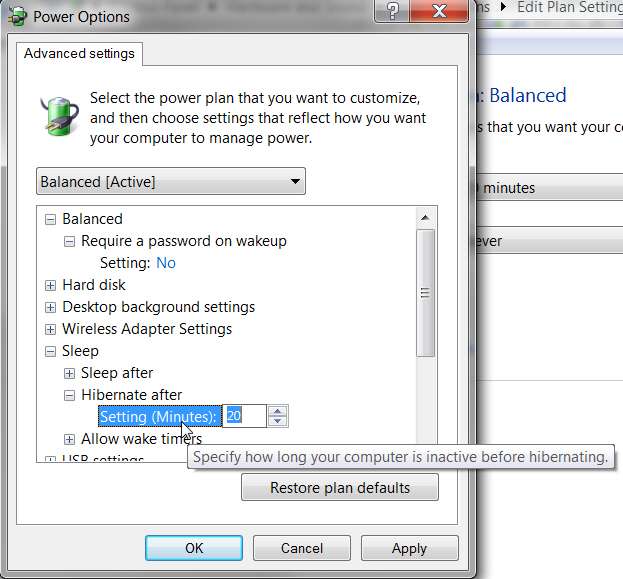
It works exactly the same way on Win7.

hibernateminutes.jpg


The OP apparently wanted the system to go into hibernation IMMEDIATELY after a program ended. If, like you, it was acceptable to simply let the program finish its task and terminate and then the system entered a period of inactivity until the power plan hibernation time limit trigger finally gets exceeded, the system would enter hibernation automatically.

Exactly the same as with WinXP.
 

My Computer

Computer type
PC/Desktop
Computer Manufacturer/Model Number
Home-built, two systems (1) and (2)
OS
Windows 7 Pro x64 (1), Win7 Pro X64 (2)
CPU
i5-3350p 3.1Ghz/6MB-cache (1); E8400 3.0Ghz/6MB-cache (2)
Motherboard
ASUS P8Z77-V Pro (1); ASUS P5Q3 (2)
Memory
8GB PC3-12800 DDR3 (1); 4GB PC3-10600 DDR3 (2)
Graphics Card(s)
ATI HD7750 (1), (see TV cards); ATI R7 250 (2)
Sound Card
Realtek ALC892 HD Audio (1); Realtek ALC1200 HD Audio (2)
Monitor(s) Displays
Eizo HD2441W LCD, Eizo S2433W (1); Eizo 24" S2433W (2)
Screen Resolution
1920x1200, 1920x1200 (1); 1920x1200 (2)
Hard Drives
(1) 1TB SATA-II (7200RPM), 2x2TB SATA-III (7200RPM), 250GB SATA-III (10000RPM) for OS; 2x2TB external USB 3.0

(2) 320GB SATA-II (7200RPM), 750GB SATA-II (7200RPM), 150GB SATA-II (10000RPM) for OS; 2TB external USB 3.0
PSU
Nesteq ECS-6001 600W (1); Nesteq ECS-5001 500W (2)
Case
Acousti-Case 360 (1) and (2)
Cooling
Noctua NH-U12P SE2 for CPU, 2x120mm case fans (1) and (2)
Keyboard
IBM PS/2 (1) and (2)
Mouse
Logitech MX Revolution wireless (1); Microsoft wired (2)
Internet Speed
100mbps down / 10mbps up
Antivirus
Microsoft Security Essentials; Malwarebyte Anti-Malware Pro
Browser
Firefox
Other Info
Ceton InfiniTV 4-tuner cablecard-enabled TV card as well as Hauppauge HVR-2250 OTA/ATSC 2-tuner TV card in (1), running under Win7 WMC
I did it!But last time I did the same thing and nothing happened obviosly I did something wrong!Thanks Guys you've been very helpful, all of you!
 

My Computer

OS
w7
CPU
pentium duall core cpu e5300 @ 2.60ghz
Motherboard
asrock g 41m-s
Memory
3gb
Graphics Card(s)
ati radeon 4350 hd
Monitor(s) Displays
philips HD 23ie full hd
Screen Resolution
full hd
Hard Drives
western digital sata 2
Internet Speed
10 mbps-765 kbps
Back
Top