'Hidden' files

griffinmt

New member
Local time
6:34 PM
Messages
6
After editting a file I am saving it into its destination folder. No errors are indicated.
Then, if I do a directory listing (via cmd.exe) it does not show.
If I try to re-save it, the editor says it already exists.

The obvious cause is that I am saving it into a directory different from the one that I try to find it in. but I have gone bug-eyed trying so find any difference.

Are there other potential causes for this behavior?

Martyn
 

My Computer

Computer Manufacturer/Model Number
Dell
OS
Windows 7 Home Premium 64bit
CPU
17R
Memory
4 gb
What file are you editing?
What destination folder are you saving it to?

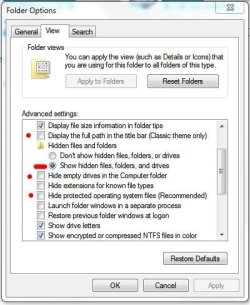
You can click Computer, click Tools, Folder Options, click View tab, and un-check all the boxes with the red dot next to them, and click the circle with with the red line next to it. Click Apply and OK.

Folder Options.JPG

This will display all the hidden files and folders.

Here's a tutorial as well - http://www.sevenforums.com/tutorials/394-hidden-files-folders-show-hide.html?filter

Let me know if this helps.
 

My Computer

Computer type
PC/Desktop
Computer Manufacturer/Model Number
Custom built by me.
OS
Windows 10 Pro
CPU
Intel Core i7-4770K (3.5Ghz)
Motherboard
Gigabyte G1 Sniper 5 (F10 Bios)
Memory
32 gig Corsair Dominator Platinum (4x8Gig)
Graphics Card(s)
Sapphire Tri-X R9 Fury
Sound Card
Soundblaster ZXR
Monitor(s) Displays
NEC PA242W 24" LCD Monitor
Screen Resolution
1920 x 1200
Hard Drives
Primary - Samsung 850 Pro (512gig), Samsung 840 Pro (256gig), 2TB WD Caviar Black.
PSU
EVGA Supernova 1000 G2
Case
Cooler Master HAF X
Cooling
Corsair H100i with Corsair Air Series SP120 Quiet Fans
Keyboard
Logitech Wireless Wave
Mouse
Logitech Performance MX
Internet Speed
High Speed Cable
Antivirus
Norton Security
Browser
IE11
Other Info
Memory Timings - 1866MHz @ 9-9-9-27-1T @ 1.5 volts
My settings are the same as yours, except for the first one which is checked.

The folder is in a website on my system. The files I see were 'dragged' there from a different folder, but it seems that the new files don't show even though they are there based upon 'conflicts' mentioned before.
 

My Computer

Computer Manufacturer/Model Number
Dell
OS
Windows 7 Home Premium 64bit
CPU
17R
Memory
4 gb
My settings are the same as yours, except for the first one which is checked.

The folder is in a website on my system. The files I see were 'dragged' there from a different folder, but it seems that the new files don't show even though they are there based upon 'conflicts' mentioned before.

As SygNus mentioned, where are you trying to save the files?
 

My Computer

Computer type
PC/Desktop
Computer Manufacturer/Model Number
Virtual Machine
OS
Windows 7 Professional 32-bit SP1
CPU
AMD A4/A6
Motherboard
Intel Corporation 440BX Desktop Reference Platform
Memory
3.00GB EDO
Graphics Card(s)
VMware SVGA 3D
Sound Card
High Definition Audio Device
Monitor(s) Displays
Generic Non-PnP Monitor on VMware SVGA 3D
Screen Resolution
1440x900
Hard Drives
1 x 60GB VMware Virtual SATA Hard Drive ATA Device
Antivirus
Kaspersky Total Security
As I stated in the message ...
"The folder is in a website on my system."
In particular it is at D:/Website/Test/
 

My Computer

Computer Manufacturer/Model Number
Dell
OS
Windows 7 Home Premium 64bit
CPU
17R
Memory
4 gb
Is D:\ your Dell recovery partition?
 

My Computer

Computer type
PC/Desktop
Computer Manufacturer/Model Number
Bruce ... somewhere in his 40's
OS
Windows 7 Ultimate 32bit SP1
CPU
Intel(R) Core(TM)2 Quad CPU @ 2.40GHz, 2400 MHz
Motherboard
INTEL/D975XBX2
Memory
4 GB
Graphics Card(s)
ATI Radeon HD 2600 Pro
Monitor(s) Displays
Samsung SyncMaster 914v
Screen Resolution
1280 x 1024
Hard Drives
2/500GB each ... ST3500630AS ATA Device.
One is not connected
PSU
Rocketfish 700 W
Case
G.Skill Gigabyte Chassis
Keyboard
Standard PS/2 Keyboard
Mouse
Microsoft PS/2 Mouse
Internet Speed
DSL
Antivirus
Avira Internet Security
Browser
IE 11
Other Info
ATI HDMI Audio
Back
Top