Hidden Folder - Can't Unhide

Danielzxzx

New member
Member
VIP
Local time
2:00 PM
Messages
233
PROBLEM IS FIXED

I'm trying to update this texture mod for this game emulator I use however when I removed the the texture mod, the game still had the textures from the mod.

I later discovered that it also puts the textures in a cache folder so I need to also remove it from the cache folder. The only problem is, the cache folder is hidden.

I already tried enabling 'Show hidden folders' from the folder options but it is still hidden.

How do I unhide the cache folder.
 
Last edited:

My Computer

OS
Windows 7
What emulator is this? Where is the cache folder located?
 

My Computer

Computer Manufacturer/Model Number
Dell XPS 15 L502x
OS
Windows 7 Ultimate x64 SP1
CPU
Core i7-2670QM
Memory
8GB DDR3 PC3-10600
Graphics Card(s)
Intel HD Graphics 3000 + GeForce GT 540M
Screen Resolution
1920x1080
Hard Drives
1TB 5400RPM Seagate
What emulator is this? Where is the cache folder located?

The emulator is Project64 and the cache folder is located in the plugin folder. The cache folder is created from a plugin called glide64 which allows for texture mods to be used for games.
 

My Computer

OS
Windows 7
Go to the plugin folder and open a command window, then execute a dir /a:h command - it will list all hidden directories.

Are you certain it's still there?
 

My Computer

Computer Manufacturer/Model Number
Dell XPS 15 L502x
OS
Windows 7 Ultimate x64 SP1
CPU
Core i7-2670QM
Memory
8GB DDR3 PC3-10600
Graphics Card(s)
Intel HD Graphics 3000 + GeForce GT 540M
Screen Resolution
1920x1080
Hard Drives
1TB 5400RPM Seagate
How do open the command window?

I'm certain the folder is still there. The texture from the mod are still in the game even though I removed the mod.
 

My Computer

OS
Windows 7
In the plugin directory, do a shift+right click and select "open command window here".
 

My Computer

Computer Manufacturer/Model Number
Dell XPS 15 L502x
OS
Windows 7 Ultimate x64 SP1
CPU
Core i7-2670QM
Memory
8GB DDR3 PC3-10600
Graphics Card(s)
Intel HD Graphics 3000 + GeForce GT 540M
Screen Resolution
1920x1080
Hard Drives
1TB 5400RPM Seagate
I typed in 'dir /a:h' but nothing happened. It said file not found?
What did I do wrong?
 

My Computer

OS
Windows 7
How do open the command window?

I'm certain the folder is still there. The texture from the mod are still in the game even though I removed the mod.

There is a free utility named "Folder Size". I believe it will provide you with a solution and it's pretty easy to use.

You can download it from;

Folder Size - Free Download

HTH
 

My Computer

Computer type
PC/Desktop
Computer Manufacturer/Model Number
Custom Built
OS
Windows 7 Professional x64
CPU
Intel i5 quad processor
Motherboard
DP67BG
Memory
16 GB
Graphics Card(s)
Radeon HD 5770
Sound Card
Realtek High Definition Audio
Monitor(s) Displays
Samsung SyncMaster
Screen Resolution
1920X1080
Hard Drives
WD 2TB (SATA Internal)
WD 1TB (USB External)
PSU
Corsair GS800
Case
Tower (Generic)
Cooling
3 Internal Fans
Keyboard
MS Wireless
Mouse
MS Optical Wired
Internet Speed
54 mbps
Antivirus
Emsisoft
Browser
IE-Version 9, Palemoon-Version 24.2.0
I typed in 'dir /a:h' but nothing happened. It said file not found?
What did I do wrong?

Nothing. If it says file not found, then there are no hidden files/folders in that directory. I'd recheck the emulator and verify that those textures aren't referenced somewhere else, because it definitely looks like those files aren't here.
 

My Computer

Computer Manufacturer/Model Number
Dell XPS 15 L502x
OS
Windows 7 Ultimate x64 SP1
CPU
Core i7-2670QM
Memory
8GB DDR3 PC3-10600
Graphics Card(s)
Intel HD Graphics 3000 + GeForce GT 540M
Screen Resolution
1920x1080
Hard Drives
1TB 5400RPM Seagate
Acually I tried searching my computer with a software I forgot I had that I use to gain access to files on my website. It turns out that there is a cache folder. I removed it using that software.

I'm not sure why the command never found the folder.
 

My Computer

OS
Windows 7
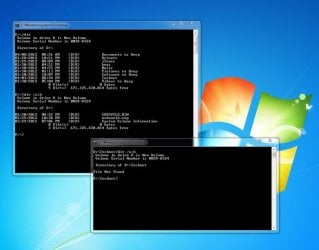
Here's an example of using dir /a:h that finds hidden files and also doesn't find hidden files:
 

Attachments

  • hidden-dir.jpg
    hidden-dir.jpg
    46.5 KB · Views: 48

My Computer

Computer Manufacturer/Model Number
Dell XPS 15 L502x
OS
Windows 7 Ultimate x64 SP1
CPU
Core i7-2670QM
Memory
8GB DDR3 PC3-10600
Graphics Card(s)
Intel HD Graphics 3000 + GeForce GT 540M
Screen Resolution
1920x1080
Hard Drives
1TB 5400RPM Seagate
Acually I tried searching my computer with a software I forgot I had that I use to gain access to files on my website. It turns out that there is a cache folder. I removed it using that software.

I'm not sure why the command never found the folder.

I don't know. Maybe there was an attribute that prevented it from being seen, or maybe it would have been visible if you opened an elevated command prompt (click the orb, type cmd, then right click on the app and select run as administrator).

Anyway, glad you got it sorted.
 

My Computer

Computer Manufacturer/Model Number
Dell XPS 15 L502x
OS
Windows 7 Ultimate x64 SP1
CPU
Core i7-2670QM
Memory
8GB DDR3 PC3-10600
Graphics Card(s)
Intel HD Graphics 3000 + GeForce GT 540M
Screen Resolution
1920x1080
Hard Drives
1TB 5400RPM Seagate
Back
Top