Hidden Folder Missing on a DVD :|

Ankith143

New member
Local time
8:56 AM
Messages
4
Hello guys,

I have copied some files to a DVD and put them up in a folder. I had to hide the folder due to privacy concerns. After a few days when I tried to access the hidden folder, i wasn't able to see the folder itself. I tried changing the folder options to "Show the hidden files" in start menu, but it's of no use. Could someone help me out in this, i want those files very badly :|

Thanks
 

My Computer

OS
Windows 7
CPU
Pentium Dual Core
Motherboard
Intel
Memory
1 GB RAM
Monitor(s) Displays
Samsung LCD SyncMaster 740N
Hard Drives
160 GB HDD

My Computer

Computer type
PC/Desktop
Computer Manufacturer/Model Number
Dell XPS 420
OS
Windows 10, Home Clean Install
CPU
Intel Core2 processsor Q8200(2.33Ghz 1333FSB) Quad Core Tech
Motherboard
Dell
Memory
6 gb
Graphics Card(s)
ATI Radeon 256MB HD3650
Sound Card
Intergrated 7.1 Channel Audio
Monitor(s) Displays
Dell SP2009W 20"
Hard Drives
640 GB Serial ATA Hard drive
Cooling
Fan
Keyboard
Dell USB Keyboard
Mouse
Dell Premium Optical USB
Internet Speed
DSL 2.85
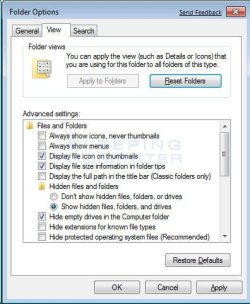
See attached...

Can you show hidden files/folders?
I wonder if attrib would help?
In unix/linux, chmod would do it.
 

Attachments

  • folder-options.jpg
    folder-options.jpg
    37.9 KB · Views: 6

My Computer

Computer Manufacturer/Model Number
Dell and Custom
OS
Systems 1 and 2: Windows 7 Enterprise x64, Win 8 Developer
CPU
System 1: i7 [email protected], System 2: AMD FX-4100 Zambezi 3.6G
Motherboard
System 1:Dell 06NWYK System 2: ASUS M5A97 AM3+
Memory
System 1: 8GB System 2: 8GB
Graphics Card(s)
System 1: ATI FirePro V4800 System 2: Radeon HD 6850
Sound Card
System 1: onboard System 2: onboard
Monitor(s) Displays
System1: Viewsonic HDMI 24"
Screen Resolution
System 1: 1920x1080 System 2: 1920x1080
Hard Drives
System 1: Mirrored .5B drives System 2: Seagate Barracuda ST1000DM003 1TB 7200 RPM 64MB Cache SATA 6.0Gb/s
Case
System 1: Dell System 2: Cooler Master
Internet Speed
10 MBPS
Back
Top