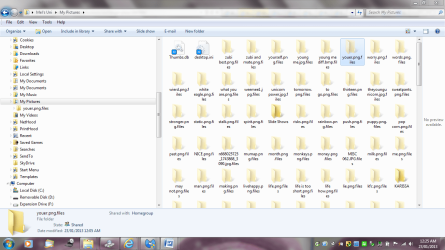
Hidden folders - can I delete them

Melissa

New member
Power User
Local time
2:05 AM
Messages
394
Dear Forum,

I recently learnt that you can see the folders that stay on your computer and impair the speed that it uses to process - for say start up.

I recently cut and pasted these folders - some were folders - some were just .bmp or .gif's from My Pictures to my Hard drive which is external.

Is it alright to delete the following folders - I am not too sure on folders like thumbs - when you don't know - I have opted not to touch.

I think that is what is wrong with my Hard Drive as I think I changed the sharing properties and then all of sudden it did not work. Keeps asking me to format it. Never done it before.

I am not too sure as I have some great work that I have created on the hard drive - I am a bit upset at myself if I created the problem by downloading programs for my mobile that are required on another computer and created a mess.

Thank you:(
 

Attachments

  • HIDDEN FOLDERS.PNG
    HIDDEN FOLDERS.PNG
    84.9 KB · Views: 29

My Computer

Computer type
Laptop
Computer Manufacturer/Model Number
Sony VAIO / E Series VPCEB46FG
OS
Windows 7 Home Premium 64bit
CPU
Windows 7 Service Pack 1 x86 NTFS
Motherboard
AMD E-350 Processor
Memory
4 GB
Hard Drives
500GB
Other Info
1.6GHz
Can't say that I understand you here. Which of these folders do you want to delete? If you're worried about deleting any of them , then don't. Nothing on the page shown will slow down your start-up. If you still want to delete things, then make a restore point/backup, and go to town!:)
 

My Computer

Computer type
Laptop
Computer Manufacturer/Model Number
MSI GE72VR Apache Pro-416
OS
Windows 10x64 Build 1709
CPU
Intel i7 7700HQ Kaby Lake
Motherboard
Micro-Star Intl. MS-179B (U3C1)
Memory
16 GB DDR4 @2400
Graphics Card(s)
Nvidia Geforce GTX 1060
Screen Resolution
1920x1080 120Hz
Hard Drives
256 GB Nvme M.2 SSD

1TB HDD@7200
Cooling
Cooler Blast 4
Keyboard
Steel Series
Antivirus
Bit Defender Free
Browser
Edge
I have already moved them - does that matter - will be a lot to undo.

How do you do a restore point?
 

My Computer

Computer type
Laptop
Computer Manufacturer/Model Number
Sony VAIO / E Series VPCEB46FG
OS
Windows 7 Home Premium 64bit
CPU
Windows 7 Service Pack 1 x86 NTFS
Motherboard
AMD E-350 Processor
Memory
4 GB
Hard Drives
500GB
Other Info
1.6GHz
Those folders are not something from Windows itself. If they are empty I see no reason why you cannot delete them.
 

My Computer

Computer type
PC/Desktop
Computer Manufacturer/Model Number
Alienware Aurora ALX R4
OS
Windows 10 Pro (x64)
CPU
Intel Core i7-3930K (3.2GHz - 4.5GHz)
Motherboard
Alienware Aurora-R4 x79
Memory
4x Samsung 4GB PC3-12800 DDR3 (16GB 1600MHz)
Graphics Card(s)
Nvidia Geforce GTX 690
Sound Card
SteelSeries Siberia Elite
Monitor(s) Displays
Dell UltraSharp U3011
Screen Resolution
2560x1600
Hard Drives
Samsung 850 Pro 256 GB, Seagate 1TB Desktop Hybrid HDD, 2x Western Digital 4TB Green HDD
PSU
875W Some Dell PSU <.<
Case
Alienware Aurora ALX
Cooling
Custom Liquid Cooling (EK CPU & GPU blocks) dual EK 480RAD
Keyboard
Logitech G710+ Mechanical
Mouse
Logitech G700s
Internet Speed
Verizon Fios (50 mbps average)
Other Info
Server: Intel NUC D54250WYK: i5-4250U, 16GB, 256 GB mSATA, Windows Server 2012 R2
I will keep them deleted. I am not too sure what to delete and what not to delete.

Perhaps a good idea to back up - I have a general idea of how to. It is that the reference to a database when I was deleting alerted me and I got very worried.

My hard drive is currently playing up and very unstable.

How do you back up and create a restore point?
 

My Computer

Computer type
Laptop
Computer Manufacturer/Model Number
Sony VAIO / E Series VPCEB46FG
OS
Windows 7 Home Premium 64bit
CPU
Windows 7 Service Pack 1 x86 NTFS
Motherboard
AMD E-350 Processor
Memory
4 GB
Hard Drives
500GB
Other Info
1.6GHz

My Computer

Computer type
Laptop
Computer Manufacturer/Model Number
MSI GE72VR Apache Pro-416
OS
Windows 10x64 Build 1709
CPU
Intel i7 7700HQ Kaby Lake
Motherboard
Micro-Star Intl. MS-179B (U3C1)
Memory
16 GB DDR4 @2400
Graphics Card(s)
Nvidia Geforce GTX 1060
Screen Resolution
1920x1080 120Hz
Hard Drives
256 GB Nvme M.2 SSD

1TB HDD@7200
Cooling
Cooler Blast 4
Keyboard
Steel Series
Antivirus
Bit Defender Free
Browser
Edge

My Computer

Computer Manufacturer/Model Number
HP, Dell, Gateway, Toshiba - 4 laptops and 2 desktops
OS
Vista, Windows7, Mint Mate, Zorin, Windows 8
CPU
from 1.6GHz Duo to i7
Monitor(s) Displays
2x HP w2207
Hard Drives
5x HDD, 7x SSD, 12x Externals
Keyboard
with trackball - no mices
Mouse
Trackball mice
Internet Speed
DSL 6000
Back
Top