
Hidden, padlocked files

Rixanu

New member
Local time
3:09 PM
Messages
10
So, I've been having some problems with backing up files. I do some fractal art in my free time, and I use a program called Apophysis 7X for this purpose. The program stores .flame files, sets of parameters for fractal images, in a "Parameters" folder, located in "C:\Program Files (x86)\Apophysis 2.0\Parameters". I'd like to back up these files, but some of them don't appear within Explorer. They are visible in the "Open" window of Apophysis, but nowhere else. They appear with a small golden padlock at the bottom left corner of the icon. I'm unable to copy/paste them, getting this error message:"Could not find this item. This is no longer located in C:\Program Files (x86)\Apophysis 2.0\Parameters. Verify the item's location and try again." I'm assuming some sort of setting on these files is keeping these padlocked files hidden. Does anyone know how to un-hide these files? FYI, I do have Explorer set to unhide hidden files and folders. My OS is Windows 7 Home Premium x64. I will be happy to provide any other needed information. I will attach some screenshots for reference. Thank you.
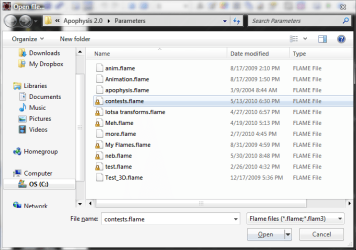
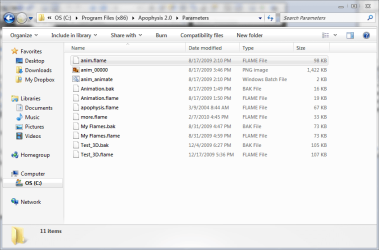
Apophysisopen.png Explorer.png
The view from Apophysis and Explorer, respectively.

Errormessage.png
The error message.
 

My Computer

Computer Manufacturer/Model Number
HP Pavilion dv6-6135dx
OS
Microsoft Windows 7 Home Premium x64 SP1
CPU
AMD A8-3500M
Memory
6 GB DDR3
Graphics Card(s)
AMD Radeon HD 6750M
Monitor(s) Displays
Laptop 15"
Screen Resolution
1366x768
Hard Drives
600 GB TOSHIBA MK6476GSX SATA Disk Device
It is because the application is trying to save to a folder inside Program Files. Configure the program not to save there.
The files you are looking for are at "C:\Users\<username>\AppData\Local\VirtualStore"
 

My Computer

Computer type
PC/Desktop
Computer Manufacturer/Model Number
Alienware Aurora ALX R4
OS
Windows 10 Pro (x64)
CPU
Intel Core i7-3930K (3.2GHz - 4.5GHz)
Motherboard
Alienware Aurora-R4 x79
Memory
4x Samsung 4GB PC3-12800 DDR3 (16GB 1600MHz)
Graphics Card(s)
Nvidia Geforce GTX 690
Sound Card
SteelSeries Siberia Elite
Monitor(s) Displays
Dell UltraSharp U3011
Screen Resolution
2560x1600
Hard Drives
Samsung 850 Pro 256 GB, Seagate 1TB Desktop Hybrid HDD, 2x Western Digital 4TB Green HDD
PSU
875W Some Dell PSU <.<
Case
Alienware Aurora ALX
Cooling
Custom Liquid Cooling (EK CPU & GPU blocks) dual EK 480RAD
Keyboard
Logitech G710+ Mechanical
Mouse
Logitech G700s
Internet Speed
Verizon Fios (50 mbps average)
Other Info
Server: Intel NUC D54250WYK: i5-4250U, 16GB, 256 GB mSATA, Windows Server 2012 R2
Well, I just feel immensely stupid for not trying that. So I assume there's no way to save in the Program Files folder without getting the files locked up like that? I guess I could use that folder you mentioned to backup if needed. Or save elsewhere. Anyway, thank you very much for the help!
 

My Computer

Computer Manufacturer/Model Number
HP Pavilion dv6-6135dx
OS
Microsoft Windows 7 Home Premium x64 SP1
CPU
AMD A8-3500M
Memory
6 GB DDR3
Graphics Card(s)
AMD Radeon HD 6750M
Monitor(s) Displays
Laptop 15"
Screen Resolution
1366x768
Hard Drives
600 GB TOSHIBA MK6476GSX SATA Disk Device
Back
Top