Solved hidden shortcut icons

Aleatha

New member
Local time
1:39 PM
Messages
2
Location
Poplar Bluff MO
hello can someone please help me i have a acer Aspire here while back i hid all my short cut icons and now i don't know how i did it and i don't know where to even start :banghead: i'm not very good at computer issues please help thank you:)
 

My Computer

Computer type
Laptop
Computer Manufacturer/Model Number
acer
OS
i have no clue
Browser
Google
Where are these icons?

Why do you want to hide them?

When you did this the last time, did you hide them one-by-one, or did you hide them all at the same time?
 

My Computer

Computer type
PC/Desktop
hello can someone please help me i have a acer Aspire here while back i hid all my short cut icons and now i don't know how i did it and i don't know where to even start :banghead: i'm not very good at computer issues please help thank you:)

You make Windows 7 display all the hidden icons at once if you click the Hidden Icons triangle on the taskbar and then click on Customize. In the box, put a check on the box next to “Always show all icons and notifications on the taskbar.”
If you then decide you have too many icons cluttering the taskbar, you can fine-tune which icons are displayed. Click on the icons you don’t want to see and drag them to the top edge of the taskbar to dump them back in the Hidden Icons corral.
Another method of hiding unwanted icons is to right-click on the taskbar, choose Properties and click on the Taskbar tab. In the Notification Area of the box, click on the Customize button and remove the check in the box that makes all the taskbar icons and notifications visible. In the top part of the box, you can use the Behaviors pop-up menu next to each icon to have it always show on the taskbar — or just show when it needs to notify you of something.
Once you have your icons of choice visible on the taskbar, you can rearrange the order they appear by dragging them to new positions on screen. Microsoft has a video that demonstrates the various ways of customizing the taskbar’s Notifications Area on its site.

http://www.sevenforums.com/tutorial...ons-hide-show-system-icons-notifications.html

HTH
 
Last edited by a moderator:

My Computer

Computer type
PC/Desktop
Computer Manufacturer/Model Number
Custom Built
OS
Windows 7 Professional x64
CPU
Intel i5 quad processor
Motherboard
DP67BG
Memory
16 GB
Graphics Card(s)
Radeon HD 5770
Sound Card
Realtek High Definition Audio
Monitor(s) Displays
Samsung SyncMaster
Screen Resolution
1920X1080
Hard Drives
WD 2TB (SATA Internal)
WD 1TB (USB External)
PSU
Corsair GS800
Case
Tower (Generic)
Cooling
3 Internal Fans
Keyboard
MS Wireless
Mouse
MS Optical Wired
Internet Speed
54 mbps
Antivirus
Emsisoft
Browser
IE-Version 9, Palemoon-Version 24.2.0
thank you both i finally got it figured out :)
 

My Computer

Computer type
Laptop
Computer Manufacturer/Model Number
acer
OS
i have no clue
Browser
Google
Hi Aleatha,

As far as I can understand, you are talking about shortcut icons on you desktop, right?

I don't know if this is silly, but try this:

  • Click Start :orb:
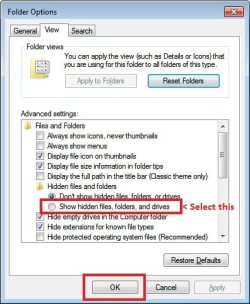
  • Type "folder options" [without quotes]
  • Click on "View" tab
  • Now click on "Show hidden files, folders and drives" as shown below:

Untitled.jpg

Also right click on desktop and make sure "Show desktop icons" is checked under "View" menu.

sg.jpg

Hope this helps.
 
Back
Top