
Hide IP from remote logon client with NOIP

SomeUserName

Banned
Local time
7:59 AM
Messages
129
Location
Niagara Falls, ON
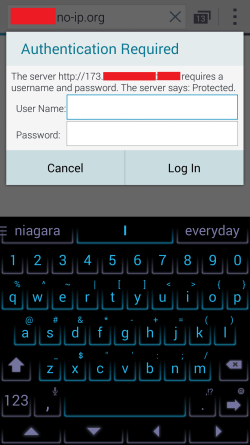
I use NO-IP and when I put my noip address into the URL bar and hit enter the remote popup logon box shows my actual IP that the client will be logging onto. Is there any way I can have my noip name show up in the login/username/password box or some other way to customize what the logon box says other than the actual numbers of my IP.
 

My Computer

Computer type
PC/Desktop
Computer Manufacturer/Model Number
Custom built by myself
OS
Windows 7 Ultimate 64Bit (SP1)
CPU
Intel® Core™ i3-6100 Processor (3M Cache, 3.70 GHz)
Motherboard
Asus B150M-C D3
Memory
Kingston 16GB Hyper X Fury Blue DDR3 1600Mhz (2x 8GB sticks)
Graphics Card(s)
On board (Asus B150M-C D3) VGA and DVI on Extended Desktop
Sound Card
On Board (Asus B150M-C D3)
Monitor(s) Displays
Left DVI: Samsung 920WM - Right VGA: Samsung 941BW
Hard Drives
WD WD5000AADS 500GB SATA Green--WD 1TB WD1001FALS SATA Black--WD 320GB WD3200JB
PSU
Cooler Master 700W Silent Pro
Case
See through Side panel--right hinge door--5x 5" & 2x 3" bays
Cooling
Side, Front, Rear fan & Power supply fan
Keyboard
Logitech MX5000 BT
Mouse
Logitech MX500
Internet Speed
40Mb down--10Mb Up
Antivirus
AVG Internet Security
Browser
Chrome-Firefox-Opera-IE-TOR
Other Info
2x LG DVD-RW--NZXT Fan contoller--4in1 Card reader
I assume that "login popup" is shown in a browser, and you're running a webserver on your computer right? (or clarify otherwise because it's really unclear). In that case, you should seek information about how to configure your webserver of choice to customize its basic authentication message, which is the text browsers display normally. Specifics on this depends on the server software you use, so look for its documentation.

Another thing to consider is that, besides the pure cosmetic nature of that message, hiding the IP is not possible at all. All that No-Ip does is giving a domain name for a given IP, which is still known and anyone connecting to you must know. And besides, it provides no security at all. There is a reason for it being called a public IP.
 

My Computer

Computer type
Laptop
Computer Manufacturer/Model Number
Toshiba Sattelite A665-S6092
OS
Windows 7 Ultimate x64
CPU
Intel Core i7-740QM
Memory
8 GB DDR3
Graphics Card(s)
NVIDIA GeForce 330GT
Screen Resolution
1366x768
Hard Drives
Samsung 840 SSD 500GB
1TB USB3 external HD
Cooling
Coolermaster Notepal U3 notebook cooling pad
Internet Speed
3mbps ASDL
Antivirus
ClamWin 0.98.7
Browser
Opera 12.17 x86 (main), Firefox 38 (sec), IE11 (last resort)
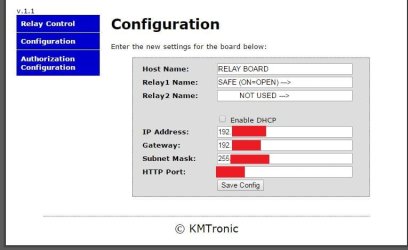
Yes correct it is a webserver. The pic is all the options I get. I figure THAT would be where I change it is HOST NAME but as the second picture shows, it still wants to display the IP.

I know that there is a Run -> CMD command (I think its netstat?) to show all the IPs you are connected to so this is indeed purely for cosmetic reasons.

Through NO-IP I have successfully gotten the name in the display tab in the browser to display what I want. Now if I could just get the logon box to show RELAY BOARD instead of the IP.
 

Attachments

  • 22.JPG
    22.JPG
    40.3 KB · Views: 1
  • Screenshot_2016-11-24-19-22-42.png
    Screenshot_2016-11-24-19-22-42.png
    58.7 KB · Views: 1

My Computer

Computer type
PC/Desktop
Computer Manufacturer/Model Number
Custom built by myself
OS
Windows 7 Ultimate 64Bit (SP1)
CPU
Intel® Core™ i3-6100 Processor (3M Cache, 3.70 GHz)
Motherboard
Asus B150M-C D3
Memory
Kingston 16GB Hyper X Fury Blue DDR3 1600Mhz (2x 8GB sticks)
Graphics Card(s)
On board (Asus B150M-C D3) VGA and DVI on Extended Desktop
Sound Card
On Board (Asus B150M-C D3)
Monitor(s) Displays
Left DVI: Samsung 920WM - Right VGA: Samsung 941BW
Hard Drives
WD WD5000AADS 500GB SATA Green--WD 1TB WD1001FALS SATA Black--WD 320GB WD3200JB
PSU
Cooler Master 700W Silent Pro
Case
See through Side panel--right hinge door--5x 5" & 2x 3" bays
Cooling
Side, Front, Rear fan & Power supply fan
Keyboard
Logitech MX5000 BT
Mouse
Logitech MX500
Internet Speed
40Mb down--10Mb Up
Antivirus
AVG Internet Security
Browser
Chrome-Firefox-Opera-IE-TOR
Other Info
2x LG DVD-RW--NZXT Fan contoller--4in1 Card reader
Still having no luck with this, wondering if someone may have any ideas?
 

My Computer

Computer type
PC/Desktop
Computer Manufacturer/Model Number
Custom built by myself
OS
Windows 7 Ultimate 64Bit (SP1)
CPU
Intel® Core™ i3-6100 Processor (3M Cache, 3.70 GHz)
Motherboard
Asus B150M-C D3
Memory
Kingston 16GB Hyper X Fury Blue DDR3 1600Mhz (2x 8GB sticks)
Graphics Card(s)
On board (Asus B150M-C D3) VGA and DVI on Extended Desktop
Sound Card
On Board (Asus B150M-C D3)
Monitor(s) Displays
Left DVI: Samsung 920WM - Right VGA: Samsung 941BW
Hard Drives
WD WD5000AADS 500GB SATA Green--WD 1TB WD1001FALS SATA Black--WD 320GB WD3200JB
PSU
Cooler Master 700W Silent Pro
Case
See through Side panel--right hinge door--5x 5" & 2x 3" bays
Cooling
Side, Front, Rear fan & Power supply fan
Keyboard
Logitech MX5000 BT
Mouse
Logitech MX500
Internet Speed
40Mb down--10Mb Up
Antivirus
AVG Internet Security
Browser
Chrome-Firefox-Opera-IE-TOR
Other Info
2x LG DVD-RW--NZXT Fan contoller--4in1 Card reader
First screenshot shows the configuration screen of the router right? That's irrelevant to the problem, the basic authentication request is setup in the webserver, not in the router, that only setups port forwarding.

Look at the configuration of your specific webserver, and lacking that, at the web application running in it. Specifics on how to do that depends on the software you're running and can vary widely.
As an example, look at this thread at StackOverflow, dealing with the exact same problem in the case of a WordPress installation: WordPress: IP Address Showing in Browser (not homepage though) - Super User

Another possibility is that the web browser just displaying it anyway. Remember that, while the server may send its name and a message, the browser can fundamentally do whatever it likes. Unlikely but possible, you can easily check this by using a different browser and see if another browser does the same.
 

My Computer

Computer type
Laptop
Computer Manufacturer/Model Number
Toshiba Sattelite A665-S6092
OS
Windows 7 Ultimate x64
CPU
Intel Core i7-740QM
Memory
8 GB DDR3
Graphics Card(s)
NVIDIA GeForce 330GT
Screen Resolution
1366x768
Hard Drives
Samsung 840 SSD 500GB
1TB USB3 external HD
Cooling
Coolermaster Notepal U3 notebook cooling pad
Internet Speed
3mbps ASDL
Antivirus
ClamWin 0.98.7
Browser
Opera 12.17 x86 (main), Firefox 38 (sec), IE11 (last resort)
Back
Top