Hide the administrator account at the login screen

bjp106

New member
Local time
7:36 AM
Messages
26

My Computer My Computer

At a glance

Windows 7
OS
Windows 7
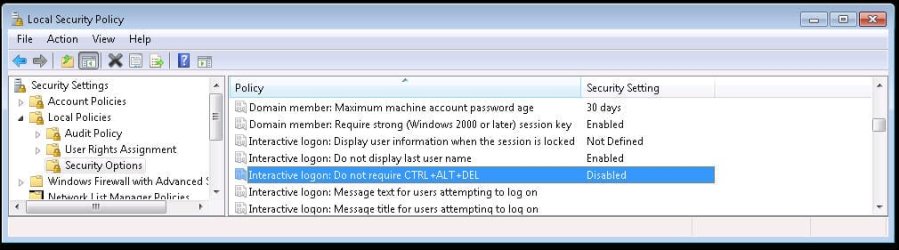
You can set crtl-alt-del in the local security policy under administrative tools in the control panel. You can also choose not to display the last user name... see the choice right above the highlighted one in the attached image.

If both are selected you are presented with blank user name and password fields after crtl-alt-del.
 

Attachments

  • lsp.jpg
    lsp.jpg
    48.6 KB · Views: 3,078

My Computer My Computer

At a glance

Windows 7P4 3.0 HT4 gigs of Crucial DDR2nVidia GeForce 7800GT 256MB 256-bit w/ ACCELS...
Computer Manufacturer/Model Number
ultraplanet - model 23
OS
Windows 7
CPU
P4 3.0 HT
Motherboard
Intel DQ965GF
Memory
4 gigs of Crucial DDR2
Graphics Card(s)
nVidia GeForce 7800GT 256MB 256-bit w/ ACCELS1 Rev 2
Sound Card
on board
Monitor(s) Displays
HP 2509m
Screen Resolution
1920x1080
Hard Drives
2x 320gb Seagate Barracuda's - SATA 3Gbit/s - RAID-0 array
PSU
650 watt
Case
Antec
Cooling
Cool Master
Keyboard
Logitech diNovo Media Desktop
Mouse
see keyboard
Internet Speed
comcast cable
Other Info
7 Ultimate and 7 Pro twice each at home - Gigabit on the Network - Tomato on the Linksys - I freely share my wireless with my neighbors (8-10 additional devices)
That doesn't quite achieve what I was asking for. That removed the icon, and I had to type in the username.

Is there a way to keep the icons and username's still displaying, while removing the administrator account from the login screen?

Also,
What happened to when in XP I could press Crtl-alt-delete twice and it would bring up the old way to login? Is there a way to do that in Win 7?

Thanks!
 

My Computer My Computer

At a glance

Windows 7
OS
Windows 7
Please clarify Administrator - distinguish between the built-in Administrator account (not shown on log-in by default) and a User Account with Admin privileges.
 
Back
Top