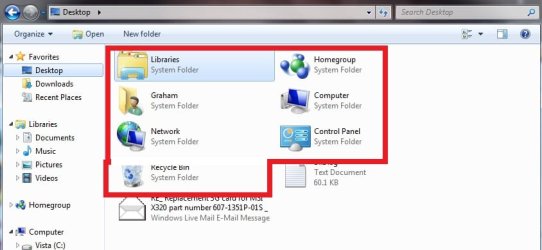
you know when you launch the open menu to upload or something and you select the desktop, it has all this crap at the top (Libraries Homegroup, user folder, eta) which you have disabled on the true desktop making uou have to scroll down to select the one thing that actually *IS* on the desktop?
how do you disable those folders so they don't show up?
how do you disable those folders so they don't show up?
My Computer
- Computer type
- PC/Desktop
- Computer Manufacturer/Model Number
- Apple 17" iMac MA199LL (Early 2006)
- OS
- Windows 8 Pro (32-bit)
- CPU
- 1.83GHz Intel Core Duo
- Memory
- 2GB 667MHz DDR2 SDRAM (PC2-5300) (upgrade)
- Graphics Card(s)
- ATI Radeon X1600 with 128MB GDDR3 memory
- Monitor(s) Displays
- 17-inch TFT active-matrix LCD, millions of colors
- Screen Resolution
- 1440 x 900
- Hard Drives
- Hitachi 320GB HDT721032SLA360 7200RPM SATA II (upgrade)
- Keyboard
- Microsoft Wired Keyboard 600
- Mouse
- Microsoft Basic Optical Mouse v2.0
- Internet Speed
- 4 Mbps
- Antivirus
- Microsoft Security Essentials
- Browser
- Google Chrome
- Other Info
- WEI:
Base Score: 3.9 Processor: 4.4 Memory 4.7
Graphics: 3.9 Gaming Graphics: 4.1 Primary HD: 5.9