hiding applications

bart2brett

New member
Local time
4:31 AM
Messages
9
I own applications that my company does not want me to use because they are not standard. Question is, if I install them in XP mode, are they detectable from the other side? (Windows 7 Pro 64bit).
 

My Computer

OS
Windows 7 Pro 64bit
If your company policy is not to use them, then I would advise that you keep to their rules, I don't let any of our staff members use any unauthorized software ... but that's only my opinion ;)
 

My Computer

Computer type
PC/Desktop
Computer Manufacturer/Model Number
Self Built
OS
Windows 7 Ultimate 64bit
CPU
AMD Phenom Quad core 9950 black edition
Motherboard
Gigabyte
Memory
16Gb
Graphics Card(s)
2x XFX Radeon 5850
Sound Card
PCI Express X-Fi Titanium / Logitech G35
Monitor(s) Displays
2x HP 2410i
Screen Resolution
1920x1080
Hard Drives
2x 500Gb Seagate
1x 300Gb Seagate
1x 1Tb Seagate
2x 1Tb Hitatchi
PSU
Jean Tech Storm 700W
Case
Cooler Master COSMOS S
Cooling
Akasa Evo Blue Pro
Keyboard
Logitech G15
Mouse
Mad Catz M.M.O. 7
Internet Speed
12mb
I own applications that my company does not want me to use because they are not standard. Question is, if I install them in XP mode, are they detectable from the other side? (Windows 7 Pro 64bit).

I would suggest that it would potentially be easy for them to see this, i know we would be able to in our infrastructure.

If your company policy is not to use them, then I would advise that you keep to their rules ... but that's only my opinion ;)

I would stick by this advise either way, corporate policy would probably have grounds to discipline you under the 'Computer Misuse Act' (or something of that sort :))

Regards,
JDobbsy1987
 

My Computer

Computer type
PC/Desktop
Computer Manufacturer/Model Number
Self Built
OS
Windows 8.1 Pro x64
CPU
Intel Core i5-2500K @ 3.30GHz - S1155
Motherboard
Asus P8P67 LE Rev3, Intel P67, S115
Memory
8GB Corsair DDR3 XMS3, PC3-12800
Graphics Card(s)
NVIDIA GeForce GTX 650
Sound Card
On-Board
Monitor(s) Displays
3 x 24" {Extended Display}
Screen Resolution
1920 x 1080
Hard Drives
300GB Seagate Barracuda 7200
PSU
550W Coolermaster GX550
Case
Silverstone Precision PS04B
Cooling
Stock
Keyboard
Logitech K120
Mouse
World of Warcraft Cataclysm MMO Gaming Mouse
Internet Speed
80 MB
Antivirus
MSE / Windows Defender
Browser
Chrome
No probs pal :)

Sorry we couldn't have offered more assistance, but I think you know where we are coming from, but don't be scarce 7 forums is a great place to hang out, and I'm sure that there are many here that can help you out with any other questions that you may have ;)
 

My Computer

Computer type
PC/Desktop
Computer Manufacturer/Model Number
Self Built
OS
Windows 7 Ultimate 64bit
CPU
AMD Phenom Quad core 9950 black edition
Motherboard
Gigabyte
Memory
16Gb
Graphics Card(s)
2x XFX Radeon 5850
Sound Card
PCI Express X-Fi Titanium / Logitech G35
Monitor(s) Displays
2x HP 2410i
Screen Resolution
1920x1080
Hard Drives
2x 500Gb Seagate
1x 300Gb Seagate
1x 1Tb Seagate
2x 1Tb Hitatchi
PSU
Jean Tech Storm 700W
Case
Cooler Master COSMOS S
Cooling
Akasa Evo Blue Pro
Keyboard
Logitech G15
Mouse
Mad Catz M.M.O. 7
Internet Speed
12mb
No probs pal :)

Sorry we couldn't have offered more assistance, but I think you know where we are coming from, but don't be scarce 7 forums is a great place to hang out, and I'm sure that there are many here that can help you out with any other questions that you may have ;)

Couldn't agree more! :thumbsup:
 

My Computer

Computer type
PC/Desktop
Computer Manufacturer/Model Number
Self Built
OS
Windows 8.1 Pro x64
CPU
Intel Core i5-2500K @ 3.30GHz - S1155
Motherboard
Asus P8P67 LE Rev3, Intel P67, S115
Memory
8GB Corsair DDR3 XMS3, PC3-12800
Graphics Card(s)
NVIDIA GeForce GTX 650
Sound Card
On-Board
Monitor(s) Displays
3 x 24" {Extended Display}
Screen Resolution
1920 x 1080
Hard Drives
300GB Seagate Barracuda 7200
PSU
550W Coolermaster GX550
Case
Silverstone Precision PS04B
Cooling
Stock
Keyboard
Logitech K120
Mouse
World of Warcraft Cataclysm MMO Gaming Mouse
Internet Speed
80 MB
Antivirus
MSE / Windows Defender
Browser
Chrome
Without prejudice to the question of running *non-approved applications* within XPMode, the special integration of XPMode and Windows 7 in the Windows Virtual PC does expose some of the XPMode installed applications to the Host Windows 7 machine - Microsoft Office, Microsoft Security Essentials, Powertoys for Windows XP - anything from the Microsoft stable seems to pass through appear in the Windows 7 All programs, under Windows Virtual PC, XP Mode Applications.

I even tried an unlikely installation of Microsoft Virtual PC 2007, which installs fine on XPMode, but will not run as a VM inside a VM -I did it to obtain for the virtual disk precompactor, not available with the Windows 7 VirtualPC, and, yes, it shows in Windows 7 All programs - Windows Virtual PC - Windows XPMode Applications.

However, so far, no non-Microsoft program (Google Chrome - nothing else installed) is detected. Google Chrome does not seem to appear in XPMode applications. Other applications - Firefox, Opera, Vuse, Adobe Reader all show as applications.

No programs in other Windows VMs -Windows 7, Win2K show through at all.


Non-installed programs running from a USB stick, for instance would be undetectable in many cases.

 
Last edited:

My Computer

Computer Manufacturer/Model Number
Acer 7520, Packard Bell dot se, Acer travelmate 2423
OS
Win 7 Ult + Starter, XP Pro +Home, 2kAS, Linux Mint 8, SuperOS
CPU
AMD 64 Athlon X2 , Intel Atom N450, Intel Celeron M 1.50 Ghz
Motherboard
Acer Fuquene
Memory
2.5GB ; 1GB; 2GB
Graphics Card(s)
Nvidia GeForce7000m; Intel; Intel
Sound Card
Realtek AC57
Monitor(s) Displays
17" ;10.1"; 19"
Screen Resolution
1440x900;1024x600;1440x900;
Hard Drives
WD 80, WD 320;
PSU
19v
Case
Laptop
Cooling
Air
Internet Speed
9.7Mb/s down 0.99Mb/s up
Other Info
ISP VIRGINMEDIA 10M cable broadband - D-Link DIR615 wireless router, 3Com OfficeConnect ASDL router used as wireless extender switch
Without prejudice to the question of running *non-approved applications* within XPMode, the special integration of XPMode and Windows 7 in the Windows Virtual PC does expose some of the XPMode installed applications to the Host Windows 7 machine - Microsoft Office, Microsoft Security Essentials, Powertoys for Windows XP - anything from the Microsoft stable seems to pass through appear in the Windows 7 All programs, under Windows Virtual PC, XP Mode Applications.

I even tried an unlikely installation of Microsoft Virtual PC 2007, which installs fine on XPMode, but will not run as a VM inside a VM -I did it to obtain for the virtual disk precompactor, not available with the Windows 7 VirtualPC, and, yes, it shows in Windows 7 All programs.

However, so far, no non-Microsoft program (Google Chrome - nothing else installed) is detected. No programs in other Windows VMs -Windows 7, Win2K show through at all.

Non-installed programs running from a USB stick, for instance would be undetectable in many cases.
Let's correct the wrong information.

1) Practically all applications installed in XP Mode can use Virtual Application feature, meaning installing an application in XP Mode in most cases automatically adds a shortcut to host machine's Start menu > Virtual PC > XP Mode Applications. Installed application must not be a Microsoft application.

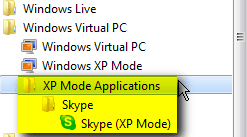
Here's just an example, I just installed Skype to XP Mode and as soon as it was installed, it was available in my host's Start menu:

XPM_Applications.png

The key is does the installed application create a shortcut in XP Mode Start menu, which is required for Virtual Application feature to work. Those few apps not doing so can easily be added to host Start menu by creating a shortcut to app in XP Mode > C:\Documents and Settings\All Users\Start Menu. Notice that in this case copying a shortcut to said folder does not work; instead you need to use Context menu > New > Shortcut tool to create a shortcut for it to appear in host Start menu.

2) Virtual Application feature works on all XP SP 3, Vista Ultimate & Enterprise and Seven Ultimate & Enterprise vm's, so to say that applications installed in Seven vm do not appear on host Start menu is wrong. (Windows Virtual PC: Requirements, end of page)

As for Windows 2000, it's understandable that Virtual Application does not work. Virtual PC integration features only support XP, Vista and Seven vm's. Integration features are needed for Virtual Application feature to work.

Kari
 

My Computer

Computer type
Laptop
Computer Manufacturer/Model Number
HP ENVY 17-1150eg
OS
Windows 10 Pro x64 EN-GB
CPU
1.6 GHz Intel Core i7-720QM Processor
Memory
6 GB
Graphics Card(s)
ATI Mobility Radeon HD 5850 Graphics
Sound Card
Beats sound system with integrated subwoofer
Monitor(s) Displays
17" laptop display, 22" LED and 32" Full HD TV through HDMI
Screen Resolution
1600*900 (1), 1920*1080 (2&3)
Hard Drives
Internal: 2 x 500 GB SATA Hard Disk Drive 7200 rpm
External: 2TB for backups, 3TB USB3 network drive for media
Cooling
As Envy runs a bit warm, I have it on a Cooler Master pad
Keyboard
Logitech diNovo Media Desktop Laser (bluetooth)
Mouse
Logitech Performance Mouse MX
Internet Speed
50/10 Mbps VDSL
Antivirus
Windows Defender 4.3.9431.0
Browser
Maxthon 3.5.2., IE11
Interesting - Thanks Kari for dispelling that - I've since loaded Opera, Firefox and Vuse into XPMode, and they all show as XPMode Applications, but Google Chrome still is not listed as an application, and none of the Windows 7 installed apps show up. Perhaps I need to reinstall the Integration Features - I probably won't bother since they appear to slow XPMode up a lot.
desktop1.png
 

My Computer

Computer Manufacturer/Model Number
Acer 7520, Packard Bell dot se, Acer travelmate 2423
OS
Win 7 Ult + Starter, XP Pro +Home, 2kAS, Linux Mint 8, SuperOS
CPU
AMD 64 Athlon X2 , Intel Atom N450, Intel Celeron M 1.50 Ghz
Motherboard
Acer Fuquene
Memory
2.5GB ; 1GB; 2GB
Graphics Card(s)
Nvidia GeForce7000m; Intel; Intel
Sound Card
Realtek AC57
Monitor(s) Displays
17" ;10.1"; 19"
Screen Resolution
1440x900;1024x600;1440x900;
Hard Drives
WD 80, WD 320;
PSU
19v
Case
Laptop
Cooling
Air
Internet Speed
9.7Mb/s down 0.99Mb/s up
Other Info
ISP VIRGINMEDIA 10M cable broadband - D-Link DIR615 wireless router, 3Com OfficeConnect ASDL router used as wireless extender switch
Chrome is one of those very few apps that on XP does not install itself in Program Files and do not create a Start menu item. Instead it is installed in XP in
C:\Documents and Settings\Username\Local Settings\Application\Data\Google\Chrome\Application\.

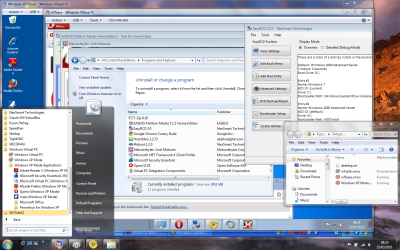
Because of this Chrome shortcut has to be manually added to guest Start menu to appear in host Start menu as told in my previous post. The screenshot below is from my host machine's Start menu showing Chrome both in XP Mode and Seven virtual machines Virtual Application list i.e. in host Start menu. The screenshot also shows that an application installed in Seven vm (OpenOffice) automatically added shortcuts to Virtual Applications:

VPC_Applications.png

Kari
 
Last edited:

My Computer

Computer type
Laptop
Computer Manufacturer/Model Number
HP ENVY 17-1150eg
OS
Windows 10 Pro x64 EN-GB
CPU
1.6 GHz Intel Core i7-720QM Processor
Memory
6 GB
Graphics Card(s)
ATI Mobility Radeon HD 5850 Graphics
Sound Card
Beats sound system with integrated subwoofer
Monitor(s) Displays
17" laptop display, 22" LED and 32" Full HD TV through HDMI
Screen Resolution
1600*900 (1), 1920*1080 (2&3)
Hard Drives
Internal: 2 x 500 GB SATA Hard Disk Drive 7200 rpm
External: 2TB for backups, 3TB USB3 network drive for media
Cooling
As Envy runs a bit warm, I have it on a Cooler Master pad
Keyboard
Logitech diNovo Media Desktop Laser (bluetooth)
Mouse
Logitech Performance Mouse MX
Internet Speed
50/10 Mbps VDSL
Antivirus
Windows Defender 4.3.9431.0
Browser
Maxthon 3.5.2., IE11
So if our original poster, in Virtual naughty mode, were to carefully install his unauthorised software in places other than Program Files, and did not create start menu items (or deleted them), he could possibly avoid obvious detection from the host OS.
 

My Computer

Computer Manufacturer/Model Number
Acer 7520, Packard Bell dot se, Acer travelmate 2423
OS
Win 7 Ult + Starter, XP Pro +Home, 2kAS, Linux Mint 8, SuperOS
CPU
AMD 64 Athlon X2 , Intel Atom N450, Intel Celeron M 1.50 Ghz
Motherboard
Acer Fuquene
Memory
2.5GB ; 1GB; 2GB
Graphics Card(s)
Nvidia GeForce7000m; Intel; Intel
Sound Card
Realtek AC57
Monitor(s) Displays
17" ;10.1"; 19"
Screen Resolution
1440x900;1024x600;1440x900;
Hard Drives
WD 80, WD 320;
PSU
19v
Case
Laptop
Cooling
Air
Internet Speed
9.7Mb/s down 0.99Mb/s up
Other Info
ISP VIRGINMEDIA 10M cable broadband - D-Link DIR615 wireless router, 3Com OfficeConnect ASDL router used as wireless extender switch

My Computer

Computer type
PC/Desktop
Computer Manufacturer/Model Number
Systems by SmartEyeball
OS
8 Pro x64
CPU
i7 3770K 4.6GHz
Motherboard
ASUS P8Z77 WS
Memory
16GB G.Skill Trident X 2666mhz
Graphics Card(s)
x2 EVGA 780 Ti Superclocked SLI
Sound Card
SB X-FI Surround 5.1 PRO USB / ATH-AD900 Headphones
Monitor(s) Displays
x3 Dell U2410 / 58" Samsung
Screen Resolution
5760*1200/ 1920*1200
Hard Drives
2x Intel 520 240GB (RAID 0) * 2x WD Caviar Blacks 2TB (RAID 0) * 2TB WD Caviar Black * Sony Optirac DVD
PSU
Silverstone Strider Evolution 1200W
Case
Thermaltake Level 10 GT Snow Edition
Cooling
Noctua NH-D14
Keyboard
Topre Realforce // Ducky Shine MX Black // Filco Ninja TKL
Mouse
Thermaltake Theron (Highly Recommended) + Razer Imperator
Antivirus
MSE
Browser
IE, FF, WaterFox
Other Info
GT Extreme V2 Sim Racing Cockpit + 40" LCD and K/B Mouse stand ▼
Fanatec CSR Elite Wheel + Clubsport V1 Pedals + CSR shifter/7G-H ▼Saitek X52 Pro ▼ TrackIR 5 Pro
Buttkicker v2 Seat Rumbler with Dedicated 5.1 and Sub Woofer attached to frame ▼
=
Bloody Big Grin
Back
Top