
High CPU Usage Using LAN

tw33k

New member
Guru
Gold Member
VIP
Local time
5:53 AM
Messages
3,028
Got a problem with my work PC. I've been testing the LAN and found that my PC (Win 7) has a high CPU usage (51%) compared with an XP PC (1%) I am using PassMark Advanced Network Test.
Specs are:

Athlon II x2 2.70GHz
4GB RAM
Realtek 8168B NIC
Pegatron M2N68-LA MOBO

All else seems fine. I think the RAM is problematic as I have 2GB generic and 2GB Corsair tri-channel 1066 running as 800 dual-channel but I can't get into the BIOS to do anything with it. Getting another stick of Corsair may be an option but I'd rather avoid spending more money on this PC. Perhaps there's an NIC setting I've neglected.
 

My Computer

Computer Manufacturer/Model Number
tw33k
OS
Windows 7 Ultimate (x64) SP1
CPU
Intel 3770k 4.6GHz
Motherboard
ASUS Maximus V Formula
Memory
8GB (2x 4GB) Crucial Ballistix
Graphics Card(s)
Sapphire 7950 (1060/1600)
Sound Card
On Board Realtek HD Audio
Monitor(s) Displays
27" Acer B273HU (via HDMI)
Screen Resolution
2048 x 1152
Hard Drives
Crucial M4 128GB
2TB WD Black
1TB Samsung F3 SATA
1TB WD Elite External
2TB WD USB 3.0
PSU
Corsair AX750 Gold
Case
Corsair Obsidian 800DW
Cooling
Corsair H100 (2x AP-121/2x UK-3000 push/pull)
Keyboard
Microsoft Wireless 5000
Mouse
Microsoft Wireless 5000
Internet Speed
5mb/s
Other Info
Logitech z-2300 2.1 speakers
Lamptron FC-5 v2
Got a problem with my work PC. I've been testing the LAN and found that my PC (Win 7) has a high CPU usage (51%) compared with an XP PC (1%) I am using PassMark Advanced Network Test.
Specs are:

Athlon II x2 2.70GHz
4GB RAM
Realtek 8168B NIC
Pegatron M2N68-LA MOBO

All else seems fine. I think the RAM is problematic as I have 2GB generic and 2GB Corsair tri-channel 1066 running as 800 dual-channel but I can't get into the BIOS to do anything with it. Getting another stick of Corsair may be an option but I'd rather avoid spending more money on this PC. Perhaps there's an NIC setting I've neglected.

You using Homegroup, or "workgroup"
 

My Computer

Computer Manufacturer/Model Number
HP Pavillion dv-7 1005 Tx
OS
Win 8 Release candidate 8400
CPU
[email protected]
Memory
4 gigs
Graphics Card(s)
Nvidia 9600M
Sound Card
HD built-in
Monitor(s) Displays
17" Wxga
Screen Resolution
1440x900
Cooling
none
Internet Speed
45Mb down 5Mb up
Have you updated the driver to the latest update? If so, check in the driver properties in Device Manager, there should be one of more options about "offloading"... try enabling it one by one if it got it.

zzz2496
 

My Computer

Computer Manufacturer/Model Number
Self Built
OS
Windows7 Ultimate 64bit
CPU
Intel Core 2 Quad Q6600
Motherboard
Abit IN9-32X-MMAX
Memory
DDR2 Adata 4GB
Graphics Card(s)
Nvidia GeForce GTX 285 1024 and Nvidia GeForce 8800GT 512
Sound Card
Asus Xonar HDAV 1.3
Monitor(s) Displays
Dell 2407WFP and BenQ 2400v and Philips 150v3
Screen Resolution
3840x1200 and 1024x768
Hard Drives
2 WDC 1TB
1 WDC 1.5TB
1 WDC 640GB
1 WDC 320GB
1 Seagate 200GB
PSU
Corsair TX 850W
Case
Cooler Master HAF932
Cooling
Arctic Cooling Freezer Extreme and plenty of fans...
Keyboard
MicrosoftNaturalKeyboard 4000/Apple Alu keyboard/Dinovo mini
Mouse
Logitech G5/MarbleMouseTrackball/PerformanceMX/SpacePilotPRO
Internet Speed
1.5Mbps down/384Kbps up
Other Info
APC SURT 1000XL
Logitech Z-560
Wiimote
Mikrotik Router
Linksys (now Cisco) SD2008 8 port Gigabit switch
Linksys WRT54G (acting as AP)
Apple wireless Aluminium keyboard
Apple Magic Mouse
Xbox360 wired controller
Have you updated the driver to the latest update? If so, check in the driver properties in Device Manager, there should be one of more options about "offloading"... try enabling it one by one if it got it.

zzz2496

Driver is up to date and Large Send Offload (IPv4) is enabled. I forgot to add that I've also disabled the onboard LAN in the BIOS (one of the few things it will allow me to change)
 

My Computer

Computer Manufacturer/Model Number
tw33k
OS
Windows 7 Ultimate (x64) SP1
CPU
Intel 3770k 4.6GHz
Motherboard
ASUS Maximus V Formula
Memory
8GB (2x 4GB) Crucial Ballistix
Graphics Card(s)
Sapphire 7950 (1060/1600)
Sound Card
On Board Realtek HD Audio
Monitor(s) Displays
27" Acer B273HU (via HDMI)
Screen Resolution
2048 x 1152
Hard Drives
Crucial M4 128GB
2TB WD Black
1TB Samsung F3 SATA
1TB WD Elite External
2TB WD USB 3.0
PSU
Corsair AX750 Gold
Case
Corsair Obsidian 800DW
Cooling
Corsair H100 (2x AP-121/2x UK-3000 push/pull)
Keyboard
Microsoft Wireless 5000
Mouse
Microsoft Wireless 5000
Internet Speed
5mb/s
Other Info
Logitech z-2300 2.1 speakers
Lamptron FC-5 v2
You using Homegroup, or "workgroup"

Can't use Homegroup as no other Win 7 machines. Switching the LAN card's duplex/speed back to auto improved things a little but still very high.
 

My Computer

Computer Manufacturer/Model Number
tw33k
OS
Windows 7 Ultimate (x64) SP1
CPU
Intel 3770k 4.6GHz
Motherboard
ASUS Maximus V Formula
Memory
8GB (2x 4GB) Crucial Ballistix
Graphics Card(s)
Sapphire 7950 (1060/1600)
Sound Card
On Board Realtek HD Audio
Monitor(s) Displays
27" Acer B273HU (via HDMI)
Screen Resolution
2048 x 1152
Hard Drives
Crucial M4 128GB
2TB WD Black
1TB Samsung F3 SATA
1TB WD Elite External
2TB WD USB 3.0
PSU
Corsair AX750 Gold
Case
Corsair Obsidian 800DW
Cooling
Corsair H100 (2x AP-121/2x UK-3000 push/pull)
Keyboard
Microsoft Wireless 5000
Mouse
Microsoft Wireless 5000
Internet Speed
5mb/s
Other Info
Logitech z-2300 2.1 speakers
Lamptron FC-5 v2
Did you check with Process Explorer which processes are using the CPU?
 

My Computer

Computer Manufacturer/Model Number
HP, Dell, Gateway, Toshiba - 4 laptops and 2 desktops
OS
Vista, Windows7, Mint Mate, Zorin, Windows 8
CPU
from 1.6GHz Duo to i7
Monitor(s) Displays
2x HP w2207
Hard Drives
5x HDD, 7x SSD, 12x Externals
Keyboard
with trackball - no mices
Mouse
Trackball mice
Internet Speed
DSL 6000
Did you check with Process Explorer which processes are using the CPU?

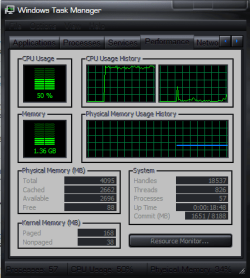
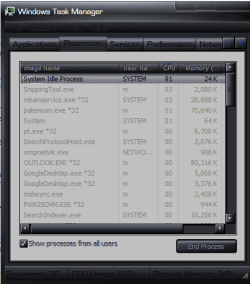
That's the strange thing. Nothing shows. The software I'm using to test shows the CPU usage at about 30% now (was over 50%). Task Manager and Resource Monitor show similar but can't find anything in processes that is causing it :confused:

cpu.PNG cpu2.PNG

edit: it's gone back to around 50%!

edit 2: changed the duplex to 100mbps and increased speed by a lot and decreased CPU usage down to around 30-40%. Not perfect but definitely better

edit 3: This is no good. Tried everything including safe mode but the CPU usage remains high! All other PCs here are XP and performing the tests on all of them give the same results, 1%. The Win 7 PC averages around 30%. I don't like it at all.
 
Last edited:

My Computer

Computer Manufacturer/Model Number
tw33k
OS
Windows 7 Ultimate (x64) SP1
CPU
Intel 3770k 4.6GHz
Motherboard
ASUS Maximus V Formula
Memory
8GB (2x 4GB) Crucial Ballistix
Graphics Card(s)
Sapphire 7950 (1060/1600)
Sound Card
On Board Realtek HD Audio
Monitor(s) Displays
27" Acer B273HU (via HDMI)
Screen Resolution
2048 x 1152
Hard Drives
Crucial M4 128GB
2TB WD Black
1TB Samsung F3 SATA
1TB WD Elite External
2TB WD USB 3.0
PSU
Corsair AX750 Gold
Case
Corsair Obsidian 800DW
Cooling
Corsair H100 (2x AP-121/2x UK-3000 push/pull)
Keyboard
Microsoft Wireless 5000
Mouse
Microsoft Wireless 5000
Internet Speed
5mb/s
Other Info
Logitech z-2300 2.1 speakers
Lamptron FC-5 v2
the first u must setup antivirus and scan ur laptop , the next u uninstall ur driver lan and restart laptop , then u reinstall driver lan , i think my way sucessful
 

My Computer

OS
win 7
This is very strange. Your left picture shows CPU usage of 50% but your right picture shows the system idle process at 91% - thus a CPU usage of 9%. Also the usage distribution between the two cores is very odd. All the load seems to be on the left core.
 

My Computer

Computer Manufacturer/Model Number
HP, Dell, Gateway, Toshiba - 4 laptops and 2 desktops
OS
Vista, Windows7, Mint Mate, Zorin, Windows 8
CPU
from 1.6GHz Duo to i7
Monitor(s) Displays
2x HP w2207
Hard Drives
5x HDD, 7x SSD, 12x Externals
Keyboard
with trackball - no mices
Mouse
Trackball mice
Internet Speed
DSL 6000
Tweek, do you by any chance have the ForeFront firewall installed?

If so read this TechNet thread to the bottom of the page.
High CPU Usage Windows Firewall

Another TechNet thread with more possible solutions. Apparently this problem can be caused by a number of third party programs or drivers. Starting in safe mode may help to isolate the problem.
http://social.answers.microsoft.com...e/thread/b5c79a15-781b-455a-9003-6d305695fce0

So many have reported this problem it's difficult to pin point the cause.
http://superuser.com/questions/91867/windows-7-svchost-high-cpu-usage

AVG has also been known to cause this problem.
http://social.answers.microsoft.com...y/thread/2f073434-704b-40f8-998b-c307b70a75cf
 
Last edited:

My Computer

Computer type
PC/Desktop
Computer Manufacturer/Model Number
Home built
OS
Windows 7 Ult, Windows 8.1 Pro,
CPU
Q9650-4.275GHz, E8600 4.5GHz, E6750-3.8GHz
Motherboard
Evga 780i FTW
Memory
G.Skill PC2 9600 1200Mhz 5 5 5 15 2T
Graphics Card(s)
GTX480
Sound Card
Asus Xonar D2
Monitor(s) Displays
HannsG
Screen Resolution
1680X1050
Hard Drives
GSkill Phoenix Pro 120GB SSD
PSU
ThermalTake Toughpower 1000Watt modular
Case
ThermalTake XaserV
Cooling
Xigmatek S1283
Keyboard
Logitech G15
Mouse
Logitech G9
Internet Speed
T1
This is very strange. Your left picture shows CPU usage of 50% but your right picture shows the system idle process at 91% - thus a CPU usage of 9%. Also the usage distribution between the two cores is very odd. All the load seems to be on the left core.

I know it's strange. It only happens copying files over the LAN :confused:

Tweek, do you by any chance have the ForeFront firewall installed?

If so read this TechNet thread to the bottom of the page.
High CPU Usage Windows Firewall

Another TechNet thread with more possible solutions. Apparently this problem can be caused by a number of third party programs or drivers. Starting in safe mode may help to isolate the problem.
Windows 7 High CPU Usage

So many have reported this problem it's difficult to pin point the cause.
Windows 7 - svchost high cpu usage. - Super User

AVG has also been known to cause this problem.
Unnecessarily high CPU usage.

My sig clearly tells which AV I use and it's not an issue with any other PC here or at home. I also mentioned earlier that I have tried in Safe Mode.
 

My Computer

Computer Manufacturer/Model Number
tw33k
OS
Windows 7 Ultimate (x64) SP1
CPU
Intel 3770k 4.6GHz
Motherboard
ASUS Maximus V Formula
Memory
8GB (2x 4GB) Crucial Ballistix
Graphics Card(s)
Sapphire 7950 (1060/1600)
Sound Card
On Board Realtek HD Audio
Monitor(s) Displays
27" Acer B273HU (via HDMI)
Screen Resolution
2048 x 1152
Hard Drives
Crucial M4 128GB
2TB WD Black
1TB Samsung F3 SATA
1TB WD Elite External
2TB WD USB 3.0
PSU
Corsair AX750 Gold
Case
Corsair Obsidian 800DW
Cooling
Corsair H100 (2x AP-121/2x UK-3000 push/pull)
Keyboard
Microsoft Wireless 5000
Mouse
Microsoft Wireless 5000
Internet Speed
5mb/s
Other Info
Logitech z-2300 2.1 speakers
Lamptron FC-5 v2
I wonder if it has something to do with the way explorer is copying the files over the lan. I take it you don't get the same CPU usage when downloading files off the internet, etc.

Try downloading TeraCopy or another third party file manager and try copying the files so that explorer isn't involved in the process. In fact, if you can, try copying the files through command prompt with explorer closed.

Keep in mind I'm totally guessing, you're more than welcome to ignore me :)
 

My Computer

Computer Manufacturer/Model Number
Apple Macbook Pro (April 2009)
OS
W7 Ult. x64 | OS X
CPU
Intel Mobile Core 2 Duo 2.93Ghz [T9800 Penryn]
Motherboard
NVIDIA nForce 730i Rev. B1 [Mac-F2268EC8 (U2E1)]
Memory
4096MB Samsung DDR3 Dual Channel [PC3-8500F 1066Mhz]
Graphics Card(s)
NVIDIA GeForce 9600M GT 512MB [G96M Rev. C1]
Sound Card
SB X-Fi Surround 5.1 USB | Onboard Realtek (Disabled)
Monitor(s) Displays
Acer x223wbd 22" | Apple Anti-Glare 17" (Disabled)
Screen Resolution
{Current} 1440x900 {Acer} 1680x1050 {Apple} 1920x1200
Hard Drives
{Internal}
Seagate Momentus 320GB 2.5" 7200RPM [ST9320421AS]

{Externals}
LaCie 320GB USB 2.0 HDD [301284UR]
LaCie 750GB USB 2.0 FW400 eSATA HDD [301314U]
LaCie 1TB USB 2.0 HDD [301304UR]
PSU
Magsafe
Case
Aluminum/Unibody (MBP52)
Cooling
2 x 6000 RPM Fans
Keyboard
Logitech G-15v2 [PN 920-000379]
Mouse
Logitech G-9 [PN 910-000338]
Internet Speed
12Mbps/2.5Mbps w/ 24Mbps Speed Boost [Comcast]
Other Info
Logitech X-540 Speakers [PN 970223-0122]
Sennheiser PC-151 Headset
I wonder if it has something to do with the way explorer is copying the files over the lan. I take it you don't get the same CPU usage when downloading files off the internet, etc.

Try downloading TeraCopy or another third party file manager and try copying the files so that explorer isn't involved in the process. In fact, if you can, try copying the files through command prompt with explorer closed.

Keep in mind I'm totally guessing, you're more than welcome to ignore me :)

This actually might be worth a shot. Thanks, didn't think of that.
 

My Computer

Computer Manufacturer/Model Number
tw33k
OS
Windows 7 Ultimate (x64) SP1
CPU
Intel 3770k 4.6GHz
Motherboard
ASUS Maximus V Formula
Memory
8GB (2x 4GB) Crucial Ballistix
Graphics Card(s)
Sapphire 7950 (1060/1600)
Sound Card
On Board Realtek HD Audio
Monitor(s) Displays
27" Acer B273HU (via HDMI)
Screen Resolution
2048 x 1152
Hard Drives
Crucial M4 128GB
2TB WD Black
1TB Samsung F3 SATA
1TB WD Elite External
2TB WD USB 3.0
PSU
Corsair AX750 Gold
Case
Corsair Obsidian 800DW
Cooling
Corsair H100 (2x AP-121/2x UK-3000 push/pull)
Keyboard
Microsoft Wireless 5000
Mouse
Microsoft Wireless 5000
Internet Speed
5mb/s
Other Info
Logitech z-2300 2.1 speakers
Lamptron FC-5 v2
Back
Top