High CPU usage when doing nothing

Dual Trace

New member
Local time
7:01 AM
Messages
12
Task Manager shows CPU usage constantly above 50% while doing nothing.
Looking at processes, all I see is chrome.exe using 60,000 - 140,000K memory (it continually varies) and between 02 - 12 CPU usage.

Currently, while I write this post Task Manager shows this information:
CPU Usage: 55 - 85%
Physical Memory: 42%

Physical Memory (MB)
Total 4061
Cached 1721
Available 2337
Free 677

I ran a Kaspersky scan and also a Malwarebytes one and nothing showed up.

I followed few recommendations from the web, but nothing worked.

Please help,
Dual Trace
 

My Computer

Computer type
Laptop
Computer Manufacturer/Model Number
Asus
OS
Windows 7 Home Premium 64-bit
CPU
Intel U7300 @1.3GHz
Memory
4GB
Graphics Card(s)
Nvidia GeForceG210M
Hard Drives
CT250BX100SSD1
Antivirus
Kaspersky
Browser
Chrome
You have a 1.3 GHz cpu, surprised it even runs Windows 7 :(
 

Attachments

  • Capture.JPG
    Capture.JPG
    24.1 KB · Views: 1

My Computer

Computer type
PC/Desktop
Computer Manufacturer/Model Number
Skylake Special #666
OS
Windows 10 Pro x64
CPU
Intel Core i7 6700K
Motherboard
Asus Sabertooth Z170 Mark 1
Memory
GSkill TridentZ RGB 16GB 3600 16-16-16-36
Graphics Card(s)
EVGA GTX 980 Ti SC x2
Sound Card
Realtek High Definition
Monitor(s) Displays
AOC G2460PG
Screen Resolution
1920 x 1080 144Hz
Hard Drives
Samsung 860 Pro 256GB, Seagate Barracuda 4TB x2
PSU
EVGA 1000 P2, EVGA White Custom Braided Cables
Case
Corsair Vengeance C70 Gunmetal Black
Cooling
Corsair H100i v2, Corsair ML120 x2, Thermal Grizzly Kryonaut
Keyboard
Logitech G910 Orion Spectrum
Mouse
Logitech G700s
Internet Speed
Verizon Fios Quantum Gateway 75/75
Antivirus
Windows Defender, Malwarebytes Free 3.8.3
Browser
Chrome
Other Info
Corsair SP120 x4, LG Blu-ray Drive, Durabrand HT-395 100 Watt Dolby Digital Amp, Corsair H2100 Wireless 7.1 Headset
It runs fine, reformatted once three years ago and installed an SSD drive one year ago. It starts in less than 20 sec.
I don't do anything fancy and can't quite complain about anything, but I just noticed the high usage.
At work I also have Windows 7 running on a 2GB machine and idle usage stays under 5%.

Here is the summary:
Laptop: Asus UL50VT
Windows 7 Home Premium 64-bit
CPU: Intel U7300 @1.3GHz
RAM: 4GB
Graphics Card(s): Nvidia GeForceG210M
Hard Drive: CT250BX100SSD1 (that is 250GB)
 

My Computer

Computer type
Laptop
Computer Manufacturer/Model Number
Asus
OS
Windows 7 Home Premium 64-bit
CPU
Intel U7300 @1.3GHz
Memory
4GB
Graphics Card(s)
Nvidia GeForceG210M
Hard Drives
CT250BX100SSD1
Antivirus
Kaspersky
Browser
Chrome
Look at task manager which process is eating most CPU. high usage could be due to anything, but knowing which background program is doing it will help significantly. Tick the "show processes from all users" option and sort by CPU % to highlight the offenders.

A blind bet: Windows update set to automatically download usually makes svchost.exe go crazy :p
 

My Computer

Computer type
Laptop
Computer Manufacturer/Model Number
Toshiba Sattelite A665-S6092
OS
Windows 7 Ultimate x64
CPU
Intel Core i7-740QM
Memory
8 GB DDR3
Graphics Card(s)
NVIDIA GeForce 330GT
Screen Resolution
1366x768
Hard Drives
Samsung 840 SSD 500GB
1TB USB3 external HD
Cooling
Coolermaster Notepal U3 notebook cooling pad
Internet Speed
3mbps ASDL
Antivirus
ClamWin 0.98.7
Browser
Opera 12.17 x86 (main), Firefox 38 (sec), IE11 (last resort)
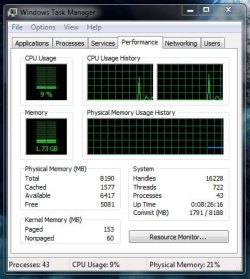
Make a snip of task manger with all windows closed and post.

Example.
 

Attachments

  • Capture.JPG
    Capture.JPG
    47.6 KB · Views: 19

My Computer

Computer type
PC/Desktop
Computer Manufacturer/Model Number
Skylake Special #666
OS
Windows 10 Pro x64
CPU
Intel Core i7 6700K
Motherboard
Asus Sabertooth Z170 Mark 1
Memory
GSkill TridentZ RGB 16GB 3600 16-16-16-36
Graphics Card(s)
EVGA GTX 980 Ti SC x2
Sound Card
Realtek High Definition
Monitor(s) Displays
AOC G2460PG
Screen Resolution
1920 x 1080 144Hz
Hard Drives
Samsung 860 Pro 256GB, Seagate Barracuda 4TB x2
PSU
EVGA 1000 P2, EVGA White Custom Braided Cables
Case
Corsair Vengeance C70 Gunmetal Black
Cooling
Corsair H100i v2, Corsair ML120 x2, Thermal Grizzly Kryonaut
Keyboard
Logitech G910 Orion Spectrum
Mouse
Logitech G700s
Internet Speed
Verizon Fios Quantum Gateway 75/75
Antivirus
Windows Defender, Malwarebytes Free 3.8.3
Browser
Chrome
Other Info
Corsair SP120 x4, LG Blu-ray Drive, Durabrand HT-395 100 Watt Dolby Digital Amp, Corsair H2100 Wireless 7.1 Headset
My Windows updates are disabled.
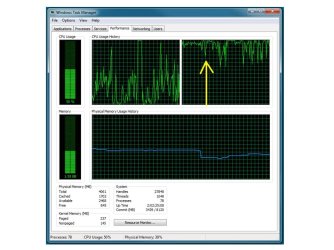
Here are the screen shots. The yellow arrow marks the moment when I shut down google chrome.
 

Attachments

  • Task manager 01.jpg
    Task manager 01.jpg
    74.3 KB · Views: 1
  • Task manager 02.jpg
    Task manager 02.jpg
    86.6 KB · Views: 0

My Computer

Computer type
Laptop
Computer Manufacturer/Model Number
Asus
OS
Windows 7 Home Premium 64-bit
CPU
Intel U7300 @1.3GHz
Memory
4GB
Graphics Card(s)
Nvidia GeForceG210M
Hard Drives
CT250BX100SSD1
Antivirus
Kaspersky
Browser
Chrome

My Computer

Computer type
PC/Desktop
Computer Manufacturer/Model Number
Custom assembled by me :}
OS
Win-7-Pro64bit 7-H-Prem-64bit
CPU
i7-5930K 2nd i9-9940x both water blocked VRM's too
Motherboard
ASUS SABERTOOTH X99 2nd ASUS x299 Apex
Memory
Trident-z 3200C14 2nd Trident-z 3600C16
Graphics Card(s)
EVGA 1080ti ftw3 2nd Titan Xp both water blocked
Sound Card
Built-in Realtek
Monitor(s) Displays
1-AOC G2460PG 24"G-Sync 144Hz/ 2nd 1-ASUS VG248QE 24" 144Hz
Screen Resolution
1920 x 1080 144Hz
Hard Drives
2-Samsung M.2 Evo & Evo Plus
2-Samsung 850 EVO 500GB SSD's/ 3-2.5 W.D. Black 1tb-&3-1tb/3-3.5 WD Black 1tb hdd's
PSU
EVGA SuperNOVA 1000-P2 2nd 1200-P2
Case
2-Corsair Obsidian Series 450D Black ATX Mid Tower
Cooling
Custom water loops
Keyboard
Logitech G710+/ 2nd Logitech G910
Mouse
2-RedDragon M901 Perdition 16400 dpi Gaming mouse = wired
Internet Speed
Comcast Ping 19ms 89.31mbps download speed 6.12mbps upload
Antivirus
Malwarebytes Pro/ Superantispyware Pro
Browser
FireFox & Pale moon
Other Info
2nd ASUS X299 Apex/Intel i9-9940x with Custom water loop/7H-Prem-x64/Corsair 450D case/Ram Trident-z 3600C16 4x8gb / Samsung970Evo plus 500gb SSD/Dual ssd EZ swap evo/PSU EVGA SuperNova 1200w-P2 80+Platinum/GPU Titan Xp /8-ML-140 on push-pull on 2-280GTX rads
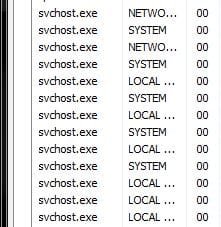
Not sure how you could miss that, mine are all at 00
 

Attachments

  • Capture.JPG
    Capture.JPG
    20.4 KB · Views: 18

My Computer

Computer type
PC/Desktop
Computer Manufacturer/Model Number
Skylake Special #666
OS
Windows 10 Pro x64
CPU
Intel Core i7 6700K
Motherboard
Asus Sabertooth Z170 Mark 1
Memory
GSkill TridentZ RGB 16GB 3600 16-16-16-36
Graphics Card(s)
EVGA GTX 980 Ti SC x2
Sound Card
Realtek High Definition
Monitor(s) Displays
AOC G2460PG
Screen Resolution
1920 x 1080 144Hz
Hard Drives
Samsung 860 Pro 256GB, Seagate Barracuda 4TB x2
PSU
EVGA 1000 P2, EVGA White Custom Braided Cables
Case
Corsair Vengeance C70 Gunmetal Black
Cooling
Corsair H100i v2, Corsair ML120 x2, Thermal Grizzly Kryonaut
Keyboard
Logitech G910 Orion Spectrum
Mouse
Logitech G700s
Internet Speed
Verizon Fios Quantum Gateway 75/75
Antivirus
Windows Defender, Malwarebytes Free 3.8.3
Browser
Chrome
Other Info
Corsair SP120 x4, LG Blu-ray Drive, Durabrand HT-395 100 Watt Dolby Digital Amp, Corsair H2100 Wireless 7.1 Headset
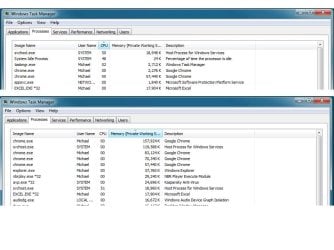
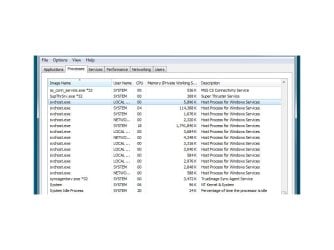
OK, here are all the svchost I can see. I'm 61, it took me a while to figure out how to find them all.
The one currently showing CPU 18 and 1,741,840k memory most of the time stays at CPU 50, but the screen shot got it at 18.
 

Attachments

  • Task manager 03.jpg
    Task manager 03.jpg
    60.6 KB · Views: 1

My Computer

Computer type
Laptop
Computer Manufacturer/Model Number
Asus
OS
Windows 7 Home Premium 64-bit
CPU
Intel U7300 @1.3GHz
Memory
4GB
Graphics Card(s)
Nvidia GeForceG210M
Hard Drives
CT250BX100SSD1
Antivirus
Kaspersky
Browser
Chrome
I ended that particular svchost process by clicking on the End Process button and restarted the computer. For maybe 2 minutes or so things were pretty quiet, but then that process slowly increased its memory usage to over 1,300,000 and CPU also up to around 50.
How can I disable that svchost and make it stay disabled?
 

My Computer

Computer type
Laptop
Computer Manufacturer/Model Number
Asus
OS
Windows 7 Home Premium 64-bit
CPU
Intel U7300 @1.3GHz
Memory
4GB
Graphics Card(s)
Nvidia GeForceG210M
Hard Drives
CT250BX100SSD1
Antivirus
Kaspersky
Browser
Chrome

My Computer

Computer type
PC/Desktop
Computer Manufacturer/Model Number
Custom assembled by me :}
OS
Win-7-Pro64bit 7-H-Prem-64bit
CPU
i7-5930K 2nd i9-9940x both water blocked VRM's too
Motherboard
ASUS SABERTOOTH X99 2nd ASUS x299 Apex
Memory
Trident-z 3200C14 2nd Trident-z 3600C16
Graphics Card(s)
EVGA 1080ti ftw3 2nd Titan Xp both water blocked
Sound Card
Built-in Realtek
Monitor(s) Displays
1-AOC G2460PG 24"G-Sync 144Hz/ 2nd 1-ASUS VG248QE 24" 144Hz
Screen Resolution
1920 x 1080 144Hz
Hard Drives
2-Samsung M.2 Evo & Evo Plus
2-Samsung 850 EVO 500GB SSD's/ 3-2.5 W.D. Black 1tb-&3-1tb/3-3.5 WD Black 1tb hdd's
PSU
EVGA SuperNOVA 1000-P2 2nd 1200-P2
Case
2-Corsair Obsidian Series 450D Black ATX Mid Tower
Cooling
Custom water loops
Keyboard
Logitech G710+/ 2nd Logitech G910
Mouse
2-RedDragon M901 Perdition 16400 dpi Gaming mouse = wired
Internet Speed
Comcast Ping 19ms 89.31mbps download speed 6.12mbps upload
Antivirus
Malwarebytes Pro/ Superantispyware Pro
Browser
FireFox & Pale moon
Other Info
2nd ASUS X299 Apex/Intel i9-9940x with Custom water loop/7H-Prem-x64/Corsair 450D case/Ram Trident-z 3600C16 4x8gb / Samsung970Evo plus 500gb SSD/Dual ssd EZ swap evo/PSU EVGA SuperNova 1200w-P2 80+Platinum/GPU Titan Xp /8-ML-140 on push-pull on 2-280GTX rads
My problem seems to be the opposite than described in that link/thread. I don't want updates at all. My computer was running fine until some updates in the past messed it up and I had to restore it and then I disabled the updates, but apparently svchost keeps spinning its wheels (if something like this is possible).
 

My Computer

Computer type
Laptop
Computer Manufacturer/Model Number
Asus
OS
Windows 7 Home Premium 64-bit
CPU
Intel U7300 @1.3GHz
Memory
4GB
Graphics Card(s)
Nvidia GeForceG210M
Hard Drives
CT250BX100SSD1
Antivirus
Kaspersky
Browser
Chrome
I think I finally fixed it by disabling Windows Update in Control Panel / Action Center.
CPU usage stays now bellow 5% when doing nothing and that stubborn svchost process seems to behave and does not wake up again few minutes after startup like it did before.
Not sure this was the way to solve it, but apparently it works now. Thanks.
 

My Computer

Computer type
Laptop
Computer Manufacturer/Model Number
Asus
OS
Windows 7 Home Premium 64-bit
CPU
Intel U7300 @1.3GHz
Memory
4GB
Graphics Card(s)
Nvidia GeForceG210M
Hard Drives
CT250BX100SSD1
Antivirus
Kaspersky
Browser
Chrome
Just a quick note it still works. Windows Update stays disabled.
Thanks to all trying to help!
 

My Computer

Computer type
Laptop
Computer Manufacturer/Model Number
Asus
OS
Windows 7 Home Premium 64-bit
CPU
Intel U7300 @1.3GHz
Memory
4GB
Graphics Card(s)
Nvidia GeForceG210M
Hard Drives
CT250BX100SSD1
Antivirus
Kaspersky
Browser
Chrome
Back
Top