High CPU when doing nothing

Others

New member
Local time
9:25 AM
Messages
8
Hello,

I have had my lap top (make, model and specs in my system details) for about three years, and have noticed that it often uses a lot of CPU even when I'm not running anything. For example, I can just start up the lap top, open Task Manager, and see that there is a lot of CPU activity. As a result, the machine runs very slowly.

I tried running msconfig and disabling all non-MS services, but it didn't really help (maybe a weeny bit, but not enough to say the problem went away).

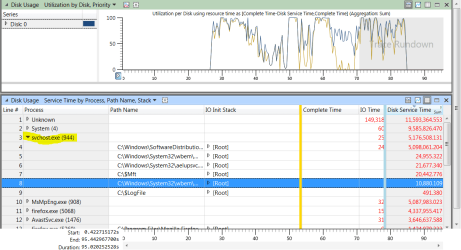
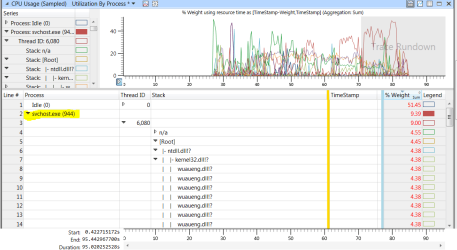
I just restarted again, and whilst the CPU wasn't as high as I've seen, it was still quite high considering I wasn't running anything at all. I used the Windows Assessment Toolkit to grab a trace which is here.

Anyone able to give any ideas what's going on?
Thanks
 

My Computer

Computer type
Laptop
Computer Manufacturer/Model Number
HP EliteBook 6930p
OS
Windows 7 Professional x64
CPU
Intel(R) Core(TM)2 Duo CPU P8400 @ 2.26GHz 2.27 GHz
Memory
4GB
Graphics Card(s)
Inbuilt
Welcome to the forum. In task manager you can click at the top of CPU to show what's using it what are the results of that?
 

My Computer

Computer type
PC/Desktop
OS
win 8 32 bit
Thanks!
Looking at the Processes tab of Task Manager shows that svchost.exe uses a lot of CPU.
 

Attachments

  • Capture.PNG
    Capture.PNG
    44.2 KB · Views: 2
  • Capture1.PNG
    Capture1.PNG
    48.6 KB · Views: 2

My Computer

Computer type
Laptop
Computer Manufacturer/Model Number
HP EliteBook 6930p
OS
Windows 7 Professional x64
CPU
Intel(R) Core(TM)2 Duo CPU P8400 @ 2.26GHz 2.27 GHz
Memory
4GB
Graphics Card(s)
Inbuilt
Please can someone help???
:thumbsup:
 

My Computer

Computer type
Laptop
Computer Manufacturer/Model Number
HP EliteBook 6930p
OS
Windows 7 Professional x64
CPU
Intel(R) Core(TM)2 Duo CPU P8400 @ 2.26GHz 2.27 GHz
Memory
4GB
Graphics Card(s)
Inbuilt
Hello :)
It looks like Windows Update maybe is the reason, as it has in the past.
A question.... have you set windows update to automatically check for updates?
 

My Computer

Computer type
PC/Desktop
Computer Manufacturer/Model Number
AsusX53, Aspire E1-572. AsusUX32A, HP Pro3130mt+3010mt, HP Proliant ML150G3, 3xCustom, i3, i5, i7
OS
Linux:Debian, Kali.. 2xWin8.1,2x,1x7Pro, Retro:1x2003server.1xXPpro, 1xW2k,1x98SE,1x95,1x3.11
CPU
cpu's intel 8088 up to intel i7 gen9.. dual xenon on server
Motherboard
a lot of them :-)
Memory
oldest 1024KB newest 64GB
Graphics Card(s)
mostly internals i don't game
Sound Card
old retro=soundblaster.. newer ones internal
Monitor(s) Displays
smalest 12" largest 26"
Internet Speed
100/100
Antivirus
NortonInternetSecurity, MS, Avast, (not on the same computer
Browser
IE8, IE9. IE11, Firefox
Other Info
I can't fit all info on all my computers in these fields :-D
Thanks for your reply.
Yes windows update is set to automatically check for updates.
What would that mean?
 

My Computer

Computer type
Laptop
Computer Manufacturer/Model Number
HP EliteBook 6930p
OS
Windows 7 Professional x64
CPU
Intel(R) Core(TM)2 Duo CPU P8400 @ 2.26GHz 2.27 GHz
Memory
4GB
Graphics Card(s)
Inbuilt
Thanks for your reply.
Yes windows update is set to automatically check for updates.
What would that mean?

try changing it to never check and restart your computer.
If the problem ends, I'll will try to find the thread for you that deals with how to solve that problem.
But first, I am going to eat some food
 

My Computer

Computer type
PC/Desktop
Computer Manufacturer/Model Number
AsusX53, Aspire E1-572. AsusUX32A, HP Pro3130mt+3010mt, HP Proliant ML150G3, 3xCustom, i3, i5, i7
OS
Linux:Debian, Kali.. 2xWin8.1,2x,1x7Pro, Retro:1x2003server.1xXPpro, 1xW2k,1x98SE,1x95,1x3.11
CPU
cpu's intel 8088 up to intel i7 gen9.. dual xenon on server
Motherboard
a lot of them :-)
Memory
oldest 1024KB newest 64GB
Graphics Card(s)
mostly internals i don't game
Sound Card
old retro=soundblaster.. newer ones internal
Monitor(s) Displays
smalest 12" largest 26"
Internet Speed
100/100
Antivirus
NortonInternetSecurity, MS, Avast, (not on the same computer
Browser
IE8, IE9. IE11, Firefox
Other Info
I can't fit all info on all my computers in these fields :-D

My Computer

Computer type
Laptop
Computer Manufacturer/Model Number
HP EliteBook 6930p
OS
Windows 7 Professional x64
CPU
Intel(R) Core(TM)2 Duo CPU P8400 @ 2.26GHz 2.27 GHz
Memory
4GB
Graphics Card(s)
Inbuilt
Hi Marie SWE,

www.transfernow.net/01j7k4u26d89

There is the new trace after I've disabled the windows update.
Maybe a bit better but not loads.
:)

Unfortunately, I couldn't view that file. I am using a Linux computer at the moment, while I reinstalls my windows 7 computers.
If it is windows update that messes with your svchost.exe Look at these two threads in here.
I didn't find the thread I was thinking about, that one went through the process step by step.

Svchost.exe Crazy High CPU Usage and Crazy High Memory Usage
and
Windows update runs for ever.Also svchost consume 50% of cpu
 

My Computer

Computer type
PC/Desktop
Computer Manufacturer/Model Number
AsusX53, Aspire E1-572. AsusUX32A, HP Pro3130mt+3010mt, HP Proliant ML150G3, 3xCustom, i3, i5, i7
OS
Linux:Debian, Kali.. 2xWin8.1,2x,1x7Pro, Retro:1x2003server.1xXPpro, 1xW2k,1x98SE,1x95,1x3.11
CPU
cpu's intel 8088 up to intel i7 gen9.. dual xenon on server
Motherboard
a lot of them :-)
Memory
oldest 1024KB newest 64GB
Graphics Card(s)
mostly internals i don't game
Sound Card
old retro=soundblaster.. newer ones internal
Monitor(s) Displays
smalest 12" largest 26"
Internet Speed
100/100
Antivirus
NortonInternetSecurity, MS, Avast, (not on the same computer
Browser
IE8, IE9. IE11, Firefox
Other Info
I can't fit all info on all my computers in these fields :-D
Back
Top