high memory and cpu usage

Envy17

New member
Local time
8:18 PM
Messages
18
After I boot up my Envy 17, and do nothing but let it sit for a few minutes, the memory usage goes up to 50-55%, and CPU usage climbs to 25-35%, for no apparent reason. The fan starts blowing like crazy, and the system slows. I look under task manager processes, there are like 80 of them going. No applications running. Why is this happening? How do I fix it? thanks.
 

My Computer

Computer Manufacturer/Model Number
HP Envy 17
OS
Win 7 Home Premium 64bit
CPU
i5-580

My Computer

Computer type
PC/Desktop
Computer Manufacturer/Model Number
Dell XPS 420
OS
Windows 10, Home Clean Install
CPU
Intel Core2 processsor Q8200(2.33Ghz 1333FSB) Quad Core Tech
Motherboard
Dell
Memory
6 gb
Graphics Card(s)
ATI Radeon 256MB HD3650
Sound Card
Intergrated 7.1 Channel Audio
Monitor(s) Displays
Dell SP2009W 20"
Hard Drives
640 GB Serial ATA Hard drive
Cooling
Fan
Keyboard
Dell USB Keyboard
Mouse
Dell Premium Optical USB
Internet Speed
DSL 2.85
Yes, that is correct. If the problem does not happen, you follow the procedure and put them back few at a time. This is a way to possibly diagnose the problem.
 

My Computer

Computer type
PC/Desktop
Computer Manufacturer/Model Number
Dell XPS 420
OS
Windows 10, Home Clean Install
CPU
Intel Core2 processsor Q8200(2.33Ghz 1333FSB) Quad Core Tech
Motherboard
Dell
Memory
6 gb
Graphics Card(s)
ATI Radeon 256MB HD3650
Sound Card
Intergrated 7.1 Channel Audio
Monitor(s) Displays
Dell SP2009W 20"
Hard Drives
640 GB Serial ATA Hard drive
Cooling
Fan
Keyboard
Dell USB Keyboard
Mouse
Dell Premium Optical USB
Internet Speed
DSL 2.85
Yes, that is correct. If the problem does not happen, you follow the procedure and put them back few at a time. This is a way to possibly diagnose the problem.

Does not work. I did a startup with ALL startup items disabled. Still jumps to 50% memory and 25% CPU usage. Virus scan is negative. Now what?
 

My Computer

Computer Manufacturer/Model Number
HP Envy 17
OS
Win 7 Home Premium 64bit
CPU
i5-580
How did you do a full anti virus scan and malwarebytes scan in half an hour?
 

My Computer

Computer type
PC/Desktop
Computer Manufacturer/Model Number
Dell XPS 420
OS
Windows 10, Home Clean Install
CPU
Intel Core2 processsor Q8200(2.33Ghz 1333FSB) Quad Core Tech
Motherboard
Dell
Memory
6 gb
Graphics Card(s)
ATI Radeon 256MB HD3650
Sound Card
Intergrated 7.1 Channel Audio
Monitor(s) Displays
Dell SP2009W 20"
Hard Drives
640 GB Serial ATA Hard drive
Cooling
Fan
Keyboard
Dell USB Keyboard
Mouse
Dell Premium Optical USB
Internet Speed
DSL 2.85
did the virus scan earlier.
i also notice that when I do try stopping processes in task manager, it won't let me, says access denied? Should I throw the whole computer in the trash now? (actually, I'm still within the return period).
Scan was with Norton security suite.
 

My Computer

Computer Manufacturer/Model Number
HP Envy 17
OS
Win 7 Home Premium 64bit
CPU
i5-580
Do the malwarebytes, also, many times that picks up things the others dont. Its one of the best. If that comes up negative
Disconnect from the internet and see if the problem persists.
 

My Computer

Computer type
PC/Desktop
Computer Manufacturer/Model Number
Dell XPS 420
OS
Windows 10, Home Clean Install
CPU
Intel Core2 processsor Q8200(2.33Ghz 1333FSB) Quad Core Tech
Motherboard
Dell
Memory
6 gb
Graphics Card(s)
ATI Radeon 256MB HD3650
Sound Card
Intergrated 7.1 Channel Audio
Monitor(s) Displays
Dell SP2009W 20"
Hard Drives
640 GB Serial ATA Hard drive
Cooling
Fan
Keyboard
Dell USB Keyboard
Mouse
Dell Premium Optical USB
Internet Speed
DSL 2.85
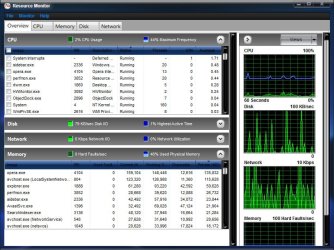
You can type resource monitor in start menu, open resource monitor. On the Overview page, expand the CPU and Memory sections. And see which items are using these resources.

Resource.jpg

A Guy
 

My Computer

Computer type
PC/Desktop
OS
Windows 10 Home x64
CPU
INTEL Core i5-750 Quad-Core 3.37GHz
Motherboard
ASUS P7P55D
Memory
HyperX Fury Black Series 8GB (2 x 4GB) 1866Mhz
Graphics Card(s)
EVGA GeForce GTX 750 Superclocked 1GB 128-Bit GDDR5
Monitor(s) Displays
LG 32MA68HY 32" IPS
Screen Resolution
1920 x 1080
Hard Drives
Samsung 840 Evo 120GB, SEAGATE 500GB Barracuda® 7200.12, SATA 3 Gb/s, 7200 RPM, 16MB cache
PSU
ANTEC TruePower New TP-550, 80 PLUS, 550W
Case
ANTEC Three Hundred Illusion
Cooling
COOLER MASTER Hyper 212 Plus, 4 x 120mm 1 x 140mm Noctua's
Internet Speed
85 + Mbps
Antivirus
Avast
Browser
Vivaldi
Back
Top