High ping in game, low ping in cmd

Poro

New member
Local time
7:01 AM
Messages
21
Hey,

Firstly, I'm not sure if this belongs in the network or the gaming section but I decided to post this here. So, my problems is that when I play Left 4 Dead, I have something like +100ms ping to servers that others have just fine ping in. I also did a traceroute to a certain server and it gave me a ping of 65ms but when I join it in game, it will be something like +100ms. What's wrong?
 

My Computer My Computer

Computer Manufacturer/Model Number
Custom Built
OS
Windows 7 Home Premium x64
CPU
Intel i7 920 @ 3.80 GHz
Motherboard
ASUS P6T (x58 chipset)
Memory
3x Kingston HyperX DDR3 @ 1600 MHz
Graphics Card(s)
ATi Radeon 5970 2GB + nVidia 8800 GTX
Sound Card
Creative X-Fi Fatal1ty
Monitor(s) Displays
HP LP2475W
Screen Resolution
1920x1200
Hard Drives
Samsung SpinPoint F1 500GB
PSU
Chieftec 750w
Case
Compucase 6C11
Cooling
Noctua NH-U12P
Keyboard
Logitech MX5000
Mouse
Roccat Kone
Internet Speed
12MB/1MB
Hi there!

Id say your issue is the location of the game server, for example, If your in australia and you connect to a US server, your ping is going to be 100+, but on the other hand if you connect to an Aussie server, your ping will be quite low, generally bellow 30.

All it is telling you is how fast information is getting to the Game server your playing on :D
 

My Computer My Computer

Computer Manufacturer/Model Number
Self Built
OS
Windows 7 Ultimate X64
CPU
Intel Core i5 CPU @ 720 2.80 GHz 2.79 GHz
Motherboard
Gigabyte H55M-S2H
Memory
4GB Veritech DDR3 RAM
Graphics Card(s)
Nvidia GeForce 9500GT
Monitor(s) Displays
BenQ FP71G
Hard Drives
360GB HDD
PSU
600W
Cooling
4 internal system fans
Keyboard
Widows 7 Optimised
Mouse
Widows 7 Optimised
Internet Speed
1MBps-5MBps
Your in-game ping will usually be higher than a simple trace/ping from a console or browser. Keep in mind when in-game there is extra latency due to the server actually processing all of the information from all players, and then passing that update on to your machine. Outside of the game, all it has to do is return a few packets, not quite the same.
 

My Computer My Computer

Computer Manufacturer/Model Number
HPE-112y Custom + Custom Build
OS
HP Win7 Pro x64 | Custom Win7 Pro x64
CPU
HP PhII X4 965 Black Ed. 3.4Ghz | PhII X6 1100T 3.3/3.7
Motherboard
OEM HP | ASUS Crosshair IV Extreme 890FX
Memory
8GB DDR3 1333 OC Black Edition x2
Graphics Card(s)
HP XFX Radeon HD4890 1GB | AMD Radeon HD 6990
Sound Card
Realtek 7.1 Digital HDMI x2
Monitor(s) Displays
HP 20" 1680x1050 LCD | Samsung 23" 2ms 1920x1200 LED
Screen Resolution
1680x1050 + 1920x1200 & HDTV for Gaming/TV
Hard Drives
1TB WD "Green" 5,400 RPM SCSI W/ AMD RAID/Xpert
Custom 2x 128GB OCZ Enyo SSD
PSU
Thermaltake Black Widow 850watt Modular x2
Case
HP HPE- 112y OEM Modded | Custom Xclio A380S
Cooling
HP Antec120mm | Custom Antec 360mm/250mm/200mm/120mm
Keyboard
HP G15 | G19
Mouse
G500 x2
Internet Speed
15mb down, 2mb up
Other Info
2x DVD-RAM | 2x BD-ROM
Hi there!

Id say your issue is the location of the game server, for example, If your in australia and you connect to a US server, your ping is going to be 100+, but on the other hand if you connect to an Aussie server, your ping will be quite low, generally bellow 30.

All it is telling you is how fast information is getting to the Game server your playing on :D
I'm from Finland I have +100ms ping to European servers that reside in countries as France and Germany.

Your in-game ping will usually be higher than a simple trace/ping from a console or browser. Keep in mind when in-game there is extra latency due to the server actually processing all of the information from all players, and then passing that update on to your machine. Outside of the game, all it has to do is return a few packets, not quite the same.
Yeah, I'm aware of this fact. The thing is that I used to have a much lower ping. I had something like 65ms in console (normal) and in game about 80ms. Nowadays I have +100ms for some reason.
 

My Computer My Computer

Computer Manufacturer/Model Number
Custom Built
OS
Windows 7 Home Premium x64
CPU
Intel i7 920 @ 3.80 GHz
Motherboard
ASUS P6T (x58 chipset)
Memory
3x Kingston HyperX DDR3 @ 1600 MHz
Graphics Card(s)
ATi Radeon 5970 2GB + nVidia 8800 GTX
Sound Card
Creative X-Fi Fatal1ty
Monitor(s) Displays
HP LP2475W
Screen Resolution
1920x1200
Hard Drives
Samsung SpinPoint F1 500GB
PSU
Chieftec 750w
Case
Compucase 6C11
Cooling
Noctua NH-U12P
Keyboard
Logitech MX5000
Mouse
Roccat Kone
Internet Speed
12MB/1MB
More users playing on the server than usual? That might be another reason.
 

My Computer My Computer

Computer Manufacturer/Model Number
Self Built
OS
Windows 7 Ultimate X64
CPU
Intel Core i5 CPU @ 720 2.80 GHz 2.79 GHz
Motherboard
Gigabyte H55M-S2H
Memory
4GB Veritech DDR3 RAM
Graphics Card(s)
Nvidia GeForce 9500GT
Monitor(s) Displays
BenQ FP71G
Hard Drives
360GB HDD
PSU
600W
Cooling
4 internal system fans
Keyboard
Widows 7 Optimised
Mouse
Widows 7 Optimised
Internet Speed
1MBps-5MBps
Not really, normal 8 slot versus game.
 

My Computer My Computer

Computer Manufacturer/Model Number
Custom Built
OS
Windows 7 Home Premium x64
CPU
Intel i7 920 @ 3.80 GHz
Motherboard
ASUS P6T (x58 chipset)
Memory
3x Kingston HyperX DDR3 @ 1600 MHz
Graphics Card(s)
ATi Radeon 5970 2GB + nVidia 8800 GTX
Sound Card
Creative X-Fi Fatal1ty
Monitor(s) Displays
HP LP2475W
Screen Resolution
1920x1200
Hard Drives
Samsung SpinPoint F1 500GB
PSU
Chieftec 750w
Case
Compucase 6C11
Cooling
Noctua NH-U12P
Keyboard
Logitech MX5000
Mouse
Roccat Kone
Internet Speed
12MB/1MB
A Ping is affected by EVERYTHING what's between your computer and the target, as well as by your TCP/IP settings. So if your stream is routed through server with a high volume throughput or your MTU is set wrong, you suffer.
I just wonder if the higher in-game ping is caused by the strain that the game itself puts on your computer.
It's just a theory. but if you Alt-tab out of the game, you could verify if the timing still differs.

To check if your MTU is set correctly it's a little awkward.
Valid packet sizes lie between 576 and 1500
Is the MTU too small, you're transmissions mainly consist of headers and not enough data to be effective.
Is the MTU too big the packets will be fragmented and take even longer to transmit
Even tho it's possible to set any number within range I seem to remember that it is recommended to keep the packet size a multiple of 16.
Ping itself adds 28 bites to the packet (20 bytes IP header and 8 Bytes IMCP header) so those 28 need to be subtracted first to get a working number.
In short MTU = x*16 + 28

The Test command would be like this:

Ping <server ip> -f -l <desired MTU -28>
so if you start at say 560 and work your way up until you found the smallest transfer time
ping 72.14.204.104 -f -l 560

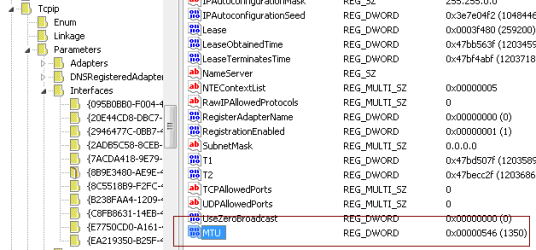
Once you have your number open regedit and go to
HKEY_LOCAL_MACHINE\SYSTEM\CurrentControlSet\Services\Tcpip\Parameters\Interfaces
there you have to go to your Adapter ID where you right click in the right window and create a new DWORD.
Name it MTU and give it your found number (don't forget to add 28 ;) in the example it's 1350 decimal

mtu_reg_value.png
If you find at one point it's not the right number anymore, either go through it again or just delete that key and rely on windows to do the right thing.

Again the standard warning : Don't mess with the registry if you're not sure what you're doing..at least generate a system restore point!

-DG
 

My Computer My Computer

Computer Manufacturer/Model Number
HP m8000n
OS
Windows 7 Ultimate x86
CPU
DualCore AMD Athlon 64 X2, 2600 MHz 5200+
Motherboard
Asus M2N68-LA (Narra)
Memory
Samsung 2GB DDR2
Graphics Card(s)
Onboard NVIDIA GeForce 6150SE nForce 430
Sound Card
Onboard nVIDIA nForce 6100-430 (MCP61P)
Monitor(s) Displays
Westinghouse 19" LED
Screen Resolution
1280x1024
Hard Drives
SATA II Seagate Barracuda 500GB
USB II WD Elements 500GB
USB II WD My Book 1TB
USB II WD My Book 2TB
PSU
Stock (HP)
Case
Stock (HP)
Cooling
Stock
Keyboard
Logitech Classic KB 200
Mouse
Standard HP opticle USB mouse
In case of a high ping on left for dead you have to change the server in the edit settings dedicated server or local

you have those options and that will change the ping there is no way to fix this issue through your devices it is just thiere servers sometimes there flat out terrible but it also depends on your net work if your running reg dsl well yeah your going to get a lag i am on cable speeds and everyonece ina while you'll get a lag

Im pretty sure it is thiere servers and not your isp and yeah you are playing team against team and you have a 5970 you should be great if it was a lower cardi would see it messing with you with all the things going on but you got the top dog so it has to be thiere servers
 

My Computer My Computer

Computer type
PC/Desktop
Computer Manufacturer/Model Number
CoreI7-6700K MrFingerIII Special Builds
OS
Windows 10 Home Premium 64bit sp1
CPU
Intel I7-6700K @ 4.6 Ghz 1.344 volts everyday OC
Motherboard
Asrock Fatality K6 Z170 Socket 1151
Memory
32GB G-Skill TridentZ 3200mhz 16-18-18-38 DDR4
Graphics Card(s)
Sli Gigabyte Windforce GTX 980 G1
Sound Card
AC97 Creative Rage Tactic 3D Headphones Bluetooth
Monitor(s) Displays
27" Asus ROG Swift PG278Q G-Sync 48" Vizio Smart HD TV
Screen Resolution
2560x1440p 27"- 48" Currently Gaming at 2560x1440p Res 2K
Hard Drives
250GB Samsung Evo840SSD Seagate baracuda 500 GB WD Mybook 500Gb 1TB Seagate Barracuda
PSU
HX1050w Corsair Silver 80plus certified crosfire/sli
Case
Enthod Pro Full Tower
Cooling
Corsair H110i GT 280 mm High Performance WaterBlock
Keyboard
Logitech wireless keyboard
Mouse
Logitech wireless mouse
Internet Speed
Cox Cable 100+ mb
Antivirus
WebRoot Spysweeper with Antivirus
Browser
IE-10, Chrome, Opera
Other Info
My Other Rig is a AMD FX8320E @4.6Ghz 16GB Ballistic Sport Ram
Mobo Asrock Fatality 990FX 120GB OCZ SSD 1TB Seagate Barracuda Corsair H75 Cooling PSU Corsair CX750
GPU GTX Gigabyte 970G1
Back
Top