High RAM usage

Nicane

New member
Local time
7:32 PM
Messages
63
I have been getting this weird problem lately with Windows 7, and I apologize if this has been posted and solved before, but I couldn't find anything. So, I don't remember when this started, but my RAM usage is upwards to 78% with 4 GB of RAM. And I am currently running a lot of programs, true, but closing them all does nothing. It's as if Windows is failing to eliminate the resources used by the programs even after closing. The RAM is around 48% on startup (which seems insanely high...), and as I open programs, it increases until I get only 200 MB or so left. And it won't go way all that much even if I end every process I can. Anybody have any clues to fixing this? It never happened when I was running XP on the same machine. MY thoughts on it is that one: there is a hidden process or program that isn't showing and is always running and eating up my RAM; and/or two: Windows isn't utilizing the RAM like it should be. 4 GB is over-kill if I was to leave it as-is on startup. But it eats it away like nothing. Help? Thank you. :)
 

My Computer

OS
Windows 7 Ultimate 64-Bit (Build 7600)
CPU
Intel Q9550 2.83 GHz
Motherboard
ASUS P5E3 Premium
Memory
OCZ Platinum DDR3 1600
Graphics Card(s)
ATI Radeon 2400 HD
Monitor(s) Displays
Acer X221W
PSU
PC P&C 610W
Case
Antec 1200
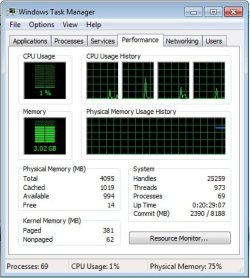
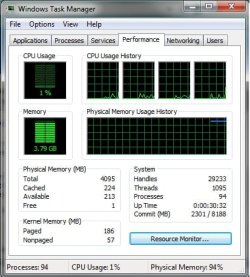
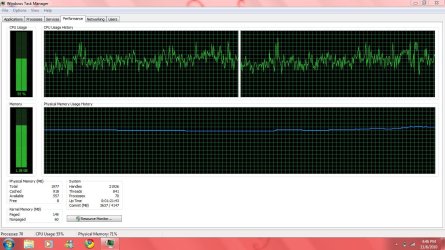
You are (most likely) observing the new method of memory management. Windows is caching to RAM - all of which will be gracefully released when needed. Can you post a snip of your Task Manager performance window for confirmation?
 
I have been getting this weird problem lately with Windows 7, and I apologize if this has been posted and solved before, but I couldn't find anything. So, I don't remember when this started, but my RAM usage is upwards to 78% with 4 GB of RAM. And I am currently running a lot of programs, true, but closing them all does nothing. It's as if Windows is failing to eliminate the resources used by the programs even after closing. The RAM is around 48% on startup (which seems insanely high...), and as I open programs, it increases until I get only 200 MB or so left. And it won't go way all that much even if I end every process I can. Anybody have any clues to fixing this? It never happened when I was running XP on the same machine. MY thoughts on it is that one: there is a hidden process or program that isn't showing and is always running and eating up my RAM; and/or two: Windows isn't utilizing the RAM like it should be. 4 GB is over-kill if I was to leave it as-is on startup. But it eats it away like nothing. Help? Thank you. :)
.
I believe the way to test this is to load different programs and see if memory is made available. Windows keeps a lot in the cache, but should release ram immediately when necessary.
 

My Computer

Computer type
PC/Desktop
OS
Windows 7 x64
CPU
Intel Core2 Extreme Q6850 3.00GHz
Motherboard
EVGA 132-CK-NF79
Memory
8 GB
Graphics Card(s)
Radeon R7 260X
Sound Card
Xonar DS
Hard Drives
Hitachi Deskstar 1 tb
What you are seeing is indeed normal. Rather than have RAM sit around empty and unused, Windows preloads stuff into RAM that you often run so that it opens quicker when you need it. The thing is, when an application needs RAM, Windows will simply overwrite that cached content...so you really have nothing to lose. The way I look at it, if I have 8GB of RAM...might as well use close to 8GB of RAM. No sense in always having 6GB of RAM just sitting there unused.
 

My Computer

Computer Manufacturer/Model Number
Self-Built in July 2009
OS
Windows 7 Ultimate x64
CPU
Intel Q9550 2.83Ghz OC'd to 3.40Ghz
Motherboard
Gigabyte GA-EP45-UD3R rev. 1.1, F12 BIOS
Memory
8GB G.Skill PI DDR2-800, 4-4-4-12 timings
Graphics Card(s)
EVGA 1280MB Nvidia GeForce GTX570
Sound Card
Realtek ALC899A 8 channel onboard audio
Monitor(s) Displays
23" Acer x233H
Screen Resolution
1920x1080
Hard Drives
Intel X25-M 80GB Gen 2 SSD
Western Digital 1TB Caviar Black, 32MB cache. WD1001FALS
PSU
Corsair 620HX modular
Case
Antec P182
Cooling
stock
Keyboard
ABS M1 Mechanical
Mouse
Logitech G9 Laser Mouse
Internet Speed
15/2 cable modem
Other Info
Windows and Linux enthusiast. Logitech G35 Headset.
Well, it does not seem like Windows is doing that. Like when I am running with 200 MB of RAM left and run any programs, it takes foreverrrr, compared to when I just start it up. And the RAM will keep adding up more and more.

Edit: Another thing I forgot to mention. When shutting down, even after closing everything before-hand and ending all processes that I can (as a test), it tells me that Windows is waiting for a program to end so it can shut down, but in the list where it shows the programs, there is nothing. Which leads me to believe it's not a program, but either a service or hidden process or something like that. I could be wrong though.

Thank you VERY much for your fast responses. ^_^

Attached are the images of Task Managers Performance tab.
 

Attachments

  • TaskManager.jpg
    TaskManager.jpg
    38.8 KB · Views: 173
  • TaskManager2.jpg
    TaskManager2.jpg
    39.2 KB · Views: 144
Last edited:

My Computer

OS
Windows 7 Ultimate 64-Bit (Build 7600)
CPU
Intel Q9550 2.83 GHz
Motherboard
ASUS P5E3 Premium
Memory
OCZ Platinum DDR3 1600
Graphics Card(s)
ATI Radeon 2400 HD
Monitor(s) Displays
Acer X221W
PSU
PC P&C 610W
Case
Antec 1200
Running any security software, anti-virus, anti-malware etc? Because it is not Windows itself that is doing it, but either a driver or another process that has a memory leak.
 

My Computer

Computer type
PC/Desktop
Computer Manufacturer/Model Number
Alienware Aurora ALX R4
OS
Windows 10 Pro (x64)
CPU
Intel Core i7-3930K (3.2GHz - 4.5GHz)
Motherboard
Alienware Aurora-R4 x79
Memory
4x Samsung 4GB PC3-12800 DDR3 (16GB 1600MHz)
Graphics Card(s)
Nvidia Geforce GTX 690
Sound Card
SteelSeries Siberia Elite
Monitor(s) Displays
Dell UltraSharp U3011
Screen Resolution
2560x1600
Hard Drives
Samsung 850 Pro 256 GB, Seagate 1TB Desktop Hybrid HDD, 2x Western Digital 4TB Green HDD
PSU
875W Some Dell PSU <.<
Case
Alienware Aurora ALX
Cooling
Custom Liquid Cooling (EK CPU & GPU blocks) dual EK 480RAD
Keyboard
Logitech G710+ Mechanical
Mouse
Logitech G700s
Internet Speed
Verizon Fios (50 mbps average)
Other Info
Server: Intel NUC D54250WYK: i5-4250U, 16GB, 256 GB mSATA, Windows Server 2012 R2
Just avast!, other than that... no. I've closed that program as well though. Nothing seems to reduce it past 70%. No matter what I close.
 

My Computer

OS
Windows 7 Ultimate 64-Bit (Build 7600)
CPU
Intel Q9550 2.83 GHz
Motherboard
ASUS P5E3 Premium
Memory
OCZ Platinum DDR3 1600
Graphics Card(s)
ATI Radeon 2400 HD
Monitor(s) Displays
Acer X221W
PSU
PC P&C 610W
Case
Antec 1200
Download ProcessExplorer (Google it, should find a link on Microsoft site).

Once downloaded, run it as administrator, and right click on the column bar with all the column headers and click "Select Columns". Click the Process Memory tab and select Private Bytes, then click "Ok" and sort this colum in ascending order. It shows a lot more processes than task manager.

I had this problem and fixed it today. Mine was caused by WMP network service, the sharing service for it. After stopping this service and ending the process in ProcessExplorer, it fixed all high RAM usage.
 

My Computer

Computer type
PC/Desktop
Computer Manufacturer/Model Number
Custom Built
OS
Windows 8.1 Pro x64
CPU
Intel Core i7 4790k
Motherboard
MSI Z97S Krait Edition
Memory
8GB Corsair Dominator 1600MHz
Graphics Card(s)
MSI TwinFrozr GeForce GTX770
Sound Card
ASUS Xonar DX/XD 7.1
Monitor(s) Displays
Dell 24" S2409W + Dell 20" E207WFP
Screen Resolution
1920x1080 + 1680x1050
Hard Drives
1x 120GB OCZ Agility 3, 1x 750GB Western Digital Caviar Black, 1x 1TB Western Digital Caviar Blue
PSU
Corsair HX850 modular
Case
Fractal Design Define R4
Cooling
Corsair H60 w/ twin Corsair SP120 fans
Keyboard
Logitech G510S Keyboard
Mouse
Logitech G500S Laser Mouse
Internet Speed
40Mbps
Antivirus
Microsoft Security Essentials
Browser
Google Chrome
Other Info
LG Blu-Ray player
I already have that downloaded! :D Haha, well, I already used it to find something with high RAM usage, but nothing shows above 225,000 K (about). So I really don't know. The only thing related to your problem was wpmntwrk.exe which could not be killed. =/
 

My Computer

OS
Windows 7 Ultimate 64-Bit (Build 7600)
CPU
Intel Q9550 2.83 GHz
Motherboard
ASUS P5E3 Premium
Memory
OCZ Platinum DDR3 1600
Graphics Card(s)
ATI Radeon 2400 HD
Monitor(s) Displays
Acer X221W
PSU
PC P&C 610W
Case
Antec 1200
I already have that downloaded! :D Haha, well, I already used it to find something with high RAM usage, but nothing shows above 225,000 K (about). So I really don't know. The only thing related to your problem was wpmntwrk.exe which could not be killed. =/
Disable the service.
 
~facepalm~ That was stupid. Why didn't I think of that. :P A tad too much to drink, I would say. Ah well, I will report back if this works after I restart. Thank you for that advice.
 

My Computer

OS
Windows 7 Ultimate 64-Bit (Build 7600)
CPU
Intel Q9550 2.83 GHz
Motherboard
ASUS P5E3 Premium
Memory
OCZ Platinum DDR3 1600
Graphics Card(s)
ATI Radeon 2400 HD
Monitor(s) Displays
Acer X221W
PSU
PC P&C 610W
Case
Antec 1200
I hope I never need that particular service. It really pigs up my install.
 
Okay, I have it disabled, restarted.. and it's at 39%, running more programs.. I opened up a game, and ran the same programs as before. It's not going over 55%... wow. Thank you sooo much for that advice about WPMnetwork thing. I closed the programs, and it's down to 37%, as it should. :) Ah, perfect. Problem solved! Now on to my two next problems...
 

My Computer

OS
Windows 7 Ultimate 64-Bit (Build 7600)
CPU
Intel Q9550 2.83 GHz
Motherboard
ASUS P5E3 Premium
Memory
OCZ Platinum DDR3 1600
Graphics Card(s)
ATI Radeon 2400 HD
Monitor(s) Displays
Acer X221W
PSU
PC P&C 610W
Case
Antec 1200
I hope I never need that particular service. It really pigs up my install.

It's mainly used for sharing media with Xbox 360s from what I've read about it.

And glad it worked for you :)
 

My Computer

Computer type
PC/Desktop
Computer Manufacturer/Model Number
Custom Built
OS
Windows 8.1 Pro x64
CPU
Intel Core i7 4790k
Motherboard
MSI Z97S Krait Edition
Memory
8GB Corsair Dominator 1600MHz
Graphics Card(s)
MSI TwinFrozr GeForce GTX770
Sound Card
ASUS Xonar DX/XD 7.1
Monitor(s) Displays
Dell 24" S2409W + Dell 20" E207WFP
Screen Resolution
1920x1080 + 1680x1050
Hard Drives
1x 120GB OCZ Agility 3, 1x 750GB Western Digital Caviar Black, 1x 1TB Western Digital Caviar Blue
PSU
Corsair HX850 modular
Case
Fractal Design Define R4
Cooling
Corsair H60 w/ twin Corsair SP120 fans
Keyboard
Logitech G510S Keyboard
Mouse
Logitech G500S Laser Mouse
Internet Speed
40Mbps
Antivirus
Microsoft Security Essentials
Browser
Google Chrome
Other Info
LG Blu-Ray player
wmpnetwk.exe is for streaming you media files to other computers on your network. For example, I have my main computer in my computer room and I stream my music and videos to my media center. If you don't share your media library with other computers then you don't need this running.
 

My Computer

Computer Manufacturer/Model Number
Custom by me.
OS
Windows 7 64bit RTM
CPU
Intel Core i7 920 Nehalem Over clocked to 3.5 Ghz
Motherboard
EVGA 132-BL-E758-A1 LGA 1366 Intel X58
Memory
CORSAIR DOMINATOR 6GB (3 x 2GB) 240-Pin DDR3 SDRAM DDR3 1600
Graphics Card(s)
EVGA 01G-P3-1280-AR GeForce GTX 280 1GB
Sound Card
Soundblaster X-Fi Fatal1ty
Monitor(s) Displays
2 x 20in Dell Flatpanels 3200x1200
Screen Resolution
3200x1200
Hard Drives
150GB WD Velociraptor(C:), WD 750GB (D:Games), WD 1TB Black (E:Data1), WD 1TB Green (F:Data2)
PSU
CORSAIR HX1000 1000 watt
Case
Desktop
Cooling
Air
Keyboard
Logitech G15
Mouse
Logitech Revolution MX
Internet Speed
25 MB/s
Hey guys.

I'm having similar issues with my ram. I honestly dont think it was this way before my mate re-installed Windows 7.(Was running exact same Win 7 before)

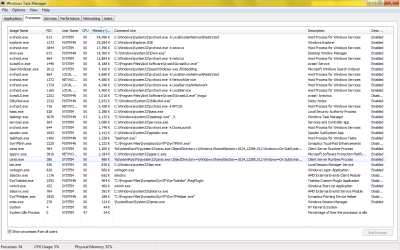
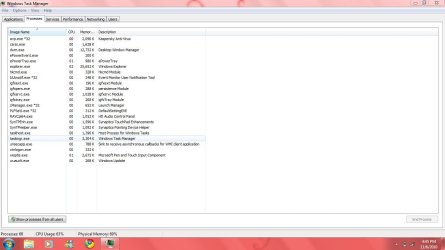
Could you guys please shed some light on this. Attached are pics of my processes and performance in Task Manager.

(I installed the Process Explorer mentioned earlier in this thread, but its way to confusing for me. I'm still in the very early stages of learning about PC's) :o
 

Attachments

  • TaskMan Performance.png
    TaskMan Performance.png
    21.5 KB · Views: 184
  • TaskMan Processes.png
    TaskMan Processes.png
    50.3 KB · Views: 116
Last edited:

My Computer

Computer Manufacturer/Model Number
Toshiba
OS
Windows 7 Ultimate 6.1.7600 Build 7600 X86-based PC
CPU
Intel(R) Core(TM)2 Duo CPU T7100 @1.8GHz, 1801Mhz. 2 Cores
Motherboard
not sure - Satellite A200 ???
Memory
2.0 GB
Graphics Card(s)
ATI Mobility Radeon HD 2600 1012MB
Sound Card
High Definition Audio Device
Monitor(s) Displays
Generic PnP Monitor
Screen Resolution
1280 x 800 (32 bit)(60 HZ)
Hard Drives
FUJITSU MHW2160BH PL ATA Device 150 GB
PSU
External ?
Case
Toshiba LapTop
You RAM usage is fine, James78.
 

My Computer

Computer type
PC/Desktop
Computer Manufacturer/Model Number
Alienware Aurora ALX R4
OS
Windows 10 Pro (x64)
CPU
Intel Core i7-3930K (3.2GHz - 4.5GHz)
Motherboard
Alienware Aurora-R4 x79
Memory
4x Samsung 4GB PC3-12800 DDR3 (16GB 1600MHz)
Graphics Card(s)
Nvidia Geforce GTX 690
Sound Card
SteelSeries Siberia Elite
Monitor(s) Displays
Dell UltraSharp U3011
Screen Resolution
2560x1600
Hard Drives
Samsung 850 Pro 256 GB, Seagate 1TB Desktop Hybrid HDD, 2x Western Digital 4TB Green HDD
PSU
875W Some Dell PSU <.<
Case
Alienware Aurora ALX
Cooling
Custom Liquid Cooling (EK CPU & GPU blocks) dual EK 480RAD
Keyboard
Logitech G710+ Mechanical
Mouse
Logitech G700s
Internet Speed
Verizon Fios (50 mbps average)
Other Info
Server: Intel NUC D54250WYK: i5-4250U, 16GB, 256 GB mSATA, Windows Server 2012 R2

My Computer

Computer Manufacturer/Model Number
Sony Vaio Z46GDU
OS
Windows 7 Ultimate x86-64
CPU
[email protected] 1066MHz FSB
Motherboard
Sony branded
Memory
6GB DDR3 1066MHz
Graphics Card(s)
9300M GS 256MB Dedicated (Speed) + Intel4500MHD (Stamina)
Sound Card
Realtek HD Audio
Monitor(s) Displays
13.1' WXGA
Screen Resolution
1600x900
Hard Drives
320GB 7200RPM w/ 16MB cache
Internet Speed
1MB/s
Thanks fellas, I can sleep easy tonight :D
(sprinkle, sprinkle)
 

My Computer

Computer Manufacturer/Model Number
Toshiba
OS
Windows 7 Ultimate 6.1.7600 Build 7600 X86-based PC
CPU
Intel(R) Core(TM)2 Duo CPU T7100 @1.8GHz, 1801Mhz. 2 Cores
Motherboard
not sure - Satellite A200 ???
Memory
2.0 GB
Graphics Card(s)
ATI Mobility Radeon HD 2600 1012MB
Sound Card
High Definition Audio Device
Monitor(s) Displays
Generic PnP Monitor
Screen Resolution
1280 x 800 (32 bit)(60 HZ)
Hard Drives
FUJITSU MHW2160BH PL ATA Device 150 GB
PSU
External ?
Case
Toshiba LapTop
Hey there, my gf's laptop has the similar problem. The physical memory shoots up between 65% to 80% of 2GB. The laptop is just 3 months old and no new software were installed except Kaspersky anti virus.Can anyone help me??

process.JPG

performance.JPG

build : Acer Aspire 4736Z
Pentium(R) Dual-core T4400 - 2.20GHz
2.00 GB RAM
Windows 7 Home Premium (x64)
 

My Computer

Computer Manufacturer/Model Number
acer 4530
OS
windows 7 professional (x86)
CPU
amd turion x2 RM-74
Graphics Card(s)
GeForce 9100m G
Back
Top