Solved High value of lag/ping during the night than the day in online gaming.

Sam Jackson

New member
Local time
3:33 PM
Messages
26
Location
Sarawak, Malaysia.
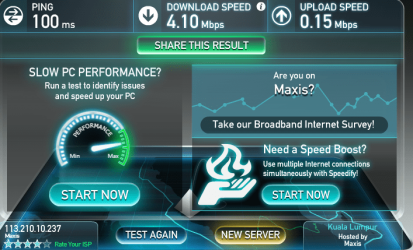
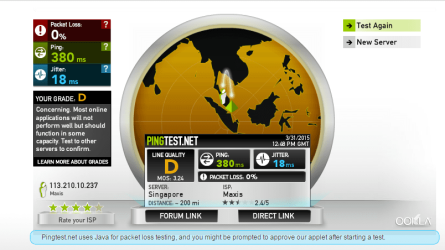
Hello everyone, I am one of new members in this forum. :) Can I ask why are my Mission Against Terror Online game(M.A.T.) always experience high value of lag/ping (200 - 988) during the night than the day (around 100)? For your information, I always scanned my computer with AVG Antivirus Free Edition 2015 and Malwarebytes Anti-Malware. Both found no malware. Besides that, I tested my Maxis Wireless Internet modem speed and ping. I will upload the screenshots of those results now. In addition, I always scan my computer for any errors with Advanced Systemcare Ultimate 8, and defrag hard disk with Smart Defrag 4 before I playing it. Last but not least, my computer information is Windows 7 Home Premium 32 bit, Intel Core 2 Duo E7500 2.93 GHZ, NVIDIA GeForce G210 512MB, and 3GB RAM. Please reply this as soon as possible because I playing it everyday.
 

Attachments

  • Capture 1.PNG
    Capture 1.PNG
    101.3 KB · Views: 2
  • Capture 2.PNG
    Capture 2.PNG
    58.6 KB · Views: 2

My Computer My Computer

At a glance

Windows 7 Home Premium 32 bitIntel Core 2 Duo processor E75003GB DDR3Nvidia GeForce G210 512MB
Computer type
PC/Desktop
Computer Manufacturer/Model Number
Acer
OS
Windows 7 Home Premium 32 bit
CPU
Intel Core 2 Duo processor E7500
Memory
3GB DDR3
Graphics Card(s)
Nvidia GeForce G210 512MB
Antivirus
360 Internet Security 2015
Browser
Google Chrome
Ping time is dependent on many factors, most of which are beyond your control or influence. This includes your computer, it's connection to the Internet, the server you are pinging, and everything in between. As the problem does not occur during the day it seems unlikely to be a local problem. Internet usage is typically higher in the evening and that often leads to congestion and high ping times. This is not an uncommon situation.

I doubt there is anything you can do about this. You could try contacting your ISP.
 

My Computer My Computer

At a glance

Windows 7 Pro 64 bitXeon W35208 GBNvidia Geforce 210
Computer type
PC/Desktop
Computer Manufacturer/Model Number
HP
OS
Windows 7 Pro 64 bit
CPU
Xeon W3520
Memory
8 GB
Graphics Card(s)
Nvidia Geforce 210
Maybe your ISP is routing your IP to a farther route causing high latency.
 

My Computer My Computer

At a glance

Windows 7 Home Premium 64-BITAMD A8 7200P8GB 1600mhzRadeon R5 (APU) + Radeon R5 M230 2GB Dual Gra...
Computer type
PC/Desktop
Computer Manufacturer/Model Number
ASUS X550ZE
OS
Windows 7 Home Premium 64-BIT
CPU
AMD A8 7200P
Motherboard
N/A
Memory
8GB 1600mhz
Graphics Card(s)
Radeon R5 (APU) + Radeon R5 M230 2GB Dual Graphics
Sound Card
Realtek ALC269 with SonicMaster
Monitor(s) Displays
Laptop Display
Screen Resolution
1920 x 1080 @60hz
Hard Drives
WDC WD50 00LPVX-80V0TT0 (500GB)
PSU
Laptop Charger
Mouse
ARMAGGEDON TEXTRON SCORPION 7
Internet Speed
100 mbps DOWN / 50 mbps UP
Antivirus
Windows Defender
Browser
Mozzila FireFox, Valve Steam in-game internet browser
with a ping that high, it seems like you're on 3G, that would explain the ping, i'm not familiar with Maxis as an ISP but I believe they offer wireless as well as hardline internet services?
 

My Computer My Computer

At a glance

Windows 7 Ultimate x64 SP1Intel Q6600 @ 2.6Ghz4Gb DDR2 Corsair Dominator @ 800Mhz 5-5-5-15EVGA 560 GTX SC FTW 1GB
Computer type
PC/Desktop
Computer Manufacturer/Model Number
Custom Build
OS
Windows 7 Ultimate x64 SP1
CPU
Intel Q6600 @ 2.6Ghz
Motherboard
Evga NF78-CK-132-A 3-Way SLI
Memory
4Gb DDR2 Corsair Dominator @ 800Mhz 5-5-5-15
Graphics Card(s)
EVGA 560 GTX SC FTW 1GB
Sound Card
Realtek HD 7.1 Audio, Plantronics GameCom780 7.1 Headset
Monitor(s) Displays
Dell S2409W
Screen Resolution
1920 x 1080
Hard Drives
SanDisk SDSSDHII-120G-G25 120GB SSD
Samsung 7200RPM 750Gb SATA
Samsung 850 EVO 120GB SSD
Western Digital Green 1TB 7200RPM
PSU
Xigmatek 750W Quad sli quad core 80% eff
Case
Antec 900 Gaming Case
Cooling
Zalman CNPS9700-NT NVIDIA Tritium
Keyboard
Logitech generic keyboard, MS wireless keyboard
Mouse
Razor Lachesis Banshee V2 Blue, 4000DPI, MS wireless mouse
Internet Speed
152Mb Virgin Media Fibre Optic
Antivirus
Microsoft Security Essentials
Browser
Google Chrome
Other Info
Wireless Gaming Receiver for Windows, Wireless Xbox 360 Pad
Thank you for you guys reply, I very appreciate it. Yesterday, I had also lodged a complaint about this matter to the ISP forum and currently I still waiting for their reply. Maybe I will switch from ethernet connection to xDSL connection in the future.
 

My Computer My Computer

At a glance

Windows 7 Home Premium 32 bitIntel Core 2 Duo processor E75003GB DDR3Nvidia GeForce G210 512MB
Computer type
PC/Desktop
Computer Manufacturer/Model Number
Acer
OS
Windows 7 Home Premium 32 bit
CPU
Intel Core 2 Duo processor E7500
Memory
3GB DDR3
Graphics Card(s)
Nvidia GeForce G210 512MB
Antivirus
360 Internet Security 2015
Browser
Google Chrome
Hello there,
Try pinging other common websites throughout the day and see if your day-time vs night-time ping value difference is similar in these sites also.
If that isn't the case, I believe the issue maybe with the game servers itself?
As in with varying timezones, your night gaming time maybe some other zones peak player usage time and therefore server loads maybe high leading to higher ping.
 

My Computer My Computer

At a glance

Windows 7 Ultimate 64bitIntel i7 479016 GB DDR3Asus GTX 970
Computer type
PC/Desktop
Computer Manufacturer/Model Number
Custom Build
OS
Windows 7 Ultimate 64bit
CPU
Intel i7 4790
Memory
16 GB DDR3
Graphics Card(s)
Asus GTX 970
That jitter is somewhat uncommon unless your pinging to another ISP which is normal in PingTests. But if you're pinging on the same ISP then there is a problem because that Jitter is not normal and far from good for playing online games.
 

My Computer My Computer

At a glance

Windows 7 Home Premium 64-BITAMD A8 7200P8GB 1600mhzRadeon R5 (APU) + Radeon R5 M230 2GB Dual Gra...
Computer type
PC/Desktop
Computer Manufacturer/Model Number
ASUS X550ZE
OS
Windows 7 Home Premium 64-BIT
CPU
AMD A8 7200P
Motherboard
N/A
Memory
8GB 1600mhz
Graphics Card(s)
Radeon R5 (APU) + Radeon R5 M230 2GB Dual Graphics
Sound Card
Realtek ALC269 with SonicMaster
Monitor(s) Displays
Laptop Display
Screen Resolution
1920 x 1080 @60hz
Hard Drives
WDC WD50 00LPVX-80V0TT0 (500GB)
PSU
Laptop Charger
Mouse
ARMAGGEDON TEXTRON SCORPION 7
Internet Speed
100 mbps DOWN / 50 mbps UP
Antivirus
Windows Defender
Browser
Mozzila FireFox, Valve Steam in-game internet browser
Hi RoasterMen, Yes, I was pinging the same ISP. What causes problem to the jitter? please explain it to me with more details if possible.
 

My Computer My Computer

At a glance

Windows 7 Home Premium 32 bitIntel Core 2 Duo processor E75003GB DDR3Nvidia GeForce G210 512MB
Computer type
PC/Desktop
Computer Manufacturer/Model Number
Acer
OS
Windows 7 Home Premium 32 bit
CPU
Intel Core 2 Duo processor E7500
Memory
3GB DDR3
Graphics Card(s)
Nvidia GeForce G210 512MB
Antivirus
360 Internet Security 2015
Browser
Google Chrome
Simply said, time difference in packet inter-arrival time to their destination can be called jitter. Jitter is specific issue that normally exists in packet networks and this phenomenon is usually not causing any communication problems. TCP/IP is responsible for dealing with the jitter impact on communication. On the other hand, in VoIP network environment, or better say in any bigger environment today where we use IP phones on our network this can be a bigger problem. When someone is sending VoIP communication at a normal interval (let’s say one frame every 10 ms) those packets can stuck somewhere in between inside the packet network and not arrive at expected regular peace to the destined station. That’s the whole jitter phenomenon all about so we can say that the anomaly in tempo with which packet is expected and when it is in reality received is jitter.

In this image above, you can notice that the time it takes for packets to be send is not the same as the period in which the will arrive at the receiver side. One of the packets encounters some delay on his way and it is received little later than it was asumed. Here are the jitter buffers entering the story. They will mitigate packet delay if required. VoIP packets in networks have very changeable packet inter-arrival intervals because they are usually smaller than normal data packets and are therefore more numerous with bigger chance to get some delay.

In order to have the chance to better tune the jitter correction, best practice is to enumerate packets who arrive late and with that base data calculate a ratio of those packets and packets that are successfully transferred. With that ratio you can better adapt the jitter buffer to some predictable number of late arriving packets. This is the best way to tune jitter buffer. Although it can maybe some time be confusing but the jitter and total delay are not even close to be the same thing. Having a lot of jitter in network will probably increase the total delay to, but it must not be the case. It will usually mean that because more jitter means that you need bigger jitter buffer to be able to compensate the unpredictable packet network packet flow behavior.
The buffers are not endlessly big. In case of heavy jitter situation it is better to drop some packets or have fixed size buffer instead of creating delays in the jitter buffers itself. The main reason for the last sentence is that if you did a good job in planing and designing the network infrastructure with all the best practice and recommendations, the probability to have jitter issues is minimal. In that kind of network jitter is normally not a big problem.
You can se if there is some jitter in your network using RTP timestamps in Cisco IOS. Cisco IOS has by default those buffers set like a dynamic queue. This queue will change its size depending on the packet timing and tempo when arriving to destination. Almost all other vendors use static jitter buffers, Cisco deduced that dynamic jitter buffer with some enhancement in the design is the best way to use the buffer for VoIP transferring networks.


Source: What is Jitter in Networking?
 

My Computer My Computer

At a glance

Windows 7 Home Premium 64-BITAMD A8 7200P8GB 1600mhzRadeon R5 (APU) + Radeon R5 M230 2GB Dual Gra...
Computer type
PC/Desktop
Computer Manufacturer/Model Number
ASUS X550ZE
OS
Windows 7 Home Premium 64-BIT
CPU
AMD A8 7200P
Motherboard
N/A
Memory
8GB 1600mhz
Graphics Card(s)
Radeon R5 (APU) + Radeon R5 M230 2GB Dual Graphics
Sound Card
Realtek ALC269 with SonicMaster
Monitor(s) Displays
Laptop Display
Screen Resolution
1920 x 1080 @60hz
Hard Drives
WDC WD50 00LPVX-80V0TT0 (500GB)
PSU
Laptop Charger
Mouse
ARMAGGEDON TEXTRON SCORPION 7
Internet Speed
100 mbps DOWN / 50 mbps UP
Antivirus
Windows Defender
Browser
Mozzila FireFox, Valve Steam in-game internet browser
As mentioned earlier, if you systematically get higher ping in the evenings, it is because ISP infrastructure is saturated due to everyone using it simultaneously.

You may look into VPN services (usually paid, some offer free trials for a week or two) to see if you can get a better route to the game servers. I have seen this before when I was playing WoW competitively. The ISP default route was taking us to France first and ping was unbearable (often disconnect too). Once I changed to connect through Germany with a paid VPN service, my ping improved to normal values and no more disconnects.

I used https://www.vpngates.com/ back then
But there is also https://zenmate.com/
and countless others if you search Google.
 

My Computer My Computer

At a glance

Windows 7 Ultimate x64 SP1AMD Phenom 2 1090T2x8GB Kingston HyperX Fury Black 1600Mhz Unga...MSI GTX 970 Gaming 4G
Computer type
PC/Desktop
Computer Manufacturer/Model Number
Custom Build
OS
Windows 7 Ultimate x64 SP1
CPU
AMD Phenom 2 1090T
Motherboard
Gigabyte GA-890FXA-UD5
Memory
2x8GB Kingston HyperX Fury Black 1600Mhz Unganged
Graphics Card(s)
MSI GTX 970 Gaming 4G
Sound Card
Realtek On-Board HD 7.1 Audio / Logitech G35
Monitor(s) Displays
3xAcer GD245HQ
Screen Resolution
1920x1080
Hard Drives
Samsung 850 Pro 512GB SSD - OS /
WD Caviar Black SATA 3 - 1 TBx2 - Dynamic RAID 0 /
WD Caviar Green SATA 2 - 640GBx2 - Dynamic RAID 0 /
WD Caviar Green SATA 2 - 640GB - Internal Backup /
Seagate Barracude SATA 3 - 3TB - External Backup/ Sync
PSU
HighPower 1000W
Case
Cooler Master HAF 932
Cooling
Noctua NH-D14
Keyboard
Logitech G19
Mouse
Logitech G500
Internet Speed
100/4 Mbit Cable (100GB quota)
Antivirus
ZoneAlarm Extreme Security / MBAM Pro / MBAE Free / SAS Free
Browser
IE 11 - Firefox - Chrome
Other Info
Logitech F710/ G27/ G940/ Z5500 // TrackIR 5 // Nvidia 3D Surround Vision
Back
Top