
Highest level folders on Windows Explorer

churin

New member
Power User
Local time
8:26 PM
Messages
341
Location
California
On my desktop machine, they are Favorites and Desktop, while on my notebook machine, they are Favorites, Libraries, Homegroup, Computer and Network. The OSes are both W7 x64 Ultimate and I thought I installed them the same way. I wonder why the difference.
How can I make Windows Explorer of the notebook PC's show the same way as the desktop PC does?
 

My Computer

Computer type
PC/Desktop
OS
W7 Ult x64, W8 Pro x64 and W10 Pro x64
CPU
Phenom FX6300
Motherboard
Gigabyte GA-970A-UD3 rev. 1.2
Memory
16GB DDR3 1866 G.Skill F3-1866C9D-16GWM x2
Graphics Card(s)
Radeon R7 360
Sound Card
Asus Xonar DS
Monitor(s) Displays
27" x2, Dell P2715Q
Screen Resolution
3840 x 2160
Hard Drives
Samsung 850Pro 1TB SSD - system
Samsung 4TB SSD - Data
PSU
Corsair CX450M
Case
Corsair 200R
Cooling
Zalman CNPS5X Performa
Internet Speed
400Mbps/12Mbps
Other Info
2nd machine: Same as above
3rd machine: Apple MacAir with W7 Ult installed
Do you have a scrennshot?
 

My Computer

Computer type
PC/Desktop
Computer Manufacturer/Model Number
Alienware Aurora ALX R4
OS
Windows 10 Pro (x64)
CPU
Intel Core i7-3930K (3.2GHz - 4.5GHz)
Motherboard
Alienware Aurora-R4 x79
Memory
4x Samsung 4GB PC3-12800 DDR3 (16GB 1600MHz)
Graphics Card(s)
Nvidia Geforce GTX 690
Sound Card
SteelSeries Siberia Elite
Monitor(s) Displays
Dell UltraSharp U3011
Screen Resolution
2560x1600
Hard Drives
Samsung 850 Pro 256 GB, Seagate 1TB Desktop Hybrid HDD, 2x Western Digital 4TB Green HDD
PSU
875W Some Dell PSU <.<
Case
Alienware Aurora ALX
Cooling
Custom Liquid Cooling (EK CPU & GPU blocks) dual EK 480RAD
Keyboard
Logitech G710+ Mechanical
Mouse
Logitech G700s
Internet Speed
Verizon Fios (50 mbps average)
Other Info
Server: Intel NUC D54250WYK: i5-4250U, 16GB, 256 GB mSATA, Windows Server 2012 R2
On my desktop machine, they are Favorites and Desktop, while on my notebook machine, they are Favorites, Libraries, Homegroup, Computer and Network. The OSes are both W7 x64 Ultimate and I thought I installed them the same way. I wonder why the difference.
How can I make Windows Explorer of the notebook PC's show the same way as the desktop PC does?
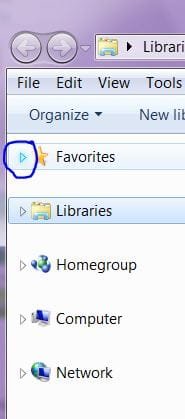
Click on this drop down button
button.JPG
 

My Computer

Computer Manufacturer/Model Number
Gateway GT5692
OS
Windows 7 Ulti. x64
CPU
AMD Phenom 8450 triple-core 2.10 ghz
Memory
4GB
Graphics Card(s)
ATI Radion HD 3200
Monitor(s) Displays
Gateway FPD1775W
Screen Resolution
1280x720
Hard Drives
465.6613 Gibibytes
your desktop machine has 'Show all folders' selected while your notebook does not

when it's like that there are 2 groupings like you describe the favorites and desktop

right click an empty part of the navigation pane and select 'show all folders' and the navigation pane will be grouped like your desktop

on a side note not sure why the heck in the nav pane they refer to the links folder as favorites, when there already exists the real favorites folder. It should just be called links or a new name, not sure why it got changed
 

My Computer

Computer Manufacturer/Model Number
HP DV9033CL
OS
Windows 7 Professional 32 Bit
Memory
2 GB
Graphics Card(s)
nVidia GeForce Go 7600
Sound Card
Conexant HD Audio Board
Screen Resolution
1440x900
Internet Speed
aDSL 1.5Mbps / 256 Kbps
Thanks to everyone for your responses.

right click an empty part of the navigation pane and select 'show all folders' and the navigation pane will be grouped like your desktop
This took care of my problem. Thanks for your help.

This is off-topic but I do not really need the "Favorites". Is there a way to get rid of it?
 

My Computer

Computer type
PC/Desktop
OS
W7 Ult x64, W8 Pro x64 and W10 Pro x64
CPU
Phenom FX6300
Motherboard
Gigabyte GA-970A-UD3 rev. 1.2
Memory
16GB DDR3 1866 G.Skill F3-1866C9D-16GWM x2
Graphics Card(s)
Radeon R7 360
Sound Card
Asus Xonar DS
Monitor(s) Displays
27" x2, Dell P2715Q
Screen Resolution
3840 x 2160
Hard Drives
Samsung 850Pro 1TB SSD - system
Samsung 4TB SSD - Data
PSU
Corsair CX450M
Case
Corsair 200R
Cooling
Zalman CNPS5X Performa
Internet Speed
400Mbps/12Mbps
Other Info
2nd machine: Same as above
3rd machine: Apple MacAir with W7 Ult installed
This is off-topic but I do not really need the "Favorites". Is there a way to get rid of it?

go below and uncheck favorites
To customize the right pane of the Start menu


  1. You can add or remove items, such as Computer, Control Panel, and Pictures, that appear on the right side of the Start menu. You can also change some items so that they appear as links or menus.
  2. Right click the start button and select Properties.
  3. Click the Start Menu tab, and then click Customize.
  4. In the Customize Start Menu dialog box, select the options in the list that you want, click OK, and then click OK again.
 

My Computer

Computer type
PC/Desktop
Computer Manufacturer/Model Number
diy
OS
Win7 pro x64
CPU
stock i7 7700k
Motherboard
Gigabyte Z270N-WIFI mini-ITX
Memory
Corsair Vengeance LPX 16GB (2x8GB) DDR4 @ 3200MHz
Graphics Card(s)
integrated Intel HD 630
Sound Card
onboard Realtek ALC1220
Monitor(s) Displays
two vertically mounted samsung 55" 4k un55mu8000
Screen Resolution
1920x1280
Hard Drives
256GB Samsung EVO 960 M.2 pci-e NVMe SSD
PSU
SilverStone Nightjar ST45NF 450Watt Fanless
Case
No case. Motherboard is mounted directly onto power supply
Cooling
Evercool low profile 815EP with Panaflow 12L fan at 7v
Keyboard
Ortek MCK-86 mini
Mouse
Belkin 5-button USB
Internet Speed
spectrum 400mbps
Thanks to everyone for your responses.

right click an empty part of the navigation pane and select 'show all folders' and the navigation pane will be grouped like your desktop
This took care of my problem. Thanks for your help.

This is off-topic but I do not really need the "Favorites". Is there a way to get rid of it?

Just a note before you get rid of favorites.

The Favorites in the explorer are not the IE favorites.
You can drag any folder you open often to the Favorites.
Then you don't have to browse for it any more.

Check it out before you decide to get rid of it.

Good luck
 

My Computer

OS
Win7 Build 7600 x86
CPU
Pentium II 300MHz
Motherboard
Asus
Memory
32mb EDO RAM
Graphics Card(s)
Diamond Viper
Sound Card
Soundblaster 16
Monitor(s) Displays
14" AOC CRT 16K color
Screen Resolution
800x600
Hard Drives
300mb Quantum fireball
PSU
110 Watts
Cooling
Passive
Keyboard
Trust Ergonomic
Mouse
Generic
Internet Speed
256K u 128K d
SquonkSC:
I did not know what to do with the Favorites though I knew this was not the same as in IE. So, thank you for enlightening me about it. I tried the Favorites but the problem is that the folder under it does not open in tree fashion as Windows Explorer. Another word I want sub-folders shown on the left side field so that it is easier to hunt for a file.

So let me repeat the previous question: Is it possible to remove the Favorites?
 

My Computer

Computer type
PC/Desktop
OS
W7 Ult x64, W8 Pro x64 and W10 Pro x64
CPU
Phenom FX6300
Motherboard
Gigabyte GA-970A-UD3 rev. 1.2
Memory
16GB DDR3 1866 G.Skill F3-1866C9D-16GWM x2
Graphics Card(s)
Radeon R7 360
Sound Card
Asus Xonar DS
Monitor(s) Displays
27" x2, Dell P2715Q
Screen Resolution
3840 x 2160
Hard Drives
Samsung 850Pro 1TB SSD - system
Samsung 4TB SSD - Data
PSU
Corsair CX450M
Case
Corsair 200R
Cooling
Zalman CNPS5X Performa
Internet Speed
400Mbps/12Mbps
Other Info
2nd machine: Same as above
3rd machine: Apple MacAir with W7 Ult installed
SquonkSC:
I did not know what to do with the Favorites though I knew this was not the same as in IE. So, thank you for enlightening me about it. I tried the Favorites but the problem is that the folder under it does not open in tree fashion as Windows Explorer. Another word I want sub-folders shown on the left side field so that it is easier to hunt for a file.

So let me repeat the previous question: Is it possible to remove the Favorites?

I don't have an answer for removing the favorites.

But you are missing the point for it's use.
Favorites is ideal to jump directly to a folder that is several layers deep inside a folder tree, but you access it often.
Instead of climbing down the folder tree, you jump there instantly.

It has it's own function, and making trees in it would work counter productive to it's function.

If you are still sure you want to get rid of it, you'll have to wait for someone who knows how.

Good luck
 

My Computer

OS
Win7 Build 7600 x86
CPU
Pentium II 300MHz
Motherboard
Asus
Memory
32mb EDO RAM
Graphics Card(s)
Diamond Viper
Sound Card
Soundblaster 16
Monitor(s) Displays
14" AOC CRT 16K color
Screen Resolution
800x600
Hard Drives
300mb Quantum fireball
PSU
110 Watts
Cooling
Passive
Keyboard
Trust Ergonomic
Mouse
Generic
Internet Speed
256K u 128K d
Favorites is ideal to jump directly to a folder that is several layers deep inside a folder tree, but you access it often.
Instead of climbing down the folder tree, you jump there instantly.

It has it's own function, and making trees in it would work counter productive to it's function.

A good example of this is my uni work. I have a massive hierarchy sorted under my documents by year, semester, unit, and assessment. Instead of having to manually click through libraries > my documents > Uni 2009 > Semester 2 to get the unit folders, I just pin the Semester 2 folder to favourites as a shortcut. Click on it and bam! your at the unit folders.
A hierarchy would defeat the purpose of such functionality.
I also pin folders that I'm currently doing assessment in to the explorer jumplist, so I can jump straight there.
 

My Computer

Computer Manufacturer/Model Number
Dell Inspiron 1545
OS
Windows 7 build 7100 x86
CPU
Intel Core 2 Duo 2.1GHz
Motherboard
GM45 chipset
Memory
3GB
Graphics Card(s)
Intel(TM) Graphics Media Accelerator X4500HD
Sound Card
Realtek HD
Monitor(s) Displays
15.6" WLED 720p
Screen Resolution
1366x768
Hard Drives
320GB 5400rpm hard drive
SqonkSC and antt:

As I stated I tried Favorites and I think I understand how Favorites works. I am not saying Favorites is useless. I see its usefulness depending upon circumstances. In my case there are four folders among many others in D: drive I frequently need to access. So, I put their short-cuts in Favorites. Each of them has sub-folders. The problem is that I very often need to examine what are in many of the sub-folders before proceeding to next down sub-folders or to a list of files. Note that very often I do not remember name of the destination sub-folder. After having tried Favorites I felt it easier to use folder tree than Favorites.
 

My Computer

Computer type
PC/Desktop
OS
W7 Ult x64, W8 Pro x64 and W10 Pro x64
CPU
Phenom FX6300
Motherboard
Gigabyte GA-970A-UD3 rev. 1.2
Memory
16GB DDR3 1866 G.Skill F3-1866C9D-16GWM x2
Graphics Card(s)
Radeon R7 360
Sound Card
Asus Xonar DS
Monitor(s) Displays
27" x2, Dell P2715Q
Screen Resolution
3840 x 2160
Hard Drives
Samsung 850Pro 1TB SSD - system
Samsung 4TB SSD - Data
PSU
Corsair CX450M
Case
Corsair 200R
Cooling
Zalman CNPS5X Performa
Internet Speed
400Mbps/12Mbps
Other Info
2nd machine: Same as above
3rd machine: Apple MacAir with W7 Ult installed
This is off-topic but I do not really need the "Favorites". Is there a way to get rid of it?

go below and uncheck favorites
To customize the right pane of the Start menu


  1. You can add or remove items, such as Computer, Control Panel, and Pictures, that appear on the right side of the Start menu. You can also change some items so that they appear as links or menus.
  2. Right click the start button and select Properties.
  3. Click the Start Menu tab, and then click Customize.
  4. In the Customize Start Menu dialog box, select the options in the list that you want, click OK, and then click OK again.
My apology that I overlooked your response.
The Favorites I want to get rid of is not the one on the right pane of the Start menu but the one on the left pane on Windows Explorer.
Thanks anyway for trying to help me.
 

My Computer

Computer type
PC/Desktop
OS
W7 Ult x64, W8 Pro x64 and W10 Pro x64
CPU
Phenom FX6300
Motherboard
Gigabyte GA-970A-UD3 rev. 1.2
Memory
16GB DDR3 1866 G.Skill F3-1866C9D-16GWM x2
Graphics Card(s)
Radeon R7 360
Sound Card
Asus Xonar DS
Monitor(s) Displays
27" x2, Dell P2715Q
Screen Resolution
3840 x 2160
Hard Drives
Samsung 850Pro 1TB SSD - system
Samsung 4TB SSD - Data
PSU
Corsair CX450M
Case
Corsair 200R
Cooling
Zalman CNPS5X Performa
Internet Speed
400Mbps/12Mbps
Other Info
2nd machine: Same as above
3rd machine: Apple MacAir with W7 Ult installed
Back
Top