Highlight newly installed items keeps enabling itself.

scribblesteve

New member
Local time
2:30 PM
Messages
15
I've gone into Start Menu Properties > Customize and de-selected "Highlight newly installed programs"

Hit apply, then ok. It works immediately, but the next time I install a program the programs are highlighted and the check box has checked itself.

I can't find a solution to this onilne anywhere. Help would be appreciated. It's driving me nuts.
 

My Computer

Computer Manufacturer/Model Number
HP
OS
Windows 7 Home Premium
Memory
3.75

My Computer

Computer type
PC/Desktop
Computer Manufacturer/Model Number
Lenovo IdeaCenter 450
OS
Windows 10 Pro X64
CPU
Intel Quad Core i7-4770 @ 3.4Ghz
Memory
16.0GB PC3-12800 DDR3 SDRAM 1600 MHz
Graphics Card(s)
Intel Integrated HD Graphics
Sound Card
Realtek HD Audio
Monitor(s) Displays
HP 22" LCD
Screen Resolution
1680 x 1050
Hard Drives
250GB Samsung EVO SATA-3 SSD
2TB Seagate ST2000DM001 SATA-2
1.5TB Seagate ST3150041AS SATA
Keyboard
Dell USB
Mouse
Lenovo USB
Internet Speed
Cable via Road Runner 3MB Upload, 30MB Download
Antivirus
Windows Defender, MBAM Pro, MBAE
Browser
Seamonkey
Other Info
UEFI/GPT
PLDS DVD-RW DH16AERSH
Thanks! I'll see if that worked the next time I install something. I appreciate your help. I'll post here again if the problem resurrects.
 

My Computer

Computer Manufacturer/Model Number
HP
OS
Windows 7 Home Premium
Memory
3.75

My Computer

Computer Manufacturer/Model Number
HP
OS
Windows 7 Home Premium
Memory
3.75
Do the other settings work?
Because I used to have this same problem, and NONE of explorer.exe's settings worked. It turned out to be a corrupted user profile.
 

My Computer

OS
N/A
Download Startuplist 2.02, unzip it then run it and save the output as .txt and upload here please.

I'm wondering if you have something running that is restoring any changes made to the registry.
 

My Computer

Computer type
PC/Desktop
Computer Manufacturer/Model Number
Lenovo IdeaCenter 450
OS
Windows 10 Pro X64
CPU
Intel Quad Core i7-4770 @ 3.4Ghz
Memory
16.0GB PC3-12800 DDR3 SDRAM 1600 MHz
Graphics Card(s)
Intel Integrated HD Graphics
Sound Card
Realtek HD Audio
Monitor(s) Displays
HP 22" LCD
Screen Resolution
1680 x 1050
Hard Drives
250GB Samsung EVO SATA-3 SSD
2TB Seagate ST2000DM001 SATA-2
1.5TB Seagate ST3150041AS SATA
Keyboard
Dell USB
Mouse
Lenovo USB
Internet Speed
Cable via Road Runner 3MB Upload, 30MB Download
Antivirus
Windows Defender, MBAM Pro, MBAE
Browser
Seamonkey
Other Info
UEFI/GPT
PLDS DVD-RW DH16AERSH
Here are the results from Startup 2.0
 

Attachments

Last edited:

My Computer

Computer Manufacturer/Model Number
HP
OS
Windows 7 Home Premium
Memory
3.75
Give this a try.
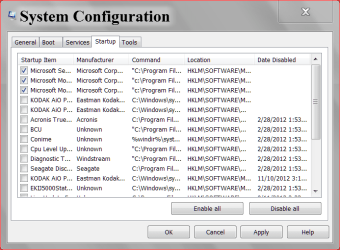
Go to Start and type in msconfig and then go to Start Up.

START UP 11 25.PNG

Notice I don't have many check marks. What I have told Windows is I don't want all those things that I haven't checked to start when I boot.
They will start when I get into Windows and tick on them. When I want to use them I just tick on them; use them and when done close them. Their for they don't run in the background when not needed. Some keep auto updates to programs checked. You get to pick and choose. If you don't like the changes you made you can just change them again, reboot.
There are steps here that will explain it better. Just scroll down.
http://www.sevenforums.com/tutorials/11728-optimize-windows-7-a.html
Here is another Tutorial that might help you.
http://www.sevenforums.com/tutorials/1401-startup-programs-change.html
 

My Computer

Computer type
PC/Desktop
Computer Manufacturer/Model Number
Home made Desktop
OS
Windows 10 Pro. 64/ version 1709 Windows 7 Pro/64
CPU
Intel i7-6800K @ 4.3
Motherboard
ASUS X-99 Deluxe II
Memory
Corsair Platinum 16 gig @2400
Graphics Card(s)
EVGA GTX 1070 OC
Monitor(s) Displays
Asus 27" LED LCD/VE278Q
Screen Resolution
1920-1080 or 1280-720 HDMI
Hard Drives
INTEL SSD 730-240 Gb Sata 3.0/
PSU
EVGA Platium 1200W
Case
Phanteks Luxe Tempered Glass 8 fans/ one radiator
Cooling
XSPC/ Water Cooled CPU
Keyboard
Das 4 Professional
Mouse
Logitech M705/MX Anywhere 2-S
Internet Speed
100 mbits
Antivirus
Microsoft Security Essentials/ Malwarebytes Premium 3.0/ SAS
Browser
I.E. 11 default/Firefox/ ISP Time Warner Cable/Spectrum
Other Info
LG BluRay Burner/
Sound system-KLipsch-THX/
Icy Dock ssd Hot Swap bays.

My Computer

Computer type
PC/Desktop
Computer Manufacturer/Model Number
Lenovo IdeaCenter 450
OS
Windows 10 Pro X64
CPU
Intel Quad Core i7-4770 @ 3.4Ghz
Memory
16.0GB PC3-12800 DDR3 SDRAM 1600 MHz
Graphics Card(s)
Intel Integrated HD Graphics
Sound Card
Realtek HD Audio
Monitor(s) Displays
HP 22" LCD
Screen Resolution
1680 x 1050
Hard Drives
250GB Samsung EVO SATA-3 SSD
2TB Seagate ST2000DM001 SATA-2
1.5TB Seagate ST3150041AS SATA
Keyboard
Dell USB
Mouse
Lenovo USB
Internet Speed
Cable via Road Runner 3MB Upload, 30MB Download
Antivirus
Windows Defender, MBAM Pro, MBAE
Browser
Seamonkey
Other Info
UEFI/GPT
PLDS DVD-RW DH16AERSH
Back
Top