
Solved Hitman Pro (?)

fireberd

Beach Observer
Guru
Gold Member
VIP
Local time
3:45 AM
Messages
8,135
Location
Inverness, FL
I had a PC yesterday to "clean" that had a lot of spyware and malware, including Smartshopper and several "PC repair" malware infections. I ran my trusty Malwarebytes Pro and it cleaned a lot of junk out of the computer but didn't do a thing for smart shopper and several other malwares such as the "PC repair" apps.

I did some searching and came up with one thread that included Hitman Pro to clean out things missed by other malware programs. I ran Hitman Pro and it found the Smartshopper and the PC repair type malware and cleaned them all.

I'm not promoting Hitman Pro, basically I want some info on it. This was my first use of it.
 

My Computer

Computer type
PC/Desktop
Computer Manufacturer/Model Number
My Own Build
OS
Windows 10 64 bit
CPU
Intel i7 6700K
Motherboard
ASUS ROG Maximus VIII Hero
Memory
16GB Corsair Dominator
Graphics Card(s)
Intel CPU Graphics
Sound Card
RealTek
Monitor(s) Displays
27" Dell S2719dgf
Screen Resolution
2560X1440
Hard Drives
1 TB Samsung 850 EVO SSD for Win 10 Pro
500GB Samsung 850 EVO SSD for Win 10 Insider
2 TB drive for backup
PSU
EVGA Supernova 750G2
Case
BeQuiet Silent Base 600
Cooling
Deepcool Captain 120EX
Keyboard
Microsoft Wireless 2000
Mouse
Microsoft wireless
Internet Speed
100 MB/sec (Cable)
Antivirus
Microsoft Defender and Malwarebytes
Browser
Edge/Firefox
Other Info
Cakewalk (Sonar) by BandLab and Studio One 4.1 Pro recording studio software. MOTU 896Mk3 Hybrid recording interface, Frontier Tranzport wireless control unit, Behringer X-Touch Control Surface.
Five USB connected optical drives for CD Audio production using Nero BurningROM
Hitman Pro

There's some explanation of what the free version is capable of here:

Pros and Cons of MBAM/HMP/EEK/CCE | MalwareTips.com

Personally I've only ever used it on rare occasions after removing tricky to remove toolbars like Conduit. HMP will detect leftovers that are missed by other scanners but manual removal is required if you don't want to purchase a license. The free version has a 30 day license only.

The best feature is the scan for malware remnants. It scans the registry and finds and removes stuff that some other scanners miss.

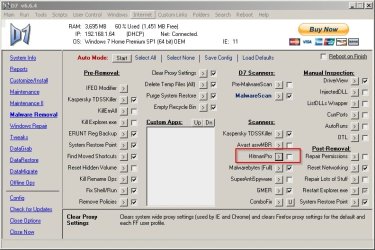
I usually use D7 to run it:

D7 v6.6.4.jpg

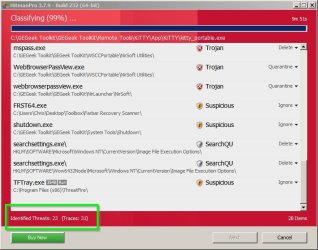
As usual it's down to user choice to decide on false positive detections:

HitmanPro 3.7.9 - Build 232 (64-bit).jpg

You might also be interested in HitManPro Alert:

HitmanPro.Alert 2 - SurfRight

HitmanPro.Alert CryptoGuard - SurfRight - video shows usage.

It installs as a service and watches browsers. Currently works for me using IE11, Cyberfox 64bit (installed), Opera 64bit portable, SlimBoat portable.
 
Last edited:

My Computer

Computer type
Laptop
Computer Manufacturer/Model Number
ASUS
OS
Microsoft Windows 7 Home Premium 64-bit 7601 Multiprocessor Free Service Pack 1
CPU
AMD C-60 APU with Radeon(tm) HD Graphics
Motherboard
ASUSTeK COMPUTER INC. X501U
Memory
4.00 GB
Graphics Card(s)
AMD Radeon HD 6290 Graphics
Sound Card
(1) AMD High Definition Audio Device (2) Realtek High Defi
Screen Resolution
1366 x 768 x 32 bits (4294967296 colors) @ 60 Hz
Hard Drives
Hitachi HTS545050A7E380 SATA Disk Device
Antivirus
Comodo CIS & FW, SecureAplus App Whitelisting, Threatfire
Browser
Cyberfox 64bit, Opera 64bit, Airfox
Other Info
Spy-The-Spy, HitmanPro.Alert, Norton Connect Safe, MJRegWatcher, BitDefender TrafficLight, Voodoo Shield, Zemana AntiMalware
Hitman Pro was written in the AutoIt scripting language. In the early years, it was an interface that automated several other tools. I'm not sure if the current version of Hitman Pro does anything more than make it easy to run other tools/scanners. In other words, you might have achieved the same results by running the tools that Hitman Pro wraps in AutoIt.

Do you try to uninstall these undesired apps first? Or do you use the malware tools first?
 

My Computer

Computer type
Laptop
Computer Manufacturer/Model Number
Employer provided Dell Latitude
OS
W7 Pro SP1 64bit
CPU
i7
Memory
8GB
Graphics Card(s)
Intel HD Graphics
Hard Drives
crappy SSD
Antivirus
Employer mandated Symantec Endpoint Protection
Browser
Pale Moon 64bit, IE11 64bit & Chrome 64bit
Hitman Pro is a multiscanning tool and uses several AV engines while most other tools use only one. When I start HMP it says: in-cloud technology partners: Bitdefender, Kaspersky Lab.
According to HitmanPro - Wikipedia, the free encyclopedia it also uses Dr Web, Emisoft, G-data and Ikarus.

The other major difference from other tools is that it's not free if you want it to clean infections. But if any infections are found you're offered a free trial license.

I use HMP myself to verify that I'm clean. I'm a cautious user so I never expect it to find anything which means I don't need a license. I try to avoid using software that might be a false-positive. If there's any doubt then I don't use it.
 

My Computer

Computer type
Laptop
Computer Manufacturer/Model Number
HP Elitebook 8540p
OS
Windows 7 Pro 32
CPU
Intel(R) Core(TM) i5 CPU M 540 @ 2.53GHz
Motherboard
Hewlett-Packard 1521
Memory
4,00 GB (Usable 2,98)
Graphics Card(s)
NVIDIA NVS 5100M
Sound Card
NVIDIA High Definition Audio
Screen Resolution
1600x900
Hard Drives
INTEL SSDSA2CW120G3
Antivirus
F-Secure Internet Security
Browser
IE, Firefox, Opera
Other Info
Sandboxie,
SRP (Software Restriction Policy),
EMET (Enhanced Mitigation Experience Toolkit),
WFC (Windows Firewall Control by BiniSoft),
Malwarebytes Premium
Thanks for the info. I try to avoid the crap sites and so far Malwarebytes and MSE have kept me clean. But, I occasionally get a PC to work on that is infected with malware/spyware. In the past I've been able to clean them with just Malwarebytes, but the infected PC that was brought to me yesterday, had more than Malwarebytes could detect. Fortunately I found the reference to Hitman Pro to remove one of the malware programs that the client had, and it did the job on the one I specifically was looking for and others, including toolbars, that Malwarebytes didn't touch.
 

My Computer

Computer type
PC/Desktop
Computer Manufacturer/Model Number
My Own Build
OS
Windows 10 64 bit
CPU
Intel i7 6700K
Motherboard
ASUS ROG Maximus VIII Hero
Memory
16GB Corsair Dominator
Graphics Card(s)
Intel CPU Graphics
Sound Card
RealTek
Monitor(s) Displays
27" Dell S2719dgf
Screen Resolution
2560X1440
Hard Drives
1 TB Samsung 850 EVO SSD for Win 10 Pro
500GB Samsung 850 EVO SSD for Win 10 Insider
2 TB drive for backup
PSU
EVGA Supernova 750G2
Case
BeQuiet Silent Base 600
Cooling
Deepcool Captain 120EX
Keyboard
Microsoft Wireless 2000
Mouse
Microsoft wireless
Internet Speed
100 MB/sec (Cable)
Antivirus
Microsoft Defender and Malwarebytes
Browser
Edge/Firefox
Other Info
Cakewalk (Sonar) by BandLab and Studio One 4.1 Pro recording studio software. MOTU 896Mk3 Hybrid recording interface, Frontier Tranzport wireless control unit, Behringer X-Touch Control Surface.
Five USB connected optical drives for CD Audio production using Nero BurningROM
Hopefully, my questions below are not too far off topic.

I would like to discuss tactics. Specifically:
Do you try to uninstall these undesired apps first?
Or do you use the malware tools first?


Or do you use the malware tools first and if stuff is found...
...exit the tool without letting it change stuff
...then try to uninstall these undesired apps via normal means
...then repeat scans with the tools?
 

My Computer

Computer type
Laptop
Computer Manufacturer/Model Number
Employer provided Dell Latitude
OS
W7 Pro SP1 64bit
CPU
i7
Memory
8GB
Graphics Card(s)
Intel HD Graphics
Hard Drives
crappy SSD
Antivirus
Employer mandated Symantec Endpoint Protection
Browser
Pale Moon 64bit, IE11 64bit & Chrome 64bit
I tried uninstalling what I found. Some were toolbars and uninstalled and some toolbars would not uninstall, either with the Windows uninstall or Revo Uninstaller. One, a "repair" program popped up a window about how many errors were on the PC when I tried to uninstall it.

I ran Malwarebytes after not being able to uninstall some of the garbage. I had to first run in Safe Mode with Malwarebytes. After getting it somewhat cleaned in Safe Mode, I booted into regular Windows and ran Malwarebytes again. Still had some left after that. Searching for info on one of the apps that would not uninstall I came across the reference to Hitman Pro.

Most of the problems were related to a particular date and after talking to the owner, his granddaughter used the PC that day. Several unwanted programs and Chrome was installed and a lot of the toolbars were Chrome installed.

The better thing, with this particular PC, which has Vista on it and has never been reinstalled, would have been a clean install but I wanted to avoid that.
 

My Computer

Computer type
PC/Desktop
Computer Manufacturer/Model Number
My Own Build
OS
Windows 10 64 bit
CPU
Intel i7 6700K
Motherboard
ASUS ROG Maximus VIII Hero
Memory
16GB Corsair Dominator
Graphics Card(s)
Intel CPU Graphics
Sound Card
RealTek
Monitor(s) Displays
27" Dell S2719dgf
Screen Resolution
2560X1440
Hard Drives
1 TB Samsung 850 EVO SSD for Win 10 Pro
500GB Samsung 850 EVO SSD for Win 10 Insider
2 TB drive for backup
PSU
EVGA Supernova 750G2
Case
BeQuiet Silent Base 600
Cooling
Deepcool Captain 120EX
Keyboard
Microsoft Wireless 2000
Mouse
Microsoft wireless
Internet Speed
100 MB/sec (Cable)
Antivirus
Microsoft Defender and Malwarebytes
Browser
Edge/Firefox
Other Info
Cakewalk (Sonar) by BandLab and Studio One 4.1 Pro recording studio software. MOTU 896Mk3 Hybrid recording interface, Frontier Tranzport wireless control unit, Behringer X-Touch Control Surface.
Five USB connected optical drives for CD Audio production using Nero BurningROM

My Computer

Computer type
Laptop
Computer Manufacturer/Model Number
Employer provided Dell Latitude
OS
W7 Pro SP1 64bit
CPU
i7
Memory
8GB
Graphics Card(s)
Intel HD Graphics
Hard Drives
crappy SSD
Antivirus
Employer mandated Symantec Endpoint Protection
Browser
Pale Moon 64bit, IE11 64bit & Chrome 64bit
Honestly, I can't remember. I'm so cautious that I haven't had a single infection, PUP, unwanted toolbar or anything in many years. I always check downloaded programs on VirusTotal/Herdprotect/WOT before running or installing them. If it's a browser plugin/add-on for example I download the install file first and scan it.
I mainly use Firefox with NoScript, Ghostery, WOT and ask-to-activate plugins. But to be extra sure I use Sandboxie too.

I do remember the last time I was infected, a nasty one on my work computer. My company had recently switched from F-Secure to McAfee to save some bucks :o I think it cost more in the end cause suddenly lots of colleagues started to get infected. This was when MSN Messenger was a popular chat tool. Some decided to reinstall, some had to replace the hard drive, I decided to try the cleaning method. Don't remember exactly but it required a lot of different AV tools to get totally clean. What one picked up, others missed and so on. I learned a lot from that mess.

Not exactly what you asked, sorry. But my experience at least. I use my own solution to check files on Virustotal and Herdprotect, the second Tutorial in my signature. But to make sure I get an updated result I sometimes go to Virustotal to upload and re-scan the file. I also do a manual scan with my AV and MBAM to get heuristics checked as well.

My bottom line: if you're cautious enough you shouldn't have to end up in a situation where you need to ask these questions. But hopefully others can give you a better answer.
 

My Computer

Computer type
Laptop
Computer Manufacturer/Model Number
HP Elitebook 8540p
OS
Windows 7 Pro 32
CPU
Intel(R) Core(TM) i5 CPU M 540 @ 2.53GHz
Motherboard
Hewlett-Packard 1521
Memory
4,00 GB (Usable 2,98)
Graphics Card(s)
NVIDIA NVS 5100M
Sound Card
NVIDIA High Definition Audio
Screen Resolution
1600x900
Hard Drives
INTEL SSDSA2CW120G3
Antivirus
F-Secure Internet Security
Browser
IE, Firefox, Opera
Other Info
Sandboxie,
SRP (Software Restriction Policy),
EMET (Enhanced Mitigation Experience Toolkit),
WFC (Windows Firewall Control by BiniSoft),
Malwarebytes Premium
I didn't have any infections on MY computer. It was a client's PC that was brought in to me to clean. I asked about Hitman Pro as I had never used it before and was wondering about it. Nothing else.
 

My Computer

Computer type
PC/Desktop
Computer Manufacturer/Model Number
My Own Build
OS
Windows 10 64 bit
CPU
Intel i7 6700K
Motherboard
ASUS ROG Maximus VIII Hero
Memory
16GB Corsair Dominator
Graphics Card(s)
Intel CPU Graphics
Sound Card
RealTek
Monitor(s) Displays
27" Dell S2719dgf
Screen Resolution
2560X1440
Hard Drives
1 TB Samsung 850 EVO SSD for Win 10 Pro
500GB Samsung 850 EVO SSD for Win 10 Insider
2 TB drive for backup
PSU
EVGA Supernova 750G2
Case
BeQuiet Silent Base 600
Cooling
Deepcool Captain 120EX
Keyboard
Microsoft Wireless 2000
Mouse
Microsoft wireless
Internet Speed
100 MB/sec (Cable)
Antivirus
Microsoft Defender and Malwarebytes
Browser
Edge/Firefox
Other Info
Cakewalk (Sonar) by BandLab and Studio One 4.1 Pro recording studio software. MOTU 896Mk3 Hybrid recording interface, Frontier Tranzport wireless control unit, Behringer X-Touch Control Surface.
Five USB connected optical drives for CD Audio production using Nero BurningROM
fireberd, we got that. But sometimes a discussion goes on after the original issue is solved ;) You can unsubscribe from this thread if you don't want to see new posts.
(I answered a direct question addressed to me and Callender)
 

My Computer

Computer type
Laptop
Computer Manufacturer/Model Number
HP Elitebook 8540p
OS
Windows 7 Pro 32
CPU
Intel(R) Core(TM) i5 CPU M 540 @ 2.53GHz
Motherboard
Hewlett-Packard 1521
Memory
4,00 GB (Usable 2,98)
Graphics Card(s)
NVIDIA NVS 5100M
Sound Card
NVIDIA High Definition Audio
Screen Resolution
1600x900
Hard Drives
INTEL SSDSA2CW120G3
Antivirus
F-Secure Internet Security
Browser
IE, Firefox, Opera
Other Info
Sandboxie,
SRP (Software Restriction Policy),
EMET (Enhanced Mitigation Experience Toolkit),
WFC (Windows Firewall Control by BiniSoft),
Malwarebytes Premium
Hitman Pro removal of detected items

Where do I start? Re: Post #6

Well usually nothing new sneaks through and if it does then I'm using CPM (Comodo Programs Manager) to monitor software installs. Uninstalling the offender using CPM usually removes all trace but I also use other software that monitors and logs registry changes in real-time and software that logs any newly created or modified executables or drivers with the option to quarantine them.

Sometimes I'm not too careful when installing what I think is trusted software only to find out later that it contains a trojan or whatever. I hardly ever need to deal with removal of viruses or spyware but uninstalling a program then doing a manual scan for leftover files/ folders and registry entries followed by scans with several scanners and checking for suspicious hidden files and unsigned files seems to do the trick. I also regularly check network activity to see what's connecting and weed out anything unwanted.

The last step is a manual registry scan using RegSeeker.

If and when needed I just roll back to a recent system image backup. Personally I wouldn't trust security software to actually remove all trace of an infection even though it might manage to render it inactive.
 

My Computer

Computer type
Laptop
Computer Manufacturer/Model Number
ASUS
OS
Microsoft Windows 7 Home Premium 64-bit 7601 Multiprocessor Free Service Pack 1
CPU
AMD C-60 APU with Radeon(tm) HD Graphics
Motherboard
ASUSTeK COMPUTER INC. X501U
Memory
4.00 GB
Graphics Card(s)
AMD Radeon HD 6290 Graphics
Sound Card
(1) AMD High Definition Audio Device (2) Realtek High Defi
Screen Resolution
1366 x 768 x 32 bits (4294967296 colors) @ 60 Hz
Hard Drives
Hitachi HTS545050A7E380 SATA Disk Device
Antivirus
Comodo CIS & FW, SecureAplus App Whitelisting, Threatfire
Browser
Cyberfox 64bit, Opera 64bit, Airfox
Other Info
Spy-The-Spy, HitmanPro.Alert, Norton Connect Safe, MJRegWatcher, BitDefender TrafficLight, Voodoo Shield, Zemana AntiMalware
If and when needed I just roll back to a recent system image backup. Personally I wouldn't trust security software to actually remove all trace of an infection even though it might manage to render it inactive.
I agree. My example was on a work computer and many years ago. I wouldn't try that multi-cleaning method again. So it's nothing I recommend (in case anyone maybe interpreted it that way)
 

My Computer

Computer type
Laptop
Computer Manufacturer/Model Number
HP Elitebook 8540p
OS
Windows 7 Pro 32
CPU
Intel(R) Core(TM) i5 CPU M 540 @ 2.53GHz
Motherboard
Hewlett-Packard 1521
Memory
4,00 GB (Usable 2,98)
Graphics Card(s)
NVIDIA NVS 5100M
Sound Card
NVIDIA High Definition Audio
Screen Resolution
1600x900
Hard Drives
INTEL SSDSA2CW120G3
Antivirus
F-Secure Internet Security
Browser
IE, Firefox, Opera
Other Info
Sandboxie,
SRP (Software Restriction Policy),
EMET (Enhanced Mitigation Experience Toolkit),
WFC (Windows Firewall Control by BiniSoft),
Malwarebytes Premium
Thanks for the info. I errantly assumed that the discussion (re: post 6) would center around cleaning up computers owned/operated by other people (family, friends, friends of friends...).

As for me, I've not had an infection (that I know of) in I don't know how long. Even when I go hunting for infections (while inside a VM on an isolated network) - I have a hard time getting infected. I have yet to witness a drive by infection.


When I'm cleaning up computers owned/operated by other people, I start with the normal method for uninstalling an app (if there is one). Then cycle thru various tools. Then manual searches for junk missed. The last infection that I cleaned up after involved CryptoWall 2.0 (no normal uninstall process). Maybe CryptoWall 2.0 came in via malverts on that computer. From what I've read, even HitmanPro's Alerter is having a hard time with the heuristics of the 100+ variants that have come out these past few weeks.

Thanks again for posting.
(perhaps I should have made my own topic :-)
 

My Computer

Computer type
Laptop
Computer Manufacturer/Model Number
Employer provided Dell Latitude
OS
W7 Pro SP1 64bit
CPU
i7
Memory
8GB
Graphics Card(s)
Intel HD Graphics
Hard Drives
crappy SSD
Antivirus
Employer mandated Symantec Endpoint Protection
Browser
Pale Moon 64bit, IE11 64bit & Chrome 64bit
Removing infections

Well I'm no expert but I don't see infections very often. Sometimes I will clean a family member's machine but it's ususally just adware and run of the mill stuff where the usual tools will do the job.

I tend to use UVK Portable (the .com version) and add a few additional third party apps along with the built in ones.

It gets a mention here along with HitmanPro. HitmanPro features in quite a few videos on this site but watching through the various videos reveals that usually a combination of manual removal and then running several tools is needed.

Delete Computer Viruses - Video

Check out some of the videos for ideas if you have time.

More videos
 
Last edited:

My Computer

Computer type
Laptop
Computer Manufacturer/Model Number
ASUS
OS
Microsoft Windows 7 Home Premium 64-bit 7601 Multiprocessor Free Service Pack 1
CPU
AMD C-60 APU with Radeon(tm) HD Graphics
Motherboard
ASUSTeK COMPUTER INC. X501U
Memory
4.00 GB
Graphics Card(s)
AMD Radeon HD 6290 Graphics
Sound Card
(1) AMD High Definition Audio Device (2) Realtek High Defi
Screen Resolution
1366 x 768 x 32 bits (4294967296 colors) @ 60 Hz
Hard Drives
Hitachi HTS545050A7E380 SATA Disk Device
Antivirus
Comodo CIS & FW, SecureAplus App Whitelisting, Threatfire
Browser
Cyberfox 64bit, Opera 64bit, Airfox
Other Info
Spy-The-Spy, HitmanPro.Alert, Norton Connect Safe, MJRegWatcher, BitDefender TrafficLight, Voodoo Shield, Zemana AntiMalware
Callender,
Thanks for the videos. I've not used a wrapper app like that before. Maybe someday :-)
 

My Computer

Computer type
Laptop
Computer Manufacturer/Model Number
Employer provided Dell Latitude
OS
W7 Pro SP1 64bit
CPU
i7
Memory
8GB
Graphics Card(s)
Intel HD Graphics
Hard Drives
crappy SSD
Antivirus
Employer mandated Symantec Endpoint Protection
Browser
Pale Moon 64bit, IE11 64bit & Chrome 64bit
I only help family members sometimes, but never something serious. I mostly uninstall Chrome and other stuff that's been installed when they try themselves to install a new version of Flash for example. Some people seem to be blind about the checkboxes options during installations ;)

Nice tip Callender! I've noticed you know a lot of cool tools that at least I've never heard of :cool:
 

My Computer

Computer type
Laptop
Computer Manufacturer/Model Number
HP Elitebook 8540p
OS
Windows 7 Pro 32
CPU
Intel(R) Core(TM) i5 CPU M 540 @ 2.53GHz
Motherboard
Hewlett-Packard 1521
Memory
4,00 GB (Usable 2,98)
Graphics Card(s)
NVIDIA NVS 5100M
Sound Card
NVIDIA High Definition Audio
Screen Resolution
1600x900
Hard Drives
INTEL SSDSA2CW120G3
Antivirus
F-Secure Internet Security
Browser
IE, Firefox, Opera
Other Info
Sandboxie,
SRP (Software Restriction Policy),
EMET (Enhanced Mitigation Experience Toolkit),
WFC (Windows Firewall Control by BiniSoft),
Malwarebytes Premium
Back
Top