
HL-DT-ST BDDVDRW GGC-H20L unable to read certain discs

Are you able to look inside the discs under explorer?
 

My Computer My Computer

At a glance

Windows 7 Home Premium x64Intel 2500k @4.5ghz 66deg max P95/IBT8 Gigs Patriot Viper 2 Extreme @1600EVGA GTX 580 3 GIG 35degrees idle
Computer Manufacturer/Model Number
Home Made
OS
Windows 7 Home Premium x64
CPU
Intel 2500k @4.5ghz 66deg max P95/IBT
Motherboard
Gigabyte Z68A-D3-B3
Memory
8 Gigs Patriot Viper 2 Extreme @1600
Graphics Card(s)
EVGA GTX 580 3 GIG 35degrees idle
Sound Card
Nvidia HD audio via HDMI to 7.1 Receiver
Monitor(s) Displays
32" Olevia hdtv
Screen Resolution
1080p
Hard Drives
64gig SSD(OS/Apps)
250gig (Files and Dox)
1tb (imaging and backup)
PSU
Corsair vx550w
Case
Thermaltake V3 black
Cooling
CM 212+(push n pull) 4 case fans
Keyboard
Logitech wireless Combo, G13
Mouse
G300
Internet Speed
40mps
Other Info
Two others up and running; C2D E5200/MSI G41M-P26/Corsair XMS3 8gb/GTS 250 1gb and C2D E8200/xFx 750sli/8gb Corsair Dominator/2x EVGA 550ti
Working on; i2600 Build...
HP DV6
@Work I use a Lenovo 5536B8U + Lenovo U300s
Yes........but only IF the disc loads. If I put a disc in there and it doesn't load, and I go try to look at it(the drive is saying nothing is loaded when there is a disc in there) it'll freeze my computer and restart explorer.

Again I have NO problems reading Music Discs and Regular Game Discs, I can burn regular discs, it'll read burned discs.
But I have problems reading Blu-Rays/DVD/DVD Game Discs.

When the disc doesn't load the drive just keeps blinking its light.
 

My Computer My Computer

At a glance

Windows 7 Home Premium 64bitIntel Core 2 Quad Q9300 2.50GHz5GBNvidia GeForce 8800 GT
Computer Manufacturer/Model Number
HP
OS
Windows 7 Home Premium 64bit
CPU
Intel Core 2 Quad Q9300 2.50GHz
Memory
5GB
Graphics Card(s)
Nvidia GeForce 8800 GT
Sound Card
Realtek High Definition Audio
Monitor(s) Displays
HP w2207 Wide LCD
Hard Drives
1 450GB
Hrm, yeah, you should try cleaning it. I don't think this will help, because you are having problems with a certain media, not all media.

Did you try updating the firmware? If you have, then the only other possibility is that the drive is failing.
 
Last edited:

My Computer My Computer

At a glance

Windows 7 Home Premium x64Intel 2500k @4.5ghz 66deg max P95/IBT8 Gigs Patriot Viper 2 Extreme @1600EVGA GTX 580 3 GIG 35degrees idle
Computer Manufacturer/Model Number
Home Made
OS
Windows 7 Home Premium x64
CPU
Intel 2500k @4.5ghz 66deg max P95/IBT
Motherboard
Gigabyte Z68A-D3-B3
Memory
8 Gigs Patriot Viper 2 Extreme @1600
Graphics Card(s)
EVGA GTX 580 3 GIG 35degrees idle
Sound Card
Nvidia HD audio via HDMI to 7.1 Receiver
Monitor(s) Displays
32" Olevia hdtv
Screen Resolution
1080p
Hard Drives
64gig SSD(OS/Apps)
250gig (Files and Dox)
1tb (imaging and backup)
PSU
Corsair vx550w
Case
Thermaltake V3 black
Cooling
CM 212+(push n pull) 4 case fans
Keyboard
Logitech wireless Combo, G13
Mouse
G300
Internet Speed
40mps
Other Info
Two others up and running; C2D E5200/MSI G41M-P26/Corsair XMS3 8gb/GTS 250 1gb and C2D E8200/xFx 750sli/8gb Corsair Dominator/2x EVGA 550ti
Working on; i2600 Build...
HP DV6
@Work I use a Lenovo 5536B8U + Lenovo U300s
Well the firmware update link that was posted was only got Vista and XP. So when I tried to download it it told me I didn't meet the minimum requirements. I think the firmware version on that site was 1.07. And mine currently is 1.05, but I can't find any firmware updates for Windows 7
 

My Computer My Computer

At a glance

Windows 7 Home Premium 64bitIntel Core 2 Quad Q9300 2.50GHz5GBNvidia GeForce 8800 GT
Computer Manufacturer/Model Number
HP
OS
Windows 7 Home Premium 64bit
CPU
Intel Core 2 Quad Q9300 2.50GHz
Memory
5GB
Graphics Card(s)
Nvidia GeForce 8800 GT
Sound Card
Realtek High Definition Audio
Monitor(s) Displays
HP w2207 Wide LCD
Hard Drives
1 450GB
Remove the drive, on the bottom there is a label that will give you all of the information for that drive. Take a high quality picture of it and post it here. We might be able to find you something.
 

My Computer My Computer

At a glance

Windows 7 Home Premium x64Intel 2500k @4.5ghz 66deg max P95/IBT8 Gigs Patriot Viper 2 Extreme @1600EVGA GTX 580 3 GIG 35degrees idle
Computer Manufacturer/Model Number
Home Made
OS
Windows 7 Home Premium x64
CPU
Intel 2500k @4.5ghz 66deg max P95/IBT
Motherboard
Gigabyte Z68A-D3-B3
Memory
8 Gigs Patriot Viper 2 Extreme @1600
Graphics Card(s)
EVGA GTX 580 3 GIG 35degrees idle
Sound Card
Nvidia HD audio via HDMI to 7.1 Receiver
Monitor(s) Displays
32" Olevia hdtv
Screen Resolution
1080p
Hard Drives
64gig SSD(OS/Apps)
250gig (Files and Dox)
1tb (imaging and backup)
PSU
Corsair vx550w
Case
Thermaltake V3 black
Cooling
CM 212+(push n pull) 4 case fans
Keyboard
Logitech wireless Combo, G13
Mouse
G300
Internet Speed
40mps
Other Info
Two others up and running; C2D E5200/MSI G41M-P26/Corsair XMS3 8gb/GTS 250 1gb and C2D E8200/xFx 750sli/8gb Corsair Dominator/2x EVGA 550ti
Working on; i2600 Build...
HP DV6
@Work I use a Lenovo 5536B8U + Lenovo U300s
I have the same drive and had to change a registry setting to get it to start working again.
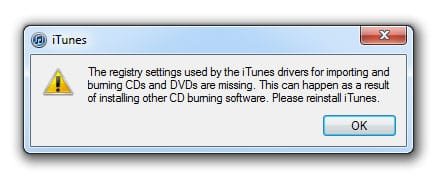
The only issue with the registry setting change is that iTunes give me an error when it opens.

iTunes still imports my CD's from the drive though, even though I get the error when I open iTunes.

Let me find the registry setting I had to change.

on this page,
http://support.microsoft.com/kb/314060
scroll down to Windows Vista, then follow the instructions for deleting the upper and lower filters, then reboot.
 

Attachments

  • itunes-error.jpg
    itunes-error.jpg
    28 KB · Views: 6

My Computer My Computer

At a glance

Windows 7 Ultimate 64bitIntel i7 3770K16GB DDR3 1333 Corsair XMS3XFX HD6950 2GB EyeFinity
Computer Manufacturer/Model Number
HAL-9000
OS
Windows 7 Ultimate 64bit
CPU
Intel i7 3770K
Motherboard
Asus Sabertooth Z77
Memory
16GB DDR3 1333 Corsair XMS3
Graphics Card(s)
XFX HD6950 2GB EyeFinity
Sound Card
Logitech G35 & Sennheiser PC135 & VIA HD
Monitor(s) Displays
23" HP 2310e, 23" Samsung B2230, 21.5" Viewsonic
Screen Resolution
5760x1080
Hard Drives
16TB of Storage
128GB & 256GB Crucial M4 SSD's, 2X 1TB WD Black, 3x 2TB WD, 3x 2TB Samsung F4, 1.5TB Seagate, WD 500GB,
PSU
Antec True Power New 650watt
Case
Cooler Master HAF-932
Cooling
Corsair H60 Hydro Cooler, 3x 230mm Fans, 2x120mm Fan
Keyboard
Logitech G15 and G13
Mouse
Logitech G700 Gaming Mouse
Internet Speed
50/10 Mbit
Other Info
Speakers : Alesis M1 Active Mk2 Studio Monitors , APC RS 1200 UPS, HP 4500DN Color Laser, HP P1006 mono Laser, Kodak 8500 Dye-Sub, Epson 1280 inkjet, Epson Worforce 610 MFC
I don't have windows vista I have Windows 7 and the page that link sends me to only says use the hardware and device troubleshooter for windows 7...which i've alrdy done, and done with other programs and it always tells me everything is working fine.
 

My Computer My Computer

At a glance

Windows 7 Home Premium 64bitIntel Core 2 Quad Q9300 2.50GHz5GBNvidia GeForce 8800 GT
Computer Manufacturer/Model Number
HP
OS
Windows 7 Home Premium 64bit
CPU
Intel Core 2 Quad Q9300 2.50GHz
Memory
5GB
Graphics Card(s)
Nvidia GeForce 8800 GT
Sound Card
Realtek High Definition Audio
Monitor(s) Displays
HP w2207 Wide LCD
Hard Drives
1 450GB
I don't have windows vista I have Windows 7 and the page that link sends me to only says use the hardware and device troubleshooter for windows 7...which i've alrdy done, and done with other programs and it always tells me everything is working fine.

I know you have Windows 7. Just follow the instructions in the Windows Vista section.
 

My Computer My Computer

At a glance

Windows 7 Ultimate 64bitIntel i7 3770K16GB DDR3 1333 Corsair XMS3XFX HD6950 2GB EyeFinity
Computer Manufacturer/Model Number
HAL-9000
OS
Windows 7 Ultimate 64bit
CPU
Intel i7 3770K
Motherboard
Asus Sabertooth Z77
Memory
16GB DDR3 1333 Corsair XMS3
Graphics Card(s)
XFX HD6950 2GB EyeFinity
Sound Card
Logitech G35 & Sennheiser PC135 & VIA HD
Monitor(s) Displays
23" HP 2310e, 23" Samsung B2230, 21.5" Viewsonic
Screen Resolution
5760x1080
Hard Drives
16TB of Storage
128GB & 256GB Crucial M4 SSD's, 2X 1TB WD Black, 3x 2TB WD, 3x 2TB Samsung F4, 1.5TB Seagate, WD 500GB,
PSU
Antec True Power New 650watt
Case
Cooler Master HAF-932
Cooling
Corsair H60 Hydro Cooler, 3x 230mm Fans, 2x120mm Fan
Keyboard
Logitech G15 and G13
Mouse
Logitech G700 Gaming Mouse
Internet Speed
50/10 Mbit
Other Info
Speakers : Alesis M1 Active Mk2 Studio Monitors , APC RS 1200 UPS, HP 4500DN Color Laser, HP P1006 mono Laser, Kodak 8500 Dye-Sub, Epson 1280 inkjet, Epson Worforce 610 MFC
Oh ok cool thanks
 

My Computer My Computer

At a glance

Windows 7 Home Premium 64bitIntel Core 2 Quad Q9300 2.50GHz5GBNvidia GeForce 8800 GT
Computer Manufacturer/Model Number
HP
OS
Windows 7 Home Premium 64bit
CPU
Intel Core 2 Quad Q9300 2.50GHz
Memory
5GB
Graphics Card(s)
Nvidia GeForce 8800 GT
Sound Card
Realtek High Definition Audio
Monitor(s) Displays
HP w2207 Wide LCD
Hard Drives
1 450GB
Close thread please.

Tried everything, nothing would work. Ended up buying a new drive.

Thanks for your help everyone!
 

My Computer My Computer

At a glance

Windows 7 Home Premium 64bitIntel Core 2 Quad Q9300 2.50GHz5GBNvidia GeForce 8800 GT
Computer Manufacturer/Model Number
HP
OS
Windows 7 Home Premium 64bit
CPU
Intel Core 2 Quad Q9300 2.50GHz
Memory
5GB
Graphics Card(s)
Nvidia GeForce 8800 GT
Sound Card
Realtek High Definition Audio
Monitor(s) Displays
HP w2207 Wide LCD
Hard Drives
1 450GB
Get your problem solved untouchablejen? The problem isn't hardware so i hope you didn't throw out your drive.

So i have the exact same issue with my Blu-Ray drive (HL-DT-ST BDDVDRW GGC-H20L) in my HP m9458f.
Reply with a post or message me and i'll share the info.
Either way, i'll post details here tomorrow so that the next unlucky guy/gal can have a resolution to the problem. Sorry, but it's after midnight now and i gotta get some zzz's.
 

My Computer My Computer

At a glance

Windows 7 Home Premium 64bit
OS
Windows 7 Home Premium 64bit
Couldn't stop thinkin about it so i came back to post this...
After some more searches i realize this person's issue has been resolved, not solved, but i know someone else will have the same problem sooner or later.

I used the methods in these webpages.

CD or DVD Cannot Burn Discs (Windows*7) HP Pavilion Elite m9458f Desktop PC | HP® Support
The CD drive or the DVD drive does not work as expected on a computer that is running Windows Vista

I've encountered this type of issue twice. Fixed both times by deleting upper and lower filters in the registry using regedit.

Both times, a certain "mystery driver" appeared without my knowledge of how i acquired it. The suspect drivers were;

1) afd.sys, which seemed to be connected to a fake DRVSTORE folder and a GEARAspi file in my C:\windows>system32>drivers directory.

2) pxHLPA64.sys (sorry, no 'educational' memories of the details) Had to do with SONIC folder in my C:\windows>system32>drivers

I have no idea of the cause of the first event.
Pretty sure the second time was a result of downloading and installing the newest version of itunes (v 10.7).

I hope my input helps someone at some point. Even if it only helps them realize that someone out there has worse grammar and forum skill than them.
 

My Computer My Computer

At a glance

Windows 7 Home Premium 64bit
OS
Windows 7 Home Premium 64bit
Back
Top