Hmm RAM...

hayper

New member
Local time
12:35 AM
Messages
26
Location
BiH Zenica
i'm a litle bit confused about this..


when i start my comp use of RAM is about 600-700 Mb... normaly...

with msn,xf,antivirus,ati catalist control... is about 710Mb...

leave that
i go out and back 1-2 hours later go to task menager and se usage of ram about 1,20 Gb... suprised a lot
restart comp and everything goes from the begining...


how to resolve this...

/ my dad doesn't touch my comp,comp is alone.../
 

My Computer

Computer Manufacturer/Model Number
asus
OS
windows 7
CPU
core 2 duo 2,53
Motherboard
p5kpl/epu
Memory
2 gb ddr2
Graphics Card(s)
Nvidia GEForce 430 GT 1024 mb ddr2
Sound Card
realtek and c-media
Monitor(s) Displays
19 wide Asus
Screen Resolution
1280/1024
Hard Drives
350+ gb
PSU
/?
Case
stock
Cooling
6 air
Internet Speed
4096/512
Thats fairly common. My laptop uses about 600 at first boot and after about 10 minutes its up to about 1.10gb. If I go and watch a movie and come back its around 1.50gb, you have nothing to fear as long as your system doesn't start lagging or freezing up.

You have RAM for it to be used, not for it to sit there un-used. :)
 

My Computer

Computer Manufacturer/Model Number
Custom | Whitebox
OS
Windows 7 Ultimate, OS X 10.7, Ubuntu 11.04
CPU
Intel E6750 @ 3.80GHz
Motherboard
Gigabyte GA-EP45-UD3L (Revision 1.1)
Memory
2x2GB & 2x1GB (6GB) OCZ Reaper 1066MHz @ 1080MHz
Graphics Card(s)
EVGA nVidia GTX 260 896mb (216 Core) FTW Edition
Sound Card
Realtek ALC888
Monitor(s) Displays
21" VIZIO TV
Screen Resolution
1680x1050 @ 60Hz
Hard Drives
Western Digital WD6401AALS - 640GB
Hitachi HDP725016GLA380 - 160GB
PSU
Corsair 750W
Case
NZXT Nemesis Elite
Cooling
Thermaltake SpinQ
Keyboard
Logitech Wireless S520
Mouse
Logitech Wireless S520 - Microsoft Wireless Arc Mouse
Internet Speed
Download: 20mbps, Upload: 3mbps
The system preloads things that you commonly use into RAM so that they will start faster when you launch them. In the event that you need to run something that needs the RAM, Windows will simply overwrite the stuff that it cached into RAM.

It's a philosophy that having RAM sitting around and doing nothing is a waste...and it's better to use it instead.
 

My Computer

Computer Manufacturer/Model Number
Self-Built in July 2009
OS
Windows 7 Ultimate x64
CPU
Intel Q9550 2.83Ghz OC'd to 3.40Ghz
Motherboard
Gigabyte GA-EP45-UD3R rev. 1.1, F12 BIOS
Memory
8GB G.Skill PI DDR2-800, 4-4-4-12 timings
Graphics Card(s)
EVGA 1280MB Nvidia GeForce GTX570
Sound Card
Realtek ALC899A 8 channel onboard audio
Monitor(s) Displays
23" Acer x233H
Screen Resolution
1920x1080
Hard Drives
Intel X25-M 80GB Gen 2 SSD
Western Digital 1TB Caviar Black, 32MB cache. WD1001FALS
PSU
Corsair 620HX modular
Case
Antec P182
Cooling
stock
Keyboard
ABS M1 Mechanical
Mouse
Logitech G9 Laser Mouse
Internet Speed
15/2 cable modem
Other Info
Windows and Linux enthusiast. Logitech G35 Headset.

My Computer

OS
Windows 8 Professional x64
CPU
Intel Core i7-3770K @4.5 GHz
Motherboard
Asus Sabertooth Z77
Memory
16GB G.Skill Ripjaws DDR3-1600
Graphics Card(s)
Gigabyte GeForce GTX 670 OC
Sound Card
Realtek
Monitor(s) Displays
HP 2711x 27" LED
Screen Resolution
1920 X 1080p
Hard Drives
Crucial m4 256GB SSD (system)
Seagate Barracuda XT 2TB 7200 RPM (storage)
PSU
Strider Gold Evolution ST1000-G
Case
Raven RV01
Cooling
Noctua NH-D14
Keyboard
Logitech K800
Mouse
Logitech Performance Mouse MX
Internet Speed
FIOS - 75/35 Mbps
Other Info
Pioneer black internal CD/DVD/BD read/write
Logitech Z506 5.1 speakers
--------------------------------------------------
Alienware X51/i7-3770/EVGA GTX 660ti FTW/16GB 1600/Blu-ray/2TB SATA III HD
The system preloads things that you commonly use into RAM so that they will start faster when you launch them. In the event that you need to run something that needs the RAM, Windows will simply overwrite the stuff that it cached into RAM.

It's a philosophy that having RAM sitting around and doing nothing is a waste...and it's better to use it instead.

oky... just to know... thx!
 

My Computer

Computer Manufacturer/Model Number
asus
OS
windows 7
CPU
core 2 duo 2,53
Motherboard
p5kpl/epu
Memory
2 gb ddr2
Graphics Card(s)
Nvidia GEForce 430 GT 1024 mb ddr2
Sound Card
realtek and c-media
Monitor(s) Displays
19 wide Asus
Screen Resolution
1280/1024
Hard Drives
350+ gb
PSU
/?
Case
stock
Cooling
6 air
Internet Speed
4096/512
The system preloads things that you commonly use into RAM so that they will start faster when you launch them. In the event that you need to run something that needs the RAM, Windows will simply overwrite the stuff that it cached into RAM.

It's a philosophy that having RAM sitting around and doing nothing is a waste...and it's better to use it instead.

hmm. problem oppose the fact that you said ...last night i leave my comp maybe 3 or 4 hours... and i come start movie watch him... when i'm finished i try to start call of duty 2 and i was sow a lag a lot of lag... hmm alt+F4 barely .. and start task menager....what i see astonished me... 1,86 Gb of ram is on use... i have 2 gb of ram.. i don't know how is he start cod 2... cod 2 using maybe 300-400 mb... that isn't a prepare ram for start beter... now i need a solution for problem... how to disable that for prepareing ram to start beter... need help!

man i thx u boys a lot! cya
 

My Computer

Computer Manufacturer/Model Number
asus
OS
windows 7
CPU
core 2 duo 2,53
Motherboard
p5kpl/epu
Memory
2 gb ddr2
Graphics Card(s)
Nvidia GEForce 430 GT 1024 mb ddr2
Sound Card
realtek and c-media
Monitor(s) Displays
19 wide Asus
Screen Resolution
1280/1024
Hard Drives
350+ gb
PSU
/?
Case
stock
Cooling
6 air
Internet Speed
4096/512
Ram Issue

have you checked your virtual memory settings it sounds like you have the swap file turned off.
 

My Computer

Computer Manufacturer/Model Number
Custom Built
OS
Windows 7 Ultimate 32 bit
CPU
AMD Athlon 64 X2 4200+ Overclocked to 3.0Ghz
Motherboard
Biostar TF560 A2+
Memory
2 Gigs of G.Skill DDR2 800
Graphics Card(s)
HIS ATI Radeon HD 2600 Pro With IceQ cooler
Sound Card
6.1 Channel Sound Blaster Live 24 Bit
Monitor(s) Displays
Dual 20.5 " LG Flatrons W2052TO
Screen Resolution
1152x864
Hard Drives
Dual 36 Gig 10,000 RPM Raptors
PSU
430 watt Seasonic 80%+ Dual 12v Rails 2x80mm fans
Case
CHIEFMAX YA-5X
Cooling
4-80mm case fans 1-140mm case fan freezer 64 Pro CPU cooler
Keyboard
Saitek Eclipse II
Mouse
A4Tech wireless battery free optical scroll mouse
Internet Speed
1.5 meg down 384 up
Other Info
Logisys LED fan/light controller and dual 16" LED sticks mounted inside top of case all fans are LED all lighting is blue
DVD RW and CD RW both and Memory card reader
hmm. problem oppose the fact that you said ...last night i leave my comp maybe 3 or 4 hours... and i come start movie watch him... when i'm finished i try to start call of duty 2 and i was sow a lag a lot of lag... hmm alt+F4 barely .. and start task menager....what i see astonished me... 1,86 Gb of ram is on use... i have 2 gb of ram.. i don't know how is he start cod 2... cod 2 using maybe 300-400 mb... that isn't a prepare ram for start beter... now i need a solution for problem... how to disable that for prepareing ram to start beter... need help!

man i thx u boys a lot! cya

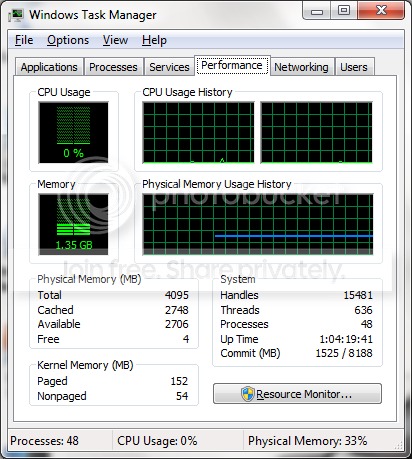
Your post is a little hard to read...but when you look at Task Manager there are a few things that you have to look at. For example, under Physical Memory...you will see a certain amount of Free Memory...but right above that you will see an entry for Available and Cached Memory.

Looking at the image below, you will see that while I only have 4MB free out of 4GB of RAM....I've got 2.7GB which is Cached and 2.7GB which is Available. Therefore, if I launched something which needed 600MB of RAM, Windows would simply use space that it's using for the cache and thus performance would not drop.
TaskManager-1.png


In your case, you could have an application running which has a memory leak and is actually "consuming" the RAM and thus your task manager would not show it as being cached or available...but rather simply in use. If this were the case, you would get massive lag launching other applications.

Hopefully that makes sense.
 

My Computer

Computer Manufacturer/Model Number
Self-Built in July 2009
OS
Windows 7 Ultimate x64
CPU
Intel Q9550 2.83Ghz OC'd to 3.40Ghz
Motherboard
Gigabyte GA-EP45-UD3R rev. 1.1, F12 BIOS
Memory
8GB G.Skill PI DDR2-800, 4-4-4-12 timings
Graphics Card(s)
EVGA 1280MB Nvidia GeForce GTX570
Sound Card
Realtek ALC899A 8 channel onboard audio
Monitor(s) Displays
23" Acer x233H
Screen Resolution
1920x1080
Hard Drives
Intel X25-M 80GB Gen 2 SSD
Western Digital 1TB Caviar Black, 32MB cache. WD1001FALS
PSU
Corsair 620HX modular
Case
Antec P182
Cooling
stock
Keyboard
ABS M1 Mechanical
Mouse
Logitech G9 Laser Mouse
Internet Speed
15/2 cable modem
Other Info
Windows and Linux enthusiast. Logitech G35 Headset.
hmm. problem oppose the fact that you said ...last night i leave my comp maybe 3 or 4 hours... and i come start movie watch him... when i'm finished i try to start call of duty 2 and i was sow a lag a lot of lag... hmm alt+F4 barely .. and start task menager....what i see astonished me... 1,86 Gb of ram is on use... i have 2 gb of ram.. i don't know how is he start cod 2... cod 2 using maybe 300-400 mb... that isn't a prepare ram for start beter... now i need a solution for problem... how to disable that for prepareing ram to start beter... need help!

man i thx u boys a lot! cya

Your post is a little hard to read...but when you look at Task Manager there are a few things that you have to look at. For example, under Physical Memory...you will see a certain amount of Free Memory...but right above that you will see an entry for Available and Cached Memory.

Looking at the image below, you will see that while I only have 4MB free out of 4GB of RAM....I've got 2.7GB which is Cached and 2.7GB which is Available. Therefore, if I launched something which needed 600MB of RAM, Windows would simply use space that it's using for the cache and thus performance would not drop.
TaskManager-1.png


In your case, you could have an application running which has a memory leak and is actually "consuming" the RAM and thus your task manager would not show it as being cached or available...but rather simply in use. If this were the case, you would get massive lag launching other applications.

Hopefully that makes sense.

i'm bosnian and my english isn't to well...
hmm... is there posible to app run it by it self?start up app is ok... i know for that and a most of it i turn it off but leaving comp and coming again and have a masive lag on it that is wrong.. that ram for prepare to work isn't working here! can that option turn off? man

cya
 

My Computer

Computer Manufacturer/Model Number
asus
OS
windows 7
CPU
core 2 duo 2,53
Motherboard
p5kpl/epu
Memory
2 gb ddr2
Graphics Card(s)
Nvidia GEForce 430 GT 1024 mb ddr2
Sound Card
realtek and c-media
Monitor(s) Displays
19 wide Asus
Screen Resolution
1280/1024
Hard Drives
350+ gb
PSU
/?
Case
stock
Cooling
6 air
Internet Speed
4096/512


see this... and ill upload when ram is overloaded
 

My Computer

Computer Manufacturer/Model Number
asus
OS
windows 7
CPU
core 2 duo 2,53
Motherboard
p5kpl/epu
Memory
2 gb ddr2
Graphics Card(s)
Nvidia GEForce 430 GT 1024 mb ddr2
Sound Card
realtek and c-media
Monitor(s) Displays
19 wide Asus
Screen Resolution
1280/1024
Hard Drives
350+ gb
PSU
/?
Case
stock
Cooling
6 air
Internet Speed
4096/512
Back
Top