
Hmmm This should be fun...

B3astiie

New member
Local time
4:43 PM
Messages
92
I have a Dell Inspiron 1721 64bit 4gig laptop. Three nights ago I saw i had two updates available one being Microsoft Silver Light download and internet explorer 9beta.

I let them download and install and decided to have it wait 20 minutes before it restarts so i can watch the Rock return on monday night raw segment via youtube.

After I was done, it restarted I walked out the room, came back and saw a lit up black screen. I figured it was installing the update or finish restarting and loading up. So i went made a sandwhich watch smallville came back an hour later only to find that it was still dark.

I powered it off and back on, the screen lit up but it was just a black screen. The CD tray light is lit but won't open, the fan starts up momentarily and then stops, the power light is on. I waited tried it again, finally it boots goes to windows, saying its finshing the update, it finishes I log in, black lit up screen again.

I restarted and it won't give me a dell screen just goes black again like what i first mention, sometime with a light sometime with no light. Sometime it'll show the dell screen like its gonna boot up then goes black. Lately its just starts like it gonna start and then the fan stops lights still lit but has a black screen with no light.

So i hit the power button and the FN key and this is what i got: the num lock and cap lock light blinking and the last light by the power button solid.

Dell charged me 62 bucks to only run the same test i been doing after promising they can fix it before they charged me. I specifically ask them 4 times that if I pay this it will get fix they said yes.

Do anyone have a clue as to whats going on?

Here is all that i have tried:

1. I reseated, relocated the memory tons of time.
2. Tried it with and without the battery and or power cord.
3. Tried hitting F12, F10, F8 and nothing
 

My Computer

Computer type
PC/Desktop
Computer Manufacturer/Model Number
Toshiba Sattelite L645D
OS
Windows 7 64 bit
CPU
AMD Turion 2 N550 Dual Core Processor 2.60 GHz
Memory
8192 MBytes
Graphics Card(s)
ATI Mobility Radeon Hd 4200 series
Monitor(s) Displays
1
Screen Resolution
1366X768
Hard Drives
C: 286GBs
Internet Speed
12
Other Info
Let me know if you need anything else. I need to find a better spec reader.
Have you tried system restore?
 

My Computer

Computer Manufacturer/Model Number
HCL
OS
Winbdows 7 ultimate x64 | Ubuntu 12.04 x64 LTS
CPU
Core 2 Duo e7400 @ 2.90GHz
Motherboard
Gigabyte G31M-ES2L
Memory
3GB DDR2
Graphics Card(s)
Asus Nvidia GTX 560Ti 1GB
Sound Card
On-board
Monitor(s) Displays
HCL eZeeBee 18.5" LCD
Screen Resolution
1366x768 @ 60Hz
Hard Drives
Western Digital 320GB
PSU
Corsair CX500 V2 500W
Cooling
Stock
Keyboard
Stock
Mouse
Stock
Internet Speed
15-25kBps D/L | 10kBps U/L | Hey Don't laugh
can't get to that point it wont' respond to F10, F12 etc. just a blank screen when powered on. no dell logo no nothing just a blank screen.
 

My Computer

Computer type
PC/Desktop
Computer Manufacturer/Model Number
Toshiba Sattelite L645D
OS
Windows 7 64 bit
CPU
AMD Turion 2 N550 Dual Core Processor 2.60 GHz
Memory
8192 MBytes
Graphics Card(s)
ATI Mobility Radeon Hd 4200 series
Monitor(s) Displays
1
Screen Resolution
1366X768
Hard Drives
C: 286GBs
Internet Speed
12
Other Info
Let me know if you need anything else. I need to find a better spec reader.
Can you get to safe mode? Do you've the windows installation/repair disc?
Does your laptop came with a hidden partition or some kind of recovery software to restore it to factory settings? If yes, have you tried it? Don't worry about the data, there're many ways to back that up.
 

My Computer

Computer Manufacturer/Model Number
HCL
OS
Winbdows 7 ultimate x64 | Ubuntu 12.04 x64 LTS
CPU
Core 2 Duo e7400 @ 2.90GHz
Motherboard
Gigabyte G31M-ES2L
Memory
3GB DDR2
Graphics Card(s)
Asus Nvidia GTX 560Ti 1GB
Sound Card
On-board
Monitor(s) Displays
HCL eZeeBee 18.5" LCD
Screen Resolution
1366x768 @ 60Hz
Hard Drives
Western Digital 320GB
PSU
Corsair CX500 V2 500W
Cooling
Stock
Keyboard
Stock
Mouse
Stock
Internet Speed
15-25kBps D/L | 10kBps U/L | Hey Don't laugh
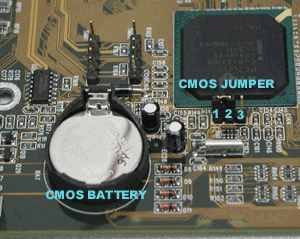
Perhaps a CMOS reset? Remove the little battery clock from the laptop for about 40mn, but this will have to be done unplug without any power wired & battery powered.

You'll have to put your hands under the laptop and a screw-driver needs.

Search keyword "CMOS Reset"...you'll have some results, just in case

Of course if nothing else can be done...for a repair CD boot.
 

Attachments

  • cmosbattery_jumpers.jpg
    cmosbattery_jumpers.jpg
    11.2 KB · Views: 959

My Computer

Computer type
PC/Desktop
Computer Manufacturer/Model Number
Custom Build
OS
Windows 7 Professional SP1 - x64 [Non-UEFI Boot]
CPU
Ivy Bridge Core i5 3570K (Delidded)
Motherboard
Asus P8Z77-V LE PLUS
Memory
G.Skill "Ares" DDR3 PC3-12800 - 1600MHz (16Gb)
Graphics Card(s)
Asus Dual-RX480-O4G
Sound Card
Creative Sound Blaster Z w/5.1 sound system
Monitor(s) Displays
Asus IPS 23"
Screen Resolution
16/9
Hard Drives
Internal:
500Go Sata 6Gb/s (x2)
500Go Sata 3Gb/s (x2)
SSD 60Go Sata 6Gb/s
PSU
In Win C 900W Series 80+ Platinum
Case
Thermaltake Chaser A71
Cooling
Custom Water Cooling Loop
Keyboard
Cooler Master QuickFire XTi
Mouse
Razer Imperator 2012 (4G)
Antivirus
MSE
Browser
IE 11.0.xxx Rtm
Other Info
"Raid0" with Intel Smart Response Technology (HDD/SSD)
the only option ican try out of all of this is the cmos reset. because when i power on there is only a blank screen with no options and can't go to safemode or boot any cds it's impossible to reformat or restore my computer.

ps is there a guide as to how to do the cmos reset for a dell inspiron 1721
 

My Computer

Computer type
PC/Desktop
Computer Manufacturer/Model Number
Toshiba Sattelite L645D
OS
Windows 7 64 bit
CPU
AMD Turion 2 N550 Dual Core Processor 2.60 GHz
Memory
8192 MBytes
Graphics Card(s)
ATI Mobility Radeon Hd 4200 series
Monitor(s) Displays
1
Screen Resolution
1366X768
Hard Drives
C: 286GBs
Internet Speed
12
Other Info
Let me know if you need anything else. I need to find a better spec reader.
try booting the system without battery ie take out the battery and give direct power to your system through the adapter see if does something
 

My Computer

Computer Manufacturer/Model Number
dell inspiron
OS
windows 7 home basic 64 bit
CPU
intel 13
Memory
3gb ram
Graphics Card(s)
500 mb ati
the only option ican try out of all of this is the cmos reset. because when i power on there is only a blank screen with no options and can't go to safemode or boot any cds it's impossible to reformat or restore my computer.

ps is there a guide as to how to do the cmos reset for a dell inspiron 1721

Keyword...on google. I do not think it is allowed here to give the links public.

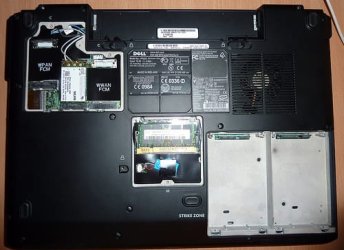
It should be near the RAM side, not so far and accessible. there's a jumper + Cmos Battery.
(The photo of the model here is Dell Inspiron 1720.)

Here there's a download service manual for 2.45£ in case you're not sure of yourself:
http://www.user-guides.co.uk/download/reset/resetcmos/reset-cmos-dell-inspiron-1721.html
 

Attachments

  • 3987784447_529754c171.jpg
    3987784447_529754c171.jpg
    29.1 KB · Views: 90
Last edited:

My Computer

Computer type
PC/Desktop
Computer Manufacturer/Model Number
Custom Build
OS
Windows 7 Professional SP1 - x64 [Non-UEFI Boot]
CPU
Ivy Bridge Core i5 3570K (Delidded)
Motherboard
Asus P8Z77-V LE PLUS
Memory
G.Skill "Ares" DDR3 PC3-12800 - 1600MHz (16Gb)
Graphics Card(s)
Asus Dual-RX480-O4G
Sound Card
Creative Sound Blaster Z w/5.1 sound system
Monitor(s) Displays
Asus IPS 23"
Screen Resolution
16/9
Hard Drives
Internal:
500Go Sata 6Gb/s (x2)
500Go Sata 3Gb/s (x2)
SSD 60Go Sata 6Gb/s
PSU
In Win C 900W Series 80+ Platinum
Case
Thermaltake Chaser A71
Cooling
Custom Water Cooling Loop
Keyboard
Cooler Master QuickFire XTi
Mouse
Razer Imperator 2012 (4G)
Antivirus
MSE
Browser
IE 11.0.xxx Rtm
Other Info
"Raid0" with Intel Smart Response Technology (HDD/SSD)
So I tried reseting the Cmos now the activity lights come up, everything sounds like it's about to to boot but the screen is still black and the noise comes to a stop fan still running though. FN + Power test has the num lock and caplock lights flashing.
 

My Computer

Computer type
PC/Desktop
Computer Manufacturer/Model Number
Toshiba Sattelite L645D
OS
Windows 7 64 bit
CPU
AMD Turion 2 N550 Dual Core Processor 2.60 GHz
Memory
8192 MBytes
Graphics Card(s)
ATI Mobility Radeon Hd 4200 series
Monitor(s) Displays
1
Screen Resolution
1366X768
Hard Drives
C: 286GBs
Internet Speed
12
Other Info
Let me know if you need anything else. I need to find a better spec reader.
any ideas?

also the cd try will not open
 

My Computer

Computer type
PC/Desktop
Computer Manufacturer/Model Number
Toshiba Sattelite L645D
OS
Windows 7 64 bit
CPU
AMD Turion 2 N550 Dual Core Processor 2.60 GHz
Memory
8192 MBytes
Graphics Card(s)
ATI Mobility Radeon Hd 4200 series
Monitor(s) Displays
1
Screen Resolution
1366X768
Hard Drives
C: 286GBs
Internet Speed
12
Other Info
Let me know if you need anything else. I need to find a better spec reader.
Anyway for you to flash again the bios from usb key...?

How many times have tried booting after CMOS reset?
 

My Computer

Computer type
PC/Desktop
Computer Manufacturer/Model Number
Custom Build
OS
Windows 7 Professional SP1 - x64 [Non-UEFI Boot]
CPU
Ivy Bridge Core i5 3570K (Delidded)
Motherboard
Asus P8Z77-V LE PLUS
Memory
G.Skill "Ares" DDR3 PC3-12800 - 1600MHz (16Gb)
Graphics Card(s)
Asus Dual-RX480-O4G
Sound Card
Creative Sound Blaster Z w/5.1 sound system
Monitor(s) Displays
Asus IPS 23"
Screen Resolution
16/9
Hard Drives
Internal:
500Go Sata 6Gb/s (x2)
500Go Sata 3Gb/s (x2)
SSD 60Go Sata 6Gb/s
PSU
In Win C 900W Series 80+ Platinum
Case
Thermaltake Chaser A71
Cooling
Custom Water Cooling Loop
Keyboard
Cooler Master QuickFire XTi
Mouse
Razer Imperator 2012 (4G)
Antivirus
MSE
Browser
IE 11.0.xxx Rtm
Other Info
"Raid0" with Intel Smart Response Technology (HDD/SSD)
i ugplugged the cmos for about an hour

and exaxtly how do i flash bios from usb and what would i need?
 

My Computer

Computer type
PC/Desktop
Computer Manufacturer/Model Number
Toshiba Sattelite L645D
OS
Windows 7 64 bit
CPU
AMD Turion 2 N550 Dual Core Processor 2.60 GHz
Memory
8192 MBytes
Graphics Card(s)
ATI Mobility Radeon Hd 4200 series
Monitor(s) Displays
1
Screen Resolution
1366X768
Hard Drives
C: 286GBs
Internet Speed
12
Other Info
Let me know if you need anything else. I need to find a better spec reader.
anyone?
 

My Computer

Computer type
PC/Desktop
Computer Manufacturer/Model Number
Toshiba Sattelite L645D
OS
Windows 7 64 bit
CPU
AMD Turion 2 N550 Dual Core Processor 2.60 GHz
Memory
8192 MBytes
Graphics Card(s)
ATI Mobility Radeon Hd 4200 series
Monitor(s) Displays
1
Screen Resolution
1366X768
Hard Drives
C: 286GBs
Internet Speed
12
Other Info
Let me know if you need anything else. I need to find a better spec reader.
Drivers and Downloads

If you don't have a floppy drive, you can probably prepare a bootable DOS USB flash drive using the utility from HP:

HP Drive Key Boot Utility - HP Business Support Center

I'm not optimistic that reflashing the BIOS will help you, though. My guess is that you suffered some sort of hardware failure, unconnected with your recent downloads.

Good luck.
 

My Computer

Computer Manufacturer/Model Number
homegrown
OS
Windows 7 Pro X64 SP1
CPU
Intel Core I7-3930k
Motherboard
Asus P9X79 Pro
Memory
16 GB Gskill DDR3-2133
Graphics Card(s)
eVGA GTX680
Sound Card
Creative X-Fi Titanium
Monitor(s) Displays
As PA246Q
Screen Resolution
1920 X 1200
Hard Drives
Corsair Force GT, 120 GB
WDC 1.5TB Caviar Black
PSU
PCP&C Silencer 750 Crossfire
Case
Silverstone FT02
Cooling
Noctua NH-D14
Keyboard
cheap Logitech USB
Mouse
Microsoft Intellimouse Explorer (old optical) USB
Internet Speed
6Mb cable
Other Info
Pioneer BDR-205
Samsung SH-203B
Monsoon 5.1 speakers
thank you bro, im gonna go for it. and what ur guessing is what im afraid of...lol incase i do end up buying a new computer what would u recommend for 800 or below
 

My Computer

Computer type
PC/Desktop
Computer Manufacturer/Model Number
Toshiba Sattelite L645D
OS
Windows 7 64 bit
CPU
AMD Turion 2 N550 Dual Core Processor 2.60 GHz
Memory
8192 MBytes
Graphics Card(s)
ATI Mobility Radeon Hd 4200 series
Monitor(s) Displays
1
Screen Resolution
1366X768
Hard Drives
C: 286GBs
Internet Speed
12
Other Info
Let me know if you need anything else. I need to find a better spec reader.
thank you bro, im gonna go for it. and what ur guessing is what im afraid of...lol incase i do end up buying a new computer what would u recommend for 800 or below

I'm not sure that this is the right service, but it may be:

$100 Dell Laptop Repair, Dell Repair, Laptop Repair Notebook Services | Dell Repair Parts-People.com

$100 for diagnosis and labor. (Parts extra.) My boss used them on a Dell notebook he'd acquired through eBay, which had worked for a long time but suddenly would not boot. Turned out to be a failed DIMM. (The machine wouldn't display any startup stuff at all.)

I'm not up-to-date in laptop recommendations, should you need to buy a new one. I've been satisfied with my cheap ($350) Compaq CQ-105NR. It's about 30 months old. It's not a desktop replacement, but it has better graphics than some (nVidia 8200m). It upgraded to Win7 X86 with only a little trouble (mainly due to its nVidia chipset). I mainly use my desktop, which currently uses an I7-920 OC'd to 3.8 GHz.
 

My Computer

Computer Manufacturer/Model Number
homegrown
OS
Windows 7 Pro X64 SP1
CPU
Intel Core I7-3930k
Motherboard
Asus P9X79 Pro
Memory
16 GB Gskill DDR3-2133
Graphics Card(s)
eVGA GTX680
Sound Card
Creative X-Fi Titanium
Monitor(s) Displays
As PA246Q
Screen Resolution
1920 X 1200
Hard Drives
Corsair Force GT, 120 GB
WDC 1.5TB Caviar Black
PSU
PCP&C Silencer 750 Crossfire
Case
Silverstone FT02
Cooling
Noctua NH-D14
Keyboard
cheap Logitech USB
Mouse
Microsoft Intellimouse Explorer (old optical) USB
Internet Speed
6Mb cable
Other Info
Pioneer BDR-205
Samsung SH-203B
Monsoon 5.1 speakers
Back
Top