Home folder Permission and Security

torszula

New member
Local time
11:47 PM
Messages
10
I want to create a home folder that will have 5 folders inside that for the different users. What permissions and security rights are necessary for the home folder and the individual folders inside of it? I want only the user of that folder to be able to access the files inside of it.
 

My Computer

OS
Windows 7 Premium 64
I want to create a home folder that will have 5 folders inside that for the different users. What permissions and security rights are necessary for the home folder and the individual folders inside of it? I want only the user of that folder to be able to access the files inside of it.

Are these separate machines for each user?
 

My Computer

Computer type
PC/Desktop
Computer Manufacturer/Model Number
Home built
OS
Windows 7 Ult, Windows 8.1 Pro,
CPU
Q9650-4.275GHz, E8600 4.5GHz, E6750-3.8GHz
Motherboard
Evga 780i FTW
Memory
G.Skill PC2 9600 1200Mhz 5 5 5 15 2T
Graphics Card(s)
GTX480
Sound Card
Asus Xonar D2
Monitor(s) Displays
HannsG
Screen Resolution
1680X1050
Hard Drives
GSkill Phoenix Pro 120GB SSD
PSU
ThermalTake Toughpower 1000Watt modular
Case
ThermalTake XaserV
Cooling
Xigmatek S1283
Keyboard
Logitech G15
Mouse
Logitech G9
Internet Speed
T1

There is really no per user/machine share options, the ones you see are for multiple users on the same machine which is hardly ever the case.

The only workable option for this on a per machine basis is to set up a Homegroup between only the trusted machines which require full access to all files in the network.

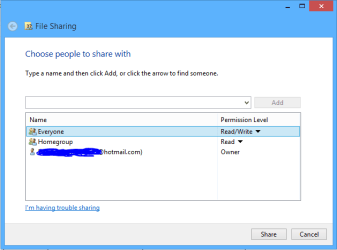
Setting up a Homegroup on certain machines will prevent the other workgroup machines from gaining access to all shared files and folders unless they are added to the Public folders or shared by adding "Everyone" using the Homegroup style sharing options, picture below.

You don't need to adjust the Security tab for this type of sharing, only the C:>Users folder requires share permissions through the Advanced sharing button which is usually the default setting.

The advantage to this is that only those Library's which are shared with "Everyone" will be viewable outside of the Homegroup.

You can also share outside the Homegroup by placing a file or folder into one of the Public folders provided that you enable sharing through the "Advanced tab" on the C:>Users>Public folder.

So just leave the limited access users in the Workgroup out of the Homegroup and make sure that all machines in the network are joined to the common Workgroup.

This may not give you the type of per user sharing that you want but it will give you some control over who see's what in a network.

 

Attachments

  • share with Everyone.PNG
    share with Everyone.PNG
    6.7 KB · Views: 1
Last edited:

My Computer

Computer type
PC/Desktop
Computer Manufacturer/Model Number
Home built
OS
Windows 7 Ult, Windows 8.1 Pro,
CPU
Q9650-4.275GHz, E8600 4.5GHz, E6750-3.8GHz
Motherboard
Evga 780i FTW
Memory
G.Skill PC2 9600 1200Mhz 5 5 5 15 2T
Graphics Card(s)
GTX480
Sound Card
Asus Xonar D2
Monitor(s) Displays
HannsG
Screen Resolution
1680X1050
Hard Drives
GSkill Phoenix Pro 120GB SSD
PSU
ThermalTake Toughpower 1000Watt modular
Case
ThermalTake XaserV
Cooling
Xigmatek S1283
Keyboard
Logitech G15
Mouse
Logitech G9
Internet Speed
T1
Back
Top