Solved Home network router shows higher transmitted packets than received

Routing94

New member
Local time
4:36 PM
Messages
10
So, after my router reset itself, I had to set it up again. no problem. Got it up and running, checking it was all fine, when I saw this under statistics.

The received bytes was a figure of around 7mb. The transmitted bytes was 47mb.

The packets, received was about 20000, transmitted was easily twice that.

I don't upload anything at all. I would watch youtube videos, browse webpages,and the received always seemed a lot less than transmitted.

What would be causing my network to transmit so much data and receive so little? There are no unauthorized devices connected to our router, so I'm at a loss as to what is using up all my bandwidth and what data it's sending?


Is it a simple thing, like I've misunderstood received/transmitted actual meaning, or what?
 

My Computer My Computer

At a glance

windows 7 64 bit
Computer type
PC/Desktop
OS
windows 7 64 bit
Are you talking about the LAN statistics, or is this what your router is saying?

If the former, are there any shared services on the network like HomeGroup, streaming or file shares?

If the latter, what?! It could be a virus. Check your Resource Monitor to see what is doing what and also to confirm which PC is doing it.
 

My Computer My Computer

At a glance

Windows 8 Pro x64i7 3820 @ 4.68GHzF3-12800CL9D-8GBXL (32GB)GTX 480 SLI
Computer type
PC/Desktop
OS
Windows 8 Pro x64
CPU
i7 3820 @ 4.68GHz
Motherboard
ASUS Rampage IV Extreme RoG BF3
Memory
F3-12800CL9D-8GBXL (32GB)
Graphics Card(s)
GTX 480 SLI
Sound Card
Auzentech X-Fi HomeTheater HD
Monitor(s) Displays
Sony 32V5500
Screen Resolution
1920 x 1080
Hard Drives
LSI MR9260-4i (RAID10):
Toshiba DT01ACA300 x 4
iaStorA:
OCZ Vertex Enterprise 120GB
ST3500320AS 500GB
Intel 520 Series 120GB
PSU
OCZ ZX 1250W
Case
HAF X
Cooling
H80
Keyboard
Cyborg V.7
Mouse
Razer Lachesis 3.5G 5600dpi
Internet Speed
23296kbps ds / 812kbps us ADSL2+
Browser
Mozilla/5.0 (Windows NT 6.3; Win64; x64; rv:32.0) Gecko/2010
Other Info
AverMedia C127 Game Broadcaster HD
It's under the routers menu statistics, specifically a header called LAN statistics, if memory serves me correctly. I'll double check tonight. There is also one called WAN statistics, which is a lot lower, and generally makes sense in terms of sent/received data.

Given there is also only one hard wired pc to the router, it strikes me as odd that one pc is transmitting all this data.

I didn't know about resource monitor either, so I'll take a look at that. And no, there is no network sharing on my home network, certainly not anyone actively sharing files between computers.

I thought it strange, but can't think what it could even be transmitting?


Edit:

Out of interest, how high should transmitted packets be in relation to received packets, or should they be roughly the same?
 

My Computer My Computer

At a glance

windows 7 64 bit
Computer type
PC/Desktop
OS
windows 7 64 bit
It's under the routers menu statistics, specifically a header called LAN statistics, if memory serves me correctly. I'll double check tonight. There is also one called WAN statistics, which is a lot lower, and generally makes sense in terms of sent/received data.

Given there is also only one hard wired pc to the router, it strikes me as odd that one pc is transmitting all this data.

I didn't know about resource monitor either, so I'll take a look at that. And no, there is no network sharing on my home network, certainly not anyone actively sharing files between computers.

I thought it strange, but can't think what it could even be transmitting?


Edit:

Out of interest, how high should transmitted packets be in relation to received packets, or should they be roughly the same?

Well, I think you have your definitions right.
Received is data that is hitting the client as far as the client is concerned and transmitted is data that is being exerted.
So, transmitted should usually be the lower factor in all respects. Even my router seems to think so for both the LAN interface and wireless interface. I can't really comment on my internet since I have ADSL with little to no upload bandwidth but, again, transmitted is significantly lower than received and not just for the obvious reason.

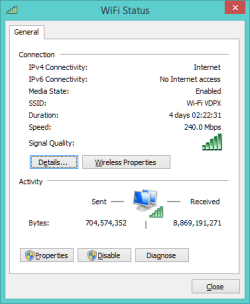
Since you have mentioned that this is only on your LAN level, I think there might be something interesting going on there. Check the router's system log. Can you also check Window's connection status? You just right click the blinking computers and bring up the Network...Center and then click on the main active network connection.
It should look something like the attached image.
 

Attachments

  • wifistatus.png
    wifistatus.png
    7.4 KB · Views: 22

My Computer My Computer

At a glance

Windows 8 Pro x64i7 3820 @ 4.68GHzF3-12800CL9D-8GBXL (32GB)GTX 480 SLI
Computer type
PC/Desktop
OS
Windows 8 Pro x64
CPU
i7 3820 @ 4.68GHz
Motherboard
ASUS Rampage IV Extreme RoG BF3
Memory
F3-12800CL9D-8GBXL (32GB)
Graphics Card(s)
GTX 480 SLI
Sound Card
Auzentech X-Fi HomeTheater HD
Monitor(s) Displays
Sony 32V5500
Screen Resolution
1920 x 1080
Hard Drives
LSI MR9260-4i (RAID10):
Toshiba DT01ACA300 x 4
iaStorA:
OCZ Vertex Enterprise 120GB
ST3500320AS 500GB
Intel 520 Series 120GB
PSU
OCZ ZX 1250W
Case
HAF X
Cooling
H80
Keyboard
Cyborg V.7
Mouse
Razer Lachesis 3.5G 5600dpi
Internet Speed
23296kbps ds / 812kbps us ADSL2+
Browser
Mozilla/5.0 (Windows NT 6.3; Win64; x64; rv:32.0) Gecko/2010
Other Info
AverMedia C127 Game Broadcaster HD
Okay, I'll try that. Are the bytes shown as sent/received under that menu just for that session, correct?
 

My Computer My Computer

At a glance

windows 7 64 bit
Computer type
PC/Desktop
OS
windows 7 64 bit
Okay, I'll try that. Are the bytes shown as sent/received under that menu just for that session, correct?
Yes. As long as it has been connected.
 

My Computer My Computer

At a glance

Windows 8 Pro x64i7 3820 @ 4.68GHzF3-12800CL9D-8GBXL (32GB)GTX 480 SLI
Computer type
PC/Desktop
OS
Windows 8 Pro x64
CPU
i7 3820 @ 4.68GHz
Motherboard
ASUS Rampage IV Extreme RoG BF3
Memory
F3-12800CL9D-8GBXL (32GB)
Graphics Card(s)
GTX 480 SLI
Sound Card
Auzentech X-Fi HomeTheater HD
Monitor(s) Displays
Sony 32V5500
Screen Resolution
1920 x 1080
Hard Drives
LSI MR9260-4i (RAID10):
Toshiba DT01ACA300 x 4
iaStorA:
OCZ Vertex Enterprise 120GB
ST3500320AS 500GB
Intel 520 Series 120GB
PSU
OCZ ZX 1250W
Case
HAF X
Cooling
H80
Keyboard
Cyborg V.7
Mouse
Razer Lachesis 3.5G 5600dpi
Internet Speed
23296kbps ds / 812kbps us ADSL2+
Browser
Mozilla/5.0 (Windows NT 6.3; Win64; x64; rv:32.0) Gecko/2010
Other Info
AverMedia C127 Game Broadcaster HD
Okay thank you. I'll update the thread when I find out more.

Thank you so much for your help thus far. :)
 

My Computer My Computer

At a glance

windows 7 64 bit
Computer type
PC/Desktop
OS
windows 7 64 bit
Okay thank you. I'll update the thread when I find out more.

Thank you so much for your help thus far. :)
I love to serve. Your appreciation is very welcome.
 

My Computer My Computer

At a glance

Windows 8 Pro x64i7 3820 @ 4.68GHzF3-12800CL9D-8GBXL (32GB)GTX 480 SLI
Computer type
PC/Desktop
OS
Windows 8 Pro x64
CPU
i7 3820 @ 4.68GHz
Motherboard
ASUS Rampage IV Extreme RoG BF3
Memory
F3-12800CL9D-8GBXL (32GB)
Graphics Card(s)
GTX 480 SLI
Sound Card
Auzentech X-Fi HomeTheater HD
Monitor(s) Displays
Sony 32V5500
Screen Resolution
1920 x 1080
Hard Drives
LSI MR9260-4i (RAID10):
Toshiba DT01ACA300 x 4
iaStorA:
OCZ Vertex Enterprise 120GB
ST3500320AS 500GB
Intel 520 Series 120GB
PSU
OCZ ZX 1250W
Case
HAF X
Cooling
H80
Keyboard
Cyborg V.7
Mouse
Razer Lachesis 3.5G 5600dpi
Internet Speed
23296kbps ds / 812kbps us ADSL2+
Browser
Mozilla/5.0 (Windows NT 6.3; Win64; x64; rv:32.0) Gecko/2010
Other Info
AverMedia C127 Game Broadcaster HD
Okay, so checked the wireless laptop, that's fine. More received than sent. Checked my networked LAN pc, and the total sent is higher than received. On first boot, checked resource monitor. SVCHOST.EXE was the highest culprit initially sending 4000 bytes but has now dropped down to zero and no longer appears on the network list.

My highest culprits now are the simple things like a web browser, sending no more than 800 bytes or so depending on what I'm doing.

Any ideas?

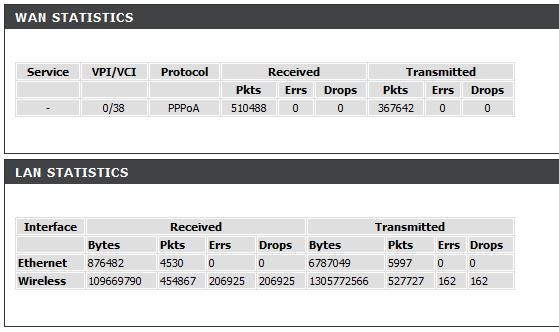
And looking up the routers menu, this is listed under statistics:

tumblr_n6ednwHgjB1qiakemo1_1280.jpg


This is where my concerns lie, look at the total transmitted data! In no way could we have transmitted over 1 GB of data!
 

My Computer My Computer

At a glance

windows 7 64 bit
Computer type
PC/Desktop
OS
windows 7 64 bit
It looks like you are doing a lot of networking locally.

Is there only a PC and a laptop on the network? One wired, one wireless?
Are you positive there is no printing, streaming, remote access, HomeGroup, file sharing or other services being exchanged between the two devices?

svchost.exe is Window's main process for everything service related. Was there anything in brackets while you were looking? Was it all in caps?
Is it possible for you to send a screenshot of your Resource Monitor?
 

My Computer My Computer

At a glance

Windows 8 Pro x64i7 3820 @ 4.68GHzF3-12800CL9D-8GBXL (32GB)GTX 480 SLI
Computer type
PC/Desktop
OS
Windows 8 Pro x64
CPU
i7 3820 @ 4.68GHz
Motherboard
ASUS Rampage IV Extreme RoG BF3
Memory
F3-12800CL9D-8GBXL (32GB)
Graphics Card(s)
GTX 480 SLI
Sound Card
Auzentech X-Fi HomeTheater HD
Monitor(s) Displays
Sony 32V5500
Screen Resolution
1920 x 1080
Hard Drives
LSI MR9260-4i (RAID10):
Toshiba DT01ACA300 x 4
iaStorA:
OCZ Vertex Enterprise 120GB
ST3500320AS 500GB
Intel 520 Series 120GB
PSU
OCZ ZX 1250W
Case
HAF X
Cooling
H80
Keyboard
Cyborg V.7
Mouse
Razer Lachesis 3.5G 5600dpi
Internet Speed
23296kbps ds / 812kbps us ADSL2+
Browser
Mozilla/5.0 (Windows NT 6.3; Win64; x64; rv:32.0) Gecko/2010
Other Info
AverMedia C127 Game Broadcaster HD
Well, there are actually two laptops and a phone connected to the wireless currently, with a possible third laptop on occasions. Though in that log of data, it has only been two laptops and one phone.

I could screenshot my desktop PC's Resource manager, but as I say, the Svchost.exe has stopped transmitting now. (It wasn't all caps either, and there wasn't anything in brackets next to it.)

I do know it was PID 1196 I think, which had a lot of seemingly legit processes attached to it, so I'm guessing it wasn't a fraud.

As for file sharing, it's turned off I'm sure, and no one is moving files around the network, we all work locally off our own machines, just all connected to the same router.
 

My Computer My Computer

At a glance

windows 7 64 bit
Computer type
PC/Desktop
OS
windows 7 64 bit
As for file sharing, it's turned off I'm sure, and no one is moving files around the network, we all work locally off our own machines, just all connected to the same router.
Even if I were to cross out the file sharing from my extensive question there would still be plenty left unaccounted for.
Anyway, I would put the laptops side by side and see if there is any correspondence in data transfer, but seeing as the LAN side of things is also interestingly peaking out like the other devices, it is definitely widespread across the network.

Are you using some sort of tunneling software or p2p on the local network, or are you guys sharing torrents or something? If not, is there a domain that you are all connecting to? Is this a work-based professional network with heavily administered configuration going on in the background?
In the case of the latter, someone may or may not be telling you that they're actually watching everything that you do across the network. I have witnessed professional remote screen-viewing software do this sort of thing, but it made a lot more sense in an enterprise fiber-optic interconnected government environment...

Again, put all of the resource monitors, task managers, connection status windows and what ever else you can think of up on all of the screens next to each other so that you watch for any similarities in their activity.
If there is none, then somebody is keeping secrets from you and there is more to your network than you are aware of.

If all else fails I would try to seek out any suspicious behaviour that I can't explain during my usual routine of music, word processing and what ever else. I would probably unplug the WAN and the phone just for insurance.

Since you haven't shown me your resource monitor I can't really tell you whether there are any software packages that are designed to run the network that hard installed on your computers.

Edit: You can try to turn off NetBIOS and see if the computer that has it turned off on is steadily easing away from the trend.
 

My Computer My Computer

At a glance

Windows 8 Pro x64i7 3820 @ 4.68GHzF3-12800CL9D-8GBXL (32GB)GTX 480 SLI
Computer type
PC/Desktop
OS
Windows 8 Pro x64
CPU
i7 3820 @ 4.68GHz
Motherboard
ASUS Rampage IV Extreme RoG BF3
Memory
F3-12800CL9D-8GBXL (32GB)
Graphics Card(s)
GTX 480 SLI
Sound Card
Auzentech X-Fi HomeTheater HD
Monitor(s) Displays
Sony 32V5500
Screen Resolution
1920 x 1080
Hard Drives
LSI MR9260-4i (RAID10):
Toshiba DT01ACA300 x 4
iaStorA:
OCZ Vertex Enterprise 120GB
ST3500320AS 500GB
Intel 520 Series 120GB
PSU
OCZ ZX 1250W
Case
HAF X
Cooling
H80
Keyboard
Cyborg V.7
Mouse
Razer Lachesis 3.5G 5600dpi
Internet Speed
23296kbps ds / 812kbps us ADSL2+
Browser
Mozilla/5.0 (Windows NT 6.3; Win64; x64; rv:32.0) Gecko/2010
Other Info
AverMedia C127 Game Broadcaster HD
Okay, thanks for the tips.

This is a home network, so I doubt anyone would be professionally monitoring all our pc's. Checked all the resource monitors, and aside from a few high peaks on initial boot of web browsers, they all stabilize out to a low, steady number.

We have no torrenting or P2P network going on, and no heavy domain usage, etc. It's a common house hold really, people browse websites, watch bbc iplayer, youtube, etc.

At the end of the day, it's all internally on the LAN so it's not using up our internet bandwidth or slowing down our web browsing speeds, right?


I'll reset the counters tonight and see if they increase as the evening goes on, then look into it further.
 

My Computer My Computer

At a glance

windows 7 64 bit
Computer type
PC/Desktop
OS
windows 7 64 bit
Having just rebooted the router to reset the values, the statistics look like this:

WAN bytes - 200 on both.

Lan bytes - Much less at around 20,000 or so.


The fact the total on the WAN is next to nothing, but LAN is still high makes me think it could be an error with the router or just data transfer between the pc's and the router itself. I'll look into it, but as I say, nothing stands out to be transmitting, and each individual pc has a sensible amount of transfered bytes, only the router reports a high number.

Will double check the info, thank you for the help! But, since it isn't causing any harm, I'm inclined to leave it alone. :)
 

My Computer My Computer

At a glance

windows 7 64 bit
Computer type
PC/Desktop
OS
windows 7 64 bit
Okay, thanks for the tips.
it's all internally on the LAN so it's not using up our internet bandwidth or slowing down our web browsing speeds, right?
That's right but if your network is cheap it may actually be a problem when all of your devices are operating like this simultaneously. If you have wireless N, then you have 30MB/s to play with per device. Each device should be happy to speak to each other at speeds less than and up to that without affecting your network, but then there's the wired computer. That one may be connected at 10Mb, 100Mb or 1Gbit. At 100Mb it has about 9-10MB/s of bandwidth to play with. If it isn't FULL DUPLEX, this means that rapid connectivity between that machine and the others could slow its internet access right down or make it choppy. If it is FULL DUPLEX then upload or download will only be stunted based on which ever is being hit, and I don't know which is. Particularly per specific machine. This is less likely with the laptops but still a possibility considering I can max out these connections with a single file transfer myself.

As we don't know what is really happening here I can't promise that it will not hurt your internet connectivity, but I am sure you understand the principle of a trafficked highway and how that highway has an entrance(s) that can also have a traffic jam leading up to it.

router or just data transfer between the pc's and the router itself.
Yes, and this requires resources. This also indicates the network is communicating frantically amongst itself. A router has one lone CPU that can be stressed.

each individual pc has a sensible amount of transfered bytes, only the router reports a high number.
Oh, that's different. I thought your computer was consistent with the router's readings. I suppose I should have asked you for that network status screenshot a little bit more thoroughly.
 

My Computer My Computer

At a glance

Windows 8 Pro x64i7 3820 @ 4.68GHzF3-12800CL9D-8GBXL (32GB)GTX 480 SLI
Computer type
PC/Desktop
OS
Windows 8 Pro x64
CPU
i7 3820 @ 4.68GHz
Motherboard
ASUS Rampage IV Extreme RoG BF3
Memory
F3-12800CL9D-8GBXL (32GB)
Graphics Card(s)
GTX 480 SLI
Sound Card
Auzentech X-Fi HomeTheater HD
Monitor(s) Displays
Sony 32V5500
Screen Resolution
1920 x 1080
Hard Drives
LSI MR9260-4i (RAID10):
Toshiba DT01ACA300 x 4
iaStorA:
OCZ Vertex Enterprise 120GB
ST3500320AS 500GB
Intel 520 Series 120GB
PSU
OCZ ZX 1250W
Case
HAF X
Cooling
H80
Keyboard
Cyborg V.7
Mouse
Razer Lachesis 3.5G 5600dpi
Internet Speed
23296kbps ds / 812kbps us ADSL2+
Browser
Mozilla/5.0 (Windows NT 6.3; Win64; x64; rv:32.0) Gecko/2010
Other Info
AverMedia C127 Game Broadcaster HD
It's okay, it's probably my fault for withholding relevant information. I just didn't know it was relevant.

Funnily enough, I reset the router so it's values were zero, disconnected all Ethernet devices and then looked at it's statistics via a wireless laptop.

With no Ethernet devices attached at all, it reported 5000+ bytes transmitted via Ethernet and none received. I'm guessing none received as it wasn't online to receive the usual data from the internet, the reliable source. As to what was transmitting, I'll never know, since there wasn't any device directly plugged into the router!
 

My Computer My Computer

At a glance

windows 7 64 bit
Computer type
PC/Desktop
OS
windows 7 64 bit
It's okay, it's probably my fault for withholding relevant information. I just didn't know it was relevant.
Usually when I am asking someone for information it tends to be relevant to the discussion at hand.

Funnily enough, I reset the router so it's values were zero, disconnected all Ethernet devices and then looked at it's statistics via a wireless laptop.

With no Ethernet devices attached at all, it reported 5000+ bytes transmitted via Ethernet and none received. I'm guessing none received as it wasn't online to receive the usual data from the internet, the reliable source. As to what was transmitting, I'll never know, since there wasn't any device directly plugged into the router!
Yes, 5000 bytes sounds about right for the router to ask for a...forgot what the word is. Anyway, it repopulates. The internet has nothing to do with the LAN in this case where the router has hoped for a response back from your wired devices. Since it didn't get any, that is why there are no received. It now knows not to bother asking for next time it starts up, though it probably will anyway just for good measure. You might notice a slight decrease in bytes for the next attempt if you don't plug in a wired device.
 

My Computer My Computer

At a glance

Windows 8 Pro x64i7 3820 @ 4.68GHzF3-12800CL9D-8GBXL (32GB)GTX 480 SLI
Computer type
PC/Desktop
OS
Windows 8 Pro x64
CPU
i7 3820 @ 4.68GHz
Motherboard
ASUS Rampage IV Extreme RoG BF3
Memory
F3-12800CL9D-8GBXL (32GB)
Graphics Card(s)
GTX 480 SLI
Sound Card
Auzentech X-Fi HomeTheater HD
Monitor(s) Displays
Sony 32V5500
Screen Resolution
1920 x 1080
Hard Drives
LSI MR9260-4i (RAID10):
Toshiba DT01ACA300 x 4
iaStorA:
OCZ Vertex Enterprise 120GB
ST3500320AS 500GB
Intel 520 Series 120GB
PSU
OCZ ZX 1250W
Case
HAF X
Cooling
H80
Keyboard
Cyborg V.7
Mouse
Razer Lachesis 3.5G 5600dpi
Internet Speed
23296kbps ds / 812kbps us ADSL2+
Browser
Mozilla/5.0 (Windows NT 6.3; Win64; x64; rv:32.0) Gecko/2010
Other Info
AverMedia C127 Game Broadcaster HD
So if it's just the router requesting something from the wired/wireless device, can it be restricted?

Still seems weird netstat -e shows one set of values for sent/received bytes, network connection another, and the router a third set. >_<
 

My Computer My Computer

At a glance

windows 7 64 bit
Computer type
PC/Desktop
OS
windows 7 64 bit
No, it can't. These devices try to talk to each other all the time just to make sure they're all on the same page, or in that case, just to see if they're still there. Propagating was the word I was looking for. If you turn these things off—and you can't, they're apart of ancient established networking standards—things will not function properly.

Router is turned off and on; its memory cleared, it checks if its previous friends are still awake on the network by sending out a "Hello! Are you still awake?"
There is no response. Router worries its friends have all died spontaneously while it was out, so it now feels less enticed to remember who and where its friends are/were, etc.

That's a gross oversimplification but it should be entertainingly educational enough.
 

My Computer My Computer

At a glance

Windows 8 Pro x64i7 3820 @ 4.68GHzF3-12800CL9D-8GBXL (32GB)GTX 480 SLI
Computer type
PC/Desktop
OS
Windows 8 Pro x64
CPU
i7 3820 @ 4.68GHz
Motherboard
ASUS Rampage IV Extreme RoG BF3
Memory
F3-12800CL9D-8GBXL (32GB)
Graphics Card(s)
GTX 480 SLI
Sound Card
Auzentech X-Fi HomeTheater HD
Monitor(s) Displays
Sony 32V5500
Screen Resolution
1920 x 1080
Hard Drives
LSI MR9260-4i (RAID10):
Toshiba DT01ACA300 x 4
iaStorA:
OCZ Vertex Enterprise 120GB
ST3500320AS 500GB
Intel 520 Series 120GB
PSU
OCZ ZX 1250W
Case
HAF X
Cooling
H80
Keyboard
Cyborg V.7
Mouse
Razer Lachesis 3.5G 5600dpi
Internet Speed
23296kbps ds / 812kbps us ADSL2+
Browser
Mozilla/5.0 (Windows NT 6.3; Win64; x64; rv:32.0) Gecko/2010
Other Info
AverMedia C127 Game Broadcaster HD
wrong understanding the counters meaning

I was wondering the same question.

The point is that the statistics information is for the modem itself, not for your computers. The counters are counted by the modem based on the packets coming and packets going out of it.

Code:
              LAN                           WAN

+---------+   modem receives    +-------+   transmits     ___________
| Your PC |-------------------->| MODEM |--------------->(           )
|         |<--------------------|       |<--------------(  INTERNET   )
+---------+   modem transmits   +-------+   receives     (___________)
 

My Computer My Computer

At a glance

Windows 10 PRO 64 bitcore i7No
Computer type
PC/Desktop
Computer Manufacturer/Model Number
ASUS
OS
Windows 10 PRO 64 bit
CPU
core i7
Motherboard
ASUS
Graphics Card(s)
No
Back
Top