Home network WIN7 & XP: file and printer sharing problem

guyc

New member
Hello

I set up a home network with a WIN 7 Home Premium (Dutch language) laptop and a XP Professional (English language) netbook. There are both an HP LaserJet 4 and an HP Photosmart 7760 printer connected to the WIN7-laptop. Both computers have only one user profile which has administrator rights. They are both connected to the same ADSL modem by wire (not wireless). Internet is working fine.

It took me several hours to make this home network working. Now I have complete access with my WIN7-machine to the XP-netbook. But other way around is not working as I would wish.

With my XP-netbook, though, I can only access the files which I put in "Public" folders: "Public documents", "Public desktop", ... Now, every file on the desktop has a lock symbol added to the icon. No problem so far, but I'd like to share also two folders that I created myself: C:\_Install and C:\_Programs. I don't manage to do so.

I also have a problem with the settings to print from the XP-netbook to the HP PS7760-printer connected to the WIN7-laptop: I can't install the driver through the network. I can install this printer correctly locally on both computers. But on the XP-machine I have to provide driver files which I can't find and on the WIN7-machine I can optionally install an x86-driver which I also can't find. (The Laserjet 4-drivers are embedded in both Windows-versions, but the PS7760 are not included in XP.)

So here are my questions:

  1. Is it normal that, with WIN7, only files and folders in "Public" folders can be shared? How can I share C:\_Install and C:\_Programs on my WIN7-machine with my XP-netbook?
  2. How can I feed the correct printer driver into my XP-machine or into my WIN7-machine so that I can print from my XP-netbook to my HP PS7760 on my WIN7-laptop?
Thanks for your advice and greetings

Guy, Belgium
 

My Computer

OS
windows 7 premium 64 bit

My Computer

Computer Manufacturer/Model Number
Lenovo Desktop/Samsung Laptop
OS
Win7 & Win8 64bit
CPU
Intel i5
Internet Speed
Charter-20 Mbps
Antivirus
Avast
Browser
FF, IE9 and Chrome
Clarification

Hello 2xg

Do you have a Workgroup networking established? Please verify your current setup from this Microsoft Tutorial.
Sharing files and printers with different versions of Windows - Help & How-to - Microsoft Windows
- On my WIN7-computer, I have full access to my XP-computer. So this is no problem.
- On my XP-computer, I can only access the Public-folders of my WIN7-computer. I can see other shared folders, but I can't get access to any of them.

For now, share the C Drive from both computers and give them Full permission.
- No problem accessing maps of my XP-computer.
- When I share other maps than the Public-folders of my WIN7-computer, I can't get access to them. But I can access the DVD-drive (reading D: is no problem; I didn't try writing).

Are you the only one that need to access the 2 computers?
- On the XP-computer, as far as I know, there's only one user account (with Administrator rights)
- On the WIN7-computer, there is one guest account (which has been set up by Prey - Open source anti-theft solution for your laptop, phone and tablet – Prey) and one user account (which is used by my wife and I)

Hope you could help me out - thanks!

Guy, Belgium
 

My Computer

OS
windows 7 premium 64 bit
Can we try a work around?

From your XP computer, click on start and type \\Win7ComputerName\SharedDrive or folder then press enter and also replace the computer name with the Win 7 IP Address (just an example) - \\192.168.1.10\SharedDrive or folder then press enter. Were you able to access the shared folder/drive and modify the files?
 

My Computer

Computer Manufacturer/Model Number
Lenovo Desktop/Samsung Laptop
OS
Win7 & Win8 64bit
CPU
Intel i5
Internet Speed
Charter-20 Mbps
Antivirus
Avast
Browser
FF, IE9 and Chrome
Dear 2xg

Thanks for your reply. Since today, i'm having a very busy schedule until Saturday.

I will get back to you, but don't know if it will be before Saturday.

Thanks in advance and greetings

Guy, Belgium
 

My Computer

OS
windows 7 premium 64 bit
No worries Guy, we'll be right here when you get back....:D
 

My Computer

Computer Manufacturer/Model Number
Lenovo Desktop/Samsung Laptop
OS
Win7 & Win8 64bit
CPU
Intel i5
Internet Speed
Charter-20 Mbps
Antivirus
Avast
Browser
FF, IE9 and Chrome
File sharing still a problem - Printer sharing solved

Hello 2xg

I tried but got exactly the same error message. The exact error message I receive is:
\\WIN7PC\C is not accessible. You might not have permission to use this network resource. Contact the administrator of this server to find out if you have access permissions.
Access is denied.
So I still can't share files. I wrote that I could access the files that are in the "Public"-folders. Now I see that even here here are problems: I have only complete access to my wife's (!) folder and subfolders; every other folder I can see but can't access it nor the subfolders (access is denied)!

I can have access to my DVD-drive (I only tested reading files on D: ).

Some history and some personal thoughts:

  • My "My documents"-folder is still the same as I had on my Win95, Win98, WinME, Win2K, WinXP and Win7-pc's, but in time they only grew bigger in amount of files and subfolders. Maybe permissions have been changed in time due to migration to other Windows versions.
  • If I remember correctly, when sharing folders in WinXP, WinXP changes every file in every subfolder of the shared folder (which sometimes took several minutes). I have never noticed WIN7 doing this?!
  • When changing permissions, there are only 3 permissions to grant: full management (maybe this is not correct English, but on the Win7-pc I'm working with a Dutch Windows version), write and access. Is this normal?
My intuition says this could be involved into the problem.

One good thing, though: I could solve the printer sharing problem. First, I installed the WinXP printer driver on the XP-pc; afterwards I rerouted it from local printing to the shared printer on the WIN7-pc.

So, again, help wanted for file sharing! :cry: Thanks in advance!

Guy, Belgium
 
Last edited:

My Computer

OS
windows 7 premium 64 bit
Hello there guyc, glad to see your printer sharing is solved... but for your drive folder sharing, can you try this temporarily?

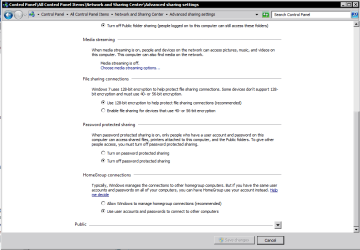
1. Go to network and sharing center, advanced sharing settings, and turn off password protected sharing for now.
nfs.PNG

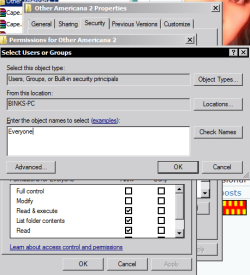
2. For the folders that you wish to share, can you change the security settings to allow everyone access by right clicking on the folder, selecting the security tab, and clicking on the edit button, selecting add, and in the dialog box type in Everyone and clicking okay... Notice everyone is now a username added to the groups...

For example i want to share my american shows to other pcs in the network thats on drive V

nfs2.PNG

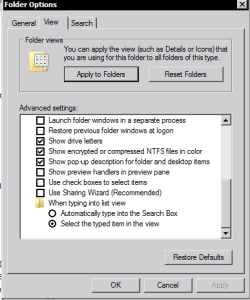
3. If you haven't already, disable Use Sharing Wizard by going to Folder Options, clicking on the View tab and deselecting the Use Sharing Wizard checkbox

nfs3.PNG

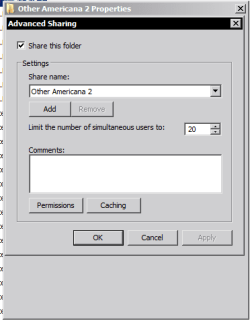
4. Now right click on the folder to share, select the sharing tab, and click on Advanced Sharing, tick the Share this folder checkbox and click okay..

nfs4.PNG

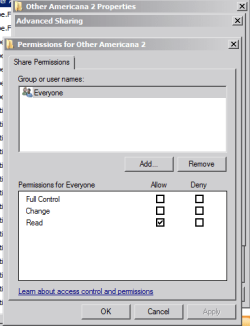
Your folder should now be shared to anyone on the network (Thats the only downside to this solution).. But they cannot modify any files in the folder and only read it, unless you change the permissions to full control for everyone in the previous advanced sharing dialogue box like this:-

nfs5.PNG

Hope that helps!

EDIT:- Ensure both your PCs are in the same workgroup to make things simpler! Also, if you wish to hide the share so that only you can see it, add a $ symbol at the end of the share name in the Advanced Sharing dialogue box
 

My Computer

Computer Manufacturer/Model Number
DELL SXPS 1640
OS
Windows 7 x64 Professional SP1
CPU
Intel C2D T9550 2.66 GHz @ 2.793 GHz (Thanks ThrottleStop!!)
Motherboard
Intel PM45
Memory
8 GB DDR3
Graphics Card(s)
ATI MOBILITY RADEON 4670
Sound Card
CREATIVE XFI AUDIO NOTEBOOK
Monitor(s) Displays
16.1 WLED
Screen Resolution
1920x1080
Hard Drives
Seagate ST9500420AS 500GB (465GiBi) 7200 RPM Drive

External Drives:-
2 TB WD Essentials x 3
1 TB WD Mybook Gen 1
1 TB WD Mybook Gen 2
1 TB Seagate
1 TB Seagate
320 GB WD Scorpio Black (enclosed)
PSU
90W Dell Power Brick
Case
Dell Chassis
Cooling
Coolermaster Cooling Pad
Keyboard
Built-in backlighted Keyboard
Mouse
Logitech Wireless Mini Mouse
Internet Speed
4/0.5
delay

Hello solarmystic

Again I am here to tell that, due to a very busy month of July, I don't know when I will be able to try this. But I will try it, and then I will also give you feedback.

Thanks and greetz

Guy, Belgium
 

My Computer

OS
windows 7 premium 64 bit
Not a problem, eagerly awaiting your return!
 

My Computer

Computer Manufacturer/Model Number
DELL SXPS 1640
OS
Windows 7 x64 Professional SP1
CPU
Intel C2D T9550 2.66 GHz @ 2.793 GHz (Thanks ThrottleStop!!)
Motherboard
Intel PM45
Memory
8 GB DDR3
Graphics Card(s)
ATI MOBILITY RADEON 4670
Sound Card
CREATIVE XFI AUDIO NOTEBOOK
Monitor(s) Displays
16.1 WLED
Screen Resolution
1920x1080
Hard Drives
Seagate ST9500420AS 500GB (465GiBi) 7200 RPM Drive

External Drives:-
2 TB WD Essentials x 3
1 TB WD Mybook Gen 1
1 TB WD Mybook Gen 2
1 TB Seagate
1 TB Seagate
320 GB WD Scorpio Black (enclosed)
PSU
90W Dell Power Brick
Case
Dell Chassis
Cooling
Coolermaster Cooling Pad
Keyboard
Built-in backlighted Keyboard
Mouse
Logitech Wireless Mini Mouse
Internet Speed
4/0.5
Is the C drive shared with full permission? Have you tried replacing the Win7PC with its IP Address, so will try to access the Win7PC as this: \\Win7IPAddress\C ?
\\WIN7PC\C is not accessible.
Can you also please post an ipconfig /all of your 2 computer's for review? It will be good if you can convert it into a .txt file. Follow this tutorial on how to run the ipconfig /all command and convert it to a .txt file.
 

My Computer

Computer Manufacturer/Model Number
Lenovo Desktop/Samsung Laptop
OS
Win7 & Win8 64bit
CPU
Intel i5
Internet Speed
Charter-20 Mbps
Antivirus
Avast
Browser
FF, IE9 and Chrome
Sorry for not answering

I just want to say "sorry" that I never responded to this thread and thank the persons who tried to help.
 

My Computer

OS
windows 7 premium 64 bit
Back
Top