Home Networking Problem Between Win 7 & Vista PCs

indijones

New member
Local time
9:34 PM
Messages
7
I just bought a laptop with Win 7 Home Prem 64 bit installed that is wirelessly connected to my router. I have another desktop with Vista Home Prem 64 bit wired connected to the router. I was trying to set up home network from my laptop and it gave me a password. After that I could see my desktop in my laptop under Network but whenever I click on the desktop, a popup asks for user name and password. The password that my laptop provided doesn't connect to the desktop saying "wrong pass". I can also see my laptop from my desktop but can't communicate. Both the comps are running under Administrator accounts and doesn't require any login/pass to log into them. Please note that I don't have any problem with accessing the internet. I would appreciate it very much if someone could tell me how I could set up a home network between the two to be able to share files. Thanks!
 

My Computer

OS
windows 7
Welcome to Seven Forums!

There are few things to look at.

First off is to make sure you're using a workgroup and not Homegroups.

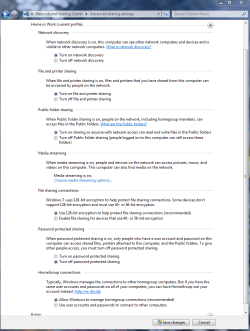
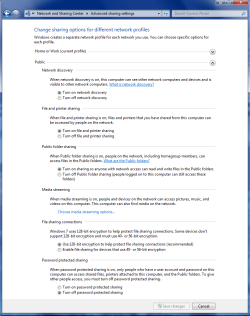
Next take a look at the Advanced Sharing Settings under network and Sharing Center. Primarily look at network discovery, password protected sharing, public folder sharing, file sharing connections.

Give those a look and let me know how it goes.

You may want to take a look at the tutorials here on the networking forum. I'll bet you'll find a lot of great info there to help.
 

My Computer

Computer Manufacturer/Model Number
Dell C521
OS
W7 Ultimate 64bit W7 Premium 64bit W7 Premium 32bit WXP Home 32bit
CPU
Athlon 64X2 5000+
Motherboard
Dell
Memory
4GB
Graphics Card(s)
ATI X1300
Sound Card
On Board
Monitor(s) Displays
Dell 19" Flat
Screen Resolution
1280x1024
Hard Drives
500GB Western Digital Caviar Green
Mouse
Microsoft Wireless Intellimouse Explorer 2.0
Internet Speed
SBC DSL - 6Mbps
Good call Redbirddad, the fact that he needed to use a password to connect probably means he tried to use Homegroup for sharing between his Win 7 and Vista machine which won't work. He needs to set up either Work or Public file shares.

As for the user password prompts, it usually helps if you turn on or off password protected sharing in the Home and Work advanced sharing options. Toggling between the two settings will change this behavior.
 

Attachments

  • Home or work homegroup enable.PNG
    Home or work homegroup enable.PNG
    45 KB · Views: 508
  • public sharing enabled all.PNG
    public sharing enabled all.PNG
    39.7 KB · Views: 433

My Computer

Computer type
PC/Desktop
Computer Manufacturer/Model Number
Home built
OS
Windows 7 Ult, Windows 8.1 Pro,
CPU
Q9650-4.275GHz, E8600 4.5GHz, E6750-3.8GHz
Motherboard
Evga 780i FTW
Memory
G.Skill PC2 9600 1200Mhz 5 5 5 15 2T
Graphics Card(s)
GTX480
Sound Card
Asus Xonar D2
Monitor(s) Displays
HannsG
Screen Resolution
1680X1050
Hard Drives
GSkill Phoenix Pro 120GB SSD
PSU
ThermalTake Toughpower 1000Watt modular
Case
ThermalTake XaserV
Cooling
Xigmatek S1283
Keyboard
Logitech G15
Mouse
Logitech G9
Internet Speed
T1
Thanks! I made changes as per chev65 in my laptop and will make changes to desktop as well and see what happens.
 

My Computer

OS
windows 7
Back
Top