Home Premium x64 Upgrade Kit (Unable to start / finish)

ToxicCookie

New member
Local time
5:39 PM
Messages
14
Been trying to upgrade the Vista Home Premium on a laptop into a Windows 7 version, with varying degrees of fail.
Machine is a Acer 5810TG with specs;
- Intel Core 2 Solo Processor SU3500 (1.4GHz, 800MHz FSB)
- Ati Mobility Radeon HD 4330 up to 1742MB Hypermemory
- 4GB DDR3 Memory
- 500GB HDD (Uncertain of type, but can look it up)
- Acer Nplify 802.11a/b/g/Draft-N

Been a while since I started trying, as in the start, it would finish the installation, but after boot, the screen would continue remain black. (Think it went past the first Win7 load, before it went dark)

However, in new futile attempts, it stopped at 0%, and during next try, refused to stop preparing for the install itself.

Think the first case might've been related to graphics drivers or such, but unsure.
Anyone have any idea what might be wrong?
Any help appreciated :huh:
 

My Computer My Computer

At a glance

Windows 7 Ultimate SP1 x64Intel Core 2 Quad Q6600 2.4GHz (2008)Corsair TWIN2X 6400C4 DDR2, 2048MB CL4 (2008)HIS Radeon HD 2600 XT 512MB GDDR3 (2008)
OS
Windows 7 Ultimate SP1 x64
CPU
Intel Core 2 Quad Q6600 2.4GHz (2008)
Motherboard
MSI P35 NEO-F (Socket-775, DDR2) (2008)
Memory
Corsair TWIN2X 6400C4 DDR2, 2048MB CL4 (2008)
Graphics Card(s)
HIS Radeon HD 2600 XT 512MB GDDR3 (2008)
Sound Card
Creative SB Audigy 4 (2006)
Monitor(s) Displays
BenQ G2411HD
Screen Resolution
1920x1080
Hard Drives
Samsung SpinPoint T133S 400GB SATA2 (2006)
PSU
Chieftec Strømforsyning ATX 400W, 120mm (2006)
Case
Chieftec Dragon Medium Tower (2006)
Keyboard
Standard Logitech
Mouse
Razer Lachesis
Internet Speed
12Mbps
Been trying to do more every now and then, since each try can easily take half hour -> hour, depending on whether the install wants to be co-operative or not.

However, some progress has been made, as I've got an error number; 0x80070570
An error about being unable to complete the install, as some files are damaged / missing.
A common tip related to this seems to be removing ram before installing, however, haven't done it on a laptop before, so would see if there's anything else I could do before I try this.
 

My Computer My Computer

At a glance

Windows 7 Ultimate SP1 x64Intel Core 2 Quad Q6600 2.4GHz (2008)Corsair TWIN2X 6400C4 DDR2, 2048MB CL4 (2008)HIS Radeon HD 2600 XT 512MB GDDR3 (2008)
OS
Windows 7 Ultimate SP1 x64
CPU
Intel Core 2 Quad Q6600 2.4GHz (2008)
Motherboard
MSI P35 NEO-F (Socket-775, DDR2) (2008)
Memory
Corsair TWIN2X 6400C4 DDR2, 2048MB CL4 (2008)
Graphics Card(s)
HIS Radeon HD 2600 XT 512MB GDDR3 (2008)
Sound Card
Creative SB Audigy 4 (2006)
Monitor(s) Displays
BenQ G2411HD
Screen Resolution
1920x1080
Hard Drives
Samsung SpinPoint T133S 400GB SATA2 (2006)
PSU
Chieftec Strømforsyning ATX 400W, 120mm (2006)
Case
Chieftec Dragon Medium Tower (2006)
Keyboard
Standard Logitech
Mouse
Razer Lachesis
Internet Speed
12Mbps
Ah, will try doing as you said, and I am currently trying to perform a clean install.
Thanks for the help, will report back later on :)
 

My Computer My Computer

At a glance

Windows 7 Ultimate SP1 x64Intel Core 2 Quad Q6600 2.4GHz (2008)Corsair TWIN2X 6400C4 DDR2, 2048MB CL4 (2008)HIS Radeon HD 2600 XT 512MB GDDR3 (2008)
OS
Windows 7 Ultimate SP1 x64
CPU
Intel Core 2 Quad Q6600 2.4GHz (2008)
Motherboard
MSI P35 NEO-F (Socket-775, DDR2) (2008)
Memory
Corsair TWIN2X 6400C4 DDR2, 2048MB CL4 (2008)
Graphics Card(s)
HIS Radeon HD 2600 XT 512MB GDDR3 (2008)
Sound Card
Creative SB Audigy 4 (2006)
Monitor(s) Displays
BenQ G2411HD
Screen Resolution
1920x1080
Hard Drives
Samsung SpinPoint T133S 400GB SATA2 (2006)
PSU
Chieftec Strømforsyning ATX 400W, 120mm (2006)
Case
Chieftec Dragon Medium Tower (2006)
Keyboard
Standard Logitech
Mouse
Razer Lachesis
Internet Speed
12Mbps
Should've meddled more with DOS these past few years :/
Having a few problems trying to upgrade the BIOS from an USB.

Following this tutorial;
How to Update BIOS on a Machine With No OS | eHow.com
However, I put the BIOS files in a sub-folder named 'Flash', but I've no idea on how to use the cd command to get there.

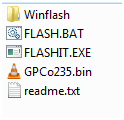
The BIOS files include; FLASH.BAT, FLASHIT.exe, GPC_V135
There was a sub folder for a win install which I deemed useless, and a readme, informing that FLASH.BAT was for DOS, and the file in the sub-folder was for Windows.

On my stationary, the root is H:\, but it's A:\ on the USB.
However, I'm only able to use 'cd A:\', and not 'cd A:\Flash\', 'cd flash' or anything like that.

If I'm not mistaken, all I have to do is manage to navigate to my folder, and then use run command on FLASH.BAT to upgrade, amirite?

Thanks for any help :)
 

My Computer My Computer

At a glance

Windows 7 Ultimate SP1 x64Intel Core 2 Quad Q6600 2.4GHz (2008)Corsair TWIN2X 6400C4 DDR2, 2048MB CL4 (2008)HIS Radeon HD 2600 XT 512MB GDDR3 (2008)
OS
Windows 7 Ultimate SP1 x64
CPU
Intel Core 2 Quad Q6600 2.4GHz (2008)
Motherboard
MSI P35 NEO-F (Socket-775, DDR2) (2008)
Memory
Corsair TWIN2X 6400C4 DDR2, 2048MB CL4 (2008)
Graphics Card(s)
HIS Radeon HD 2600 XT 512MB GDDR3 (2008)
Sound Card
Creative SB Audigy 4 (2006)
Monitor(s) Displays
BenQ G2411HD
Screen Resolution
1920x1080
Hard Drives
Samsung SpinPoint T133S 400GB SATA2 (2006)
PSU
Chieftec Strømforsyning ATX 400W, 120mm (2006)
Case
Chieftec Dragon Medium Tower (2006)
Keyboard
Standard Logitech
Mouse
Razer Lachesis
Internet Speed
12Mbps
I don't know but if you do it wrong you'll brick your system for good.
 

My Computer My Computer

At a glance

W 7 64-bit UltimateIntel Q9550 Yorkfield8GB Dominator 8500C5DATI : XFX 5870
Computer Manufacturer/Model Number
* BFK Customs *
OS
W 7 64-bit Ultimate
CPU
Intel Q9550 Yorkfield
Motherboard
ASUS P5Q Pro
Memory
8GB Dominator 8500C5D
Graphics Card(s)
ATI : XFX 5870
Sound Card
Realtek HD Audio 7-1
Monitor(s) Displays
1x 47" LCD HDMI & 3x 26" LCD HDMI
Screen Resolution
1920x1080P & 1920x1200
Hard Drives
1x 80GB Intel X25-M G2 SSD : 1x 500GB & 1x 640GB WD Caviar Black(s)
PSU
Corsair 620HX
Case
Cooler Master RC-690
Cooling
Tuniq Tower 120, 2x 140mm and 3x 120mm case fans
Keyboard
Microsoft 500
Mouse
Razer Diamondback 3G
Internet Speed
14 Mb/s
Other Info
1x Koutech 3Gb/s SATA HDD Hot Swap Rack
Save yourself a headache and abort that bios update plan. One doesnt update the bios with instructions from ehow etc. First of all theres no need to update the bios unless the bios offers a concrete benefit- as stated in its changelog. So first thing, go to the support page for your model and look up the available bios updates. If theres a newer one available (to determine that you need to know whats already there mind you), read up its release text to see how you'll gain by updating to that.

If theres no gain, sit tight. If there is download and read up accompanying instructions. Then come back here and tell us what you found out.
 

My Computer My Computer

At a glance

Windows 7 x64 pro/ Windows 7 x86 Pro/ XP SP3 x86
Computer Manufacturer/Model Number
Too many to describe...
OS
Windows 7 x64 pro/ Windows 7 x86 Pro/ XP SP3 x86
Save yourself a headache and abort that bios update plan. One doesnt update the bios with instructions from ehow etc. First of all theres no need to update the bios unless the bios offers a concrete benefit- as stated in its changelog. So first thing, go to the support page for your model and look up the available bios updates. If theres a newer one available (to determine that you need to know whats already there mind you), read up its release text to see how you'll gain by updating to that.

If theres no gain, sit tight. If there is download and read up accompanying instructions. Then come back here and tell us what you found out.

Considering it's Acer, it's a pain in the ass to get changelogs.
Some say to e-mail them for it, yet others have gone for weeks without response.

However, at least I think they update with a 0.01 revision per BIOS release, and current release is at 1.35, with mine at 1.25. Either way, an updated BIOS ain't a bad thing.
Also I know that doing it wrong will brick the system, but aren't the risks more limited while doing it in DOS? Also, a power blackout is very unlikely to happen here.

Back on track though, I would like to perform the BIOS update, as it might help with my main problem, that of the windows install. Was gonna follow gregrocker's advise, but my venture into DOS was not a pretty one.

For some reason, I'm unable to execute FLASH.BAT from root (A:\), and if I put it into a subfolder, it seems impossible to navigate to.
Is there any other DOS version other than FreeDOS that might work better?
 

My Computer My Computer

At a glance

Windows 7 Ultimate SP1 x64Intel Core 2 Quad Q6600 2.4GHz (2008)Corsair TWIN2X 6400C4 DDR2, 2048MB CL4 (2008)HIS Radeon HD 2600 XT 512MB GDDR3 (2008)
OS
Windows 7 Ultimate SP1 x64
CPU
Intel Core 2 Quad Q6600 2.4GHz (2008)
Motherboard
MSI P35 NEO-F (Socket-775, DDR2) (2008)
Memory
Corsair TWIN2X 6400C4 DDR2, 2048MB CL4 (2008)
Graphics Card(s)
HIS Radeon HD 2600 XT 512MB GDDR3 (2008)
Sound Card
Creative SB Audigy 4 (2006)
Monitor(s) Displays
BenQ G2411HD
Screen Resolution
1920x1080
Hard Drives
Samsung SpinPoint T133S 400GB SATA2 (2006)
PSU
Chieftec Strømforsyning ATX 400W, 120mm (2006)
Case
Chieftec Dragon Medium Tower (2006)
Keyboard
Standard Logitech
Mouse
Razer Lachesis
Internet Speed
12Mbps
How are you getting into A:?

Although these days windows flashers work pretty reliably.
 

My Computer My Computer

At a glance

Windows 7 x64 pro/ Windows 7 x86 Pro/ XP SP3 x86
Computer Manufacturer/Model Number
Too many to describe...
OS
Windows 7 x64 pro/ Windows 7 x86 Pro/ XP SP3 x86
The only way I would update BIOS is from Windows which is safer than flashing from DOS.
 
After starting up, I end up at;
A:\>
Which I take would be the root? :r
However, when trying to use cd to navigate, the only thing that doesn't lead to an error, is if I use;
cd A, cd A:\, or different kinds of that. Trying to launch the FLASH.BAT while I've put it in root, or navigating to a sub-folder 'Flash' just gives me error messages.

"A:\>FLASH.BAT" gives me: Bad command or filename - "FLASH.BAT".
"A:\> cd Flash" gives me: chdir failed for 'Flash'.

However, there's 1 thing I'm uncertain of.
When the pc boots into FreeDOS, I can choose between 5 options;
1. Install to harddisk using FreeDOS SETUP (default)
2. FreeDOS Safe Mode (don't load any drivers)
3. FreeDOS Live CD with HIMEM + EMM386
4. FreeDOS Live CD with HIMEM only
5. FreeDOS Live CD

Since I'm using USB, I suppose I should use 2.
I've tested with other options, but with same results.
Option 1 is for installing FreeDOS itself to the harddisk, or?

Edit:
I would rather update from Windows, but my pc doesn't agree with letting me install it.
Thus doing this in the first place :|
 

My Computer My Computer

At a glance

Windows 7 Ultimate SP1 x64Intel Core 2 Quad Q6600 2.4GHz (2008)Corsair TWIN2X 6400C4 DDR2, 2048MB CL4 (2008)HIS Radeon HD 2600 XT 512MB GDDR3 (2008)
OS
Windows 7 Ultimate SP1 x64
CPU
Intel Core 2 Quad Q6600 2.4GHz (2008)
Motherboard
MSI P35 NEO-F (Socket-775, DDR2) (2008)
Memory
Corsair TWIN2X 6400C4 DDR2, 2048MB CL4 (2008)
Graphics Card(s)
HIS Radeon HD 2600 XT 512MB GDDR3 (2008)
Sound Card
Creative SB Audigy 4 (2006)
Monitor(s) Displays
BenQ G2411HD
Screen Resolution
1920x1080
Hard Drives
Samsung SpinPoint T133S 400GB SATA2 (2006)
PSU
Chieftec Strømforsyning ATX 400W, 120mm (2006)
Case
Chieftec Dragon Medium Tower (2006)
Keyboard
Standard Logitech
Mouse
Razer Lachesis
Internet Speed
12Mbps
I've no idea what you're talking about. To flash in DOS, you need to boot to PURE DOS (not the DOS screen inside windows). This can be done via a bootable usb stick (if the computer can boot from usb) or CD (or even floppy but most people dont have those nowadays). So if you want to flash in DOS, do the following.

1) Make a bootable usb stick or CD.

http://www.sevenforums.com/tutorials/2432-usb-windows-7-installation-key-drive-create.html

2) Unzip the Acer bios update package to the root of the usb stick you made in Step 1.

3) Set boot priority in the bios to usb first, shutdown computer, then boot from the usb.

4) At the command prompt, type Flash.bat, hit Enter, let it do its thing.

5) Computer will reboot after the flash. Remove the usb stick so that the computer doesnt boot from it again. Now check the bios version by clicking on Start button, then type msinfo32.

Make sure the computer is connected to the wall outlet during this entire process and is not on battery. Also make sure you download the right bios from acer's site.
 

My Computer My Computer

At a glance

Windows 7 x64 pro/ Windows 7 x86 Pro/ XP SP3 x86
Computer Manufacturer/Model Number
Too many to describe...
OS
Windows 7 x64 pro/ Windows 7 x86 Pro/ XP SP3 x86
I did make a bootable USB stick, with FreeDOS, as I followed this;
http://www.ehow.com/how_7570360_update-bios-machine-os.html

Also, I put the latest BIOS version from the Acer website onto the USB as well.
My problem however, is being unable to run the FLASH.BAT to perform the upgrade.
Putting it directly on the USB stick, not in any sub-folders, and then using 'A:\>Flash.bat' just gives me this; Bad command or filename - "FLASH.BAT".
If I could get it to run, I'd be well on my way.
 

My Computer My Computer

At a glance

Windows 7 Ultimate SP1 x64Intel Core 2 Quad Q6600 2.4GHz (2008)Corsair TWIN2X 6400C4 DDR2, 2048MB CL4 (2008)HIS Radeon HD 2600 XT 512MB GDDR3 (2008)
OS
Windows 7 Ultimate SP1 x64
CPU
Intel Core 2 Quad Q6600 2.4GHz (2008)
Motherboard
MSI P35 NEO-F (Socket-775, DDR2) (2008)
Memory
Corsair TWIN2X 6400C4 DDR2, 2048MB CL4 (2008)
Graphics Card(s)
HIS Radeon HD 2600 XT 512MB GDDR3 (2008)
Sound Card
Creative SB Audigy 4 (2006)
Monitor(s) Displays
BenQ G2411HD
Screen Resolution
1920x1080
Hard Drives
Samsung SpinPoint T133S 400GB SATA2 (2006)
PSU
Chieftec Strømforsyning ATX 400W, 120mm (2006)
Case
Chieftec Dragon Medium Tower (2006)
Keyboard
Standard Logitech
Mouse
Razer Lachesis
Internet Speed
12Mbps
When you are at A: prompt, type dir then hit Enter, what does it show?
 

My Computer My Computer

At a glance

Windows 7 x64 pro/ Windows 7 x86 Pro/ XP SP3 x86
Computer Manufacturer/Model Number
Too many to describe...
OS
Windows 7 x64 pro/ Windows 7 x86 Pro/ XP SP3 x86
A friend who knows a little about this, told me to do this yesterday.
It tells me there's 3 file(s) and 2 dir(s), but it doesn't mention anything about file- or foldernames.
But here's everything that pops up;

DRIVERS <DIR> 09-03-2006 12:11a
FREEDOS <DIR> 09-03-2006 12:11a
COMMAND COM 66.945 09-03-2006 12:11a
FDCONFIG SYS 1,768 09-03-2006 12:11a
KERNEL SYS 45,341 09-03-2006 12:10a
3 file(s) 114,054 bytes
2 dir(s) 1,259, 520 bytes free

Edit: As it is currently, this is how the USB stick shows up on this pc;
H:

FreeDOS files; (Just what these files are from, all files are in root)
menu.c32
syslinux.cfg
ubninit
ubnkern

Acer BIOS files;
FLASH.BAT
FLASHIT.exe
GPC_V135.bin
 

My Computer My Computer

At a glance

Windows 7 Ultimate SP1 x64Intel Core 2 Quad Q6600 2.4GHz (2008)Corsair TWIN2X 6400C4 DDR2, 2048MB CL4 (2008)HIS Radeon HD 2600 XT 512MB GDDR3 (2008)
OS
Windows 7 Ultimate SP1 x64
CPU
Intel Core 2 Quad Q6600 2.4GHz (2008)
Motherboard
MSI P35 NEO-F (Socket-775, DDR2) (2008)
Memory
Corsair TWIN2X 6400C4 DDR2, 2048MB CL4 (2008)
Graphics Card(s)
HIS Radeon HD 2600 XT 512MB GDDR3 (2008)
Sound Card
Creative SB Audigy 4 (2006)
Monitor(s) Displays
BenQ G2411HD
Screen Resolution
1920x1080
Hard Drives
Samsung SpinPoint T133S 400GB SATA2 (2006)
PSU
Chieftec Strømforsyning ATX 400W, 120mm (2006)
Case
Chieftec Dragon Medium Tower (2006)
Keyboard
Standard Logitech
Mouse
Razer Lachesis
Internet Speed
12Mbps
A friend who knows a little about this, told me to do this yesterday.
It tells me there's 3 file(s) and 2 dir(s), but it doesn't mention anything about file- or foldernames.
But here's everything that pops up;

DRIVERS <DIR> 09-03-2006 12:11a
FREEDOS <DIR> 09-03-2006 12:11a
COMMAND COM 66.945 09-03-2006 12:11a
FDCONFIG SYS 1,768 09-03-2006 12:11a
KERNEL SYS 45,341 09-03-2006 12:10a
3 file(s) 114,054 bytes
2 dir(s) 1,259, 520 bytes free
Exactly. Theres no file called Flash.bat at the root of the usb, hence the error bad filename or command.

You need to unzip the Acer package, then copy everything inside to the root of usb for that command to work.
 

My Computer My Computer

At a glance

Windows 7 x64 pro/ Windows 7 x86 Pro/ XP SP3 x86
Computer Manufacturer/Model Number
Too many to describe...
OS
Windows 7 x64 pro/ Windows 7 x86 Pro/ XP SP3 x86
files in Acer download.

Capture.PNG
 

My Computer My Computer

At a glance

ME/XP/Vista/Win7
OS
ME/XP/Vista/Win7
I did unarchive all the files, so, the files are in root, unarchived.
There's not even any sub-folders currently, when I used the dir command.
And it's more than 3 files (Unless it ignores the FreeDOS files, in which case it's three)

And there was a Winflash, but seeing it's used for flashing while in Windows, I removed it.

Edit:
http://support.acer.com/us/en/product/default.aspx?tab=5&modelId=1195
There's 2 different sets, and I've been using;
Patches BIOS kernel code.
 

My Computer My Computer

At a glance

Windows 7 Ultimate SP1 x64Intel Core 2 Quad Q6600 2.4GHz (2008)Corsair TWIN2X 6400C4 DDR2, 2048MB CL4 (2008)HIS Radeon HD 2600 XT 512MB GDDR3 (2008)
OS
Windows 7 Ultimate SP1 x64
CPU
Intel Core 2 Quad Q6600 2.4GHz (2008)
Motherboard
MSI P35 NEO-F (Socket-775, DDR2) (2008)
Memory
Corsair TWIN2X 6400C4 DDR2, 2048MB CL4 (2008)
Graphics Card(s)
HIS Radeon HD 2600 XT 512MB GDDR3 (2008)
Sound Card
Creative SB Audigy 4 (2006)
Monitor(s) Displays
BenQ G2411HD
Screen Resolution
1920x1080
Hard Drives
Samsung SpinPoint T133S 400GB SATA2 (2006)
PSU
Chieftec Strømforsyning ATX 400W, 120mm (2006)
Case
Chieftec Dragon Medium Tower (2006)
Keyboard
Standard Logitech
Mouse
Razer Lachesis
Internet Speed
12Mbps
I would not update BIOS this way. We can help you troubleshoot the install as it could be any number of things which I would try first to get installed before updating BIOS. You are courting disaster, and the first date is already going bad.

Unless you know for sure your model Acer needs BIOS update to upgrade to Win7 then it is likely another issue which is blocking install. Did you reset the CMOS, try setting SATA controller in BIOS setup to AHCI, and remove all but 2gb of RAM as suggested in my first post?

Can you run your factory Recovery partition or disks to reinstall Vista just for the purpose of updating the BIOS from it (providing there is a Windows BIOS update method) if you must have the latest BIOS? If so, then you can also try running the upgrade DVD from Vista, even in-place Upgrading. http://www.sevenforums.com/installation-setup/44793-simple-guide-successful-place-upgrade.html
 
Back
Top