Homegroup aaarrghh!!

azurian

New member
Local time
12:44 AM
Messages
1
Hi everyone. I have tried for hours to research this problem, without success. Any help wiuld be appreciated.

I have a Windows 7 desktop and a Windows 7 starter netbook. I have tried to set up a homegroup without success. I am using a Belkin N wireless router. I can connect to the internet with both machines and I can see them both on the Network. But whenever I try to join the netbook to the homegroup, it will not accept the password created when the homegroup was set up.

The clocks are in sync and both machine are set to HOME.

Any ides please?
 

My Computer

OS
Windows 7 Home Premium
Make sure there is a password set for each user account on each machine. (Different thing than homegroup password.)

Not sure if it matters, but it's good to pay attention to and use same upper and lower case. Case sensitivity may actually matter but I don't know because I've never used homegroup.

Instead, I rely on classic sharing method between machines.
 

My Computer

Computer Manufacturer/Model Number
self built
OS
7600.20510 x86
CPU
P4 550 3.4 GHz HT running at 3.5 GHz
Motherboard
MSI PM8M3-V (MS-7211 v1.x) Micro-ATX mainboard
Memory
OCZ 2 GB(2x1GB) DDR400mHz running @ 414 mHz
Graphics Card(s)
HIS Radeon HD 3850 IceQ 3 Turbo HDMI Dual DL-DVI AGP
Sound Card
MOTU Traveler firewire studio interface 192 kHz 24 bit
Monitor(s) Displays
22" widescreen Acer X223W LCD, 17" Compaq P75 CRT
Screen Resolution
1680x1050 and 1280x1024
Hard Drives
SATA I x2 WD, 400 GB and 120 GB, SATA 2 WD Caviar Black 1 TB
PSU
350W generic
Case
Cybertronpc, it glows blue
Cooling
stock cpu fan, Ice-Q 3 gpu and system, many case fans
Keyboard
Logitch Classical Keyboard 200
Mouse
Logitech Mediaplay cordless
Internet Speed
1792/448 kbits/sec
Other Info
SATA II PCI fake RAID adapter, 1 GB Readyboost, original ATI Remote Wonder (even works with WMC perfectly), Logitech Rumblepad 2 game controller x2
I have the same setup and the same issue... i have tried all the troubleshooting i have seen here and nothing works
 

My Computer

OS
Win 7
Hi everyone. I have tried for hours to research this problem, without success. Any help wiuld be appreciated.

I have a Windows 7 desktop and a Windows 7 starter netbook. I have tried to set up a homegroup without success. I am using a Belkin N wireless router. I can connect to the internet with both machines and I can see them both on the Network. But whenever I try to join the netbook to the homegroup, it will not accept the password created when the homegroup was set up.

The clocks are in sync and both machine are set to HOME.

Any ides please?

Hi and welcome to sevenforums

I have a couple. Homegroup is lousy. Changing from homegroup to workgroup will allow you to disable IPv6 (proglematic), not have to have a password if you dont want one, speed up your downloads, and make them more stabile. the change is pretty simple. When you first setup networing they asked if you were going to use a home network, or an office typw network. Just choose office

Let us know if you need help with changing should you choose to

Ken J
 

My Computer

Computer Manufacturer/Model Number
HP Pavillion dv-7 1005 Tx
OS
Win 8 Release candidate 8400
CPU
[email protected]
Memory
4 gigs
Graphics Card(s)
Nvidia 9600M
Sound Card
HD built-in
Monitor(s) Displays
17" Wxga
Screen Resolution
1440x900
Cooling
none
Internet Speed
45Mb down 5Mb up
Try removing both computers from the homegroup, then create a new one using the netbook, be sure and write down the homegroup password, after that join the homegroup with the desktop.

Do not use the same user name on both machine's, that was the only thing that caused me problems using Homegroups.

I have absolutely zero problems using Homegroups and I'm starting to realize the beauty of it's functionality,. Setting up a new computer with homegroups could not be easier. It works so well I can't even believe it. I'am not sure why it's not working correctly for Ken.

On a newly set up machine,as long as another homegroup machine is turned on, the prompt for the homegroup password to join the homegroup pops up right before I get to Windows the first time. I honestly don't see how it could be easier.

I think the problems people are seeing with homegroups has to do with their router not being capible of supporting IPV6 functionality.

I'am trying to figure out why people seem to be having problems using homegroups when it works so well for me, that is the only reason I can think of.
 

My Computer

Computer type
PC/Desktop
Computer Manufacturer/Model Number
Home built
OS
Windows 7 Ult, Windows 8.1 Pro,
CPU
Q9650-4.275GHz, E8600 4.5GHz, E6750-3.8GHz
Motherboard
Evga 780i FTW
Memory
G.Skill PC2 9600 1200Mhz 5 5 5 15 2T
Graphics Card(s)
GTX480
Sound Card
Asus Xonar D2
Monitor(s) Displays
HannsG
Screen Resolution
1680X1050
Hard Drives
GSkill Phoenix Pro 120GB SSD
PSU
ThermalTake Toughpower 1000Watt modular
Case
ThermalTake XaserV
Cooling
Xigmatek S1283
Keyboard
Logitech G15
Mouse
Logitech G9
Internet Speed
T1
Try removing both computers from the homegroup, then create a new one using the netbook, be sure and write down the homegroup password, after that join the homegroup with the desktop.

Do not use the same user name on both machine's, that was the only thing that caused me problems using Homegroups.

I have absolutely zero problems using Homegroups and I'm starting to realize the beauty of it's functionality,. Setting up a new computer with homegroups could not be easier. It works so well I can't even believe it. I'am not sure why it's not working correctly for Ken.

On a newly set up machine,as long as another homegroup machine is turned on, the prompt for the homegroup password to join the homegroup pops up right before I get to Windows the first time. I honestly don't see how it could be easier.

I think the problems people are seeing with homegroups has to do with their router not being capible of supporting IPV6 functionality.

I'am trying to figure out why people seem to be having problems using homegroups when it works so well for me, that is the only reason I can think of.

I havent the same name and I have both computers as HOME NETWORK (one laptop and one desktop)
The laptop can find the desktop in homegroups but the desktop cant find the laptop
Both can be shown in Network...

Problem not solved what now?
Thanks
 

My Computer

Computer Manufacturer/Model Number
Unable
OS
7
CPU
Intel Core 2 Duo E6420
Motherboard
ASRock 775Dual-VSTA
Memory
Kingston
Graphics Card(s)
ATI Radeon HD 2600 XT
Sound Card
Creative Soundblaster Audigy 2 ZS
Monitor(s) Displays
Samtron
Screen Resolution
1024x728
Hard Drives
SATA and IDE
Keyboard
Logitech Internet Pro
Mouse
Razer Death Adder
Internet Speed
8MB
Homegroup is ONLY for people who don't understand advanced sharing and permissions. Get out of the homegroup and use a workgroup instead.
 

My Computer

Computer Manufacturer/Model Number
Dell XPS 8300
OS
Win7 x64
CPU
Intel(R) Core(TM) i7-2600 CPU @ 3.40GHz
Memory
16GB Dual-Channel
Graphics Card(s)
NVIDIA GeForce GTS 450
Monitor(s) Displays
Viewsonic VX2753mh-LED 27" HDMI
Screen Resolution
1920x1080
...
I think the problems people are seeing with homegroups has to do with their router not being capible of supporting IPV6 functionality.

I still have this issue and I cant seem to figure it out... all things now are pointing to my router. I have a Belkin N router.... how can i test it to see if IPV6 is enabled? I just updated the firmware, how do i check?
 

My Computer

OS
Win 7
...
I think the problems people are seeing with homegroups has to do with their router not being capible of supporting IPV6 functionality.

I still have this issue and I cant seem to figure it out... all things now are pointing to my router. I have a Belkin N router.... how can i test it to see if IPV6 is enabled? I just updated the firmware, how do i check?

Ping the hostname of the remote computer like this, from a command prompt:

ping -6 hostname
 

My Computer

Computer Manufacturer/Model Number
self built
OS
7600.20510 x86
CPU
P4 550 3.4 GHz HT running at 3.5 GHz
Motherboard
MSI PM8M3-V (MS-7211 v1.x) Micro-ATX mainboard
Memory
OCZ 2 GB(2x1GB) DDR400mHz running @ 414 mHz
Graphics Card(s)
HIS Radeon HD 3850 IceQ 3 Turbo HDMI Dual DL-DVI AGP
Sound Card
MOTU Traveler firewire studio interface 192 kHz 24 bit
Monitor(s) Displays
22" widescreen Acer X223W LCD, 17" Compaq P75 CRT
Screen Resolution
1680x1050 and 1280x1024
Hard Drives
SATA I x2 WD, 400 GB and 120 GB, SATA 2 WD Caviar Black 1 TB
PSU
350W generic
Case
Cybertronpc, it glows blue
Cooling
stock cpu fan, Ice-Q 3 gpu and system, many case fans
Keyboard
Logitch Classical Keyboard 200
Mouse
Logitech Mediaplay cordless
Internet Speed
1792/448 kbits/sec
Other Info
SATA II PCI fake RAID adapter, 1 GB Readyboost, original ATI Remote Wonder (even works with WMC perfectly), Logitech Rumblepad 2 game controller x2
...
I think the problems people are seeing with homegroups has to do with their router not being capible of supporting IPV6 functionality.

I still have this issue and I cant seem to figure it out... all things now are pointing to my router. I have a Belkin N router.... how can i test it to see if IPV6 is enabled? I just updated the firmware, how do i check?

Ping the hostname of the remote computer like this, from a command prompt:

ping -6 hostname

I got a response for both the desktop and laptop, so i assume that means it is on for both? and the router supports it?
 

My Computer

OS
Win 7
That means that IPv6 is working correctly on the router, your machine and the remote machine as well.

In Network and Sharing Center (top left), click Change advanced sharing settings. Click the dropdown arrow for your type of network set.
Click the dot for Turn on network discovery.
 

My Computer

Computer Manufacturer/Model Number
self built
OS
7600.20510 x86
CPU
P4 550 3.4 GHz HT running at 3.5 GHz
Motherboard
MSI PM8M3-V (MS-7211 v1.x) Micro-ATX mainboard
Memory
OCZ 2 GB(2x1GB) DDR400mHz running @ 414 mHz
Graphics Card(s)
HIS Radeon HD 3850 IceQ 3 Turbo HDMI Dual DL-DVI AGP
Sound Card
MOTU Traveler firewire studio interface 192 kHz 24 bit
Monitor(s) Displays
22" widescreen Acer X223W LCD, 17" Compaq P75 CRT
Screen Resolution
1680x1050 and 1280x1024
Hard Drives
SATA I x2 WD, 400 GB and 120 GB, SATA 2 WD Caviar Black 1 TB
PSU
350W generic
Case
Cybertronpc, it glows blue
Cooling
stock cpu fan, Ice-Q 3 gpu and system, many case fans
Keyboard
Logitch Classical Keyboard 200
Mouse
Logitech Mediaplay cordless
Internet Speed
1792/448 kbits/sec
Other Info
SATA II PCI fake RAID adapter, 1 GB Readyboost, original ATI Remote Wonder (even works with WMC perfectly), Logitech Rumblepad 2 game controller x2
That means that IPv6 is working correctly on the router, your machine and the remote machine as well.

In Network and Sharing Center (top left), click Change advanced sharing settings. Click the dropdown arrow for your type of network set.
Click the dot for Turn on network discovery.

It was already on... I have double checked all of the settings on that menu.
 

My Computer

OS
Win 7
Then best thing to do is completely uninstall (not only disable instead) any 3rd party firewalls on all machines involved. Most have a backup settings function so you don't have to reconfigure them upon reinstall. Then test.
 

My Computer

Computer Manufacturer/Model Number
self built
OS
7600.20510 x86
CPU
P4 550 3.4 GHz HT running at 3.5 GHz
Motherboard
MSI PM8M3-V (MS-7211 v1.x) Micro-ATX mainboard
Memory
OCZ 2 GB(2x1GB) DDR400mHz running @ 414 mHz
Graphics Card(s)
HIS Radeon HD 3850 IceQ 3 Turbo HDMI Dual DL-DVI AGP
Sound Card
MOTU Traveler firewire studio interface 192 kHz 24 bit
Monitor(s) Displays
22" widescreen Acer X223W LCD, 17" Compaq P75 CRT
Screen Resolution
1680x1050 and 1280x1024
Hard Drives
SATA I x2 WD, 400 GB and 120 GB, SATA 2 WD Caviar Black 1 TB
PSU
350W generic
Case
Cybertronpc, it glows blue
Cooling
stock cpu fan, Ice-Q 3 gpu and system, many case fans
Keyboard
Logitch Classical Keyboard 200
Mouse
Logitech Mediaplay cordless
Internet Speed
1792/448 kbits/sec
Other Info
SATA II PCI fake RAID adapter, 1 GB Readyboost, original ATI Remote Wonder (even works with WMC perfectly), Logitech Rumblepad 2 game controller x2
I have just the windows firewall with the default settings on both pcs
 

My Computer

OS
Win 7
Alright. Are you saying that your password isn't accepted? Then rerun the wizard that creates it and go from there.
 

My Computer

Computer Manufacturer/Model Number
self built
OS
7600.20510 x86
CPU
P4 550 3.4 GHz HT running at 3.5 GHz
Motherboard
MSI PM8M3-V (MS-7211 v1.x) Micro-ATX mainboard
Memory
OCZ 2 GB(2x1GB) DDR400mHz running @ 414 mHz
Graphics Card(s)
HIS Radeon HD 3850 IceQ 3 Turbo HDMI Dual DL-DVI AGP
Sound Card
MOTU Traveler firewire studio interface 192 kHz 24 bit
Monitor(s) Displays
22" widescreen Acer X223W LCD, 17" Compaq P75 CRT
Screen Resolution
1680x1050 and 1280x1024
Hard Drives
SATA I x2 WD, 400 GB and 120 GB, SATA 2 WD Caviar Black 1 TB
PSU
350W generic
Case
Cybertronpc, it glows blue
Cooling
stock cpu fan, Ice-Q 3 gpu and system, many case fans
Keyboard
Logitch Classical Keyboard 200
Mouse
Logitech Mediaplay cordless
Internet Speed
1792/448 kbits/sec
Other Info
SATA II PCI fake RAID adapter, 1 GB Readyboost, original ATI Remote Wonder (even works with WMC perfectly), Logitech Rumblepad 2 game controller x2
Alright. Are you saying that your password isn't accepted? Then rerun the wizard that creates it and go from there.

Correct. I have tried deleting homegroup and recreating in from both PCs with the same result.

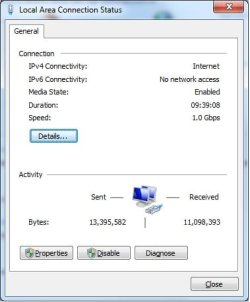
I did notice that if I click on 'Local Area Connection Status' from the Network and Sharing Center that the IPv6 Connectivity: No network access (See image)

Is that a problem?
 

Attachments

  • LAN.jpg
    LAN.jpg
    20.2 KB · Views: 10

My Computer

OS
Win 7
Do you have any anti-virus applications installed? If so, try uninstalling them to see if that helps.

Also, have you read the Microsoft white paper on sharing with Windows 7?

http://www.microsoft.com/downloads/...5D-1B5A-4447-8036-ACC918BA7AF2&displaylang=en

It's a very good article with step by step instructions. One other thing - did you install Windows 7 on these computers, or did they come with 7 preinstalled?
 

My Computer

Computer Manufacturer/Model Number
Dell XPS 15 L502x
OS
Windows 7 Ultimate x64 SP1
CPU
Core i7-2670QM
Memory
8GB DDR3 PC3-10600
Graphics Card(s)
Intel HD Graphics 3000 + GeForce GT 540M
Screen Resolution
1920x1080
Hard Drives
1TB 5400RPM Seagate
Do you have any anti-virus applications installed? If so, try uninstalling them to see if that helps.

Also, have you read the Microsoft white paper on sharing with Windows 7?

Download details: Windows 7 & HomeGroup: Downlevel Sharing

It's a very good article with step by step instructions. One other thing - did you install Windows 7 on these computers, or did they come with 7 preinstalled?


I have no virus protection on either PC. I will read these instructions. The laptop came preinstalled, the desktop i did a clean install
 

My Computer

OS
Win 7
Are you attempting to connect via wifi? If so, try connecting both computers to the router with an ethernet cable to see if the problem goes away. You may need to update your wifi drivers on either the desktop or the netbook, depending on which one has the wifi connection.

Something else I just thought about - do both computers have the same name, ie: kegobeer_pc?
 

My Computer

Computer Manufacturer/Model Number
Dell XPS 15 L502x
OS
Windows 7 Ultimate x64 SP1
CPU
Core i7-2670QM
Memory
8GB DDR3 PC3-10600
Graphics Card(s)
Intel HD Graphics 3000 + GeForce GT 540M
Screen Resolution
1920x1080
Hard Drives
1TB 5400RPM Seagate
Alright. Are you saying that your password isn't accepted? Then rerun the wizard that creates it and go from there.

Correct. I have tried deleting homegroup and recreating in from both PCs with the same result.

I did notice that if I click on 'Local Area Connection Status' from the Network and Sharing Center that the IPv6 Connectivity: No network access (See image)

Is that a problem?

Home Groups does not work unless IPv6 is functioning properly. This is no doubt your problem.

That is also the reason I said this 15 posts ago:

"I think the problems people are seeing with homegroups has to do with their router not being capible of supporting IPV6 functionality."

I can't say for sure what is causing this problem but I can say for certain that Homegroups will not work unless IPv6 is working correctly. :)

Feel free to Rep me for being the first to bring up a potential problem with your IPv6 network connection. ;)
 

My Computer

Computer type
PC/Desktop
Computer Manufacturer/Model Number
Home built
OS
Windows 7 Ult, Windows 8.1 Pro,
CPU
Q9650-4.275GHz, E8600 4.5GHz, E6750-3.8GHz
Motherboard
Evga 780i FTW
Memory
G.Skill PC2 9600 1200Mhz 5 5 5 15 2T
Graphics Card(s)
GTX480
Sound Card
Asus Xonar D2
Monitor(s) Displays
HannsG
Screen Resolution
1680X1050
Hard Drives
GSkill Phoenix Pro 120GB SSD
PSU
ThermalTake Toughpower 1000Watt modular
Case
ThermalTake XaserV
Cooling
Xigmatek S1283
Keyboard
Logitech G15
Mouse
Logitech G9
Internet Speed
T1
Back
Top