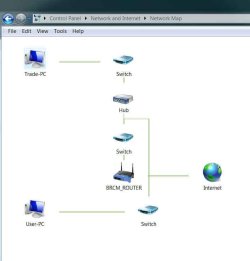
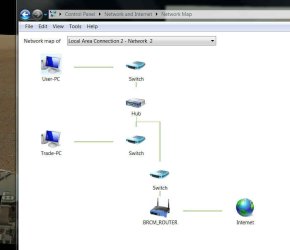
Hello. I have two Windows 7 Pro computers. For the Homegroup they both have the same password yet both say that no other computers are currently available.
Under the network icon I can see the other computer but when I map a network drive each require a username and password. Neither computer requires a logon.
Both computers belong to Workgroup.
I thought this was supposed to be automatic. Initially I did get a couple of drives showing. I'm not sure what happened but the mapped network folders were showing one way but never seemed to work very well and the client computer didn't recognize a Homegroup password. I fixed that but now I can't get any further.
Computers - just one problem after another. Tiring.
Well this may have something to do with it. On System Properties\ Computer Name\ Network ID. I changed both computers to read 'This is a home computer...' and restarted. Now I see that neither selection actually changed. When I look again both selections still read 'This computer is part of a business network...'.
I'm still working on it. This should have maybe been obvious but I had all the 'Share Libraries unchecked - except printers. I could see the printer. I don't use libraries. I don't really have any convenient use for them. What I want is simply the other computer and all of it's drives showing in the navigation pane. I thought that's what was going to show - the whole computer. Not just libraries. That's what I'm trying to do. Show each computer in its entirety.
I am utterly baffled by what Microsoft thinks a home computer user needs. Years ago I had two XP computers connected . Took me 5 minutes. Everything up. All the drives showed and worked perfectly. Never a single problem.
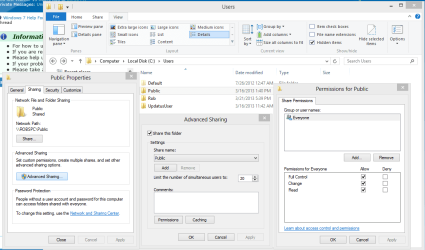
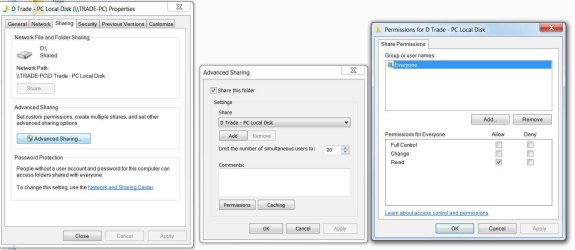
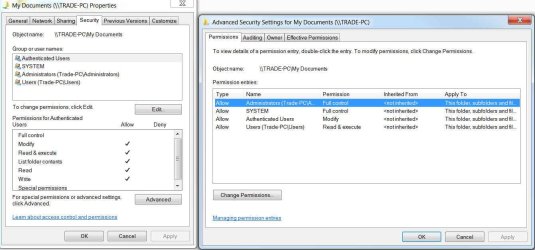
I have got the Homegroup libraries to show. And I shared a 'user' folder, I turn off password protected sharing but I still get a requirement to enter a username and password when I try to open it.
Under the network icon I can see the other computer but when I map a network drive each require a username and password. Neither computer requires a logon.
Both computers belong to Workgroup.
I thought this was supposed to be automatic. Initially I did get a couple of drives showing. I'm not sure what happened but the mapped network folders were showing one way but never seemed to work very well and the client computer didn't recognize a Homegroup password. I fixed that but now I can't get any further.
Computers - just one problem after another. Tiring.
Well this may have something to do with it. On System Properties\ Computer Name\ Network ID. I changed both computers to read 'This is a home computer...' and restarted. Now I see that neither selection actually changed. When I look again both selections still read 'This computer is part of a business network...'.
I'm still working on it. This should have maybe been obvious but I had all the 'Share Libraries unchecked - except printers. I could see the printer. I don't use libraries. I don't really have any convenient use for them. What I want is simply the other computer and all of it's drives showing in the navigation pane. I thought that's what was going to show - the whole computer. Not just libraries. That's what I'm trying to do. Show each computer in its entirety.
I am utterly baffled by what Microsoft thinks a home computer user needs. Years ago I had two XP computers connected . Took me 5 minutes. Everything up. All the drives showed and worked perfectly. Never a single problem.
I have got the Homegroup libraries to show. And I shared a 'user' folder, I turn off password protected sharing but I still get a requirement to enter a username and password when I try to open it.
Last edited:
My Computer
- Computer type
- PC/Desktop
- Computer Manufacturer/Model Number
- custom build
- OS
- Microsoft Windows 7 Professional 64-bit 7601 Multiprocessor Service Pack 1
- CPU
- AMD FX(tm)-8120 Eight-Core Processor
- Motherboard
- Gigabyte Technology Co., Ltd. GA-990FXA-UD3
- Memory
- 16.00 GB
- Graphics Card(s)
- (1) AMD Radeon HD 6800 Series (2) AMD Radeon HD 6800 Serie
- Sound Card
- (1) Realtek High Definition Audio (2) AMD High Definition
- Monitor(s) Displays
- 8 monitors
- Screen Resolution
- (1) 1920 x 1080 x 32 bits (4294967296 colors) @ 60 Hz (2)
- Hard Drives
- (1) ST500DM0 02-1BC142 SATA Disk Device (2) ST500DM0 02-1BC142 SATA Disk Device (3) WDC WD10 EZEX-00RKKA0 SATA Disk Device (4) WDC WD25 00JB-00GVC0 USB Device
- PSU
- Antec 750
- Case
- Corsair
- Keyboard
- Logitech
- Mouse
- Logitech
- Internet Speed
- Hi-speed
- Antivirus
- Webroot
- Browser
- IE Firefox