Homegroup file sharing problem.

mike189

New member
Local time
6:58 PM
Messages
13
Hello,
I just installed win7 home premium 64x on my desktop and win7 pro 64x on my laptop. I set up a home group and both computers can join successfully. However the problem i am having is that my desktop can see the folders on my laptop, and open the folders to see and run the files (songs/pictures and documents all can be accessed)

when my laptop tries to read the desktops share folders, all i can see is more folders and no files. I click on pictures folder then click on 01-08-holiday folder to see that set of pictures, and there are 0 files in there. I have clicked 'share with' on every folder but it does not affect the files inside??? So i have manually gone into a few so far and select all'd them and shared with. This has worked so that my laptop can see the files, but i have MANY folders and do not wish to do this every time for my photos, there has to be a better way right?

The second problem related to the first is, when my laptop tries to read the music files from my desktop, it only sees the folder 'music' but no files are inside. I tried to 'select all' and 'share with' them like i did with the photo's, but the 'share with' option does not give the 3 choice [none, read, read/write] it simply says 'advanced share settings' and i am left with music files covered in the 'lock' symbol that can not be unlocked.

can anyone help me with this problem?
 
Last edited:

My Computer

Computer Manufacturer/Model Number
home built
OS
win 7
CPU
core duo 6600
Memory
3gb
Graphics Card(s)
geforce 8800 gtx
Monitor(s) Displays
samsung 22inch
PSU
600w
Cooling
liquid
Welcome to SF mike189 :)

This sounds like a permissions issue.
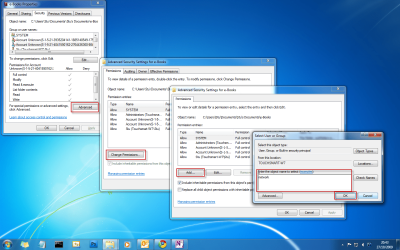
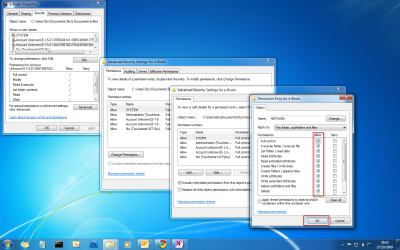
In the properties of the folder that won't display, choose the security tab. In the ACL add NETWORK and grant full permissions.
See how that goes & let us know ;)

1.png

2.png
 

My Computer

Computer Manufacturer/Model Number
HP Touchsmart IQ771.uk
OS
Windows 7 Ultimate x64
CPU
AMD Turion(tm) 64 X2 Mobile Technology TL-56
Motherboard
ASUS Pheonix
Memory
3GB Nanya PC2-6400 DDR2-SDRAM SO-DIM (400MHz)
Graphics Card(s)
NVIDIA GeForce Go 7600 256MB GDDR3 SDRAM
Sound Card
High Definition Intergrated NVIDIA MCP51
Monitor(s) Displays
46" Sony Bravia HDTV
Screen Resolution
1600x1200
Hard Drives
1.5TB Samsug
320GB Seagate ST3320820AS - SATA 3Gb/s 8MB
500GB Maxtor Basics STM305003EHD301-RK
Internet Speed
↓6.32 Mb/s ↑0.35 Mb/s ↔26ms
Other Info
BIOS - American Megatrends Inc. 5.07
Ethernet Port - NVIDIA nForce 10/100/1000 Mbps
DVD Drive - TSSTcorp DVDR/RW TS-T632L
Under the permissions tab, i have added 'everyone' and 'network' with full control, the files still do not appear in the folder.

The name i used to login for windows on both machines in 'michael' one shows as michael-pc and the other as michael-laptop, could this be causing problems? just throwing it out there, seems like it would not cause trouble since the desktop can see the laptops files with no trouble.

...and thanks for the welcome :)
 

My Computer

Computer Manufacturer/Model Number
home built
OS
win 7
CPU
core duo 6600
Memory
3gb
Graphics Card(s)
geforce 8800 gtx
Monitor(s) Displays
samsung 22inch
PSU
600w
Cooling
liquid
also when i look at the permissions for the individual music files, it does not have network/everyone or anything listed except for the local stuff
but when i look at some music files from my laptop, the permissions are everyone/homegroup users etc...

this seems like the problem
 

My Computer

Computer Manufacturer/Model Number
home built
OS
win 7
CPU
core duo 6600
Memory
3gb
Graphics Card(s)
geforce 8800 gtx
Monitor(s) Displays
samsung 22inch
PSU
600w
Cooling
liquid
also when i look at the permissions for the individual music files, it does not have network/everyone or anything listed except for the local stuff
but when i look at some music files from my laptop, the permissions are everyone/homegroup users etc...

this seems like the problem

In that case, see the first screenshot i posted, check the "Replace all child objects with inheritable........"
 

My Computer

Computer Manufacturer/Model Number
HP Touchsmart IQ771.uk
OS
Windows 7 Ultimate x64
CPU
AMD Turion(tm) 64 X2 Mobile Technology TL-56
Motherboard
ASUS Pheonix
Memory
3GB Nanya PC2-6400 DDR2-SDRAM SO-DIM (400MHz)
Graphics Card(s)
NVIDIA GeForce Go 7600 256MB GDDR3 SDRAM
Sound Card
High Definition Intergrated NVIDIA MCP51
Monitor(s) Displays
46" Sony Bravia HDTV
Screen Resolution
1600x1200
Hard Drives
1.5TB Samsug
320GB Seagate ST3320820AS - SATA 3Gb/s 8MB
500GB Maxtor Basics STM305003EHD301-RK
Internet Speed
↓6.32 Mb/s ↑0.35 Mb/s ↔26ms
Other Info
BIOS - American Megatrends Inc. 5.07
Ethernet Port - NVIDIA nForce 10/100/1000 Mbps
DVD Drive - TSSTcorp DVDR/RW TS-T632L
also when i look at the permissions for the individual music files, it does not have network/everyone or anything listed except for the local stuff
but when i look at some music files from my laptop, the permissions are everyone/homegroup users etc...

this seems like the problem

In that case, see the first screenshot i posted, check the "Replace all child objects with inheritable........"

aha, this worked like a charm. is there a way to apply this to all of my seperate picture folders? and is there a way to avoid this problem i nthe future, or will some folders just need some extra tlc?
 

My Computer

Computer Manufacturer/Model Number
home built
OS
win 7
CPU
core duo 6600
Memory
3gb
Graphics Card(s)
geforce 8800 gtx
Monitor(s) Displays
samsung 22inch
PSU
600w
Cooling
liquid
*edit*

nm, i just cut all the picture folders and pasted them into a folder called pictures in the shared pictures librarie.

then changed the permissions just like i did in music.

thank you very much for the help.

Is there a way to make it so I do not need to do this every time for the desktop? My laptop seemed to create the folders seemlessly without needing this extra attention.
 

My Computer

Computer Manufacturer/Model Number
home built
OS
win 7
CPU
core duo 6600
Memory
3gb
Graphics Card(s)
geforce 8800 gtx
Monitor(s) Displays
samsung 22inch
PSU
600w
Cooling
liquid
No, i think you'll have to apply the permissions manually. I may be wrong.......
I'm glad you got it working. :D

EDIT:
I think if you set the parent folder permissions to how you need and check the inheritable box that might work.
Also, it might be wise to make a note of permission changes you make so you can revert easily if needed ;)
 

My Computer

Computer Manufacturer/Model Number
HP Touchsmart IQ771.uk
OS
Windows 7 Ultimate x64
CPU
AMD Turion(tm) 64 X2 Mobile Technology TL-56
Motherboard
ASUS Pheonix
Memory
3GB Nanya PC2-6400 DDR2-SDRAM SO-DIM (400MHz)
Graphics Card(s)
NVIDIA GeForce Go 7600 256MB GDDR3 SDRAM
Sound Card
High Definition Intergrated NVIDIA MCP51
Monitor(s) Displays
46" Sony Bravia HDTV
Screen Resolution
1600x1200
Hard Drives
1.5TB Samsug
320GB Seagate ST3320820AS - SATA 3Gb/s 8MB
500GB Maxtor Basics STM305003EHD301-RK
Internet Speed
↓6.32 Mb/s ↑0.35 Mb/s ↔26ms
Other Info
BIOS - American Megatrends Inc. 5.07
Ethernet Port - NVIDIA nForce 10/100/1000 Mbps
DVD Drive - TSSTcorp DVDR/RW TS-T632L
*edit*

nm, i just cut all the picture folders and pasted them into a folder called pictures in the shared pictures librarie.

then changed the permissions just like i did in music.

thank you very much for the help.

Is there a way to make it so I do not need to do this every time for the desktop? My laptop seemed to create the folders seemlessly without needing this extra attention.

Yes there is a way, if you set up Homegroups on the desktop and other computers you can share your entire picture or music library collection with all of your other Homegroup enabled computers.
 

My Computer

Computer type
PC/Desktop
Computer Manufacturer/Model Number
Home built
OS
Windows 7 Ult, Windows 8.1 Pro,
CPU
Q9650-4.275GHz, E8600 4.5GHz, E6750-3.8GHz
Motherboard
Evga 780i FTW
Memory
G.Skill PC2 9600 1200Mhz 5 5 5 15 2T
Graphics Card(s)
GTX480
Sound Card
Asus Xonar D2
Monitor(s) Displays
HannsG
Screen Resolution
1680X1050
Hard Drives
GSkill Phoenix Pro 120GB SSD
PSU
ThermalTake Toughpower 1000Watt modular
Case
ThermalTake XaserV
Cooling
Xigmatek S1283
Keyboard
Logitech G15
Mouse
Logitech G9
Internet Speed
T1
*edit*

nm, i just cut all the picture folders and pasted them into a folder called pictures in the shared pictures librarie.

then changed the permissions just like i did in music.

thank you very much for the help.

Is there a way to make it so I do not need to do this every time for the desktop? My laptop seemed to create the folders seemlessly without needing this extra attention.

Yes there is a way, if you set up Homegroups on the desktop and other computers you can share your entire picture or music library collection with all of your other Homegroup enabled computers.

yea i already have both of these machines set up on the same home group, just only one of the computers could actually see the files. the other one could only see folders and nothing else. permissions seemed to clear this up though.
 

My Computer

Computer Manufacturer/Model Number
home built
OS
win 7
CPU
core duo 6600
Memory
3gb
Graphics Card(s)
geforce 8800 gtx
Monitor(s) Displays
samsung 22inch
PSU
600w
Cooling
liquid
Back
Top