Homegroup - half working

Paradoxicated

New member
Member
Local time
12:28 AM
Messages
7
Location
South Jersey
Have homegroup set-up and working on 2 of the 3 computers in the home. 1 desktop, 2 laptops. Both laptops are IDENTICAL in their builds, both have Win7.

All 3 computers are "joined' to the same homegroup. One laptop is able view and share files with the desktop and vice-versa. The other laptop, is the problem, it is in fact joined to same homegroup but can NOT view or share files on the homegroup.

That's the problem.

I went through this forum and tried some of the suggestions here, but none worked.
 

My Computer

OS
Windows 7 Pro / Win 7 Prem
Have homegroup set-up and working on 2 of the 3 computers in the home. 1 desktop, 2 laptops. Both laptops are IDENTICAL in their builds, both have Win7.

All 3 computers are "joined' to the same homegroup. One laptop is able view and share files with the desktop and vice-versa. The other laptop, is the problem, it is in fact joined to same homegroup but can NOT view or share files on the homegroup.

That's the problem.

I went through this forum and tried some of the suggestions here, but none worked.

You should have started your own thread. Thsi one is so old not many ppl witll even see it.

Just as a test try making a new network connection using "workgroup" instead of "homegroup".

Work-group uses IPv4 which works better on older hardware.

If it works you can disable IPv6 and kill homegroup

Let us know if you need help with setting that up


Ken
 

My Computer

Computer Manufacturer/Model Number
HP Pavillion dv-7 1005 Tx
OS
Win 8 Release candidate 8400
CPU
[email protected]
Memory
4 gigs
Graphics Card(s)
Nvidia 9600M
Sound Card
HD built-in
Monitor(s) Displays
17" Wxga
Screen Resolution
1440x900
Cooling
none
Internet Speed
45Mb down 5Mb up
Homegroup Problem, cont'd

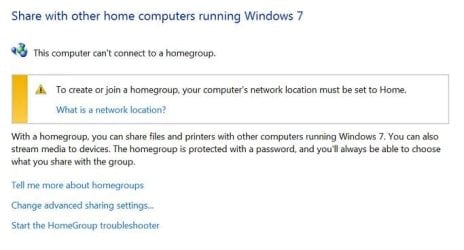
Thanks for the quick response Ken. That didn't work however. What happened when I made all 3 a Workgroup is Homegroup would not even allow me to create a new Homegroup at all. I got an error message that said,

Homegroup screen.jpg

Also note, prior to trying your suggestion, I temporarily got all 3 computers to work. I had tried the changing the name of the one laptop that wasn't able to view the homegroup (although it was part of it). When I did that, I left the homegroup and re-joined it, all with success. And! I was then able to view/share all homegroup files on all 3 computers. However, and sadly enough, after a reboot, I not only lost the ability again on the same laptop to view/share the files on the homegroup, I was then not able even able to join the homegroup. So out of the frying pan and in to the fire. I went from bad to better to gooder (smirk) to worse in 10 minutes.
 

My Computer

OS
Windows 7 Pro / Win 7 Prem
Thread moved. ;)
 

My Computer

Computer type
PC/Desktop
Computer Manufacturer/Model Number
Self built custom
OS
64-bit Windows 11 Pro for Workstations
CPU
Intel i7-8700K OC'd to 5 GHz
Motherboard
ASUS ROG Maximus XI Formula Z390
Memory
64 GB (4x16GB) G.SKILL TridentZ RGB DDR4 3600 MHz
Graphics Card(s)
ASUS ROG-STRIX-GTX1080TI-O11G-GAMING
Sound Card
Integrated
Monitor(s) Displays
2 x Samsung Odyssey G7 27"
Screen Resolution
2560x1440
Hard Drives
1TB Samsung 990 PRO M.2,
4TB Samsung 990 PRO PRO M.2,
TerraMaster F8 SSD Plus NAS
PSU
Seasonic Prime Titanium 850W
Case
Thermaltake Core P3
Cooling
Corsair Hydro H115i
Keyboard
Logitech wireless K800
Mouse
Logitech MX Master 4
Internet Speed
2 Gb/s Download and 100 Mb/s Upload
Antivirus
Malwarebyte Anti-Malware Premium
Browser
Google Chrome
Other Info
Logitech Z625 speaker system,
Logitech BRIO 4K Pro webcam,
HP Color LaserJet Pro MFP M477fdn,
APC SMART-UPS RT 1000 XL - SURT1000XLI,
Galaxy S23 Plus phone
Thanks for the quick response Ken. That didn't work however. What happened when I made all 3 a Workgroup is Homegroup would not even allow me to create a new Homegroup at all. I got an error message that said,

View attachment 74136

Also note, prior to trying your suggestion, I temporarily got all 3 computers to work. I had tried the changing the name of the one laptop that wasn't able to view the homegroup (although it was part of it). When I did that, I left the homegroup and re-joined it, all with success. And! I was then able to view/share all homegroup files on all 3 computers. However, and sadly enough, after a reboot, I not only lost the ability again on the same laptop to view/share the files on the homegroup, I was then not able even able to join the homegroup. So out of the frying pan and in to the fire. I went from bad to better to gooder (smirk) to worse in 10 minutes.

One question, which A/V software or third party firewall are you using?
 

My Computer

Computer type
PC/Desktop
Computer Manufacturer/Model Number
Home built
OS
Windows 7 Ult, Windows 8.1 Pro,
CPU
Q9650-4.275GHz, E8600 4.5GHz, E6750-3.8GHz
Motherboard
Evga 780i FTW
Memory
G.Skill PC2 9600 1200Mhz 5 5 5 15 2T
Graphics Card(s)
GTX480
Sound Card
Asus Xonar D2
Monitor(s) Displays
HannsG
Screen Resolution
1680X1050
Hard Drives
GSkill Phoenix Pro 120GB SSD
PSU
ThermalTake Toughpower 1000Watt modular
Case
ThermalTake XaserV
Cooling
Xigmatek S1283
Keyboard
Logitech G15
Mouse
Logitech G9
Internet Speed
T1
Kaspersky.

As a test, I've turned off Kaspersky on both the Desktop and the Laptop in question - it didn't solve the issue.

The saga continues, as the problem seems to be migratory now, meaning that the problematic issue "changes" each time I change something with the Homegroup.

As stated above, I changed all networks to a 'workgroup' and that prevented a "homegroup" from being created.

So I went back and changed all to "homegroup" and then I created a new homegroup on the desktop. As before the 2 laptops immediately 'saw' the new homegroup and I was able to join the homegroup.

With NEW problems!

The original laptop with the original problem (not being to view or share files on the homegroup) was able to view/share the files, but now after a reboot the laptop can ONLY view the file directories on the desktop and other laptop, but when I click on the directories (for example pictures), nothing happens. The directory does not open.

The second laptop can STILL view/share files from the homegroup. I can click on the directories from the other laptop and desktop and they immediately open and I can use the files in them.

The desktop, that created the homegroup can view the file directories on the laptops, but when I click on them, nothing happens.

Gotta love it!
 

My Computer

OS
Windows 7 Pro / Win 7 Prem
Turning off the A/V won't fix this type of problem. You will need to uninstall it completely.

This exact problem with Kapersky has occured so many times I have lost count. :confused:
 

My Computer

Computer type
PC/Desktop
Computer Manufacturer/Model Number
Home built
OS
Windows 7 Ult, Windows 8.1 Pro,
CPU
Q9650-4.275GHz, E8600 4.5GHz, E6750-3.8GHz
Motherboard
Evga 780i FTW
Memory
G.Skill PC2 9600 1200Mhz 5 5 5 15 2T
Graphics Card(s)
GTX480
Sound Card
Asus Xonar D2
Monitor(s) Displays
HannsG
Screen Resolution
1680X1050
Hard Drives
GSkill Phoenix Pro 120GB SSD
PSU
ThermalTake Toughpower 1000Watt modular
Case
ThermalTake XaserV
Cooling
Xigmatek S1283
Keyboard
Logitech G15
Mouse
Logitech G9
Internet Speed
T1
Turning off the A/V won't fix this type of problem. You will need to uninstall it completely.

This exact problem with Kapersky has occured so many times I have lost count. :confused:

Ok, uninstalling Kaspersky worked, but now what would you suggest I use for a/v? :huh:
 

My Computer

OS
Windows 7 Pro / Win 7 Prem
Kapersky causing Homegroup sharing problems fixed

Turning off the A/V won't fix this type of problem. You will need to uninstall it completely.

This exact problem with Kapersky has occured so many times I have lost count. :confused:

Ok, uninstalling Kaspersky worked, but now what would you suggest I use for a/v? :huh:

I figured that was the problem. So far I have witnessed problems created by just about every A/V and third party firewall so it's difficult for me to recommend one in particular. I just use Malware bytes and spybot S@D to run scans with once a week and never have any problems. You can also use Msoft security essentials which seems to work well with Homegroups and it's also free. ;)
 

My Computer

Computer type
PC/Desktop
Computer Manufacturer/Model Number
Home built
OS
Windows 7 Ult, Windows 8.1 Pro,
CPU
Q9650-4.275GHz, E8600 4.5GHz, E6750-3.8GHz
Motherboard
Evga 780i FTW
Memory
G.Skill PC2 9600 1200Mhz 5 5 5 15 2T
Graphics Card(s)
GTX480
Sound Card
Asus Xonar D2
Monitor(s) Displays
HannsG
Screen Resolution
1680X1050
Hard Drives
GSkill Phoenix Pro 120GB SSD
PSU
ThermalTake Toughpower 1000Watt modular
Case
ThermalTake XaserV
Cooling
Xigmatek S1283
Keyboard
Logitech G15
Mouse
Logitech G9
Internet Speed
T1
It's all good now, thanks a bunch!

I uninstalled Kaspersky and installed Spybot S&D, Malabytes and Easy Cleaner 2.0 and MS Security Essentials. I used to use EC all the time but stopped a couple years ago, I was happy to see it was updated for Windows 7, but alas, it don't work! EC finds the dead reg files, but when I hit "delete all" it doesn't delete them. grrrrrr. No biggie.

Kaspersky was giving me trouble with other apps too so it's just as good that I uninstalled it. I'm just a little bitter because I spent $80 on Kaspersky, and now can't use it.

I'm glad I got my HG working!
 

My Computer

OS
Windows 7 Pro / Win 7 Prem
I think maybe if you go to the Kapersky forums you may find a way to make it work correctly but I can't say for sure. Glad the rest of your network is up and running. :)
 

My Computer

Computer type
PC/Desktop
Computer Manufacturer/Model Number
Home built
OS
Windows 7 Ult, Windows 8.1 Pro,
CPU
Q9650-4.275GHz, E8600 4.5GHz, E6750-3.8GHz
Motherboard
Evga 780i FTW
Memory
G.Skill PC2 9600 1200Mhz 5 5 5 15 2T
Graphics Card(s)
GTX480
Sound Card
Asus Xonar D2
Monitor(s) Displays
HannsG
Screen Resolution
1680X1050
Hard Drives
GSkill Phoenix Pro 120GB SSD
PSU
ThermalTake Toughpower 1000Watt modular
Case
ThermalTake XaserV
Cooling
Xigmatek S1283
Keyboard
Logitech G15
Mouse
Logitech G9
Internet Speed
T1
I found this:
Kaspersky Internet Security and Windows 7 Homegroup

It worked for me. And for many others.

Even if it is not exactly Kaspersky, similar settings or packet filtering would be common for tight firewall security - it was helpful to read ...

You do realize that this thread is from may? I hope he has his problem solved by now. Thanks and by the way it is interesting read


Ken
 

My Computer

Computer Manufacturer/Model Number
HP Pavillion dv-7 1005 Tx
OS
Win 8 Release candidate 8400
CPU
[email protected]
Memory
4 gigs
Graphics Card(s)
Nvidia 9600M
Sound Card
HD built-in
Monitor(s) Displays
17" Wxga
Screen Resolution
1440x900
Cooling
none
Internet Speed
45Mb down 5Mb up
You are right, Ken. I realise the thread is old, but, just like me, if people have a similar issue now and search the web, this thread may come up (as it did for me). So I thought i should post some new relevant info in case someone in need stumbles upon it...

Regards,
M
 

My Computer

OS
W7x64E,U
Back
Top