
Homegroup & IPv6

bjproc

New member
i have just installed windows 7 onto my netbook, it has joined a homegroup with my main PC (win 7 pro) with no problem, but i have a HTPC (win 7 HP) that i still cannot get to join the homegroup

i have updated the realtech drivers today, but it's still the same.

any ideas?
 

My Computer

Computer Manufacturer/Model Number
Mesh Q4
OS
Win 7 Pro 32bit
CPU
Intel Quad Core 6600
Motherboard
Asus P5N-E SLI
Memory
4 GB
Graphics Card(s)
nVidia 8800GT
Sound Card
Onboard
Hard Drives
1TB Samsung Spinpoint,
1TB WD Eco Green
i have just installed windows 7 onto my netbook, it has joined a homegroup with my main PC (win 7 pro) with no problem, but i have a HTPC (win 7 HP) that i still cannot get to join the homegroup

i have updated the realtech drivers today, but it's still the same.

any ideas?

Is your Windows 7 Pro is set the same network name as your new Htpc?

Realtek drivers as nothing to do with normaly.

Have a look here:

http://http://www.sevenforums.com/tutorials/43972-homegroup-add-computer-join.html
 

My Computer

Computer type
PC/Desktop
Computer Manufacturer/Model Number
Custom Build
OS
Windows 7 Professional SP1 - x64 [Non-UEFI Boot]
CPU
Ivy Bridge Core i5 3570K (Delidded)
Motherboard
Asus P8Z77-V LE PLUS
Memory
G.Skill "Ares" DDR3 PC3-12800 - 1600MHz (16Gb)
Graphics Card(s)
Asus Dual-RX480-O4G
Sound Card
Creative Sound Blaster Z w/5.1 sound system
Monitor(s) Displays
Asus IPS 23"
Screen Resolution
16/9
Hard Drives
Internal:
500Go Sata 6Gb/s (x2)
500Go Sata 3Gb/s (x2)
SSD 60Go Sata 6Gb/s
PSU
In Win C 900W Series 80+ Platinum
Case
Thermaltake Chaser A71
Cooling
Custom Water Cooling Loop
Keyboard
Cooler Master QuickFire XTi
Mouse
Razer Imperator 2012 (4G)
Antivirus
MSE
Browser
IE 11.0.xxx Rtm
Other Info
"Raid0" with Intel Smart Response Technology (HDD/SSD)
i did have [name]-PC (main PC) & [name]-HTPC (HTPC)

i've changed PC name to [name3]-HTPC & [name3]-PC (both on HTPC) but it's still saying that IPv6 needs to be enabled, from what i can see, it is
 

My Computer

Computer Manufacturer/Model Number
Mesh Q4
OS
Win 7 Pro 32bit
CPU
Intel Quad Core 6600
Motherboard
Asus P5N-E SLI
Memory
4 GB
Graphics Card(s)
nVidia 8800GT
Sound Card
Onboard
Hard Drives
1TB Samsung Spinpoint,
1TB WD Eco Green
i did have [name]-PC (main PC) & [name]-HTPC (HTPC)

i've changed PC name to [name3]-HTPC & [name3]-PC (both on HTPC) but it's still saying that IPv6 needs to be enabled, from what i can see, it is


Can you type cmd in search>then type ipconfig /all. Upload the output to us.

Ken
 

My Computer

Computer Manufacturer/Model Number
HP Pavillion dv-7 1005 Tx
OS
Win 8 Release candidate 8400
CPU
[email protected]
Memory
4 gigs
Graphics Card(s)
Nvidia 9600M
Sound Card
HD built-in
Monitor(s) Displays
17" Wxga
Screen Resolution
1440x900
Cooling
none
Internet Speed
45Mb down 5Mb up
hope this helps
 

Attachments

  • ip.jpg
    ip.jpg
    45.2 KB · Views: 36

My Computer

Computer Manufacturer/Model Number
Mesh Q4
OS
Win 7 Pro 32bit
CPU
Intel Quad Core 6600
Motherboard
Asus P5N-E SLI
Memory
4 GB
Graphics Card(s)
nVidia 8800GT
Sound Card
Onboard
Hard Drives
1TB Samsung Spinpoint,
1TB WD Eco Green
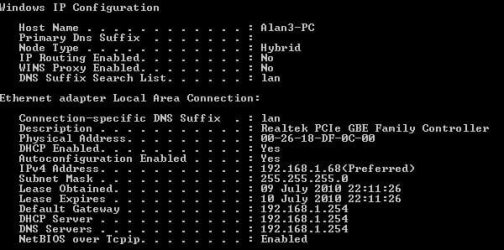
i'll add, my netbook connected to the homegroup with no problems over a wireless connection, my HTPC is wired connection
 

My Computer

Computer Manufacturer/Model Number
Mesh Q4
OS
Win 7 Pro 32bit
CPU
Intel Quad Core 6600
Motherboard
Asus P5N-E SLI
Memory
4 GB
Graphics Card(s)
nVidia 8800GT
Sound Card
Onboard
Hard Drives
1TB Samsung Spinpoint,
1TB WD Eco Green
hope this helps

Thanks I am assuming it is ethernet, correct?

Sometimes "homegroup" and IPv6 have connectivity issues. You can test to see if that i s the problem, by creating a new network connection using "workgroup"


Ken
 

My Computer

Computer Manufacturer/Model Number
HP Pavillion dv-7 1005 Tx
OS
Win 8 Release candidate 8400
CPU
[email protected]
Memory
4 gigs
Graphics Card(s)
Nvidia 9600M
Sound Card
HD built-in
Monitor(s) Displays
17" Wxga
Screen Resolution
1440x900
Cooling
none
Internet Speed
45Mb down 5Mb up

My Computer

Computer type
PC/Desktop
Computer Manufacturer/Model Number
Custom Build
OS
Windows 7 Professional SP1 - x64 [Non-UEFI Boot]
CPU
Ivy Bridge Core i5 3570K (Delidded)
Motherboard
Asus P8Z77-V LE PLUS
Memory
G.Skill "Ares" DDR3 PC3-12800 - 1600MHz (16Gb)
Graphics Card(s)
Asus Dual-RX480-O4G
Sound Card
Creative Sound Blaster Z w/5.1 sound system
Monitor(s) Displays
Asus IPS 23"
Screen Resolution
16/9
Hard Drives
Internal:
500Go Sata 6Gb/s (x2)
500Go Sata 3Gb/s (x2)
SSD 60Go Sata 6Gb/s
PSU
In Win C 900W Series 80+ Platinum
Case
Thermaltake Chaser A71
Cooling
Custom Water Cooling Loop
Keyboard
Cooler Master QuickFire XTi
Mouse
Razer Imperator 2012 (4G)
Antivirus
MSE
Browser
IE 11.0.xxx Rtm
Other Info
"Raid0" with Intel Smart Response Technology (HDD/SSD)
yes, it's connected with an ethernet cable
 

My Computer

Computer Manufacturer/Model Number
Mesh Q4
OS
Win 7 Pro 32bit
CPU
Intel Quad Core 6600
Motherboard
Asus P5N-E SLI
Memory
4 GB
Graphics Card(s)
nVidia 8800GT
Sound Card
Onboard
Hard Drives
1TB Samsung Spinpoint,
1TB WD Eco Green

My Computer

Computer Manufacturer/Model Number
Mesh Q4
OS
Win 7 Pro 32bit
CPU
Intel Quad Core 6600
Motherboard
Asus P5N-E SLI
Memory
4 GB
Graphics Card(s)
nVidia 8800GT
Sound Card
Onboard
Hard Drives
1TB Samsung Spinpoint,
1TB WD Eco Green
Thanks for reporting back in bjproc. I'm sorry I didn't get here soon enough to help you because I could have linked you to the fix for this sooner. I'll post the fix for anyone reading this.

If you are having problem joining the Homegroup from certain machines try the following procedure.

Open up a command prompt and type "regedit" without the quotes then hit enter. Navigate to the following key.

[HKEY_LOCAL_MACHINE\SYSTEM\CurrentControlSet\Services\Tcpip6\Parameters]

You have to set the DisabledComponents Dword to 0

Very important> If there isn't a disabled components dword you have to create one and then set it to zero. To do this follow the next step while you are still at the same spot in the registry.

In the right pane, right-click and select New – DWORD (32-bit value) and type in it's name as> “DisabledComponents” and set its value to 0.
“0″ = Enable All IPv6 Interfaces (Default)
After that reboot your machine and see if the problem is fixed.

This fix is also outlined in this Technet thread.
HomeGroup get an error of must have IPv6 enabled

It's also a standard fix in the Homegroup walkthough which I have posted many times.
Ultimate Troubleshooting Guide for Windows 7 HomeGroup Connection Issues
 

My Computer

Computer type
PC/Desktop
Computer Manufacturer/Model Number
Home built
OS
Windows 7 Ult, Windows 8.1 Pro,
CPU
Q9650-4.275GHz, E8600 4.5GHz, E6750-3.8GHz
Motherboard
Evga 780i FTW
Memory
G.Skill PC2 9600 1200Mhz 5 5 5 15 2T
Graphics Card(s)
GTX480
Sound Card
Asus Xonar D2
Monitor(s) Displays
HannsG
Screen Resolution
1680X1050
Hard Drives
GSkill Phoenix Pro 120GB SSD
PSU
ThermalTake Toughpower 1000Watt modular
Case
ThermalTake XaserV
Cooling
Xigmatek S1283
Keyboard
Logitech G15
Mouse
Logitech G9
Internet Speed
T1
Back
Top