
Solved Homegroup no longer working - confused!

imoani

New member
Local time
9:31 AM
Messages
6
I am running a Windows 7 64-bit desktop on a home network connected to 2 other desktops (one with the same OS as mine, the other with Win 7 32-bit) as well as 2 other laptops through a wireless router. My homegroup was working perfectly with all 5 computers until this morning.

I attempted to connect from my 64-bit system to the 32-bit desktop (as I do on a daily basis), however, I could no longer access any of the shared folders and Windows said on both computers that there was no homegroup set up. This is strange since we have been using the homegroup successfully for many months.

I ran the homegroup troubleshooter on both computers and synched the clocks as suggested to no avail.

I attempted to create a new homegroup on both computers but neither homegroup could see each other - each computer kept wanting to create a new homegroup. I subsequently left the newly created homegroups and rebooted both computers. I also reset both wireless cards and the router.

After searching on forums for an answer, I realised that one of my homegroup services had been stopped on my 64-bit machine, so I started that service again and rebooted.

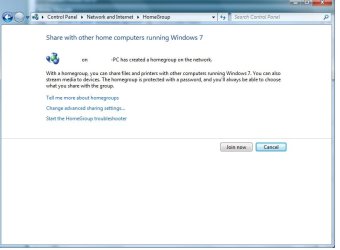
Now when I log onto my 64-bit computer (named Jane for argument's sake) and attempt look at my homegroup settings, it says Jane-PC has created a homegroup on this network (see screenshot). Since I am Jane, this is weird; although it says I have created a homegroup, I can neither join, leave or enter the correct password for this homegroup. I have tried to enter the old as well as the new homegroup passwords. I hope this makes sense!

I am stuck, as now Jane-PC and all of my other computers can see the new homegroup but none of us can join it!

Is there any way of completely removing all records of a homegroup and starting again? e.g. in regedit?
 

Attachments
  • Homegroup.jpg
    Homegroup.jpg
    36.9 KB · Views: 37

My Computer My Computer

At a glance

Microsoft Windows 7 Ultimate 64-bit SP1Intel Core i5 2400 @ 3.10GHz4.00 GB Single-Channel DDR3 @ 826MHz (9-9-9-24)AMD Radeon HD 6800 Series (Gigabyte GV-R685OC...
Computer type
PC/Desktop
Computer Manufacturer/Model Number
Custom build
OS
Microsoft Windows 7 Ultimate 64-bit SP1
CPU
Intel Core i5 2400 @ 3.10GHz
Motherboard
ASUSTeK COMPUTER INC. P8P67 LE (LGA1155)
Memory
4.00 GB Single-Channel DDR3 @ 826MHz (9-9-9-24)
Graphics Card(s)
AMD Radeon HD 6800 Series (Gigabyte GV-R685OC-1G)
Sound Card
Realtek High Definition Audio
Monitor(s) Displays
Philips 192E on AMD Radeon HD 6800 Series
Screen Resolution
1366x768 pixels
Hard Drives
932GB Western Digital WDC WD1002FAEX-00Z3A0 (SATA)
1397GB Western Digital WDC WD15EARS-00Z5B1 (SATA)
Keyboard
Logitech HID Keyboard Device
Mouse
Logitech HID-compliant mouse
Antivirus
Microsoft Security Essentials
Browser
Mozilla Firefox 19.0.2
Once you get into the problem of "can't leave the Home group" you need to perform the fix below.


The fix for this problem seems to be Deleting the file idstore.sst under C:\windows\serviceProfiles\LocalService\AppData\Roaming\PeerNetworking

You may need to do this on each of your homegroup machines.


Once everything at peer Networking Grouping is running you may also need to do this...

Start the Task Manager
Click on the service Tab
Find the "HomeGroupProvider"
and then stop the service.


You may need to go back into services and enable Peernetworking again after the fix. Don't forget to restart all machines making the adjustments.

After this you should be able to create a new Home group and will be able to join the new Home group from your other networked machines. :)
 

My Computer My Computer

At a glance

Windows 7 Ult, Windows 8.1 Pro,Q9650-4.275GHz, E8600 4.5GHz, E6750-3.8GHzG.Skill PC2 9600 1200Mhz 5 5 5 15 2TGTX480
Computer type
PC/Desktop
Computer Manufacturer/Model Number
Home built
OS
Windows 7 Ult, Windows 8.1 Pro,
CPU
Q9650-4.275GHz, E8600 4.5GHz, E6750-3.8GHz
Motherboard
Evga 780i FTW
Memory
G.Skill PC2 9600 1200Mhz 5 5 5 15 2T
Graphics Card(s)
GTX480
Sound Card
Asus Xonar D2
Monitor(s) Displays
HannsG
Screen Resolution
1680X1050
Hard Drives
GSkill Phoenix Pro 120GB SSD
PSU
ThermalTake Toughpower 1000Watt modular
Case
ThermalTake XaserV
Cooling
Xigmatek S1283
Keyboard
Logitech G15
Mouse
Logitech G9
Internet Speed
T1
As far as I'm aware, if every computer leaves the homegroup it no longer exists.

In essence, you could do just that and create a new homegroup on your main computer with a fresh home group password before getting your other computers to join the new homegroup.
 

My Computer My Computer

At a glance

Windows 7 Ultimate SP1 64-BitIntel Core i7 870 @ 2.93GHz8Gb Dual-Channel DDR3 @ 664MHznVidia GeForce GTX 460 1024MB dedicated RAM
Computer Manufacturer/Model Number
HP Pavilion Elite 495UK
OS
Windows 7 Ultimate SP1 64-Bit
CPU
Intel Core i7 870 @ 2.93GHz
Motherboard
MSI 2A9C (CPU1)
Memory
8Gb Dual-Channel DDR3 @ 664MHz
Graphics Card(s)
nVidia GeForce GTX 460 1024MB dedicated RAM
Sound Card
Realtek HD Audio
Monitor(s) Displays
HP2310i
Screen Resolution
1920 x 1080
Hard Drives
1x1954GB Hitachi HDS22020ALA 330 (RAID), 1x1954GB Hitachi External for backup and storage
PSU
460W
Case
HP Elite
Cooling
Air cooled
Keyboard
Logitech K750 solar-powered keyboard
Mouse
Logitech Wireless M180 mouse
Internet Speed
2Mb
Other Info
Pure Avanti Flow Internet Radio with iPod Dock, 64Gb iPod, HP USB Speakers, Sony MDR-V500 Headphones, Sony Vaio F-Series Laptop
Thanks for your replies and suggestions!
My HomeGroup is back up and running now :) I removed the idstore.sst files on my computers and realised one of the HomeGroup services had been stopped (not sure why). I restarted the service, rebooted and all of a sudden I could create a new HomeGroup.
 

My Computer My Computer

At a glance

Microsoft Windows 7 Ultimate 64-bit SP1Intel Core i5 2400 @ 3.10GHz4.00 GB Single-Channel DDR3 @ 826MHz (9-9-9-24)AMD Radeon HD 6800 Series (Gigabyte GV-R685OC...
Computer type
PC/Desktop
Computer Manufacturer/Model Number
Custom build
OS
Microsoft Windows 7 Ultimate 64-bit SP1
CPU
Intel Core i5 2400 @ 3.10GHz
Motherboard
ASUSTeK COMPUTER INC. P8P67 LE (LGA1155)
Memory
4.00 GB Single-Channel DDR3 @ 826MHz (9-9-9-24)
Graphics Card(s)
AMD Radeon HD 6800 Series (Gigabyte GV-R685OC-1G)
Sound Card
Realtek High Definition Audio
Monitor(s) Displays
Philips 192E on AMD Radeon HD 6800 Series
Screen Resolution
1366x768 pixels
Hard Drives
932GB Western Digital WDC WD1002FAEX-00Z3A0 (SATA)
1397GB Western Digital WDC WD15EARS-00Z5B1 (SATA)
Keyboard
Logitech HID Keyboard Device
Mouse
Logitech HID-compliant mouse
Antivirus
Microsoft Security Essentials
Browser
Mozilla Firefox 19.0.2
You're very welcome.

Pleased to see you're up and running again and thanks for the update.

The solution may help others with a similar problem.
 

My Computer My Computer

At a glance

Windows 7 Ultimate SP1 64-BitIntel Core i7 870 @ 2.93GHz8Gb Dual-Channel DDR3 @ 664MHznVidia GeForce GTX 460 1024MB dedicated RAM
Computer Manufacturer/Model Number
HP Pavilion Elite 495UK
OS
Windows 7 Ultimate SP1 64-Bit
CPU
Intel Core i7 870 @ 2.93GHz
Motherboard
MSI 2A9C (CPU1)
Memory
8Gb Dual-Channel DDR3 @ 664MHz
Graphics Card(s)
nVidia GeForce GTX 460 1024MB dedicated RAM
Sound Card
Realtek HD Audio
Monitor(s) Displays
HP2310i
Screen Resolution
1920 x 1080
Hard Drives
1x1954GB Hitachi HDS22020ALA 330 (RAID), 1x1954GB Hitachi External for backup and storage
PSU
460W
Case
HP Elite
Cooling
Air cooled
Keyboard
Logitech K750 solar-powered keyboard
Mouse
Logitech Wireless M180 mouse
Internet Speed
2Mb
Other Info
Pure Avanti Flow Internet Radio with iPod Dock, 64Gb iPod, HP USB Speakers, Sony MDR-V500 Headphones, Sony Vaio F-Series Laptop
Thanks for your replies and suggestions!
My HomeGroup is back up and running now :) I removed the idstore.sst files on my computers and realised one of the HomeGroup services had been stopped (not sure why). I restarted the service, rebooted and all of a sudden I could create a new HomeGroup.

Yes that's just another little Windows 7 bug and many people have had in the past.

Unless that idstore.sst file is gone it's impossible to create or leave the Home group.

I'm glad that deleting that terrible file fixed it for you. :)
 
Last edited:

My Computer My Computer

At a glance

Windows 7 Ult, Windows 8.1 Pro,Q9650-4.275GHz, E8600 4.5GHz, E6750-3.8GHzG.Skill PC2 9600 1200Mhz 5 5 5 15 2TGTX480
Computer type
PC/Desktop
Computer Manufacturer/Model Number
Home built
OS
Windows 7 Ult, Windows 8.1 Pro,
CPU
Q9650-4.275GHz, E8600 4.5GHz, E6750-3.8GHz
Motherboard
Evga 780i FTW
Memory
G.Skill PC2 9600 1200Mhz 5 5 5 15 2T
Graphics Card(s)
GTX480
Sound Card
Asus Xonar D2
Monitor(s) Displays
HannsG
Screen Resolution
1680X1050
Hard Drives
GSkill Phoenix Pro 120GB SSD
PSU
ThermalTake Toughpower 1000Watt modular
Case
ThermalTake XaserV
Cooling
Xigmatek S1283
Keyboard
Logitech G15
Mouse
Logitech G9
Internet Speed
T1
Back
Top