Have seen this discussed on the net but I have tried some of the suggested fixes and they have not worked. Have a pc and a notebook both running Windows 7 Home Premium 64 bit. Homegroup had been set up on the pc and I just got the notebook and have joined the same homegroup I have two printers physically attached to the pc and none as yet to the notebook. The notebook found one of the printers wirelessly
initially without a hitch, the other printer It found later and alerted me to the fact and said to press the install printer button . And this is the problem the button does not work and as such does not install the printer. As I have said I have tried many of the suggest fixes but I still can get the button to work. Any help would be most appreciated.
Is the PC also a Win7 64-bit machine? Or is it s 32-bit WinXP machine or something else? This is a question about drivers and compatibility, so it's very very important to know these answers.
Also, are both printers actually supported by Win7 with drivers? Have you checked "Win7 compatiblity" for these printers? What brand and model are the printers?
Finally, if the two printers hosted by the PC are properly set up as "shared" on the PC, then you should be able to see both of them from the notebook:
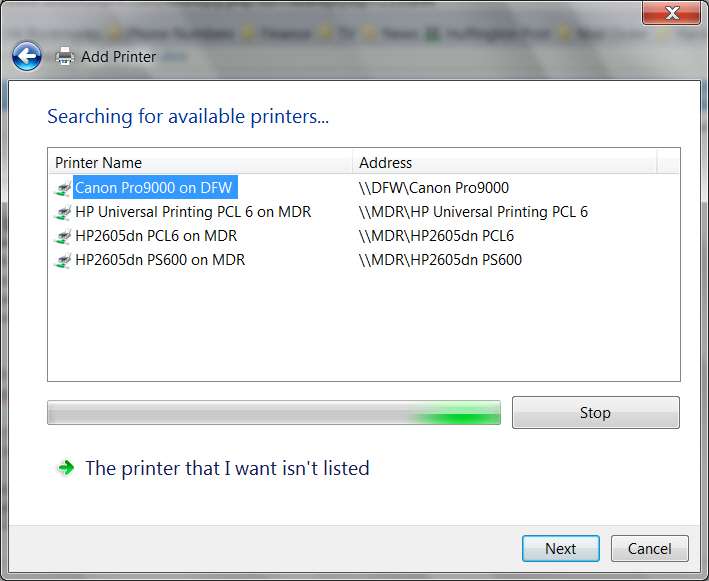
On your notebook click Start -> devices and printers, push the "Add a printer" button, select "add a network, wireless, or bluetooth printer". This will cause the "searching for available printers" dialog to appear. All properly "shared" printers on your home network should appear.
For example, in my case I have two win7 x64 PCs (MDR and DFW). From my MDR PC if I do the above steps I get the following list shown, from which I can then select the printer I want to add and push "next" to complete the installation (assuming there is no driver incompatibility between the requesting client machine and the hosting server machine).
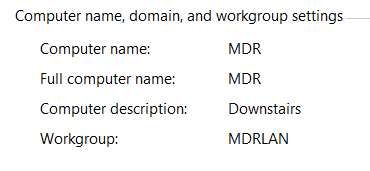
Note that I also have the same Windows "workgroup" specified in both of my machines.
Start -> right-click on "Computer", select "properties". Down a bit on the right side information is the "workgroup". For example, mine is:
Do both your notebook and PC show the same "workgroup"? If not, you should change that so both show the same workgroup.
Once both machines are in the same "workgroup", does the Add Printer dialog for a network printer performed from the laptop now show BOTH of the printers hosted by the desktop?