HomeGroup printer sharing issues

cwburns32

New member
Member
Local time
11:33 AM
Messages
82
Location
West Suburbs - Chicago, IL
I currently have a Brother MFC-8220 hooked up via USB to my main PC in my basement. I have 5 other machines - 4 laptops and one other PC. Currently 2 of the 4 laptops and the PC can print to the printer through the HomeGroup. The 2 other laptops cannot even find the printer on the network or in the HomeGroup.

1. Laptop can see all the other PCs on the HomeGroup but cannot see the printer. This laptop cannot be seen by other machines.

2. Lptop cannot see any other PC on the HomeGroup except for the host PC but still cannot see the printer. This laptop can be seen by other machines.

It is very odd that they are both acting differently. They are all set to share everything including the printer. The printer is set to share obviously as I can print from other laptop and PC with no issues.

Any help here would be great. My current system specs are for the #1 laptop I mentioned above.
 

My Computer

Computer type
PC/Desktop
Computer Manufacturer/Model Number
Custom
OS
Microsoft Windows 7 Home Premium 64-bit Service Pack 1
CPU
AMD FX-8320 @ 4.4 GHz
Motherboard
Asus M5A99X
Memory
G.Skill Ripjaw X Series 1866 16GB
Graphics Card(s)
NVIDIA GeForce GTX 670
Sound Card
N/A
Monitor(s) Displays
Asus 24" VS248H-P
Screen Resolution
1920x1080
Hard Drives
256 GB Samsung 840 Series SSD
1TB WD w 16 MB cache @ 10,000 RPM
Antivirus
Avast
Browser
Chrome
Hi there,

Have you tried manually installing the printer driver from the computers in question using this method?
Click on the Start button, in the run box type \\ComputerName\SharedPrinterName then tap the enter key from your keyboard.
 

My Computer

Computer Manufacturer/Model Number
Lenovo Desktop/Samsung Laptop
OS
Win7 & Win8 64bit
CPU
Intel i5
Internet Speed
Charter-20 Mbps
Antivirus
Avast
Browser
FF, IE9 and Chrome
Hi there,

Have you tried manually installing the printer driver from the computers in question using this method?
Click on the Start button, in the run box type \\ComputerName\SharedPrinterName then tap the enter key from your keyboard.

It just says check the spelling otherwise there might be a problem with your network which obviously there is not as I can print from 2 of the 5 PCs.
 

My Computer

Computer type
PC/Desktop
Computer Manufacturer/Model Number
Custom
OS
Microsoft Windows 7 Home Premium 64-bit Service Pack 1
CPU
AMD FX-8320 @ 4.4 GHz
Motherboard
Asus M5A99X
Memory
G.Skill Ripjaw X Series 1866 16GB
Graphics Card(s)
NVIDIA GeForce GTX 670
Sound Card
N/A
Monitor(s) Displays
Asus 24" VS248H-P
Screen Resolution
1920x1080
Hard Drives
256 GB Samsung 840 Series SSD
1TB WD w 16 MB cache @ 10,000 RPM
Antivirus
Avast
Browser
Chrome
Can you please provide us 2 ipconfig/all output, one coming from a working computer and another one from the problematic one?
http://www.sevenforums.com/network-...ing-your-networking-thread-2.html#post2490995

Attached is txt file of ipconfig/all from a non-working computer.

As for basic requirements before posting in networking thread...

1. Wired and wireless but I have two wireless connections working and one wired.

2. Comcast

3. Cable

4. Cisco XB3 DCP3939 gateway bridged to a Linksys EA4500 router (can print on working machines when connected to gateway's WiFi or the bridge's Wifi)

5. Microsoft Security Essentials

6. Attached.

Will attach from working computer in a few moments.

EDIT: And just for good measure here are the ipconfig/all from two other devices - one working and one not but these two are connected to the bridge's WiFi... although I doubt that matters as one is printing to the Homegroup printer and the other cannot even find it.
 

Attachments

My Computer

Computer type
PC/Desktop
Computer Manufacturer/Model Number
Custom
OS
Microsoft Windows 7 Home Premium 64-bit Service Pack 1
CPU
AMD FX-8320 @ 4.4 GHz
Motherboard
Asus M5A99X
Memory
G.Skill Ripjaw X Series 1866 16GB
Graphics Card(s)
NVIDIA GeForce GTX 670
Sound Card
N/A
Monitor(s) Displays
Asus 24" VS248H-P
Screen Resolution
1920x1080
Hard Drives
256 GB Samsung 840 Series SSD
1TB WD w 16 MB cache @ 10,000 RPM
Antivirus
Avast
Browser
Chrome
Thank you, I see discrepancies...

Here's the working computer, see the DNS Servers:
Connection-specific DNS Suffix . : hsd1.il.comcast.net
Description . . . . . . . . . . . : Intel(R) Centrino(R) Advanced-N 6250 AGN
Physical Address. . . . . . . . . : 64-80-99-78-31-8C
DHCP Enabled. . . . . . . . . . . : Yes
Autoconfiguration Enabled . . . . : Yes
Link-local IPv6 Address . . . . . : fe80::e90a:7b7f:8327:12ff%12(Preferred)
IPv4 Address. . . . . . . . . . . : 10.0.0.193(Preferred)
Subnet Mask . . . . . . . . . . . : 255.255.255.0
Lease Obtained. . . . . . . . . . : Friday, July 25, 2014 2:36:28 PM
Lease Expires . . . . . . . . . . : Friday, August 01, 2014 4:43:33 PM
Default Gateway . . . . . . . . . : 10.0.0.1
DHCP Server . . . . . . . . . . . : 10.0.0.1
DHCPv6 IAID . . . . . . . . . . . : 224690329
DHCPv6 Client DUID. . . . . . . . : 00-01-00-01-18-C7-7B-EE-B8-CA-3A-D6-C5-5E

DNS Servers . . . . . . . . . . . : 8.8.8.8
8.8.4.4

NetBIOS over Tcpip. . . . . . . . : Enabled
The non-working computer:
Connection-specific DNS Suffix . : hsd1.il.comcast.net
Description . . . . . . . . . . . : TP-LINK 150Mbps Wireless Lite N Adapter
Physical Address. . . . . . . . . : D8-5D-4C-90-C9-E3
DHCP Enabled. . . . . . . . . . . : Yes
Autoconfiguration Enabled . . . . : Yes
Link-local IPv6 Address . . . . . : fe80::29c7:1ca:aaab:36ed%10(Preferred)
IPv4 Address. . . . . . . . . . . : 10.0.0.120(Preferred)
Subnet Mask . . . . . . . . . . . : 255.255.255.0
Lease Obtained. . . . . . . . . . : Friday, July 25, 2014 5:19:53 PM
Lease Expires . . . . . . . . . . : Friday, August 01, 2014 5:19:53 PM
Default Gateway . . . . . . . . . : 10.0.0.1
DHCP Server . . . . . . . . . . . : 10.0.0.1
DHCPv6 IAID . . . . . . . . . . . : 249060684
DHCPv6 Client DUID. . . . . . . . : 00-01-00-01-18-C6-C4-61-D8-5D-4C-90-C9-E3

DNS Servers . . . . . . . . . . . : 75.75.75.75
75.75.76.76

NetBIOS over Tcpip. . . . . . . . : Enabled

Edit ...therefore the DNS Servers will need to be the same. I'd use the Comcast DNS's 75.75.75.75
and 75.75.76.76, set it to Auto to pickup your ISPs DNSes.

Another update of your progress will be nice.
 

My Computer

Computer Manufacturer/Model Number
Lenovo Desktop/Samsung Laptop
OS
Win7 & Win8 64bit
CPU
Intel i5
Internet Speed
Charter-20 Mbps
Antivirus
Avast
Browser
FF, IE9 and Chrome
Thank you, I see discrepancies...

Here's the working computer, see the DNS Servers:
Connection-specific DNS Suffix . : hsd1.il.comcast.net
Description . . . . . . . . . . . : Intel(R) Centrino(R) Advanced-N 6250 AGN
Physical Address. . . . . . . . . : 64-80-99-78-31-8C
DHCP Enabled. . . . . . . . . . . : Yes
Autoconfiguration Enabled . . . . : Yes
Link-local IPv6 Address . . . . . : fe80::e90a:7b7f:8327:12ff%12(Preferred)
IPv4 Address. . . . . . . . . . . : 10.0.0.193(Preferred)
Subnet Mask . . . . . . . . . . . : 255.255.255.0
Lease Obtained. . . . . . . . . . : Friday, July 25, 2014 2:36:28 PM
Lease Expires . . . . . . . . . . : Friday, August 01, 2014 4:43:33 PM
Default Gateway . . . . . . . . . : 10.0.0.1
DHCP Server . . . . . . . . . . . : 10.0.0.1
DHCPv6 IAID . . . . . . . . . . . : 224690329
DHCPv6 Client DUID. . . . . . . . : 00-01-00-01-18-C7-7B-EE-B8-CA-3A-D6-C5-5E

DNS Servers . . . . . . . . . . . : 8.8.8.8
8.8.4.4

NetBIOS over Tcpip. . . . . . . . : Enabled

The non-working computer:
Connection-specific DNS Suffix . : hsd1.il.comcast.net
Description . . . . . . . . . . . : TP-LINK 150Mbps Wireless Lite N Adapter
Physical Address. . . . . . . . . : D8-5D-4C-90-C9-E3
DHCP Enabled. . . . . . . . . . . : Yes
Autoconfiguration Enabled . . . . : Yes
Link-local IPv6 Address . . . . . : fe80::29c7:1ca:aaab:36ed%10(Preferred)
IPv4 Address. . . . . . . . . . . : 10.0.0.120(Preferred)
Subnet Mask . . . . . . . . . . . : 255.255.255.0
Lease Obtained. . . . . . . . . . : Friday, July 25, 2014 5:19:53 PM
Lease Expires . . . . . . . . . . : Friday, August 01, 2014 5:19:53 PM
Default Gateway . . . . . . . . . : 10.0.0.1
DHCP Server . . . . . . . . . . . : 10.0.0.1
DHCPv6 IAID . . . . . . . . . . . : 249060684
DHCPv6 Client DUID. . . . . . . . : 00-01-00-01-18-C6-C4-61-D8-5D-4C-90-C9-E3

DNS Servers . . . . . . . . . . . : 75.75.75.75
75.75.76.76

NetBIOS over Tcpip. . . . . . . . : Enabled

Exactly except it is the other way around the DNS server 75.75.75.75 is on the working computer and 8.8.8.8 is on non-working. I can tell by WiFi adapter name.

Either way can I fix this easily?
 

My Computer

Computer type
PC/Desktop
Computer Manufacturer/Model Number
Custom
OS
Microsoft Windows 7 Home Premium 64-bit Service Pack 1
CPU
AMD FX-8320 @ 4.4 GHz
Motherboard
Asus M5A99X
Memory
G.Skill Ripjaw X Series 1866 16GB
Graphics Card(s)
NVIDIA GeForce GTX 670
Sound Card
N/A
Monitor(s) Displays
Asus 24" VS248H-P
Screen Resolution
1920x1080
Hard Drives
256 GB Samsung 840 Series SSD
1TB WD w 16 MB cache @ 10,000 RPM
Antivirus
Avast
Browser
Chrome
I don't know if you were able to read the edits that I've made, sorry if you didn't. The DNSes need to be set to 75.75.75.75 which is your ISP's DNS'es, the 8.8.8.8 is an Open DNS, also Google's DNS'es.
Exactly except it is the other way around the DNS server 75.75.75.75 is on the working computer and 8.8.8.8 is on non-working. I can tell by WiFi adapter name.
Here's how to change the DNS server to "Obtain DNS server address automatically" from the problem computer.
 

My Computer

Computer Manufacturer/Model Number
Lenovo Desktop/Samsung Laptop
OS
Win7 & Win8 64bit
CPU
Intel i5
Internet Speed
Charter-20 Mbps
Antivirus
Avast
Browser
FF, IE9 and Chrome
Thank you, I see discrepancies...

Here's the working computer, see the DNS Servers:
Connection-specific DNS Suffix . : hsd1.il.comcast.net
Description . . . . . . . . . . . : Intel(R) Centrino(R) Advanced-N 6250 AGN
Physical Address. . . . . . . . . : 64-80-99-78-31-8C
DHCP Enabled. . . . . . . . . . . : Yes
Autoconfiguration Enabled . . . . : Yes
Link-local IPv6 Address . . . . . : fe80::e90a:7b7f:8327:12ff%12(Preferred)
IPv4 Address. . . . . . . . . . . : 10.0.0.193(Preferred)
Subnet Mask . . . . . . . . . . . : 255.255.255.0
Lease Obtained. . . . . . . . . . : Friday, July 25, 2014 2:36:28 PM
Lease Expires . . . . . . . . . . : Friday, August 01, 2014 4:43:33 PM
Default Gateway . . . . . . . . . : 10.0.0.1
DHCP Server . . . . . . . . . . . : 10.0.0.1
DHCPv6 IAID . . . . . . . . . . . : 224690329
DHCPv6 Client DUID. . . . . . . . : 00-01-00-01-18-C7-7B-EE-B8-CA-3A-D6-C5-5E

DNS Servers . . . . . . . . . . . : 8.8.8.8
8.8.4.4

NetBIOS over Tcpip. . . . . . . . : Enabled
The non-working computer:
Connection-specific DNS Suffix . : hsd1.il.comcast.net
Description . . . . . . . . . . . : TP-LINK 150Mbps Wireless Lite N Adapter
Physical Address. . . . . . . . . : D8-5D-4C-90-C9-E3
DHCP Enabled. . . . . . . . . . . : Yes
Autoconfiguration Enabled . . . . : Yes
Link-local IPv6 Address . . . . . : fe80::29c7:1ca:aaab:36ed%10(Preferred)
IPv4 Address. . . . . . . . . . . : 10.0.0.120(Preferred)
Subnet Mask . . . . . . . . . . . : 255.255.255.0
Lease Obtained. . . . . . . . . . : Friday, July 25, 2014 5:19:53 PM
Lease Expires . . . . . . . . . . : Friday, August 01, 2014 5:19:53 PM
Default Gateway . . . . . . . . . : 10.0.0.1
DHCP Server . . . . . . . . . . . : 10.0.0.1
DHCPv6 IAID . . . . . . . . . . . : 249060684
DHCPv6 Client DUID. . . . . . . . : 00-01-00-01-18-C6-C4-61-D8-5D-4C-90-C9-E3

DNS Servers . . . . . . . . . . . : 75.75.75.75
75.75.76.76

NetBIOS over Tcpip. . . . . . . . : Enabled

Edit ...therefore the DNS Servers will need to be the same. I'd use the Comcast DNS's 75.75.75.75
and 75.75.76.76, set it to Auto to pickup your ISPs DNSes.

Another update of your progress will be nice.

Okay set alternate DNS servers and both non-working machines to 75.75.75.75 as primary and 75.75.76.76 as alternate. On the machine that is connected to the bridge's WiFi the printer can be found but upon installation tells me I need to manually install driver (I'd assume look online). The machine that is connected to the gateway's WiFi still does not recognize the printer on the network or in the Homegroup. I doubt this matters but might be worth mentioning.
 

My Computer

Computer type
PC/Desktop
Computer Manufacturer/Model Number
Custom
OS
Microsoft Windows 7 Home Premium 64-bit Service Pack 1
CPU
AMD FX-8320 @ 4.4 GHz
Motherboard
Asus M5A99X
Memory
G.Skill Ripjaw X Series 1866 16GB
Graphics Card(s)
NVIDIA GeForce GTX 670
Sound Card
N/A
Monitor(s) Displays
Asus 24" VS248H-P
Screen Resolution
1920x1080
Hard Drives
256 GB Samsung 840 Series SSD
1TB WD w 16 MB cache @ 10,000 RPM
Antivirus
Avast
Browser
Chrome
Yes, please look for a current driver online and install it.
On the machine that is connected to the bridge's WiFi the printer can be found but upon installation tells me I need to manually install driver (I'd assume look online).
I would do a reboot if you have not done this yet.
The machine that is connected to the gateway's WiFi still does not recognize the printer on the network or in the Homegroup.
 

My Computer

Computer Manufacturer/Model Number
Lenovo Desktop/Samsung Laptop
OS
Win7 & Win8 64bit
CPU
Intel i5
Internet Speed
Charter-20 Mbps
Antivirus
Avast
Browser
FF, IE9 and Chrome
Yes, please look for a current driver online and install it.
On the machine that is connected to the bridge's WiFi the printer can be found but upon installation tells me I need to manually install driver (I'd assume look online).
I would do a reboot if you have not done this yet.
The machine that is connected to the gateway's WiFi still does not recognize the printer on the network or in the Homegroup.

I do have the printer driver installed and the one machine can print to the printer on the homegroup. Now just the other one. Upon a reboot the laptop still does not recognize the printer on the network or the homegroup. DNS are 75.75.75.75 and 75.75.76.76
 

My Computer

Computer type
PC/Desktop
Computer Manufacturer/Model Number
Custom
OS
Microsoft Windows 7 Home Premium 64-bit Service Pack 1
CPU
AMD FX-8320 @ 4.4 GHz
Motherboard
Asus M5A99X
Memory
G.Skill Ripjaw X Series 1866 16GB
Graphics Card(s)
NVIDIA GeForce GTX 670
Sound Card
N/A
Monitor(s) Displays
Asus 24" VS248H-P
Screen Resolution
1920x1080
Hard Drives
256 GB Samsung 840 Series SSD
1TB WD w 16 MB cache @ 10,000 RPM
Antivirus
Avast
Browser
Chrome
At least we've eliminated this one. ;)
I do have the printer driver installed and the one machine can print to the printer on the homegroup. Now just the other one.
Just to verify, the DNS'es are set to Obtain DNS server address automatically and not manually assigned?
Upon a reboot the laptop still does not recognize the printer on the network or the homegroup. DNS are 75.75.75.75 and 75.75.76.76
 

My Computer

Computer Manufacturer/Model Number
Lenovo Desktop/Samsung Laptop
OS
Win7 & Win8 64bit
CPU
Intel i5
Internet Speed
Charter-20 Mbps
Antivirus
Avast
Browser
FF, IE9 and Chrome
At least we've eliminated this one. ;)
I do have the printer driver installed and the one machine can print to the printer on the homegroup. Now just the other one.
Just to verify, the DNS'es are set to Obtain DNS server address automatically and not manually assigned?
Upon a reboot the laptop still does not recognize the printer on the network or the homegroup. DNS are 75.75.75.75 and 75.75.76.76

Whether they are set to use specific ones or obtain them automatically it still does not work. The laptop I just fixed I specifically set the DNS'es and it worked fine. Not so much here. Also I only changed iPv4 on the other laptop and it worked. I shouldn't have to touch iPv6 correct?

EDIT: Just verified through ipconfig/all output that my DNS are 75.75.75.75 and 75.75.76.76 when the option is set to obtain them automatically. I don't know if this helps.
 

My Computer

Computer type
PC/Desktop
Computer Manufacturer/Model Number
Custom
OS
Microsoft Windows 7 Home Premium 64-bit Service Pack 1
CPU
AMD FX-8320 @ 4.4 GHz
Motherboard
Asus M5A99X
Memory
G.Skill Ripjaw X Series 1866 16GB
Graphics Card(s)
NVIDIA GeForce GTX 670
Sound Card
N/A
Monitor(s) Displays
Asus 24" VS248H-P
Screen Resolution
1920x1080
Hard Drives
256 GB Samsung 840 Series SSD
1TB WD w 16 MB cache @ 10,000 RPM
Antivirus
Avast
Browser
Chrome

My Computer

Computer Manufacturer/Model Number
Lenovo Desktop/Samsung Laptop
OS
Win7 & Win8 64bit
CPU
Intel i5
Internet Speed
Charter-20 Mbps
Antivirus
Avast
Browser
FF, IE9 and Chrome

Attachments

My Computer

Computer type
PC/Desktop
Computer Manufacturer/Model Number
Custom
OS
Microsoft Windows 7 Home Premium 64-bit Service Pack 1
CPU
AMD FX-8320 @ 4.4 GHz
Motherboard
Asus M5A99X
Memory
G.Skill Ripjaw X Series 1866 16GB
Graphics Card(s)
NVIDIA GeForce GTX 670
Sound Card
N/A
Monitor(s) Displays
Asus 24" VS248H-P
Screen Resolution
1920x1080
Hard Drives
256 GB Samsung 840 Series SSD
1TB WD w 16 MB cache @ 10,000 RPM
Antivirus
Avast
Browser
Chrome
Thanks for the latest info that you've provided.

From Chris-PC computer, are you able to access other network shared resources such as shared folder or shared drive? Please give this a try if you haven't.

Also, please create an identical UserName and Password from Chris-PC and the computer that's connected to the shared network printer.

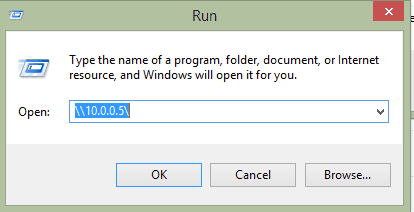
From Chris-PC computer, click on the Start button> Run> In Open: type the IP Address of the computer where the printer is connected to, for example \\10.0.0.5\ press enter after. Can you see the shared printer? What happens if you click on it? Is there an error? Please let me know the outcome. See attached image.
 

Attachments

  • Printer.PNG
    Printer.PNG
    7.9 KB · Views: 5

My Computer

Computer Manufacturer/Model Number
Lenovo Desktop/Samsung Laptop
OS
Win7 & Win8 64bit
CPU
Intel i5
Internet Speed
Charter-20 Mbps
Antivirus
Avast
Browser
FF, IE9 and Chrome
Thanks for the latest info that you've provided.

From Chris-PC computer, are you able to access other network shared resources such as shared folder or shared drive? Please give this a try if you haven't.

Also, please create an identical UserName and Password from Chris-PC and the computer that's connected to the shared network printer.

From Chris-PC computer, click on the Start button> Run> In Open: type the IP Address of the computer where the printer is connected to, for example \\10.0.0.5\ press enter after. Can you see the shared printer? What happens if you click on it? Is there an error? Please let me know the outcome. See attached image.

Damn doing \\10.0.0.179\ in the Run window found the printer, installed the driver and can now print from that laptop. WOW! Thank you so much sir, for both your awesome help and fast respones!
 

My Computer

Computer type
PC/Desktop
Computer Manufacturer/Model Number
Custom
OS
Microsoft Windows 7 Home Premium 64-bit Service Pack 1
CPU
AMD FX-8320 @ 4.4 GHz
Motherboard
Asus M5A99X
Memory
G.Skill Ripjaw X Series 1866 16GB
Graphics Card(s)
NVIDIA GeForce GTX 670
Sound Card
N/A
Monitor(s) Displays
Asus 24" VS248H-P
Screen Resolution
1920x1080
Hard Drives
256 GB Samsung 840 Series SSD
1TB WD w 16 MB cache @ 10,000 RPM
Antivirus
Avast
Browser
Chrome
Happy to hear that your issue has been resolved.

LOL, I'm not a Sir, more like a Ma'am.
Thanks for the latest info that you've provided.

From Chris-PC computer, are you able to access other network shared resources such as shared folder or shared drive? Please give this a try if you haven't.

Also, please create an identical UserName and Password from Chris-PC and the computer that's connected to the shared network printer.

From Chris-PC computer, click on the Start button> Run> In Open: type the IP Address of the computer where the printer is connected to, for example \\10.0.0.5\ press enter after. Can you see the shared printer? What happens if you click on it? Is there an error? Please let me know the outcome. See attached image.

Damn doing \\10.0.0.179\ in the Run window found the printer, installed the driver and can now print from that laptop. WOW! Thank you so much sir, for both your awesome help and fast respones!
 

My Computer

Computer Manufacturer/Model Number
Lenovo Desktop/Samsung Laptop
OS
Win7 & Win8 64bit
CPU
Intel i5
Internet Speed
Charter-20 Mbps
Antivirus
Avast
Browser
FF, IE9 and Chrome
Back
Top