
hi
i have a pc (win7 build 7100) that is connected to two printers (of which one prints (HP laserjet CP1215) and one only scans (no ink)) and it shares those printer.
My win7 build 7600 (on my main pc) added the scan-printer without asking me and didn't add the other one (the only one I can print). I then disconnected this one from the other pc and looked again, no install here.
While I used build 7100 with my main pc too, it asked me: "Do you want to install HomeGroup printer?" and it worked like a charm.
Now I tried to manually add this printer and it asked me for a driver.
I installed the HP drivers but still, not working. Then, when it asked me again to point to the .inf file, i selected the one HP-driver-installation installed (to my C:\Program files folder) but it said this driver is from a "non-certified" publisher (or something like this, sadly I can't reproduce this so I don't remember the exact words).
I clicked "install nonetheless" because I knew it was the right driver (printer prints perfectly from all other win7 workstations).
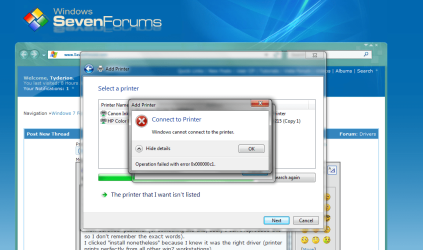
Now when I try to connect to the printer (still not showing up in "Devices and printers" it tries to connect, looks for a driver, kinda finds one and then tells me, it can't connect.
I cannot even select a new driver or anything, I can only close the window.
On all my other pcs (I only use Win7 since the RC) it works and worked without problems. I miss the "Install Homegroup printer" prompt and well ...
any ideas?
ah well i installed 32bit versions of the driver and now i downloaded 64bit verisons, but even after installing it doesn't work and as I've said before, I cannot manually select a driver inf file anymore, so ... I can't install the printer.
i have a pc (win7 build 7100) that is connected to two printers (of which one prints (HP laserjet CP1215) and one only scans (no ink)) and it shares those printer.
My win7 build 7600 (on my main pc) added the scan-printer without asking me and didn't add the other one (the only one I can print). I then disconnected this one from the other pc and looked again, no install here.
While I used build 7100 with my main pc too, it asked me: "Do you want to install HomeGroup printer?" and it worked like a charm.
Now I tried to manually add this printer and it asked me for a driver.
I installed the HP drivers but still, not working. Then, when it asked me again to point to the .inf file, i selected the one HP-driver-installation installed (to my C:\Program files folder) but it said this driver is from a "non-certified" publisher (or something like this, sadly I can't reproduce this so I don't remember the exact words).
I clicked "install nonetheless" because I knew it was the right driver (printer prints perfectly from all other win7 workstations).
Now when I try to connect to the printer (still not showing up in "Devices and printers" it tries to connect, looks for a driver, kinda finds one and then tells me, it can't connect.
I cannot even select a new driver or anything, I can only close the window.
On all my other pcs (I only use Win7 since the RC) it works and worked without problems. I miss the "Install Homegroup printer" prompt and well ...
any ideas?
ah well i installed 32bit versions of the driver and now i downloaded 64bit verisons, but even after installing it doesn't work and as I've said before, I cannot manually select a driver inf file anymore, so ... I can't install the printer.
Attachments
My Computer
- OS
- Windows 7 Professional x64
- CPU
- Intel i7 930 2.8 Ghz
- Motherboard
- Gigabyte GA-EX58-UD5
- Memory
- Mushkin Redline 3x2GB, DDR3-1600 CL6-8-6-24
- Graphics Card(s)
- Sapphire HD 5770 1G
- Sound Card
- Creative X-Fi XtremeGamer Fatal1ty Pro Series
- Monitor(s) Displays
- Samsung SyncMaster 226BW
- Hard Drives
- 1x 500 GB System
2x 1TB
1x 1.5 TB
2x 2TB
- PSU
- be quiet! DARK POWER PRO, P8 900W
- Case
- Lian Li PCB-70 Black
- Cooling
- stock
- Keyboard
- Logitech G15 Blue Backlight
- Mouse
- Logitech G5 Laser Mouse
- Internet Speed
- 100 mbit
