Hello,
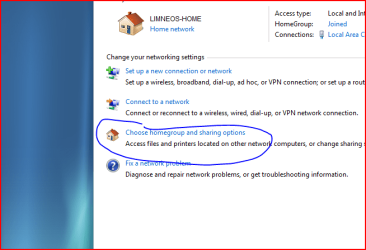
When reading the help and support instructions for creating or joining a homegroup, you're told to go to Homegroup and Sharing in the control panel.
Click to open HomeGroup and Sharing.
Do one of the following:
To create a new homegroup, click Create now.
To join an existing homegroup, click Join now.
I have not found any of this in the control panel, could someone please help me as I'd like to set up the Homegroup, and make my Wife's PC (also running 7) visible on the Homegroup and my Network.
Many thanks in advance ,
,
Bob.
When reading the help and support instructions for creating or joining a homegroup, you're told to go to Homegroup and Sharing in the control panel.
Click to open HomeGroup and Sharing.
Do one of the following:
To create a new homegroup, click Create now.
To join an existing homegroup, click Join now.
I have not found any of this in the control panel, could someone please help me as I'd like to set up the Homegroup, and make my Wife's PC (also running 7) visible on the Homegroup and my Network.
Many thanks in advance
,Bob.
My Computer
- OS
- Vista