Homegroup Setup Problem

jsinco

New member
Local time
7:59 PM
Messages
4
I thought setting up a Homegroup between two Win 7 computers was supposed to be easy, but so far no luck. I created a new Homegroup on one of the computers and joined it on the other. Both indicate that that are part of a Homegroup but when I click on Homegroup I get the message "No other homegroup computers are currently available". Both are actually running fine. I then found that my Network Discovery is
turned off, and when I try to turn it on, it immediately turns back off. I read several forums which suggesed I make sure a whole list of Services are Started and Automatic. All of them are except Computer Browser. When I try to start it I get the message "Windows could not start the Computer Browser service on the local computer. Error 1600: The specified service does not exist as an installed service".
That is where I am now and am stumped. All I want to do is a little sharing, why is it so hard! Help.
 

My Computer

OS
Windows 7 Professional 64 bit

My Computer

Computer type
PC/Desktop
Computer Manufacturer/Model Number
Novatech iRush Pro
OS
Windows 7 Ultimate SP1 - 64 Bit
CPU
Intel Core i5 2500k
Motherboard
Foxconn H67M-S/H67M-V/H67
Memory
2x4GB DDR3 1333Hz
Graphics Card(s)
Ati Radeon 6770
Sound Card
None
Monitor(s) Displays
Samsung S22B150
Screen Resolution
1920x1080
Hard Drives
2x500GB
PSU
500W
Cooling
Fan
Keyboard
HP KU0316
Mouse
Wireless Logitech M185
Internet Speed
20MB/s
Antivirus
Avast Free
Browser
Google Chrome
Other Info
Logitech M185 Mouse
KU-M316 Keyboard
Thanks for your quick reply. I have tried having both computers leave the homegroup
and then set up a new homegroup, but my problem persists. I am assuming that Homegroups will not work unless I get Network Discovery to stay on. Is that true? Further I am assuming that Network Discovery will not work correctly without the Computer Browser Service. Is that true? I also looked at the link you referenced regarding Computer Browser, but it seemed to be focus only on earlier versions of Windows, not Win 7. Any more insight would really be appreciated.
 

My Computer

OS
Windows 7 Professional 64 bit
Thanks for the suggestion Roderunner, but I would prefer not to have to move items to a special file. I also want to share a printer. I really cannot understand why Network Discovery will not turn on!
 

My Computer

OS
Windows 7 Professional 64 bit
Often with home group setups there is a specific security key that windows asks you to write down so you can allow access to each computer. Basically a password. If you did not save the key then you will need to get it. Now I don't know off my head exactly how to do that but I will do some digging and reply back unless someone else knows right now.

So far I know this much but not quite enough to fix your problem.

Go into the start menu..accessories..command prompt..right click and run as administrator. In the dos box type: IPCONFIG /ALL

This will show you what is connected to the network.
 

My Computer

Computer type
PC/Desktop
Computer Manufacturer/Model Number
Self made
OS
windows 7 home premium 64, and Windows 10 64 bit
CPU
I7 940
Motherboard
ASUS P6TX58D Premium- BIOS VERSION 1402
Memory
12 GB Dominator 3 channel 1600
Graphics Card(s)
Radeon R9 Fury Nitro
Sound Card
Z1
Monitor(s) Displays
50 Inch Panasonic TV
Screen Resolution
1920x1080
Hard Drives
Main drive OCZ Revodrive V2 and 8 TB multi drives
PSU
Coolermaster 1000
Case
CoolerMaster 932
Cooling
Coolermaster Dual fan
Keyboard
mx 5500 revolution
Mouse
mx 5500 revolution
Internet Speed
12 mb
Browser
Chrome
Other Info
set up for 3D Blue Ray applications with a surround room of 12 speaker Definitive Technology and multi amps, main is driven by yamaha M-65
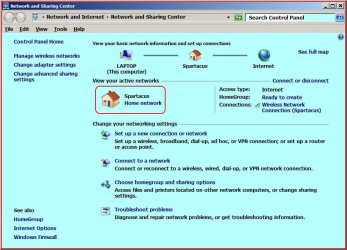
Open Network and Sharing Centre, Click as red box and change to Home Network.

RR.jpg
 

My Computer

Computer Manufacturer/Model Number
Look in my Signature.
OS
Win7 H.Prem. 32bit+SP1
Try Post #5 from this thread.

Flush the DNS cache and restore MS's Hosts file ...
Copy and paste these lines in Note pad.

@Echo on
pushd\windows\system32\drivers\etc
attrib -h -s -r hosts
echo 127.0.0.1 localhost>HOSTS
attrib +r +h +s hosts
popd
ipconfig /release
ipconfig /renew
ipconfig /flushdns
netsh winsock reset all
netsh int ip reset all
shutdown -r -t 1
del %0

Save as flush.bat to your desktop. Right click on the flush.bat file to run it as Administrator. Your computer will reboot itself.
 

My Computer

Computer type
PC/Desktop
Computer Manufacturer/Model Number
Novatech iRush Pro
OS
Windows 7 Ultimate SP1 - 64 Bit
CPU
Intel Core i5 2500k
Motherboard
Foxconn H67M-S/H67M-V/H67
Memory
2x4GB DDR3 1333Hz
Graphics Card(s)
Ati Radeon 6770
Sound Card
None
Monitor(s) Displays
Samsung S22B150
Screen Resolution
1920x1080
Hard Drives
2x500GB
PSU
500W
Cooling
Fan
Keyboard
HP KU0316
Mouse
Wireless Logitech M185
Internet Speed
20MB/s
Antivirus
Avast Free
Browser
Google Chrome
Other Info
Logitech M185 Mouse
KU-M316 Keyboard
FYI, my network is a Home network. I just discovered another quirk. When I select any file or folder, and click on the "Share With" button at the top, I see that Nobody is selected with a lock symbol. When I try to change it to share with Homegroup, it won't let me. When I dig deeper into its properties I find I AM the owner with full permissions, but it won't let me change the sharing. Any thoughts?
 

My Computer

OS
Windows 7 Professional 64 bit
Back
Top