Solved Homegroup sharing

flogit

New member
Member
VIP
Local time
9:12 PM
Messages
359
Location
south wales uk
Hi,Sorry to get back to you,Can I ask another question if thats okay.
Homegroup on same machine,I tick all boxes documents music etc then select save changes close the screen.
If I go back to that page the boxes are un ticked is there any reason why they dont stay checked even after saving changes tab on the bottom of page.
Thanks.
 

My Computer

Computer Manufacturer/Model Number
compaq presario CQ61
OS
windows 7 home premium 64bit
Hi,Sorry to get back to you,Can I ask another question if thats okay.
Homegroup on same machine,I tick all boxes documents music etc then select save changes close the screen.
If I go back to that page the boxes are un ticked is there any reason why they dont stay checked even after saving changes tab on the bottom of page.
Thanks.

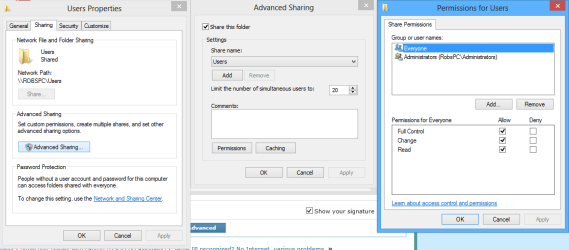
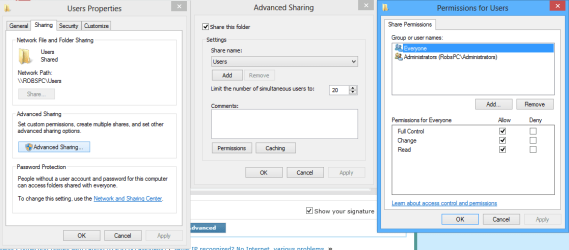
It may be worth checking that both the C:>Users and C:>Users>"Username" folders have read and write permissions set correctly though the Sharing tab as per the picture below.

If these permissions aren't enabled they will override the ones you set for the Homegroup sharing permissions, although in Windows 8 they changed this behavior I believe it still works with Windows 7. :confused:
 

Attachments

  • sharing tab full permissions.PNG
    sharing tab full permissions.PNG
    20.8 KB · Views: 10

My Computer

Computer type
PC/Desktop
Computer Manufacturer/Model Number
Home built
OS
Windows 7 Ult, Windows 8.1 Pro,
CPU
Q9650-4.275GHz, E8600 4.5GHz, E6750-3.8GHz
Motherboard
Evga 780i FTW
Memory
G.Skill PC2 9600 1200Mhz 5 5 5 15 2T
Graphics Card(s)
GTX480
Sound Card
Asus Xonar D2
Monitor(s) Displays
HannsG
Screen Resolution
1680X1050
Hard Drives
GSkill Phoenix Pro 120GB SSD
PSU
ThermalTake Toughpower 1000Watt modular
Case
ThermalTake XaserV
Cooling
Xigmatek S1283
Keyboard
Logitech G15
Mouse
Logitech G9
Internet Speed
T1
Hi>thanks for that info,The image you gave this may sound a bit stupid to you but how do I get to those boxes?

Thank You. ''Not very Techy''
 

My Computer

Computer Manufacturer/Model Number
compaq presario CQ61
OS
windows 7 home premium 64bit
Go to computer, right click c: then right click users, select properties from context menu, in the window that opens then click the sharing tab, then the advanced sharing tab.
 

My Computer

Computer Manufacturer/Model Number
Hewlett packard/p6512uk
OS
Microsoft Windows 7 Home Premium 64-bit 7600
CPU
IIx4 amd athelon 635 processor
Motherboard
FOXCONN 2AA9
Memory
2x2gb
Graphics Card(s)
ati radeon HD 5450
Sound Card
(1) Realtek High Definition Audio (2) AMD High Definition
Monitor(s) Displays
samsung lcd tv 32"
Screen Resolution
1360x 768
Hard Drives
(1) WDC WD10 01FAES-60Z2A0 SATA Disk Device (2) Maxtor OneTouch USB Device (3) ST310003 33AS USB Device (4) WD My Book 1111 USB Device
PSU
?
Cooling
air!
Keyboard
wireless hp
Mouse
wireless Hp,optical
Internet Speed
1.10mb/s
Antivirus
MSE
Browser
Firefox

My Computer

Computer type
PC/Desktop
Computer Manufacturer/Model Number
Dell / Lenovo g550
OS
Windows 7 Ultimate 64-bit
CPU
Intel Core 2 Duo E6550 @2.33GHz
Motherboard
foxconn g33m02
Memory
4GB DDR"
Graphics Card(s)
NVIDIA GeForce 8600 GS
Hard Drives
HDD 1 = 150GB
HDD 2 = 1.5TB
PSU
450W
Cooling
Stock fan
Internet Speed
12Mb
Antivirus
AVG Internet Security
Hi>thanks for that info,The image you gave this may sound a bit stupid to you but how do I get to those boxes?

Thank You. ''Not very Techy''

He already has a Homegroup set up Benji, the problem is that the sharing permissions aren't set for full control so when he makes an adjustment to the Homegroup sharing settings they aren't sticking.

Flogit, It's the C drive Users folder and the Username folder as well that need to have the sharing permissions adjusted to having full read/write control or the Homegroup Write settings won't stick.

You have to go to the little folder on the task bar lower left, click on where it says local disk C: then right click the Users folder then click on properties, then click the Sharing tab, then click the Advanced Sharing button, put a check in the box to Share this folder then click the permission tab which will get you to the third picture, put check marks for full control then hit the Apply button. You may need to do the same for the C:>Users>Username folder as well.
 

Attachments

  • sharing tab full permissions.PNG
    sharing tab full permissions.PNG
    20.8 KB · Views: 2

My Computer

Computer type
PC/Desktop
Computer Manufacturer/Model Number
Home built
OS
Windows 7 Ult, Windows 8.1 Pro,
CPU
Q9650-4.275GHz, E8600 4.5GHz, E6750-3.8GHz
Motherboard
Evga 780i FTW
Memory
G.Skill PC2 9600 1200Mhz 5 5 5 15 2T
Graphics Card(s)
GTX480
Sound Card
Asus Xonar D2
Monitor(s) Displays
HannsG
Screen Resolution
1680X1050
Hard Drives
GSkill Phoenix Pro 120GB SSD
PSU
ThermalTake Toughpower 1000Watt modular
Case
ThermalTake XaserV
Cooling
Xigmatek S1283
Keyboard
Logitech G15
Mouse
Logitech G9
Internet Speed
T1
Thanks all.
All sorted thanks to your help once again.

Thank You
 

My Computer

Computer Manufacturer/Model Number
compaq presario CQ61
OS
windows 7 home premium 64bit

My Computer

Computer type
PC/Desktop
Computer Manufacturer/Model Number
Home built
OS
Windows 7 Ult, Windows 8.1 Pro,
CPU
Q9650-4.275GHz, E8600 4.5GHz, E6750-3.8GHz
Motherboard
Evga 780i FTW
Memory
G.Skill PC2 9600 1200Mhz 5 5 5 15 2T
Graphics Card(s)
GTX480
Sound Card
Asus Xonar D2
Monitor(s) Displays
HannsG
Screen Resolution
1680X1050
Hard Drives
GSkill Phoenix Pro 120GB SSD
PSU
ThermalTake Toughpower 1000Watt modular
Case
ThermalTake XaserV
Cooling
Xigmatek S1283
Keyboard
Logitech G15
Mouse
Logitech G9
Internet Speed
T1
Back
Top