
Homegroup through router

ExNavy11

Member
Power User
Local time
8:17 PM
Messages
256
I have a desktop and notebook running Windows 7. I can create a Homegroup for each of them, but I never see an option to join an existing Homegroup.

My desktop is wired to a router. The notebook wirelessly connects to the router.

What exactly do I need to do to get one of these computers to see the other Homegroup?
 

My Computer

Computer Manufacturer/Model Number
Built
OS
Windows 7 RTM
CPU
Intel I7 920 2.67 ghz
Motherboard
EVGA X58
Memory
6GB CORSAIR DOMINATOR
Graphics Card(s)
GeForce GTX 260 Core 216 896MB 448-bit GDDR3 PCI Express 2.0
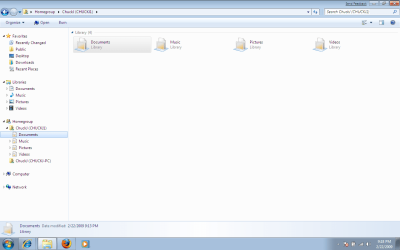
Thanks. I actually just got the option to joing the Homegroup and i am connected. I can even see the shared libraries. However, i can not open them. I double click and ....nothing.
Yes the permissions were changed to share with the Homegroup but for some reason it just isnt happening. And what's with the weird icons, are they suppose to be this way?
 

Attachments

  • hmgrp.png
    hmgrp.png
    33.5 KB · Views: 380

My Computer

Computer Manufacturer/Model Number
Built
OS
Windows 7 RTM
CPU
Intel I7 920 2.67 ghz
Motherboard
EVGA X58
Memory
6GB CORSAIR DOMINATOR
Graphics Card(s)
GeForce GTX 260 Core 216 896MB 448-bit GDDR3 PCI Express 2.0
This whole Windows 7 Network Sharing is very frustrating. With Vista I had folders and printers up and sharing in no time. I can't get anything to work with the beta.

So is Homegroup specific to Window 7's computers? God I hope not or that will be a self defeating feature. What few articles, tips or videos I've seen is everyone talking about Windows 7 machines. Didn't they design it to support multiple OS machines?

:confused:
 

My Computer

Computer Manufacturer/Model Number
Alienware Aurora
OS
Windows 7 Professional (64bit)
CPU
Core i7 Extreme 975 @ 3.33GHz overclocked to 3.6 GHz
Motherboard
Alienware 0H869M
Memory
12 GB DDR3 1333MHz
Graphics Card(s)
NVIDIA GeForce GTX 295 1.8 GB RAM
Sound Card
Creative SB X-Fi Titanium
Monitor(s) Displays
Dell 2407WFP
Screen Resolution
1920 x 1200
Hard Drives
OCZ Vertex 2 100GB SSD - Primary Drive, Western Digital 300GB SATA-II 3GB/X, 10,000 RPM, 16MB Cache - Secondary Drive
PSU
875 Watt
Case
Cosmic Black
Cooling
Alienware High-Performance Liquid Cooling
Keyboard
Logitech
Mouse
Logitech
Internet Speed
60/3MB Service
Other Info
Logitech Z-5500 THX-Certified 505-Watt 5.1 Digital Surround Sound Speaker System
Hi,

At the moment Homegroup is limited to Windows 7 only systems, however the networking in Windows 7 is fully backward compatible with previous OS versions, Vista, XP, etc. From the network and sharing centre choose "Advanced Sharing options" to share using the methods of Vista.

Once Vista is released I'm sure updates will be available to join Non windows 7 Systems to the Homegroup
 

My Computers

System One System Two

  • Computer type
    PC/Desktop
    Computer Manufacturer/Model Number
    ChillBlast - Custom to my design
    OS
    Windows 11 Pro x64 [Latest Release and Release Preview]
    CPU
    Ryzen 9 5950X, 3.8 - 5.2 MHz
    Motherboard
    Asus Prime X570-Pro
    Memory
    64GB [2 x 32GB] DDR4 3200MHz
    Graphics Card(s)
    4GB NVIDIA GEFORCE GTX 1650 Ti
    Sound Card
    On-board SPDIF to 5.1 System + HDMI [5.1 system]
    Monitor(s) Displays
    32" UHD 32 Bit HDR Monitor + 43" UHD 4K 32Bit HDR TV
    Screen Resolution
    2 x 3840 x 2160 @60Hz
    Hard Drives
    1TB M2 SSD OS, 500GB Fast Access SSD, 2 x 8TB Data + Various Externals from 1TB to 4TB, 10TB NAS
    PSU
    NZXT C750 80 PLUS Gold 750W Modular PSU
    Case
    Workstation Case [Matt Black]
    Cooling
    NZXT Kraken X63 280mm CPU Cooler +2x Quiet Case fans
    Keyboard
    Logitech Wireless MX Keys & K400 + others
    Mouse
    Logitech Wireless MX Master 3S
    Internet Speed
    920 MB Down 50 MB Up
    Antivirus
    BitDefender Total Security Pro
    Browser
    Chrome (always run latest Non-Beta)
    Other Info
    Also run ...
    Laptop - Quad 8GB - Windows 10 Pro x64
    Nexus 7 Android tablet x2
    Samsung 10.2" tablet
    Blackview TAB 8 4G Android Tablet c/w Keyboard
    Wacom Intuos Pro Medium Pen Pad
    Wacom Intuos Pro Small Pen Pad
    Wacom Expresskeys Remote
    Loopdeck+ Graphics Controller
    Shuttle Pro v2 Control
  • Computer type
    Laptop
    System Manufacturer/Model Number
    Dell XPS 17 10750H
    OS
    Windows 11 Pro x64 Latest RP
    CPU
    Intel I7 10750H 5.0GHz
    Motherboard
    Dell XPS
    Memory
    32GB [2x16GB] DDR4 2933 MHz
    Graphics Card(s)
    nVidia GTX1650Ti 4 GB GDDR6
    Sound Card
    Stock [Realtek] 4 Speaker
    Monitor(s) Displays
    17" IPS UHD+ Infinity Edge Touchscreen
    Screen Resolution
    3840 x 2400
    Hard Drives
    2TB M2 NVMe, 4TB External + various 500GB & 1TB External NVMe (also have access to spinner HDD from
    PSU
    Stock
    Case
    Stock XPS Aluminium & Carbon Fibre
    Cooling
    Stock - Active Fan Control
    Keyboard
    Backlit + Various Logitech
    Mouse
    Stock Track Pad + Logitech MX Trackball
    Internet Speed
    72 MB Down 18MB Up
    Browser
    Chrome
    Other Info
    Also run ...
    Laptop - Quad 8GB - Windows 10 Pro x64
    Nexus 7 Android tablet x2
    10.2" tablet
    Sony Z3 Android Smartphone
    Wacom Intuos Pro Medium Pen Pad
    Wacom Intuos Pro Small Pen Pad
    Wacom Expresskeys Remote
    Loopdeck+ Graphics Controller
    Shuttle Pro v2 Control Pad
    10TB NAS
Thanks. I actually just got the option to joing the Homegroup and i am connected. I can even see the shared libraries. However, i can not open them. I double click and ....nothing.
Yes the permissions were changed to share with the Homegroup but for some reason it just isnt happening. And what's with the weird icons, are they suppose to be this way?

consider filling out your full system specs as this will help ppl trying to answer questions you may have and not having the need to fill a thread with banter about specs.

as for not accessing folders, you would have to give the info of what options you have done for advanced sharing settings....

Contrary to ALL the posts i have seen in this entire forum, i have yet to have ANY problems connecting wired/wireless pc's on a network with either 7 or XP installed on either machine without the use of doing anything "special" to get it to work, printers files and all.
 

My Computer

Computer Manufacturer/Model Number
CUSTOM
OS
XP/win7 x86 build 7127
CPU
Athlon64 X2 DUAL 4200+ 2.21ghz
Motherboard
ASUS K8 PRO SLI
Memory
2GB Dual Chan DDR2 Corsair
Graphics Card(s)
Nvidia 6800GT
Sound Card
nvidia
Monitor(s) Displays
19' LCD
Screen Resolution
1280x1024
Hard Drives
WD 250, 2x500, 2x1TB IDE/USB
WD 250 SATA (system)
SEAGATE 120 Sata
PSU
coolermaster 450
Case
SUPERFLOWER
Cooling
1 HDD bay fan, 5x80mm Case Fans, AEROGATE II Fan/Temp
Keyboard
MS wireless
Mouse
MS Wireless
Internet Speed
fassssssssst
Yep, I'm afraid HomeGroup works only with Windows 7 computers. See the last sentence on this tutorial about using HomeGroups:

Windows 7: HomeGroup Overview

Quote: Remember that HomeGroup works only with Windows 7 machines and it does not support Vista or XP.
 

My Computer

OS
Vista Windows 7 Windows XP
And what's with the weird icons, are they suppose to be this way?

This is the way they show up on my laptop, a weak system, but its still pushing 7 pretty well. T2300 @1.67ghz with 1.5gb single chan ram and mobility radeon x1600.... am guessing that ms has turned down this settings in some display options or visual effects, tho i havent found anything addressing the issue. I have just noticed this myself. Desktop pc displays icons the normal way, both ways locally and thru workgroup , but is a better system than the laptop.... Laptop even has "enable glass icons" ticked. The laptop Only shows those icons when accessing the library of a user thru netwoked resources... locally on the laptop it displays the icons "normally"
 

My Computer

Computer Manufacturer/Model Number
CUSTOM
OS
XP/win7 x86 build 7127
CPU
Athlon64 X2 DUAL 4200+ 2.21ghz
Motherboard
ASUS K8 PRO SLI
Memory
2GB Dual Chan DDR2 Corsair
Graphics Card(s)
Nvidia 6800GT
Sound Card
nvidia
Monitor(s) Displays
19' LCD
Screen Resolution
1280x1024
Hard Drives
WD 250, 2x500, 2x1TB IDE/USB
WD 250 SATA (system)
SEAGATE 120 Sata
PSU
coolermaster 450
Case
SUPERFLOWER
Cooling
1 HDD bay fan, 5x80mm Case Fans, AEROGATE II Fan/Temp
Keyboard
MS wireless
Mouse
MS Wireless
Internet Speed
fassssssssst
I've got the same situatuation:

1 Router
1 PC
1 Laptop

Router <cable> PC
Router <wireless> Laptop

I see both computers in the network window. I see the crated homegroup, but when I try to join it after writing the pasword it says it's incorect even though it was Copy+Pasted and send via IM. What's wrong? :cry:
 

My Computer

OS
Windows 7
CPU
Intel Pentium D - 3.20GHz
Memory
1.00GB
Graphics Card(s)
NVIDIA GeForce 7300GT
I've got the same situatuation:

1 Router
1 PC
1 Laptop

Router <cable> PC
Router <wireless> Laptop

I see both computers in the network window. I see the crated homegroup, but when I try to join it after writing the pasword it says it's incorect even though it was Copy+Pasted and send via IM. What's wrong? :cry:

Hybrid

You created a homegroup on one and tired to join it on the other. Have you tried chinging the password and joning again?

BTW we could use your sys specs

Ken
 

My Computer

Computer Manufacturer/Model Number
HP Pavillion dv-7 1005 Tx
OS
Win 8 Release candidate 8400
CPU
[email protected]
Memory
4 gigs
Graphics Card(s)
Nvidia 9600M
Sound Card
HD built-in
Monitor(s) Displays
17" Wxga
Screen Resolution
1440x900
Cooling
none
Internet Speed
45Mb down 5Mb up
Hybrid

You created a homegroup on one and tired to join it on the other. Have you tried chinging the password and joning again?

That was the first thing I did. Nothing changeg.
 

My Computer

OS
Windows 7
CPU
Intel Pentium D - 3.20GHz
Memory
1.00GB
Graphics Card(s)
NVIDIA GeForce 7300GT
That was the first thing I did. Nothing changeg.


OK is the laptop the one w the prob? have you tried disabling IP-6 support? And im sure you have already re-booted the router and pc's.

K
 

My Computer

Computer Manufacturer/Model Number
HP Pavillion dv-7 1005 Tx
OS
Win 8 Release candidate 8400
CPU
[email protected]
Memory
4 gigs
Graphics Card(s)
Nvidia 9600M
Sound Card
HD built-in
Monitor(s) Displays
17" Wxga
Screen Resolution
1440x900
Cooling
none
Internet Speed
45Mb down 5Mb up
OK is the laptop the one w the prob? have you tried disabling IP-6 support? And im sure you have already re-booted the router and pc's.

K

Don't know what I did, but after ~10 pasword changes it's ok :D
 

My Computer

OS
Windows 7
CPU
Intel Pentium D - 3.20GHz
Memory
1.00GB
Graphics Card(s)
NVIDIA GeForce 7300GT

My Computer

Computer Manufacturer/Model Number
HP Pavillion dv-7 1005 Tx
OS
Win 8 Release candidate 8400
CPU
[email protected]
Memory
4 gigs
Graphics Card(s)
Nvidia 9600M
Sound Card
HD built-in
Monitor(s) Displays
17" Wxga
Screen Resolution
1440x900
Cooling
none
Internet Speed
45Mb down 5Mb up
Hello.

I might have the same problem or a sort of that problem my self, but:
A friend and me we are on the same network, but, he is behind a router (a router with wireless connection for his iphone) and we want to make a homegroup, Both sistems are running Windows 7 Ultimate 7600 X64.
How can we do that? Any ideas?
 

My Computer

Computer Manufacturer/Model Number
Hackerware
OS
Windows 7 (6.1) Ultimate Edition (Build 7600)
CPU
Intel Core2 CPU 6300 @ 3.51GHz
Motherboard
Asus - P5K Premium (Black Pearl Edition)
Memory
4096 MB DDR2 Dual Channel - 501.2 MHz (1:1) @ 5-5-5-18
Graphics Card(s)
HIS Radeon HD 4670 IceQ
Sound Card
ONboard (HD optical out)
Monitor(s) Displays
Licom [CRT] (17")
Screen Resolution
1028x1024
Hard Drives
Total size of hard disk(s) 412 GB
PSU
Arp Startronic 500W [ST-500CPBA] Passive PFC
Case
Spire Swordfin Bigtower
Cooling
ZEROtherm Zen FZ120
Keyboard
A4Tech KBS-8
Mouse
A4Tech X7
Internet Speed
Down: 94.66 Mb/s Up: 76.19 Mb/s Latency: 2 ms
I might have the same problem or a sort of that problem my self, but:
A friend and me we are on the same network, but, he is behind a router (a router with wireless connection for his iphone) and we want to make a homegroup, Both sistems are running Windows 7 Ultimate 7600 X64.
How can we do that? Any ideas?

EAsily

Create a workgroup on both, add you user names to the group, and reboot the vomputers a nd the router.

We could be of alot more use if you were to fill in you system specs (lower left corner) so we would know what kind of hardware you have. You can also tell us more about you network setup

Ken
 

My Computer

Computer Manufacturer/Model Number
HP Pavillion dv-7 1005 Tx
OS
Win 8 Release candidate 8400
CPU
[email protected]
Memory
4 gigs
Graphics Card(s)
Nvidia 9600M
Sound Card
HD built-in
Monitor(s) Displays
17" Wxga
Screen Resolution
1440x900
Cooling
none
Internet Speed
45Mb down 5Mb up
Back
Top