I have a Dell desktop with windows 7. and I just bought a new vaio laptop with windows 7 as well.
I did the homegroup sharing. my problem is the laptop doesnot read the desktop but the desktop reads the laptop.
I created the group from the laptop and joined it from the desktop. In this case the desktop reads the laptop files and everything is fine but from the laptop i dont even find the other computer.
I tried to leave the group from both computers and create it from the desktop and then join it from the laptop but when i go in the laptop it does not give the option to join the exisiting one it creates a new group.
I new to 7 so bare with me. When I upgraded the wifes laptop to 7 and set up the network while in the upgrade mode it set up a password and then asked me to write down this password so that when later windows 7 PC's where added I just input the password. During my upgrade of my desktop last night I got the same prompt to input password for my network, I did and I have access to all my PC's in the network. Now I don't know if this will help you in any way but this is what worked for me.
My Computer
Computer Manufacturer/Model Number
Custom built
OS
Windows 7 Ultimate 64 bit
CPU
AMD Phenom II X4 965 Black Edition
Motherboard
Gigabyte GA-MA790X-DS4
Memory
GSkill 4 X 2 GB PC 8500
Graphics Card(s)
XFX Radeon HD 6790 D
Sound Card
On board RealTek HD
Monitor(s) Displays
Dual monitors:Samsung SyncMaster S20B300
Screen Resolution
1600 X 900
Hard Drives
Seagate Barracuda 1TB (primary)
Seagate Barracuda 2 X 320 GB
PSU
Ultra X4 750 watt fully modular
Case
Thermaltake Overseer RX 1 full tower
Cooling
Core-Contact 92 mm CPU Cooler
Keyboard
Logitech G510
Mouse
Razor DeathAdder
Internet Speed
50/5 Mbps UL/DL
Other Info
Optical: Super Muliti DVD burner w/lightscribe, Hauppauge WinTV HVR-1800
Are you trying to join the Homegroup from the laptop wirelessly or wired? Sometimes it works better if you are wired, switch back to wireless if you are able to join "long shot but worth a try".
If not, it sometimes helps to clear some files from the location below and restarting and see if the issue persits.
Delate this file if present >> C:\Windows\ServiceProfiles\LocalService\AppData\Roaming\PeerNetworking idstore.sst After that start the Task Manager
Click on the service Tab
Find the "HomeGroupProvider" and stop it then reboot all machines. This will fix Homegroup connection problems in some cases.
Also make extra sure that that time and dateare set correctly on both machines and also in bios. This causes all sorts of problems with Homegroups and sharing.
If the problem still remains then use this trouble shooting guide and don't skip the part about the registry adjustment because that fixes problems with Homegroups quite often.
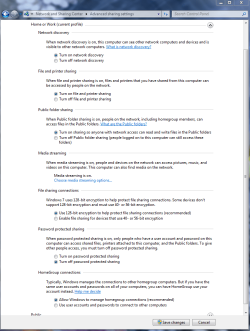
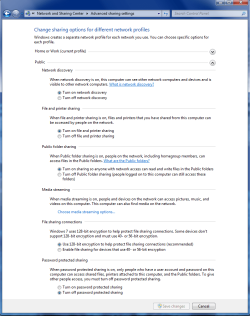
Also make sure that these settings are as shown on both machines under Advanced Sharing settings. There are two different windows here, Work-Home and Public.