Homegroup working, but cannot access desktop

morum

New member
Local time
10:06 AM
Messages
1
Hi guys, i need help with windows 7 homegroup. i set up and everything is working between 2 computers, and i can access the other computer c disk and everything, but nothing on the desktop of the other computer, is there a way to fix that because all my importat files on both computers are on the desktop.... when i go to C(the other computer c)/users/Username/Desktop windows says that it cant connect, but everywhere other on the C i can....

thank you
 

My Computer My Computer

At a glance

Windows 7 Ultimate x64
OS
Windows 7 Ultimate x64
Welcome to Seven Forums,

Did you give an 'Everyone' permission? See here how.

Also, try accessing the computer this way:
Click on Start, type \\ComputerName\C (if C Drive is shared off), you may also replace the computer name with the IP Address of the computer.
 

My Computer My Computer

At a glance

Win7 & Win8 64bitIntel i5
Computer Manufacturer/Model Number
Lenovo Desktop/Samsung Laptop
OS
Win7 & Win8 64bit
CPU
Intel i5
Internet Speed
Charter-20 Mbps
Antivirus
Avast
Browser
FF, IE9 and Chrome

My Computer My Computer

At a glance

Win7 H.Prem. 32bit+SP1
Computer Manufacturer/Model Number
Look in my Signature.
OS
Win7 H.Prem. 32bit+SP1
There is an NTFS Security feature from XP that's taken front row in Win7 called Ownership.
If you copy a folder or file from any other NTFS (Hard Disk Format for XP and up), it will have an OWNERSHIP property.
Fortunately the fix for this is easy.

I think if this is the problem, there's a quick shortcut to "Take Ownership" if you right click it.
Otherwise the long way around is . . .

Right Click on your Folder you want to access, go to
Properties, of the folder, go to the third tab,
Security Tab of properties, then the button at the botom,
Advanced Security, of security tab to open a new dialogue box, then to the third tab of that to,
Owner tab, of advanced security, and again a button at the bottom, called,
Edit ..., in advanced security where you can assign ownership.

Assign ownership to yourself. (There's a help link for that there.)
Hope that helps. :)
 
Last edited:

My Computer My Computer

At a glance

Windows 7 32bit (aka. x86)Intel Pentium 4 2.8GHz1GBATI 3D + Intel 82915G/GV/910GL Express (Dual ...
Computer type
PC/Desktop
Computer Manufacturer/Model Number
Dell
OS
Windows 7 32bit (aka. x86)
CPU
Intel Pentium 4 2.8GHz
Motherboard
Dell something
Memory
1GB
Graphics Card(s)
ATI 3D + Intel 82915G/GV/910GL Express (Dual Display)
Hard Drives
Seagate
Antivirus
AVG
Browser
Internet Explorer 8
Access problem

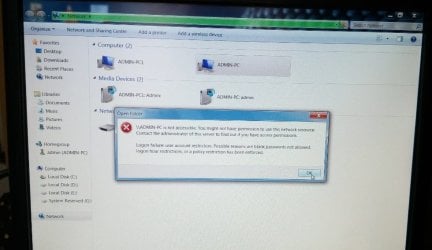
I want to create wireless LAN network. I setup everything which is require to LAN.. creating homegroup, joining homegroup, advance sharing files, permission to everyone but still it is showing admin pc is not accessible... i have given jpeg scrnshot of error.... what to do... Pls help
 

Attachments

  • Untitled.jpg
    Untitled.jpg
    57.9 KB · Views: 0

My Computer My Computer

At a glance

windows 7 ultimate 32-bit SP4GB
Computer type
PC/Desktop
Computer Manufacturer/Model Number
dell 3048
OS
windows 7 ultimate 32-bit SP
Memory
4GB
Hard Drives
1TB
Antivirus
QUICKHEAL
Browser
MOZILLA
Other Info
D-LINK MODEM ROUTER
Back
Top