Homepage is always changing

codyw

New member
Power User
Local time
11:14 PM
Messages
369
Location
Pennsylvania
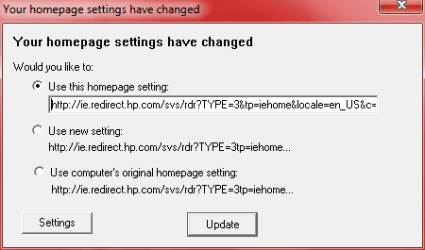
Everytime I open Internet Explorer on my PC I always get the attached picture. It doesn't matter what I tell it to do it always shows up when I launch IE. How can I get it to stop appearing on me?
 

Attachments

  • 1.PNG
    1.PNG
    5.7 KB · Views: 11

My Computer

Computer Manufacturer/Model Number
ASUSTeK Computer Inc./Q550LF/Laptop
OS
Windows 7 Ultimate x64 with SP1
CPU
Intel(R) Core(TM) i7-4500U CPU @ 1.80GHz
Motherboard
ASUSTeK Computer Inc.
Memory
8 GB
Graphics Card(s)
Intel(R) HD Graphics Family, NVIDIA GeForce
Hard Drives
Hitachi HTS547575A9E384
Internet Speed
XFINITY
Antivirus
Trend Micro
Have you scanned the pc for malware/spyware?


Andy
 

My Computer

Computer Manufacturer/Model Number
Dell Dimension 9200
OS
Windows 7 Ultimate 32bit
CPU
Intel(R) Core(TM)2 CPU 6400 @ 2.13GHz
Motherboard
Not sure - Dell Baseboard
Memory
4gb 667mhz
Graphics Card(s)
1gb ATI Radeon HD 4800 Series
Sound Card
Built in HD audio
Monitor(s) Displays
Dell E228WFP LCD
Hard Drives
500GB
PSU
Dell Standard
Case
Dell Dimension 9200 Tower
Cooling
Dell Standard + Onboard Graphics card fan
Follow above advice, its probably a redirect virus. I will get you excellent help. Please just be patient.
 

My Computer

Computer type
PC/Desktop
Computer Manufacturer/Model Number
Dell XPS 420
OS
Windows 10, Home Clean Install
CPU
Intel Core2 processsor Q8200(2.33Ghz 1333FSB) Quad Core Tech
Motherboard
Dell
Memory
6 gb
Graphics Card(s)
ATI Radeon 256MB HD3650
Sound Card
Intergrated 7.1 Channel Audio
Monitor(s) Displays
Dell SP2009W 20"
Hard Drives
640 GB Serial ATA Hard drive
Cooling
Fan
Keyboard
Dell USB Keyboard
Mouse
Dell Premium Optical USB
Internet Speed
DSL 2.85
Download super-antispyware, spybot search and destroy and spyware terminator

Update each of them and run them one at a time and see if any of them find anything

Andy
 

My Computer

Computer Manufacturer/Model Number
Dell Dimension 9200
OS
Windows 7 Ultimate 32bit
CPU
Intel(R) Core(TM)2 CPU 6400 @ 2.13GHz
Motherboard
Not sure - Dell Baseboard
Memory
4gb 667mhz
Graphics Card(s)
1gb ATI Radeon HD 4800 Series
Sound Card
Built in HD audio
Monitor(s) Displays
Dell E228WFP LCD
Hard Drives
500GB
PSU
Dell Standard
Case
Dell Dimension 9200 Tower
Cooling
Dell Standard + Onboard Graphics card fan

My Computer

Computer Manufacturer/Model Number
Custom Built by me.
OS
Windows 7 Ultimate 64bit SP1
CPU
Intel Core 2 Quad Q6600
Motherboard
Gigabyte GA-X38-DS4
Memory
2X2GB DDR2 PC6400 800MHZ DUAL CHANNEL
Graphics Card(s)
XFX RADEON HD 6850 1GB GDDR5
Sound Card
2/4/5.1/7.1-channel Realtek High Definition
Monitor(s) Displays
Samsung LE40A656F1 1080p 100Hz LCD HD TV 50,000:1
Screen Resolution
1366x768 in Desktop,1920x1080p in gaming and video
Hard Drives
C:\WD VelociRaptor 150 GB,10,000 RPM
E:\WESTERN DIGITAL WD15EADS 1.5TB CAVIAR GREEN SATA2 F:\WESTERN DIGITAL WD15EADS 1.5TB CAVIAR GREEN SATA2
PSU
THERMALTAKE W0229 TOUGHPOWER XT 750W
Case
A-Case Twin Engine BB
Cooling
3 x thermaltake smart case fan II + 1 arctic cooling fan
Keyboard
Wireless Logitech LX710
Mouse
Logitech Wireless Gaming Mouse G700
Internet Speed
ADSL 12000 plus
Other Info
Mouse Logitech G700,with 13 buttons who needs keyboard in RPG?

D:\Sony high speed sata Dvd Rewriter
Logitech Cordless Rumblepad 2
Is your homepage set to HP.com? Do you have Spybot s&d and TeaTimer running?
 

My Computer

Computer type
PC/Desktop
Computer Manufacturer/Model Number
Bruce ... somewhere in his 40's
OS
Windows 7 Ultimate 32bit SP1
CPU
Intel(R) Core(TM)2 Quad CPU @ 2.40GHz, 2400 MHz
Motherboard
INTEL/D975XBX2
Memory
4 GB
Graphics Card(s)
ATI Radeon HD 2600 Pro
Monitor(s) Displays
Samsung SyncMaster 914v
Screen Resolution
1280 x 1024
Hard Drives
2/500GB each ... ST3500630AS ATA Device.
One is not connected
PSU
Rocketfish 700 W
Case
G.Skill Gigabyte Chassis
Keyboard
Standard PS/2 Keyboard
Mouse
Microsoft PS/2 Mouse
Internet Speed
DSL
Antivirus
Avira Internet Security
Browser
IE 11
Other Info
ATI HDMI Audio
To answer all your questions:
  1. I have KIS 2011 on my PC. I read some reviews on it and it scored decently.
  2. I have Malwarebytes, SAS, Spybot S&D installed.
  3. I have scanned for malware but none was found. However, I did have a bad outbreak with another AV vendor that let in over 100 pieces of spyware. I did do a wipe of the system including a reformat of the C drive.
 

My Computer

Computer Manufacturer/Model Number
ASUSTeK Computer Inc./Q550LF/Laptop
OS
Windows 7 Ultimate x64 with SP1
CPU
Intel(R) Core(TM) i7-4500U CPU @ 1.80GHz
Motherboard
ASUSTeK Computer Inc.
Memory
8 GB
Graphics Card(s)
Intel(R) HD Graphics Family, NVIDIA GeForce
Hard Drives
Hitachi HTS547575A9E384
Internet Speed
XFINITY
Antivirus
Trend Micro
A more obvious possibility?

This an HP computer or laptop right?

If so, they may have installed a piece of crapware that is resetting your homepage to their website...

Depending on how clever they have hidden it, you may be able to find it by running Start/Search window. Then go to "Startup" tab. There may be several HP programs there some to control a mouse pad, special keyboard features etc. One of them may also be messing with your homepage settings. You can disable start up programs here one by one if they don't look like they are important and see if the problem goes away. You can always reenable them later if necessary.
 

My Computer

Computer Manufacturer/Model Number
Scratch built
OS
Windows 7 x64 Ultimate
CPU
i7 960
Motherboard
Asus P6X58D
Memory
12 Gig Corsair Dominator
Graphics Card(s)
Nvidia 480
Sound Card
Maudio Delta 44 + breakout box
Monitor(s) Displays
Dell UltraSharp U2410 24in and Samsung 21 dual monitors
Screen Resolution
1920x1200 and 1280x1024
Hard Drives
Primary: Intel X-25M G2 160G SSD
Secondary: Segate baracuda 1.0 TB
HDs in AHCI mode.
PSU
Corasair TX850
Case
Cooler Master HAF
Cooling
Corsair H50
Keyboard
Logitech G15 + N52 game pad
Mouse
Logitech MX518
Internet Speed
15kbs down 4.5kbps up
Other Info
WEI 7.6
CPU & RAM 7.6
Graphics 7.9
Hard disk 7.7
Yes it's an HP. It's a laptop and at 1 year old it went into hardware failure after Norton 2011 let in 101 pieces of spyware. It's a long, disgusting story. I was without it for a month while it was at Best Buy being repaired. At only 1 year old 3 things had to be replaced in it. I was mad about that. It should have lasted a lot longer than that.
 

My Computer

Computer Manufacturer/Model Number
ASUSTeK Computer Inc./Q550LF/Laptop
OS
Windows 7 Ultimate x64 with SP1
CPU
Intel(R) Core(TM) i7-4500U CPU @ 1.80GHz
Motherboard
ASUSTeK Computer Inc.
Memory
8 GB
Graphics Card(s)
Intel(R) HD Graphics Family, NVIDIA GeForce
Hard Drives
Hitachi HTS547575A9E384
Internet Speed
XFINITY
Antivirus
Trend Micro
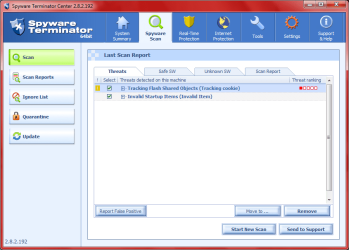
Here's what Spyware Terminator found:
 

Attachments

  • 2.PNG
    2.PNG
    39.4 KB · Views: 28

My Computer

Computer Manufacturer/Model Number
ASUSTeK Computer Inc./Q550LF/Laptop
OS
Windows 7 Ultimate x64 with SP1
CPU
Intel(R) Core(TM) i7-4500U CPU @ 1.80GHz
Motherboard
ASUSTeK Computer Inc.
Memory
8 GB
Graphics Card(s)
Intel(R) HD Graphics Family, NVIDIA GeForce
Hard Drives
Hitachi HTS547575A9E384
Internet Speed
XFINITY
Antivirus
Trend Micro
I guess my question here is: Can this problem be fixed and is Kaspersky doing it's job or do I need to look at other alternatives/options? (If this is the right question to post in this category)
 

My Computer

Computer Manufacturer/Model Number
ASUSTeK Computer Inc./Q550LF/Laptop
OS
Windows 7 Ultimate x64 with SP1
CPU
Intel(R) Core(TM) i7-4500U CPU @ 1.80GHz
Motherboard
ASUSTeK Computer Inc.
Memory
8 GB
Graphics Card(s)
Intel(R) HD Graphics Family, NVIDIA GeForce
Hard Drives
Hitachi HTS547575A9E384
Internet Speed
XFINITY
Antivirus
Trend Micro
Well those things found are nothing much.

By far the best explaination is a piece of HP crapware doing this too you. The chance of a virus changing your home page to HPs website are astronomically small :D

In the old days HP would ship with it's own customized verion of ie! Thank goodness those days are gone.

But try my previous suggestion of mssconfig.exe. It has to be some piece of HP software. EIther in your startup, or possibly installed as an IE addon. you can look for IE Addons here from IE itself from Tools->Manage addons in the IE menu bar. If you see somthing in there like "HP blah blah.." then disable it :)

Edit:

P.S. Though this acts like a contracted "virus" there is very little chance that any antivirus is going to touch it because it really is a "legitimate" piece of software installed by the manufacturer :(
 

My Computer

Computer Manufacturer/Model Number
Scratch built
OS
Windows 7 x64 Ultimate
CPU
i7 960
Motherboard
Asus P6X58D
Memory
12 Gig Corsair Dominator
Graphics Card(s)
Nvidia 480
Sound Card
Maudio Delta 44 + breakout box
Monitor(s) Displays
Dell UltraSharp U2410 24in and Samsung 21 dual monitors
Screen Resolution
1920x1200 and 1280x1024
Hard Drives
Primary: Intel X-25M G2 160G SSD
Secondary: Segate baracuda 1.0 TB
HDs in AHCI mode.
PSU
Corasair TX850
Case
Cooler Master HAF
Cooling
Corsair H50
Keyboard
Logitech G15 + N52 game pad
Mouse
Logitech MX518
Internet Speed
15kbs down 4.5kbps up
Other Info
WEI 7.6
CPU & RAM 7.6
Graphics 7.9
Hard disk 7.7
Well those things found are nothing much.

By far the best explaination is a piece of HP crapware doing this too you. The chance of a virus changing your home page to HPs website are astronomically small :D

In the old days HP would ship with it's own customized verion of ie! Thank goodness those days are gone.

But try my previous suggestion of mssconfig.exe. It has to be some piece of HP software. EIther in your startup, or possibly installed as an IE addon. you can look for IE Addons here from IE itself from Tools->Manage addons in the IE menu bar. If you see somthing in there like "HP blah blah.." then disable it :)

Edit:

P.S. Though this acts like a contracted "virus" there is very little chance that any antivirus is going to touch it because it really is a "legitimate" piece of software installed by the manufacturer :(

<<Crapware>>,a new word in computing world :p
 

My Computer

Computer Manufacturer/Model Number
Custom Built by me.
OS
Windows 7 Ultimate 64bit SP1
CPU
Intel Core 2 Quad Q6600
Motherboard
Gigabyte GA-X38-DS4
Memory
2X2GB DDR2 PC6400 800MHZ DUAL CHANNEL
Graphics Card(s)
XFX RADEON HD 6850 1GB GDDR5
Sound Card
2/4/5.1/7.1-channel Realtek High Definition
Monitor(s) Displays
Samsung LE40A656F1 1080p 100Hz LCD HD TV 50,000:1
Screen Resolution
1366x768 in Desktop,1920x1080p in gaming and video
Hard Drives
C:\WD VelociRaptor 150 GB,10,000 RPM
E:\WESTERN DIGITAL WD15EADS 1.5TB CAVIAR GREEN SATA2 F:\WESTERN DIGITAL WD15EADS 1.5TB CAVIAR GREEN SATA2
PSU
THERMALTAKE W0229 TOUGHPOWER XT 750W
Case
A-Case Twin Engine BB
Cooling
3 x thermaltake smart case fan II + 1 arctic cooling fan
Keyboard
Wireless Logitech LX710
Mouse
Logitech Wireless Gaming Mouse G700
Internet Speed
ADSL 12000 plus
Other Info
Mouse Logitech G700,with 13 buttons who needs keyboard in RPG?

D:\Sony high speed sata Dvd Rewriter
Logitech Cordless Rumblepad 2
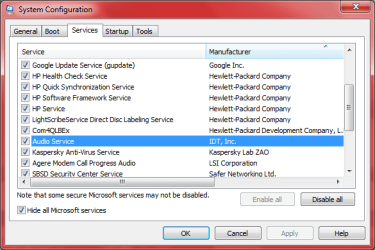
I was able to get the message about the homepage changing to go away in the add-ons section but now everytime I change the homepage to yahoo or something it changes back to HP's AOL page automatically. Even if I click the Apply button it still does that but I do see some questionable things in the msconfig window:
 

Attachments

  • 3.PNG
    3.PNG
    16.5 KB · Views: 13

My Computer

Computer Manufacturer/Model Number
ASUSTeK Computer Inc./Q550LF/Laptop
OS
Windows 7 Ultimate x64 with SP1
CPU
Intel(R) Core(TM) i7-4500U CPU @ 1.80GHz
Motherboard
ASUSTeK Computer Inc.
Memory
8 GB
Graphics Card(s)
Intel(R) HD Graphics Family, NVIDIA GeForce
Hard Drives
Hitachi HTS547575A9E384
Internet Speed
XFINITY
Antivirus
Trend Micro
this sounds to me like a legacy from your Norton install and is to do with "norton homepage protections" , do you have any part of Norton still installed ? otherwise I think its a case of tracking down the reg key and associated .exe ?
 

My Computer

Computer Manufacturer/Model Number
built my own
OS
win7 ultimate / virtual box
CPU
Intel Core i7 3770K,1155, Ivy Bridge
Motherboard
MSI Z77A-G43
Memory
GSkill Ripjaws Z Series 1600 CL 9.0 16GB
Graphics Card(s)
KFA2 GeForce GTX 670 EX OC 2048MB GDDR5 PCI-E gfx card
Sound Card
onboard Nvidia HDMI audio
Monitor(s) Displays
ASUS VK222H 22" widescreen LCD monitor
Screen Resolution
1680x1050
Hard Drives
Kingston 128gb SSD
OCZ Vertex 90gb SSD
500GB WDCaviar 16mb 5000KS
320GB WDCaviar 16mb 3200AAKS sata 2
1TB Samsung 16mb HD103SJ sata 2
PSU
Corsair HX 750W ATX2.2 Modular
Cooling
Antec 25 Kuhler H2O 620
Keyboard
logitech
Mouse
logitech MX518
Internet Speed
7mb adsl
I no longer own Norton at all after what it did to me. Nor do I have it installed at all. However, wouldn't a reformat and reinstall have fixed that issue? I guess as long as I got that message to quit coming up is OK for now since I use Firefox heavily but IE comes in handy from time to time.
 

My Computer

Computer Manufacturer/Model Number
ASUSTeK Computer Inc./Q550LF/Laptop
OS
Windows 7 Ultimate x64 with SP1
CPU
Intel(R) Core(TM) i7-4500U CPU @ 1.80GHz
Motherboard
ASUSTeK Computer Inc.
Memory
8 GB
Graphics Card(s)
Intel(R) HD Graphics Family, NVIDIA GeForce
Hard Drives
Hitachi HTS547575A9E384
Internet Speed
XFINITY
Antivirus
Trend Micro
I just went into Kaspersky's application control and found something suspicious that may be causing the home page trouble but don't know where this utility would be located:
 

Attachments

  • 4.PNG
    4.PNG
    1.9 KB · Views: 9

My Computer

Computer Manufacturer/Model Number
ASUSTeK Computer Inc./Q550LF/Laptop
OS
Windows 7 Ultimate x64 with SP1
CPU
Intel(R) Core(TM) i7-4500U CPU @ 1.80GHz
Motherboard
ASUSTeK Computer Inc.
Memory
8 GB
Graphics Card(s)
Intel(R) HD Graphics Family, NVIDIA GeForce
Hard Drives
Hitachi HTS547575A9E384
Internet Speed
XFINITY
Antivirus
Trend Micro
so have you done a format and reinstall ?

there is an AOL utility that is strangely enough called "aol homepage protection utility" so maybe look for that in control panel\programs & features and unninstall it ?
 

My Computer

Computer Manufacturer/Model Number
built my own
OS
win7 ultimate / virtual box
CPU
Intel Core i7 3770K,1155, Ivy Bridge
Motherboard
MSI Z77A-G43
Memory
GSkill Ripjaws Z Series 1600 CL 9.0 16GB
Graphics Card(s)
KFA2 GeForce GTX 670 EX OC 2048MB GDDR5 PCI-E gfx card
Sound Card
onboard Nvidia HDMI audio
Monitor(s) Displays
ASUS VK222H 22" widescreen LCD monitor
Screen Resolution
1680x1050
Hard Drives
Kingston 128gb SSD
OCZ Vertex 90gb SSD
500GB WDCaviar 16mb 5000KS
320GB WDCaviar 16mb 3200AAKS sata 2
1TB Samsung 16mb HD103SJ sata 2
PSU
Corsair HX 750W ATX2.2 Modular
Cooling
Antec 25 Kuhler H2O 620
Keyboard
logitech
Mouse
logitech MX518
Internet Speed
7mb adsl
If you have Spybot S&D and TeaTimer installed, TeaTimer will try to protect your home page too.
 

My Computer

Computer type
PC/Desktop
Computer Manufacturer/Model Number
Bruce ... somewhere in his 40's
OS
Windows 7 Ultimate 32bit SP1
CPU
Intel(R) Core(TM)2 Quad CPU @ 2.40GHz, 2400 MHz
Motherboard
INTEL/D975XBX2
Memory
4 GB
Graphics Card(s)
ATI Radeon HD 2600 Pro
Monitor(s) Displays
Samsung SyncMaster 914v
Screen Resolution
1280 x 1024
Hard Drives
2/500GB each ... ST3500630AS ATA Device.
One is not connected
PSU
Rocketfish 700 W
Case
G.Skill Gigabyte Chassis
Keyboard
Standard PS/2 Keyboard
Mouse
Microsoft PS/2 Mouse
Internet Speed
DSL
Antivirus
Avira Internet Security
Browser
IE 11
Other Info
ATI HDMI Audio
I'll have to see about protecting my homepage. There is no AOL Utility in the control panel. However, I went into SAS and looked and here it was the one that was not letting me change the homepage. I tweaked it to allow me to change the page and it seems to be OK now.
 

My Computer

Computer Manufacturer/Model Number
ASUSTeK Computer Inc./Q550LF/Laptop
OS
Windows 7 Ultimate x64 with SP1
CPU
Intel(R) Core(TM) i7-4500U CPU @ 1.80GHz
Motherboard
ASUSTeK Computer Inc.
Memory
8 GB
Graphics Card(s)
Intel(R) HD Graphics Family, NVIDIA GeForce
Hard Drives
Hitachi HTS547575A9E384
Internet Speed
XFINITY
Antivirus
Trend Micro
Back
Top