
Hook dll problem adobe player

Admiral

New member
Member
Local time
7:01 AM
Messages
41
Hey guys,
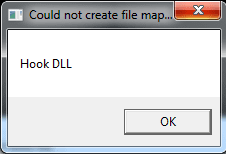
So everytime I play videos which involve adobe flash player, I always get this message, really irritating -

50a3cabf32b8dtavfN9.png


Sometimes it causes the video to shut down and say "an error has occurred". Other times it freezes my browser. It's really frustrating because I have to click on it and sometimes it stuffs up my browsing. Had it for a while now. Does anyone know what I can do to fix this?
 

Attachments
  • error.png
    error.png
    3.5 KB · Views: 11
Last edited:

My Computer

OS
Windows 7 Ultimate
Have you tried uninstalling and then reinstalling Flash Player.
 

My Computer

Computer Manufacturer/Model Number
Put together
OS
Win7 Pro-64 Bit
CPU
i7-2600-3.4GHz
Motherboard
ASRock Z68M
Memory
8 GIG DDR3
Graphics Card(s)
onboard
Sound Card
onboard
Hard Drives
Seagate 1TB 7200RPM
PSU
680 W
Case
black
Cooling
stock fans
Keyboard
Microsoft
Mouse
Microsoft optical
Yes sir, tried that with no luck. I've uninstalled with Your Uninstaller then reinstalled
 

My Computer

OS
Windows 7 Ultimate

My Computer

Computer Manufacturer/Model Number
Put together
OS
Win7 Pro-64 Bit
CPU
i7-2600-3.4GHz
Motherboard
ASRock Z68M
Memory
8 GIG DDR3
Graphics Card(s)
onboard
Sound Card
onboard
Hard Drives
Seagate 1TB 7200RPM
PSU
680 W
Case
black
Cooling
stock fans
Keyboard
Microsoft
Mouse
Microsoft optical
Been using Malwarebytes for over three years man - ive done 3 full scans last month - nothing. Also scanned with Spybot Search & Destroy and Kaspersky Internet Security 2013. Nothing else seems out of the ordinary - this may have popped up when I deleted a very miniscule virus with Malwarebytes a couple months back.
Here are my system stats -
http://rapidimg.org/image_viewer.php?v=50bda30b281b7TtNu0q.png
image_viewer.php
 

My Computer

OS
Windows 7 Ultimate
Just tried the command "sfc /verifyonly" and it said it couldn't find any "integrity violations"
 

My Computer

OS
Windows 7 Ultimate
Are you sure that this error is from the adobe flash player?

What is the add-on that is shown in the upper right corner of the video window? The thing that says "Download this video".
 

My Computer

Computer type
Laptop
Computer Manufacturer/Model Number
Employer provided Dell Latitude
OS
W7 Pro SP1 64bit
CPU
i7
Memory
8GB
Graphics Card(s)
Intel HD Graphics
Hard Drives
crappy SSD
Antivirus
Employer mandated Symantec Endpoint Protection
Browser
Pale Moon 64bit, IE11 64bit & Chrome 64bit
Are you sure that this error is from the adobe flash player?

What is the add-on that is shown in the upper right corner of the video window? The thing that says "Download this video".

Yerr dont worry about that Ive had that for years. Its from Internet Download Manager. Its an error from adobe flash player
 

My Computer

OS
Windows 7 Ultimate
Are you sure that this error is from the adobe flash player?

What is the add-on that is shown in the upper right corner of the video window? The thing that says "Download this video".

Yerr dont worry about that Ive had that for years. Its from Internet Download Manager. Its an error from adobe flash player
Process Monitor does not show flash calling hook.dll - in fact, there is no hook.dll in my virtual machine after installing IE flash 11,5,502,135 and Internet Download Manager v6.14.

What browser are you using?
 

My Computer

Computer type
Laptop
Computer Manufacturer/Model Number
Employer provided Dell Latitude
OS
W7 Pro SP1 64bit
CPU
i7
Memory
8GB
Graphics Card(s)
Intel HD Graphics
Hard Drives
crappy SSD
Antivirus
Employer mandated Symantec Endpoint Protection
Browser
Pale Moon 64bit, IE11 64bit & Chrome 64bit
Are you sure that this error is from the adobe flash player?

What is the add-on that is shown in the upper right corner of the video window? The thing that says "Download this video".

Yerr dont worry about that Ive had that for years. Its from Internet Download Manager. Its an error from adobe flash player
Process Monitor does not show flash calling hook.dll - in fact, there is no hook.dll in my virtual machine after installing IE flash 11,5,502,135 and Internet Download Manager v6.14.

What browser are you using?

Mozilla Firefox man
 

My Computer

OS
Windows 7 Ultimate
Still no hook.dll

I guess you will have to use something like process monitor to find out what is calling hook.dll.
 

My Computer

Computer type
Laptop
Computer Manufacturer/Model Number
Employer provided Dell Latitude
OS
W7 Pro SP1 64bit
CPU
i7
Memory
8GB
Graphics Card(s)
Intel HD Graphics
Hard Drives
crappy SSD
Antivirus
Employer mandated Symantec Endpoint Protection
Browser
Pale Moon 64bit, IE11 64bit & Chrome 64bit
Can you locate the file named HOOK.DLL on your computer? If so, what is the complete path to it?
 

My Computer

Computer type
Laptop
Computer Manufacturer/Model Number
Employer provided Dell Latitude
OS
W7 Pro SP1 64bit
CPU
i7
Memory
8GB
Graphics Card(s)
Intel HD Graphics
Hard Drives
crappy SSD
Antivirus
Employer mandated Symantec Endpoint Protection
Browser
Pale Moon 64bit, IE11 64bit & Chrome 64bit
What is the exact error? If you look in task manager, processes tab, is there a hook.dll listed? If so, right click it and choose Properties and see what the path is. A Guy
 

My Computer

Computer type
PC/Desktop
OS
Windows 10 Home x64
CPU
INTEL Core i5-750 Quad-Core 3.37GHz
Motherboard
ASUS P7P55D
Memory
HyperX Fury Black Series 8GB (2 x 4GB) 1866Mhz
Graphics Card(s)
EVGA GeForce GTX 750 Superclocked 1GB 128-Bit GDDR5
Monitor(s) Displays
LG 32MA68HY 32" IPS
Screen Resolution
1920 x 1080
Hard Drives
Samsung 840 Evo 120GB, SEAGATE 500GB Barracuda® 7200.12, SATA 3 Gb/s, 7200 RPM, 16MB cache
PSU
ANTEC TruePower New TP-550, 80 PLUS, 550W
Case
ANTEC Three Hundred Illusion
Cooling
COOLER MASTER Hyper 212 Plus, 4 x 120mm 1 x 140mm Noctua's
Internet Speed
85 + Mbps
Antivirus
Avast
Browser
Vivaldi
What is the exact error? If you look in task manager, processes tab, is there a hook.dll listed? If so, right click it and choose Properties and see what the path is. A Guy

Hey man, I have the exact same symptoms as this -
"For a few weeks now, if not months, whenever I start up my Firefox and move my mouse courser over a Flash application (namely YouTube videos), it gives me a pop-up prompt with the text. This only happens once after opening Firefox, after that everything is fine. Even closing and reopening the browser doesn't give me that error again.

The annoying part of this thing is, that sometimes the window does not appear, but still locks up the entire browser. In these cases I need to terminate the process.

What is the cause of this problem and how do I get rid of it? I tried reinstalling Flash Player already, but that didn't work."
What the heck is "Hook DLL"? • mozillaZine Forums

There is no hook dll in my task manager man, nup :confused:
 

My Computer

OS
Windows 7 Ultimate

My Computer

Computer type
PC/Desktop
OS
Windows 10 Home x64
CPU
INTEL Core i5-750 Quad-Core 3.37GHz
Motherboard
ASUS P7P55D
Memory
HyperX Fury Black Series 8GB (2 x 4GB) 1866Mhz
Graphics Card(s)
EVGA GeForce GTX 750 Superclocked 1GB 128-Bit GDDR5
Monitor(s) Displays
LG 32MA68HY 32" IPS
Screen Resolution
1920 x 1080
Hard Drives
Samsung 840 Evo 120GB, SEAGATE 500GB Barracuda® 7200.12, SATA 3 Gb/s, 7200 RPM, 16MB cache
PSU
ANTEC TruePower New TP-550, 80 PLUS, 550W
Case
ANTEC Three Hundred Illusion
Cooling
COOLER MASTER Hyper 212 Plus, 4 x 120mm 1 x 140mm Noctua's
Internet Speed
85 + Mbps
Antivirus
Avast
Browser
Vivaldi
There you go man, sorry :)
 

Attachments

  • error.png
    error.png
    3.5 KB · Views: 12

My Computer

OS
Windows 7 Ultimate
From reading, it appears many programmers might lazily use the name hook.dll. I would suggest disabling add ons one at a time to see if you can find an offending one.

Disable or remove Add-ons | Firefox Help

You can try in Safe Mode, but this disables all add ons, and no doubt flash videos will not work. There are some troubleshooting tips below as well

Troubleshoot Firefox issues using Safe Mode | Firefox Help

Have you tried with other browsers to confirm it only happens with FF?

A Guy
 

My Computer

Computer type
PC/Desktop
OS
Windows 10 Home x64
CPU
INTEL Core i5-750 Quad-Core 3.37GHz
Motherboard
ASUS P7P55D
Memory
HyperX Fury Black Series 8GB (2 x 4GB) 1866Mhz
Graphics Card(s)
EVGA GeForce GTX 750 Superclocked 1GB 128-Bit GDDR5
Monitor(s) Displays
LG 32MA68HY 32" IPS
Screen Resolution
1920 x 1080
Hard Drives
Samsung 840 Evo 120GB, SEAGATE 500GB Barracuda® 7200.12, SATA 3 Gb/s, 7200 RPM, 16MB cache
PSU
ANTEC TruePower New TP-550, 80 PLUS, 550W
Case
ANTEC Three Hundred Illusion
Cooling
COOLER MASTER Hyper 212 Plus, 4 x 120mm 1 x 140mm Noctua's
Internet Speed
85 + Mbps
Antivirus
Avast
Browser
Vivaldi
Back
Top