JavaScript is disabled. For a better experience, please enable JavaScript in your browser before proceeding.
You are using an out of date browser. It may not display this or other websites correctly.
You should upgrade or use an
alternative browser .
Hook up a TV to computer through HDMI?
I tried and it didnt do anything.
Occasional Poster
Guru
VIP
I tried and it didnt do anything.
You have selected the correct channel on the TV?
Computer Manufacturer/Model Number Blue Shards 1.0 OS Windows 7 Ultimate 64bit CPU AMD Phenom II 555 Black Edition Quad Core OC'd to 4.0GHz Motherboard ASUS M4A88T-M Memory G Skill RipJaw 1333MHz 4GB Graphics Card(s) ATI raideon 4250 HD/XFX ATI Radeon 1GB HD4650 Sound Card Realteck HD Audio Monitor(s) Displays 2x 22" Widescreen HD Monitors Hard Drives 500GB Sata 7500RPM PSU 850W OCUK Modular Case Antec Dark Fleet DF-30 Cooling Titan Fenrir Pro (CPU) Keyboard Logitech Wireless Mouse Logitech Wireless Internet Speed 24Meg Other Info Getting soon-
Can you explain a little more about what and how you tried?
Computer type PC/Desktop Computer Manufacturer/Model Number Self Built OS Win 10 Pro x64 CPU Intel I5-2500K @3.3GHz Motherboard Asrock P67 Extreme4 Memory 16GB G.Skill Ripjaws X (4x4GB) Graphics Card(s) EVGA GeForce 750 Ti SC 2GB Sound Card ASUS Xonar DG 5.1 Channels 24-bit 96KHz PCI Interface Sound Monitor(s) Displays auria eq2367 Screen Resolution 1920 x 1080 Hard Drives 250GB Samsung 850 EVO SSD PSU SeaSonic X 650W 80 Plus Gold Case Corsair Obsidian 750D Cooling Corsair H60, Three 140mm case fans Keyboard Logitech Wireless Keyboard K520 Mouse Logitech Wireless Mouse M310 Internet Speed Wave Broadband ~ 100 dn 5 up Antivirus Windows Defender, Malwarebytes Premium Browser Edge, IE11, Chrome Other Info Laptop specs: HP g7-1365dx /
something like this ?? go to the manufactures website and they should show you how ..
Capture11.JPG
22.5 KB
· Views: 222
Computer type PC/Desktop Computer Manufacturer/Model Number Custom Build OS Windows 10 Pro - 64 bit CPU Intel i7 2600K Motherboard Asus P8P67 Memory 8 Gig ddr3 1600 mhz - viper extreme (Patriot) Graphics Card(s) EVGA 980 TI Monitor(s) Displays 2 - Lg 21" LED , sony 48 " bravia LED Hard Drives one - samsung 840 series 465.76 GB SSD PSU 1000 Watt Coolmaster : Silent Pro Gold Case antec 1200 Cooling watercooled Mouse logitech wireless Antivirus Norton Security 2015 Other Info powerware 3.1 KVA FERRUPS with 4 - 1000 Amp Deep cycle batteries ...
New member
Member
Thread Starter
Older But No Wiser
Guru
VIP
You have to choose one or the other but not both. HDMI invariably will not function if RGB connections are used simultaneously. Depending on your graphics card you may not have audio throughput in your HDMI so you will then need to connect audio separately.
Computer type PC/Desktop Computer Manufacturer/Model Number Alienware® ALX X58 OS Win 7 Ult SP1/Win 10 Pro (all x64) CPU Intel® Core™ i7-975 Extreme O/C to 4.02 GHz, 8MB Cache Motherboard Asus® P6T Deluxe V2 X58 LGA1366 Memory 24GB Corsair Vengeance DDR3 SDRAM at 1600MHz - 6 x 4096MB Graphics Card(s) 1792 MB NVIDIA® GeForce® GTX 295 Dual Core Sound Card Onboard Soundmax® High-Definition 7.1 Performance Audio Monitor(s) Displays Samsung XL2370 LED backlit 23" W/S 2ms response time Screen Resolution 1920 X 1080 Hard Drives 2 x 500gb SATA II PSU Alienware® 1200 Watt Multi-GPU Case Alienware® P2 ALX Chassis with AlienIce™ 3.0 Video Cooling Cooling Alienware® High-Perf. Liquid Cooling + Acoustic Dampening Keyboard Microsoft® Wireless Entertainment 8000 + Logitech® G15 Wired Mouse Microsoft® Wireless Laser 8000 + Logitech® G9 Wired Internet Speed 1Gb/s Antivirus McAfee LiveSafe Browser Firefox - latest Other Info Using non-RAID on purpose as I find RAID to be too temperamental.
New member
Member
Thread Starter
This is my computer: Dell Studio 540 (Just bought at christmas)
Older But No Wiser
Guru
VIP
Have you enabled multi-display in the ATI Radeon control panel? If so is the TV detected? You may have to reboot the PC to get it to work.
Last edited: Jan 16, 2010
Computer type PC/Desktop Computer Manufacturer/Model Number Alienware® ALX X58 OS Win 7 Ult SP1/Win 10 Pro (all x64) CPU Intel® Core™ i7-975 Extreme O/C to 4.02 GHz, 8MB Cache Motherboard Asus® P6T Deluxe V2 X58 LGA1366 Memory 24GB Corsair Vengeance DDR3 SDRAM at 1600MHz - 6 x 4096MB Graphics Card(s) 1792 MB NVIDIA® GeForce® GTX 295 Dual Core Sound Card Onboard Soundmax® High-Definition 7.1 Performance Audio Monitor(s) Displays Samsung XL2370 LED backlit 23" W/S 2ms response time Screen Resolution 1920 X 1080 Hard Drives 2 x 500gb SATA II PSU Alienware® 1200 Watt Multi-GPU Case Alienware® P2 ALX Chassis with AlienIce™ 3.0 Video Cooling Cooling Alienware® High-Perf. Liquid Cooling + Acoustic Dampening Keyboard Microsoft® Wireless Entertainment 8000 + Logitech® G15 Wired Mouse Microsoft® Wireless Laser 8000 + Logitech® G9 Wired Internet Speed 1Gb/s Antivirus McAfee LiveSafe Browser Firefox - latest Other Info Using non-RAID on purpose as I find RAID to be too temperamental.
New member
Member
Thread Starter
Whats multi display? And where is it?
Older But No Wiser
Guru
VIP
Right-click an empty space on your desktop - you should see ATI Radeon Control Center or words to that effect. If you don't then you haven't installed all the latest stuff from ATI. I use nVidia so am only going by memory. The graphics card has to be told that there is another display to power, hence my mentioning the multi-display settings.
Computer type PC/Desktop Computer Manufacturer/Model Number Alienware® ALX X58 OS Win 7 Ult SP1/Win 10 Pro (all x64) CPU Intel® Core™ i7-975 Extreme O/C to 4.02 GHz, 8MB Cache Motherboard Asus® P6T Deluxe V2 X58 LGA1366 Memory 24GB Corsair Vengeance DDR3 SDRAM at 1600MHz - 6 x 4096MB Graphics Card(s) 1792 MB NVIDIA® GeForce® GTX 295 Dual Core Sound Card Onboard Soundmax® High-Definition 7.1 Performance Audio Monitor(s) Displays Samsung XL2370 LED backlit 23" W/S 2ms response time Screen Resolution 1920 X 1080 Hard Drives 2 x 500gb SATA II PSU Alienware® 1200 Watt Multi-GPU Case Alienware® P2 ALX Chassis with AlienIce™ 3.0 Video Cooling Cooling Alienware® High-Perf. Liquid Cooling + Acoustic Dampening Keyboard Microsoft® Wireless Entertainment 8000 + Logitech® G15 Wired Mouse Microsoft® Wireless Laser 8000 + Logitech® G9 Wired Internet Speed 1Gb/s Antivirus McAfee LiveSafe Browser Firefox - latest Other Info Using non-RAID on purpose as I find RAID to be too temperamental.
New member
Member
Thread Starter
Older But No Wiser
Guru
VIP
It looks like that card doesn't support dual displays. You'll have to do some research.
Computer type PC/Desktop Computer Manufacturer/Model Number Alienware® ALX X58 OS Win 7 Ult SP1/Win 10 Pro (all x64) CPU Intel® Core™ i7-975 Extreme O/C to 4.02 GHz, 8MB Cache Motherboard Asus® P6T Deluxe V2 X58 LGA1366 Memory 24GB Corsair Vengeance DDR3 SDRAM at 1600MHz - 6 x 4096MB Graphics Card(s) 1792 MB NVIDIA® GeForce® GTX 295 Dual Core Sound Card Onboard Soundmax® High-Definition 7.1 Performance Audio Monitor(s) Displays Samsung XL2370 LED backlit 23" W/S 2ms response time Screen Resolution 1920 X 1080 Hard Drives 2 x 500gb SATA II PSU Alienware® 1200 Watt Multi-GPU Case Alienware® P2 ALX Chassis with AlienIce™ 3.0 Video Cooling Cooling Alienware® High-Perf. Liquid Cooling + Acoustic Dampening Keyboard Microsoft® Wireless Entertainment 8000 + Logitech® G15 Wired Mouse Microsoft® Wireless Laser 8000 + Logitech® G9 Wired Internet Speed 1Gb/s Antivirus McAfee LiveSafe Browser Firefox - latest Other Info Using non-RAID on purpose as I find RAID to be too temperamental.
Yes it can be done!
Pro User
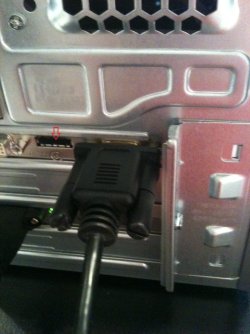
Why didn't you use the HDMI plug on your video card?
Computer type PC/Desktop Computer Manufacturer/Model Number Acer M5641 OS Windows 7 Home Premium 64bit CPU Q6600 Motherboard Nvidia MCP73PV Memory 4GB. Graphics Card(s) Sapphire Vapor-X 5750 Sound Card XFI Extreem music Monitor(s) Displays Acer X223W Screen Resolution 1680x1050 Hard Drives WD10 02FAEX PSU stock 450w Case acer Cooling stock Keyboard Microsoft Digital Media Pro. Mouse Logitech MX620 Internet Speed 49.51Mbs down 4.98Mbs up 17.6ms ping Antivirus MSE Browser Waterfox Other Info Shaw Cable
Why didn't you use the HDMI plug on your video card?
Good question. Have you tried that?
hdmi.jpg
342.6 KB
· Views: 81
Computer type PC/Desktop Computer Manufacturer/Model Number Self Built OS Win 10 Pro x64 CPU Intel I5-2500K @3.3GHz Motherboard Asrock P67 Extreme4 Memory 16GB G.Skill Ripjaws X (4x4GB) Graphics Card(s) EVGA GeForce 750 Ti SC 2GB Sound Card ASUS Xonar DG 5.1 Channels 24-bit 96KHz PCI Interface Sound Monitor(s) Displays auria eq2367 Screen Resolution 1920 x 1080 Hard Drives 250GB Samsung 850 EVO SSD PSU SeaSonic X 650W 80 Plus Gold Case Corsair Obsidian 750D Cooling Corsair H60, Three 140mm case fans Keyboard Logitech Wireless Keyboard K520 Mouse Logitech Wireless Mouse M310 Internet Speed Wave Broadband ~ 100 dn 5 up Antivirus Windows Defender, Malwarebytes Premium Browser Edge, IE11, Chrome Other Info Laptop specs: HP g7-1365dx /
New member
Member
Thread Starter
Thanks guys it worked.
Glad to hear you got it working.
Computer type PC/Desktop Computer Manufacturer/Model Number Self Built OS Win 10 Pro x64 CPU Intel I5-2500K @3.3GHz Motherboard Asrock P67 Extreme4 Memory 16GB G.Skill Ripjaws X (4x4GB) Graphics Card(s) EVGA GeForce 750 Ti SC 2GB Sound Card ASUS Xonar DG 5.1 Channels 24-bit 96KHz PCI Interface Sound Monitor(s) Displays auria eq2367 Screen Resolution 1920 x 1080 Hard Drives 250GB Samsung 850 EVO SSD PSU SeaSonic X 650W 80 Plus Gold Case Corsair Obsidian 750D Cooling Corsair H60, Three 140mm case fans Keyboard Logitech Wireless Keyboard K520 Mouse Logitech Wireless Mouse M310 Internet Speed Wave Broadband ~ 100 dn 5 up Antivirus Windows Defender, Malwarebytes Premium Browser Edge, IE11, Chrome Other Info Laptop specs: HP g7-1365dx /
Older But No Wiser
Guru
VIP
Congratulations...glad it's working.
Computer type PC/Desktop Computer Manufacturer/Model Number Alienware® ALX X58 OS Win 7 Ult SP1/Win 10 Pro (all x64) CPU Intel® Core™ i7-975 Extreme O/C to 4.02 GHz, 8MB Cache Motherboard Asus® P6T Deluxe V2 X58 LGA1366 Memory 24GB Corsair Vengeance DDR3 SDRAM at 1600MHz - 6 x 4096MB Graphics Card(s) 1792 MB NVIDIA® GeForce® GTX 295 Dual Core Sound Card Onboard Soundmax® High-Definition 7.1 Performance Audio Monitor(s) Displays Samsung XL2370 LED backlit 23" W/S 2ms response time Screen Resolution 1920 X 1080 Hard Drives 2 x 500gb SATA II PSU Alienware® 1200 Watt Multi-GPU Case Alienware® P2 ALX Chassis with AlienIce™ 3.0 Video Cooling Cooling Alienware® High-Perf. Liquid Cooling + Acoustic Dampening Keyboard Microsoft® Wireless Entertainment 8000 + Logitech® G15 Wired Mouse Microsoft® Wireless Laser 8000 + Logitech® G9 Wired Internet Speed 1Gb/s Antivirus McAfee LiveSafe Browser Firefox - latest Other Info Using non-RAID on purpose as I find RAID to be too temperamental.